Pearson Edexcel · A-Level · Computer Science
SQL Queries
Master Edexcel A-Level SQL with this comprehensive guide, packed with examiner insights, worked examples, and multi-modal resources. Learn to construct precise, mark-scoring queries and avoid the common pitfalls that cost candidates valuable marks.
- 7 min read
- 3 worked examples
- 5 practice questions
- 6 key terms
Check what you remember
Read the wording for your board, then hide it and explain Relational Database in your own words. Rough notes are fine. This is a self-check, with no mark or grade.
Reference: Pearson Edexcel
A database structured to recognise relations between stored items of information. Data is organised as a set of formally-described tables from which data can be accessed or reassembled in many different ways without having to reorganise the database tables.
Study Notes

Overview
Structured Query Language (SQL) is the universal language for managing and querying relational databases. For an Edexcel A-Level Computer Science student, proficiency in SQL is not just a desirable skill but a core requirement, frequently tested in Paper 1 and Paper 2. This topic, specification reference A6.4, requires you to move beyond simple data retrieval and master the art of constructing complex, multi-table queries that filter, sort, and aggregate data with precision. Examiners are looking for candidates who can not only write syntactically correct SQL but also interpret a given database schema to solve a specific problem. A typical exam question will present a scenario with a relational schema and ask you to write a specific query to extract information, often for 4-6 marks. This topic has strong synoptic links to 'Databases' (A6.1) and 'Relational Databases' (A6.2), as understanding database structure is fundamental to querying it effectively.
Key Concepts
Concept 1: Data Manipulation Language (DML) vs. Data Definition Language (DDL)
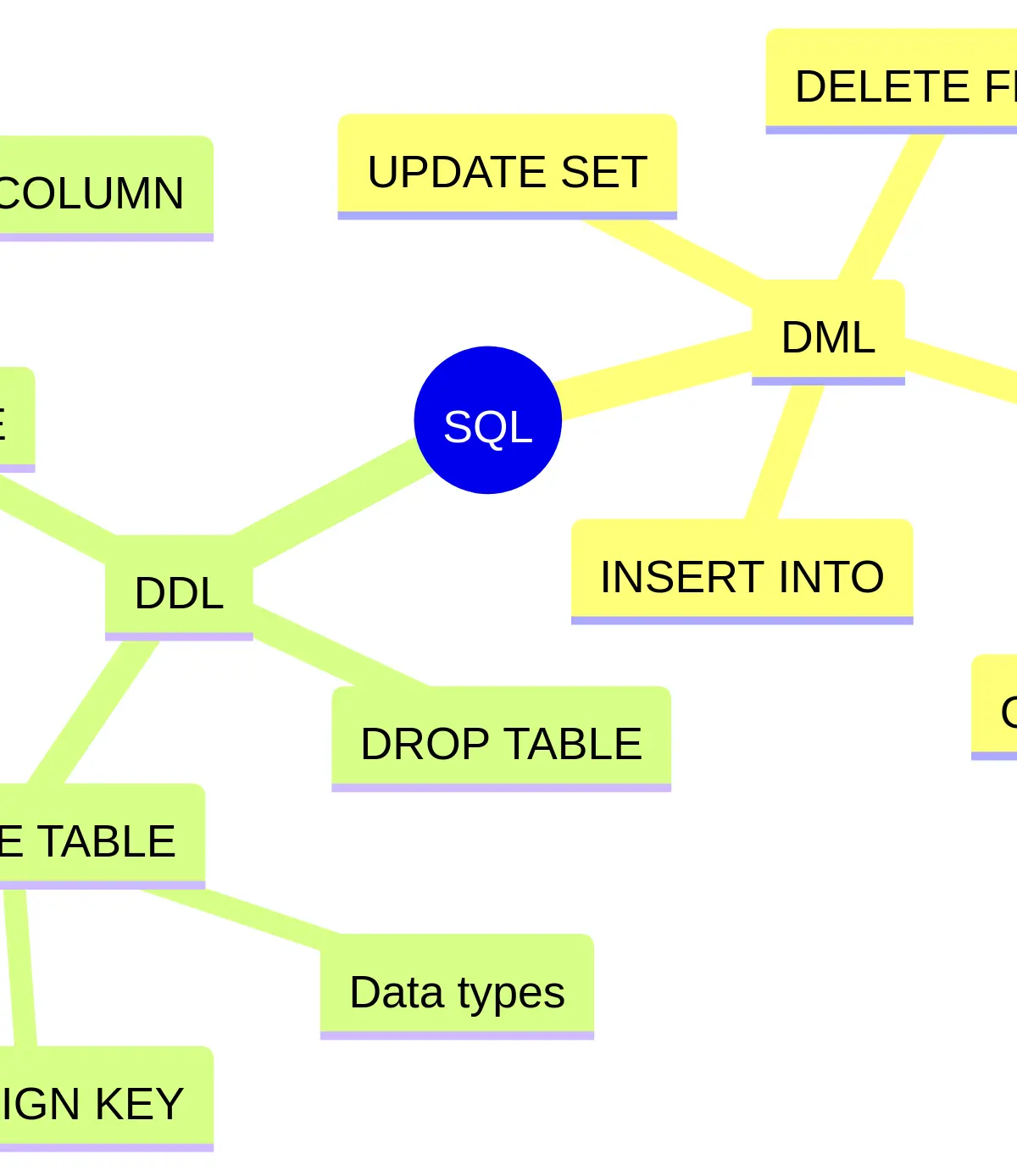
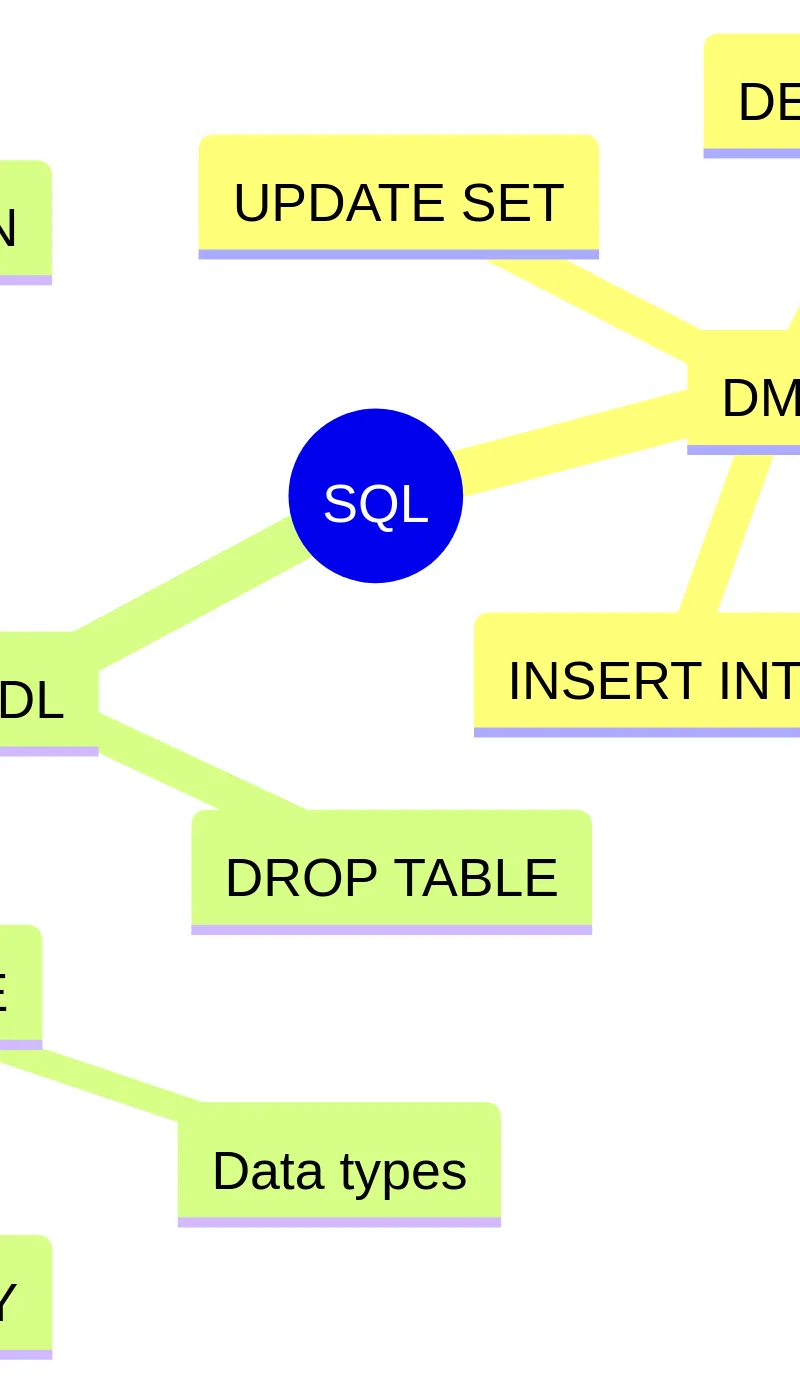
SQL commands are broadly split into two categories. DML (Data Manipulation Language) is used to interact with the data within the tables. This is what you'll use most in exams. It includes the 'big four':
- SELECT: Retrieves data from one or more tables.
- INSERT: Adds a new row of data to a table.
- UPDATE: Modifies existing data in a table.
- DELETE: Removes rows from a table.
DDL (Data Definition Language) is used to define and manage the structure of the database itself. Think of it as the blueprint for your data.
- CREATE TABLE: Builds a new table, defining its columns and their data types.
- ALTER TABLE: Modifies an existing table, for example by adding or removing a column.
- DROP TABLE: Deletes an entire table and all its data.
Examiners test your ability to distinguish between these. If a question asks you to 'add a new customer', you need an INSERT statement (DML). If it asks you to 'add a new field for customer email', you need an ALTER TABLE statement (DDL).
Concept 2: The SELECT Statement and Filtering with WHERE
The SELECT statement is the cornerstone of data retrieval. Its fundamental structure is SELECT [columns] FROM [table]. To retrieve all columns, you can use the asterisk wildcard (*), but marks are typically awarded for selecting the specific columns requested in the question.
To filter the rows returned, you use the WHERE clause. This is where the logic of your query resides.
Example: To find all customers named 'Smith' from a 'Customers' table.
SELECT CustomerID, FirstName, Postcode FROM Customers WHERE LastName = 'Smith';
Crucial Examiner Point: Notice the single quotes around 'Smith'. Any string or date value in a WHERE clause must be enclosed in single quotes. Forgetting this is one of the most common ways candidates lose a mark. Numeric values, however, do not use quotes (e.g., WHERE Age > 18). You can build complex conditions using boolean operators AND (both conditions must be true) and OR (at least one condition must be true).
Concept 3: Joining Tables
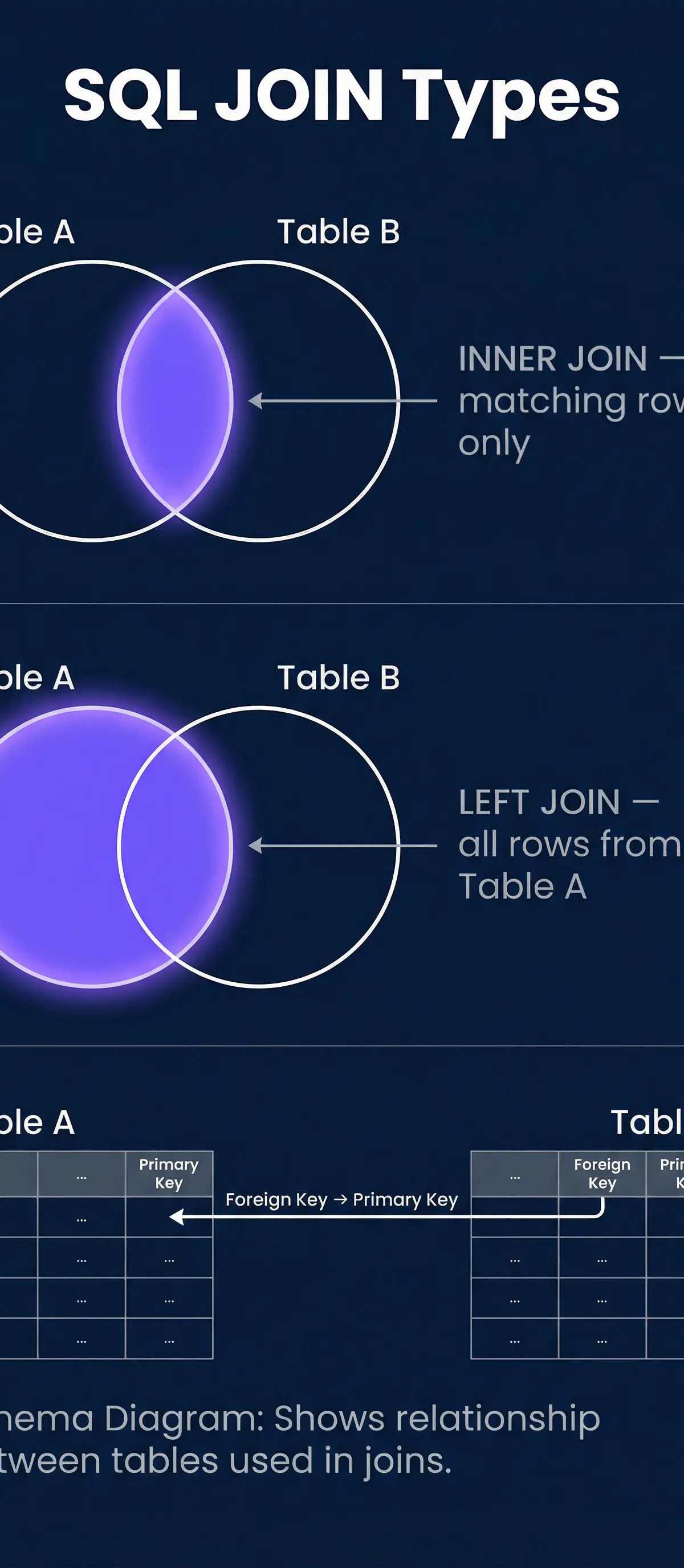
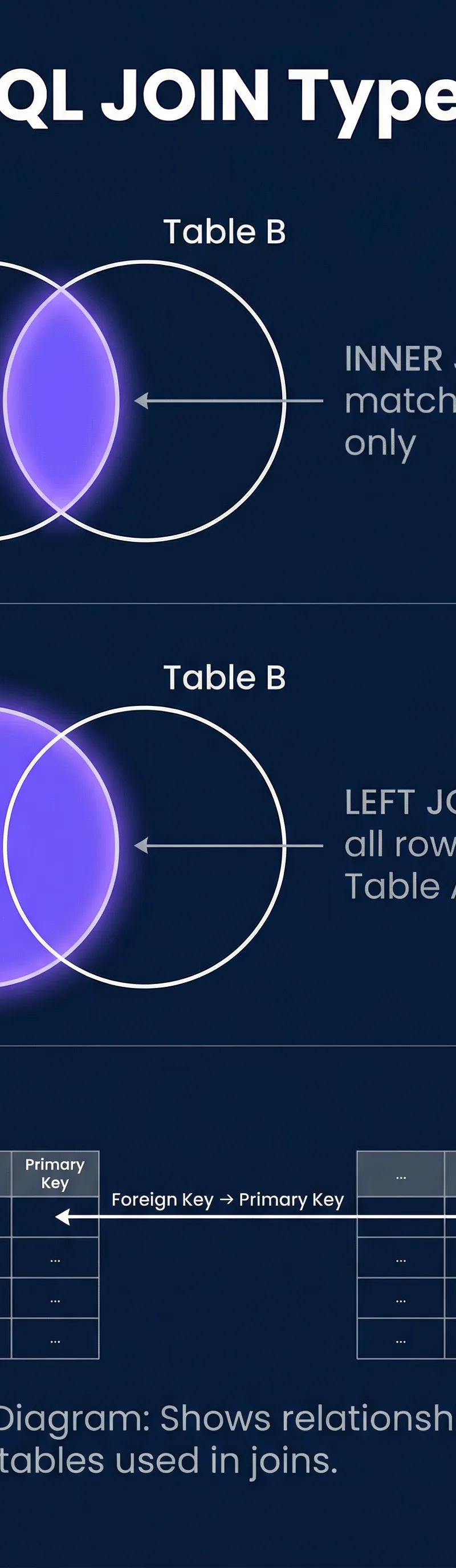
Real-world databases are relational, meaning data is split across multiple tables linked by keys. To retrieve data from multiple tables in a single query, you must use a JOIN. The most common type you'll need is the INNER JOIN. An INNER JOIN returns only the rows where the key exists in both tables.
Example: You have a Students table (with CourseID) and a Courses table (with CourseID and CourseName). To list each student's name and the name of their course, you join them on their common CourseID field.
SELECT Students.Name, Courses.CourseName FROM Students INNER JOIN Courses ON Students.CourseID = Courses.CourseID;
Crucial Examiner Point: When a column name exists in both tables (like CourseID here), you must prefix it with the table name (e.g., Students.CourseID). This is called 'qualifying the column' and failure to do so when ambiguity exists will cost you a mark.
Concept 4: Aggregation with GROUP BY
Sometimes you don't want individual rows; you want a summary. This is achieved using aggregate functions combined with the GROUP BY clause. Aggregate functions perform a calculation on a set of rows and return a single summary value.
The five you must know are:
- COUNT(): Counts the number of rows.
- SUM(): Adds up the values in a column.
- AVG(): Calculates the average of the values in a column.
- MIN(): Finds the minimum value in a column.
- MAX(): Finds the maximum value in a column.
Example: To count the number of students in each course.
SELECT CourseID, COUNT(StudentID) FROM Students GROUP BY CourseID;
The GROUP BY CourseID clause tells SQL to bundle all the rows with the same CourseID together and then apply the COUNT function to each bundle. If you need to filter the results of an aggregate function (e.g., only show courses with more than 10 students), you use the HAVING clause, which works like WHERE but for groups: HAVING COUNT(StudentID) > 10.
Mathematical/Scientific Relationships
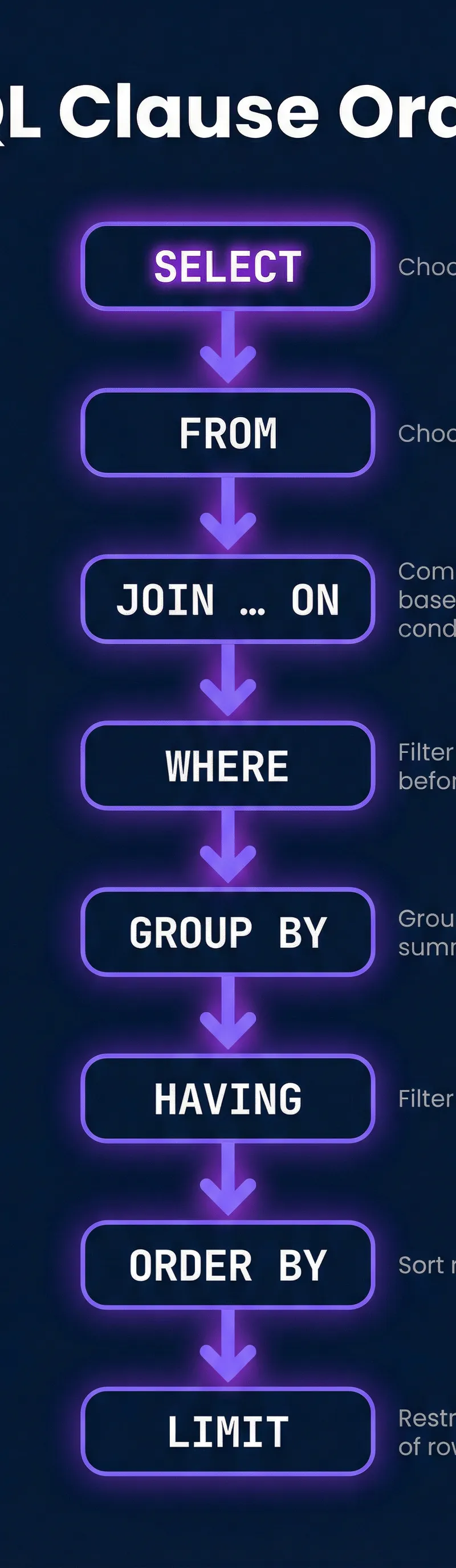
While SQL isn't mathematical in the sense of physics equations, the logical structure is paramount. The order of clauses is a strict rule that must be memorised. It is not flexible.
The Mandatory SQL Clause Order (Must Memorise):
SELECTFROMJOINWHEREGROUP BYHAVINGORDER BY
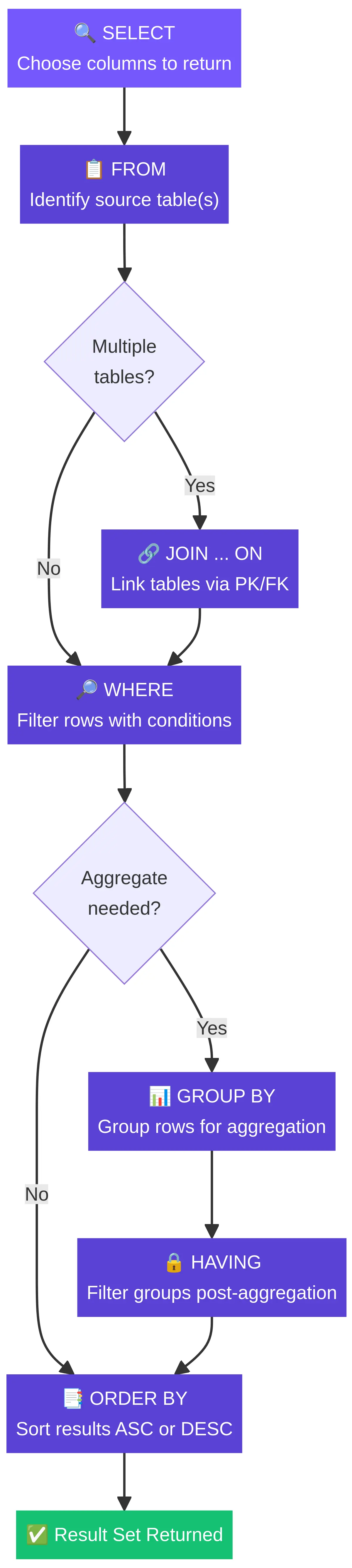
Think of it as a filtering pipeline. Data flows from the FROM clause, is filtered by WHERE, grouped by GROUP BY, filtered again by HAVING, and finally sorted by ORDER BY before being output by SELECT. Getting this order wrong results in a syntax error and will score zero marks.
Practical Applications
SQL is one of the most commercially valuable skills in computer science. It powers:
- E-commerce sites: Finding products, managing customer orders, and analysing sales data.
- Social Media: Storing user profiles, posts, connections, and serving content feeds.
- Banking Systems: Managing customer accounts, transactions, and generating statements.
- Booking Systems: Handling flight, hotel, or event bookings and checking availability.
In your A-Level project, if you are creating a dynamic web application with a database backend, you will be using SQL (or an ORM that generates SQL) extensively to manage your application's data. This is a chance to demonstrate practical application of this topic, which examiners value highly.
Visual Resources
4 diagrams and illustrations

Interactive Diagrams
2 interactive diagrams to visualise key concepts
Conceptual Flow Outline
A flowchart illustrating the logical processing order of an SQL SELECT statement. This fixed sequence is crucial for writing valid queries.
Conceptual Flow Outline
A concept map showing the two main branches of SQL: Data Manipulation Language (DML) for working with data, and Data Definition Language (DDL) for managing the database structure.
Worked Examples
3 worked examples — open one to explore the question and available guidance.
Practice Questions
Try the question, then reveal an answer plan or example response
A database has a table tblPlayers(PlayerID, PlayerName, TeamID, GoalsScored). Write an SQL query to find the names of all players who have scored more than 20 goals.
Hint: You only need to select from one table and apply a simple filter.
Two tables exist: Customer(CustomerID, Name) and Orders(OrderID, CustomerID, OrderDate, Amount). Write an SQL query to list the names of all customers who have not placed any orders. Assume a customer has not placed an order if they do not appear in the Orders table.
Hint: This requires an 'anti-join'. Think about which type of JOIN returns all records from one table, even if there are no matches in the other. How can you then filter for the non-matches?
Using the Customer and Orders tables from the previous question, write an SQL query to find the total amount spent by each customer. The output should show the customer's name and their total order amount.
Hint: You need to calculate a 'total', which suggests an aggregate function. Since you need it 'for each customer', what clause must you use with the aggregate?
Write an SQL query to find the names of all products from a Products table where the ProductName starts with the letter 'A'.
Hint: The WHERE clause supports pattern matching. What keyword and wildcard character would you use for 'starts with'?
Write a DDL statement to create a new table called Subjects with two columns: SubjectID as an integer that is the primary key, and SubjectName as a variable-length string that cannot be empty.
Hint: This requires a CREATE TABLE statement. Remember to define each column's name, data type, and any constraints like PRIMARY KEY or NOT NULL.
Exam technique
How to turn what you know into marks
How to approach the question
1. **Deconstruct**: Read the question and highlight the key requirements: what columns to SELECT, what tables to FROM, what conditions to WHERE, and any sorting (ORDER BY) or grouping (GROUP BY). 2. **Schema Scan**: Analyse the provided database schema. Identify the primary and foreign keys needed to JOIN the tables. Check the exact names and data types of the columns. 3. **Draft**: Write the query, following the 'Silly Frogs' clause order. 4. **Refine**: Re-read the question and check every condition has been met. Pay special attention to single quotes, column qualification in JOINs, and ASC/DESC for ordering.
How to structure your answer
For a simple 2-mark query, a single SELECT...FROM...WHERE statement is often enough. For a 4-6 mark question, expect to need a JOIN, multiple WHERE conditions (using AND/OR), and potentially a GROUP BY or ORDER BY. Structure your answer clearly, using block capitals for SQL keywords to improve legibility for the examiner.
Timing
Approximately 1 minute per mark. A 4-mark SQL question should be completed in around 4 minutes, leaving a minute to double-check your syntax.
Common pitfalls
- Forgetting single quotes around string/date literals in the WHERE clause. `WHERE name = Bob` is wrong; `WHERE name = 'Bob'` is right.
- Failing to qualify ambiguous column names in a JOIN. If `CustomerID` is in two tables, you must use `Customers.CustomerID`.
- Confusing WHERE and HAVING. Use WHERE to filter rows before grouping, and HAVING to filter groups after grouping.
- Incorrect clause order. `ORDER BY` must come after `WHERE` and `GROUP BY`.
What the command words want
- Compare
- Not common for SQL, but could involve comparing INNER and LEFT JOINs, highlighting similarities (both combine tables) and differences (how they handle non-matching rows).
- Explain
- Justify why a certain SQL clause is used or how it works. Use 'because' to link cause and effect (e.g., 'An INNER JOIN is used because data is needed from both the Customer and Order tables...').
- Describe
- Explain what a piece of SQL does or what a concept is. Use precise terminology.
- Evaluate
- Not applicable for SQL query writing questions.
- State/Give
- Provide a short, factual answer, often a single SQL keyword (e.g., 'DISTINCT').
- Write an SQL query/statement
- This is the most common command word. Produce a syntactically correct SQL statement that meets all the requirements of the question.
Watch or listen (optional)
Test your understanding of SQL Queries
Active recall beats re-reading. Take an instant quiz now to test what you’ve learned and lock it into long-term memory.
7 days Premium · Then the free plan continues · No card, no charge