Pearson Edexcel · A-Level · Computer Science
Testing Strategies (Unit, Integration, System)
Master Edexcel A-Level Computer Science Testing Strategies (A7.3) with this comprehensive guide. Learn the critical differences between Unit, Integration, and System testing to secure top marks and write robust, error-free code.
- 6 min read
- 3 worked examples
- 5 practice questions
- 6 key terms
Check what you remember
Read the wording for your board, then hide it and explain Unit Testing in your own words. Rough notes are fine. This is a self-check, with no mark or grade.
Reference: Pearson Edexcel
The testing of individual subroutines or modules in isolation from the rest of the program.
Study Notes

Overview
Testing is a fundamental pillar of the software development lifecycle, and a topic examiners frequently test to assess your understanding of robust programming. This guide breaks down the three core testing strategies: Unit, Integration, and System testing. You will learn not just what they are, but why they are used, how they differ, and how to apply them in exam scenarios. Understanding this hierarchy is crucial for demonstrating technical precision. It separates candidates who can simply define terms from those who can analyse and evaluate software quality. Expect questions that require you to design test plans, compare testing methodologies, and explain the purpose of testing in the context of a given scenario. Mastering this topic provides a strong foundation for understanding professional software engineering practices and directly links to your programming and project work.
Key Concepts
Concept 1: The Testing Hierarchy
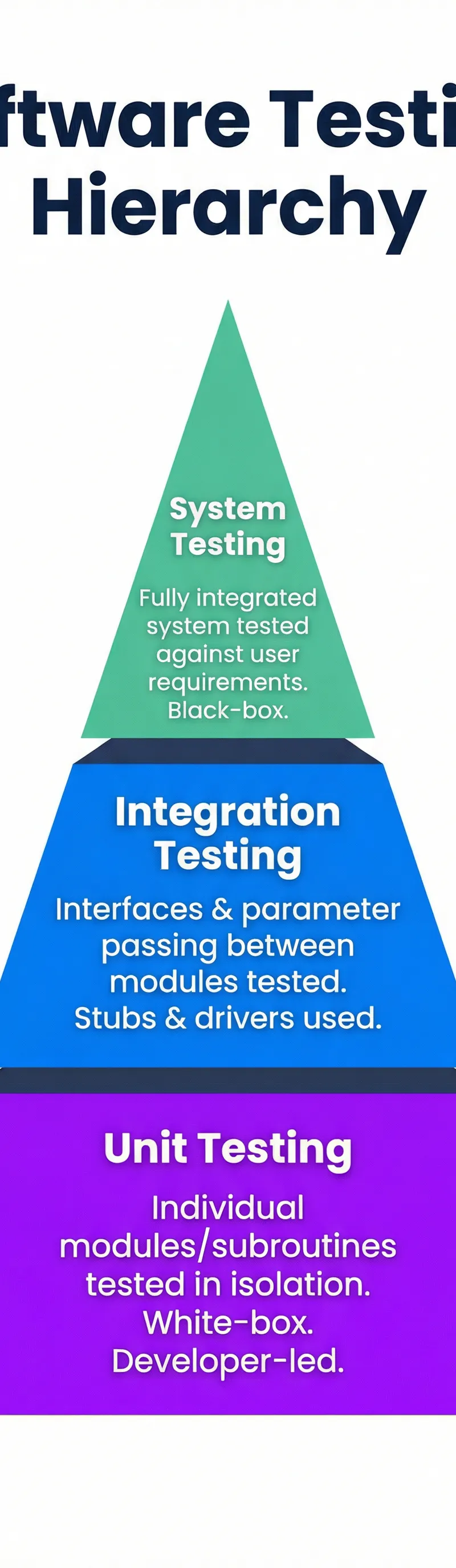
Software testing is not a single activity but a multi-stage process. Think of it as a pyramid: the base is wide with many small, fast tests, and it narrows as you go up, culminating in a single test of the entire system. This structure is known as the testing hierarchy.

-
Unit Testing (The Foundation): At the bottom, we have Unit Testing. This is where individual components, such as functions, subroutines, or modules, are tested in complete isolation. The goal is to verify that each small piece of the code works correctly on its own. Because the developer has full access to the source code to test every possible path, this is known as White-Box Testing. For a 1-mark definition, state: "Unit testing is the process of testing individual subroutines or modules in isolation from the rest of the program."
-
Integration Testing (The Connections): Once the individual units are verified, the next step is to test how they work together. Integration Testing focuses specifically on the interfaces and data transfer between modules. Do they pass parameters correctly? Does a function call from one module produce the expected effect in another? This stage is crucial for finding errors in how the different parts of your program have been 'integrated'. To secure the marks, you must use the terms 'interface' and 'parameter passing'.
-
System Testing (The Final Product): At the top of the pyramid is System Testing. Here, the fully integrated software is tested as a whole against the original user requirements. This is a form of Black-Box Testing, meaning the tester has no knowledge of the internal code structure. They behave like an end-user, checking that the software's functionality meets the specification. For a 1-mark definition, state: *"System testing verifies the fully integrated software against the original user requirements." *
Concept 2: Black-Box vs. White-Box Testing
Examiners expect you to distinguish between these two fundamental approaches.
| Feature | White-Box Testing | Black-Box Testing |
|---|---|---|
| Knowledge | Requires full knowledge of the source code and internal logic. | Requires no knowledge of the internal code; focuses only on inputs and outputs. |
| Performed By | Typically developers. | Typically dedicated testers or end-users. |
| Purpose | To test every logical path, branch, and statement in the code. | To verify that the system meets functional and non-functional requirements. |
| Example | Unit Testing | System Testing, Beta Testing |
Concept 3: Alpha and Beta Testing
These are types of user acceptance testing that occur after the main system testing is complete.
- Alpha Testing: This is performed internally by the development team or other employees within the organisation. It's a final check in a controlled environment before the software is seen by outsiders.
- Beta Testing: This is performed externally by a limited number of real end-users in their own, real-world environment. This is the final opportunity to catch bugs that only appear under real-world conditions before a full public release. A common mistake is to swap these two – remember, Alpha comes first, just like in the alphabet!
Concept 4: Designing Test Data
Simply saying you will 'test the program' is not enough; you must design specific test data. Credit is awarded for identifying and providing examples for the three types of test data.

- Normal Data: Sensible, valid data that the program is expected to accept. For a program expecting an age between 18 and 65, normal data would be 30.
- Boundary Data: Data at the very limits of the valid range. For the age example, this would be 18 and 65. These are critical to test as 'off-by-one' errors are common at boundaries.
- Erroneous Data: Invalid data that the program should reject. For the age example, this could be 17, 66, -5, or a string like "hello". The expected outcome is always an error message.
Practical Applications
In your A-Level programming project, you are required to provide evidence of testing. A well-structured test plan using these principles is essential for achieving high marks in the evaluation section. You should include screenshots of your test data table, the code being tested (for unit tests), and the output, along with commentary explaining the results. This demonstrates a professional approach to software development and directly addresses the marking criteria for robustness and testing.

Interactive Diagrams
2 interactive diagrams to visualise key concepts
Conceptual Flow Outline
A flowchart showing the iterative process of the software testing lifecycle, from Unit Testing through to release.
Conceptual Flow Outline
A concept map summarising the key types of testing and their main characteristics.
Worked Examples
3 worked examples — open one to explore the question and available guidance.
Practice Questions
Try the question, then reveal an answer plan or example response
State what is meant by 'white-box' testing. [1 mark]
Hint: Think about what the tester can 'see'.
A developer is creating a function to validate a password. The password must be between 8 and 12 characters long. Create a test plan with three pieces of boundary data for this function. [3 marks]
Hint: Boundary data tests the 'edges' of the valid range.
Explain why a developer might use stubs and drivers during unit testing. [4 marks]
Hint: Think about the goal of unit testing: isolation.
Compare alpha testing with beta testing. [4 marks]
Hint: Identify who does the testing, where they do it, and when.
A school is developing a new system for recording student attendance. Discuss the testing strategies that would be used during its development. [6 marks]
Hint: Structure your answer around the testing hierarchy: Unit, Integration, System. Also consider user testing.
Exam technique
How to turn what you know into marks
How to approach the question
1. **Identify the command word:** Is it 'Explain', 'Describe', or 'Compare'? This dictates the required depth. 2. **Spot the keywords:** Look for terms like 'integration', 'black-box', or 'test data'. This is what the question is really about. 3. **Plan your points:** For a 4-mark question, aim for 4 distinct, well-explained points or 2 points developed in detail.
How to structure your answer
For 'Describe' questions, provide a point-by-point account. For 'Explain' questions, use the structure 'Point, Evidence, Explain' (Make a point, provide a specific example or reason, then explain why it is relevant). For 'Compare' questions, use a table or write in paragraphs that explicitly address both similarities and differences.
Timing
Approximately 1 minute per mark. A 4-mark question should take no more than 5 minutes, allowing for reading and planning.
Common pitfalls
- Confusing testing with debugging. Remember: testing FINDS errors, debugging FIXES them. They are separate processes.
- Giving vague test data like 'invalid input'. You MUST provide a specific value, e.g., '-5' or 'hello'.
- Mixing up Alpha (internal) and Beta (external) testing.
What the command words want
- Compare
- Identify both similarities and differences. Use phrases like 'whereas' or 'similarly'.
- Explain
- Give reasons for how or why something happens. Use 'because' to connect your points.
- Describe
- Provide the characteristics of something. What is it like?
- Evaluate
- Make a judgement based on evidence. Consider strengths and weaknesses or pros and cons.
- Calculate
- Show your full working, even if the calculation is simple.
- State/Give
- A short, factual answer. No explanation needed.
Watch or listen (optional)
Test your understanding of Testing Strategies (Unit, Integration, System)
Active recall beats re-reading. Take an instant quiz now to test what you’ve learned and lock it into long-term memory.
7 days Premium · Then the free plan continues · No card, no charge