OCR · GCSE · Computer Science
Searching Algorithms (Linear Search, Binary Search)
Master the essential OCR GCSE Computer Science searching algorithms, Linear and Binary Search. This guide breaks down how they work, their efficiency, and how to answer exam questions to secure top marks. It's packed with worked examples, memory hooks, and a podcast to make your revision effective and engaging."
- 5 min read
- 3 worked examples
- 5 practice questions
Study Notes
Overview
In Computer Science, searching for data is a fundamental operation. For your OCR GCSE exam, you need to master two key algorithms: Linear Search and Binary Search. This topic, part of specification point 6.1, is a cornerstone of algorithmic thinking and is heavily tested in Component 02. Understanding these algorithms isn't just about memorising steps; it's about analysing their efficiency and knowing when to use each one. Examiners will expect you to trace their execution, write them in OCR Reference Language, and compare their performance. A typical exam question might ask you to trace a binary search on a given dataset for 4 marks or compare the efficiency of both algorithms for 6 marks. This guide will equip you with the knowledge to tackle these questions with confidence.

Key Concepts
Concept 1: Linear Search
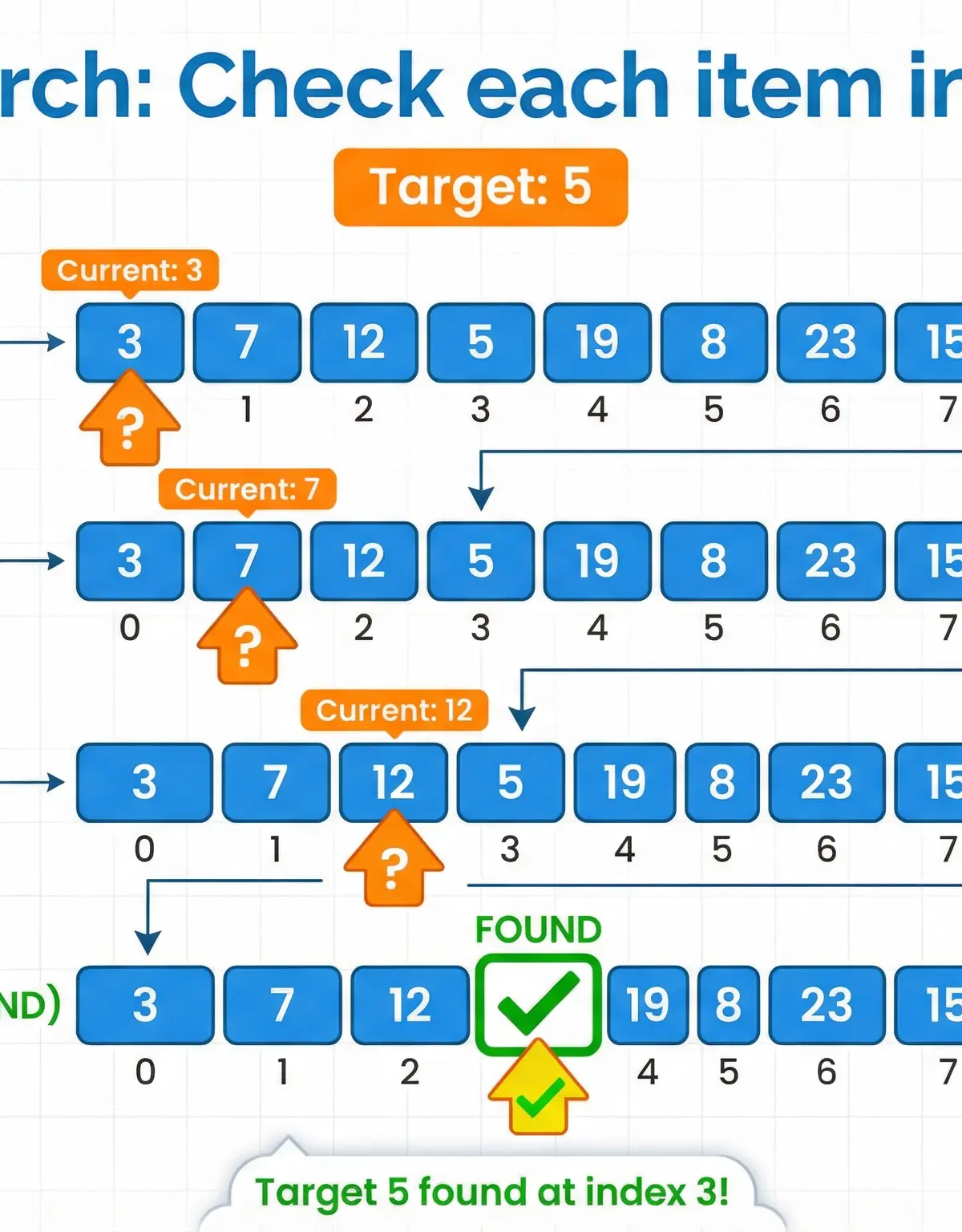
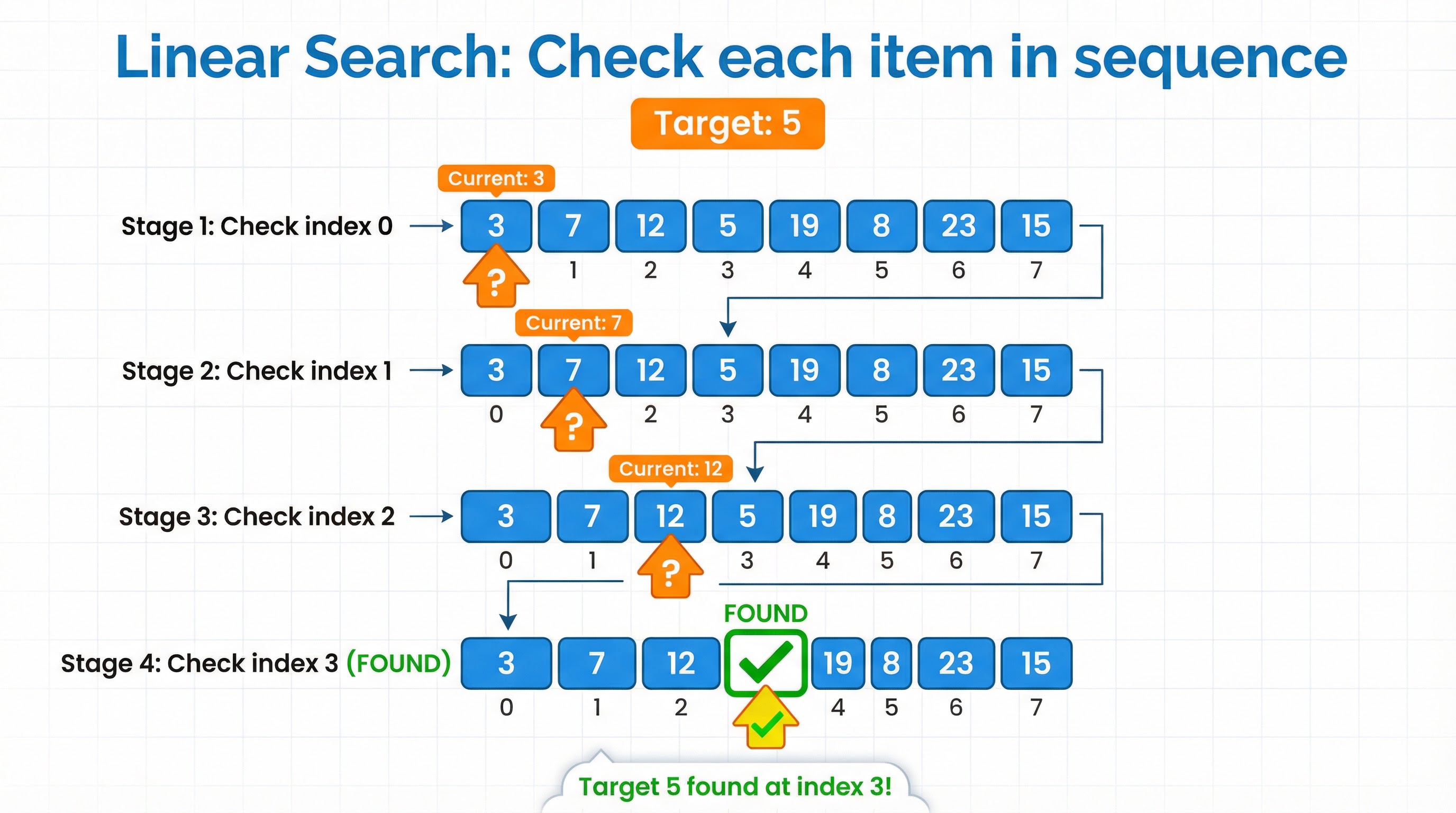
Linear Search is the most straightforward searching algorithm. It sequentially checks each element of a list until a match is found or the whole list has been searched. Think of it like looking for a specific card in a deck by flipping them over one by one from the top. The main advantage is its simplicity and the fact that it can be performed on any list, regardless of whether it is sorted or not. However, its major drawback is its inefficiency with large datasets. In the worst-case scenario (the item is at the end of the list or not in the list at all), you have to check every single item.
Example: Imagine searching for the number 19 in the list [3, 7, 12, 5, 19, 8]. The Linear Search would perform the following comparisons:
- Is
3 == 19? No. - Is
7 == 19? No. - Is
12 == 19? No. - Is
5 == 19? No. - Is
19 == 19? Yes! Found at index 4.
Concept 2: Binary Search
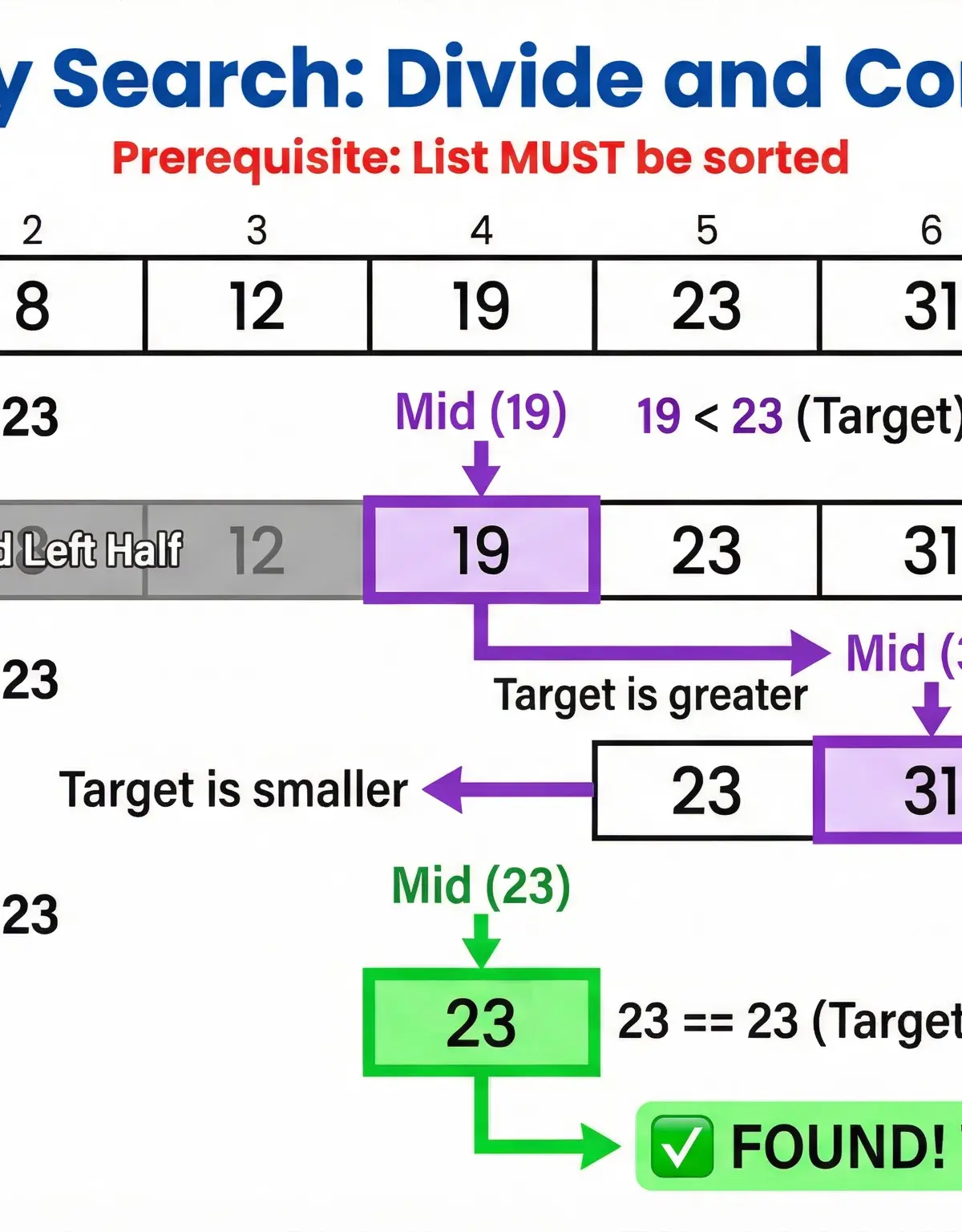
Binary Search is a much more efficient algorithm, but it comes with a crucial prerequisite: the list must be sorted. This is a point that candidates frequently miss, leading to lost marks. Binary Search works by repeatedly dividing the search interval in half. It follows a 'divide and conquer' strategy. It compares the target value to the middle element of the list. If they are not equal, the half in which the target cannot lie is eliminated, and the search continues on the remaining half, again taking the middle element to compare to the target value, and repeating this until the target value is found or the interval is empty.
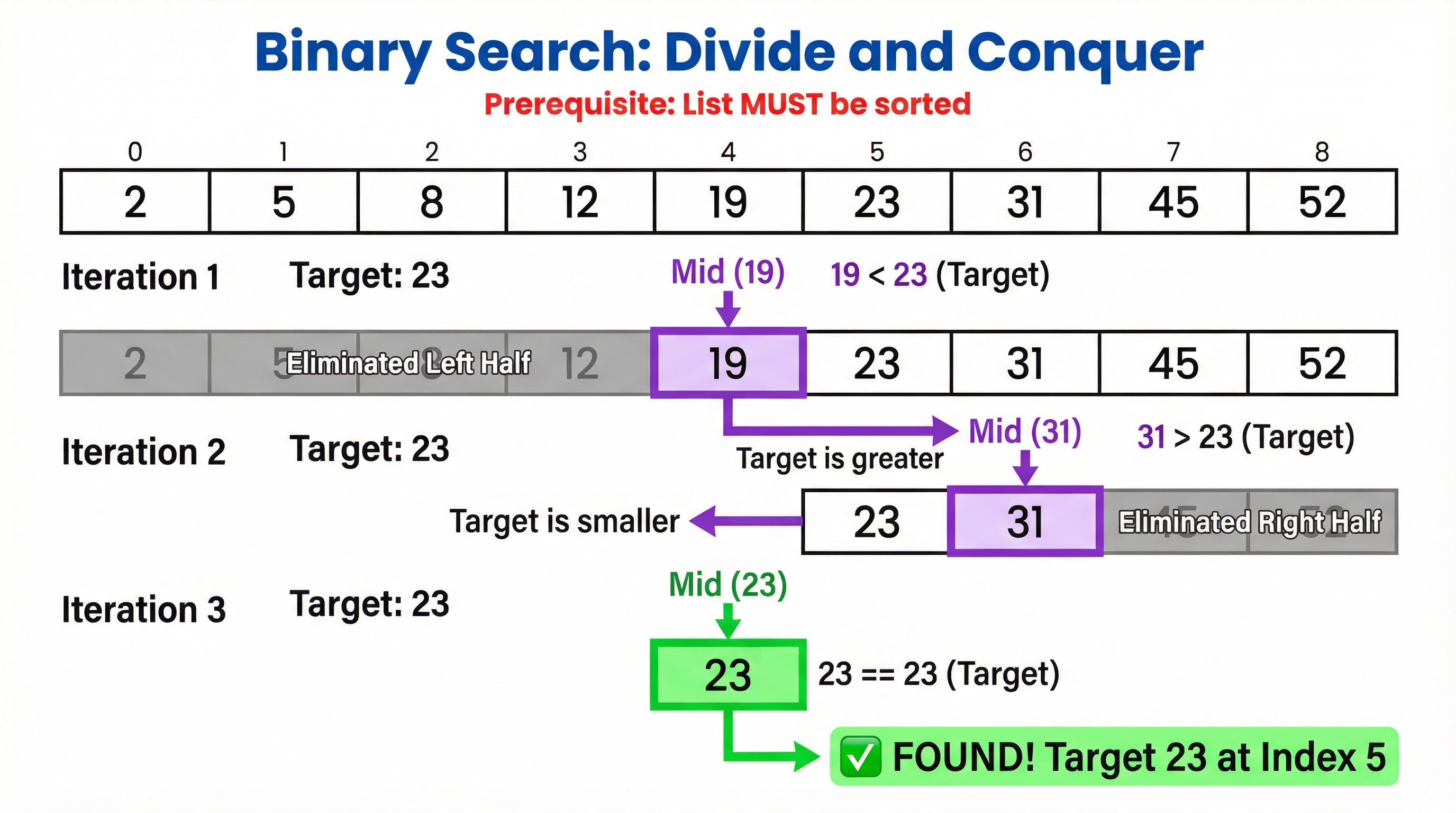
Example: Let's search for 23 in the sorted list [2, 5, 8, 12, 19, 23, 31, 45, 52].
- Iteration 1: The list has 9 elements. The middle index is
(0 + 8) DIV 2 = 4. The element at index 4 is19. Since23 > 19, we discard the left half and the midpoint. The new search space is[23, 31, 45, 52]. - Iteration 2: The new search space has indices from 5 to 8. The middle index is
(5 + 8) DIV 2 = 6. The element at index 6 is31. Since23 < 31, we discard the right half. The new search space is[23]. - Iteration 3: The new search space has indices from 5 to 5. The middle index is
(5 + 5) DIV 2 = 5. The element at index 5 is23.23 == 23. Found!
Mathematical/Scientific Relationships
Time Complexity
Time complexity is a measure of how the runtime of an algorithm scales with the size of the input (n). It's a key concept for comparing algorithms.
- Linear Search: Has a time complexity of O(n) (read as "Big O of n"). This is called linear time. In the worst case, the algorithm has to make
ncomparisons for a list ofnitems. - Binary Search: Has a time complexity of O(log n) (read as "Big O of log n"). This is called logarithmic time. The number of comparisons grows much more slowly than the size of the list. For a list of 1,000,000 items, a binary search would take at most 20 comparisons, whereas a linear search could take 1,000,000.
Midpoint Calculation (Must memorise)
For Binary Search, the formula to find the middle index is crucial. In OCR Reference Language, you must use integer division.
mid = (low + high) DIV 2
low: The starting index of the current search interval.high: The ending index of the current search interval.DIV: Integer division, which discards any remainder. This is essential for getting a valid array index.
Practical Applications
- Linear Search: Useful for small or unsorted datasets. For example, checking if a username is already in a short list of active users on a local network.
- Binary Search: Used extensively in many applications where data is sorted and performance is critical. Examples include searching for a word in a dictionary, looking up a phone number in a directory, or finding a specific product in a sorted list on an e-commerce website. Database indexing often uses a more complex version of binary search (B-Trees) to quickly locate records."
Worked Examples
3 worked examples — open one to explore the question and available guidance.
Practice Questions
Test your understanding — click to reveal model answers
State the time complexity of a linear search.
Hint: Think about how the number of steps relates to the number of items in the list.
Explain why a binary search cannot be performed on the list [4, 2, 8, 5, 1].
Hint: What is the most important rule about using a binary search?
A programmer has a list of 1,000,000 sorted customer IDs. They need to write an algorithm to find a specific ID. Evaluate the use of a linear search versus a binary search for this task.
Hint: Consider efficiency, implementation complexity, and the nature of the dataset.
Write an algorithm in OCR Reference Language to perform a linear search for a given item in an array called dataList.
Hint: You will need a loop, a counter, and a boolean flag.
Describe a scenario where a linear search would be a better choice than a binary search.
Hint: Think about the main weakness of a binary search.