Pearson Edexcel · GCSE · Mathematics
Course version: 1MA1 · Version from Mar 2026
Number - Measures and accuracy: estimate answers; check calculations using approximation and estimation, including answers obtained using technology
Spot a calculator slip before it costs you marks: turn awkward numbers into a calculation you can check in your head. This Pearson Edexcel GCSE guide teaches input rounding, sensible estimates and justified overestimates or underestimates, with original exam-style questions, diagrams and a ten-minute female-tutor podcast.
- 13 min read
- 4 worked examples
- 6 practice questions
- 9 key terms
Try the lesson
The start of the Number - Measures and accuracy: estimate answers; check calculations using approximation and estimation, including answers obtained using technology lesson, made from checked teaching notes for this specification point.
Have a go first
Estimate the value of 19.7 × 4.1 by rounding each number to 1 significant figure.
There is more to this lesson
The full lesson goes on to check your understanding and help you earn the marks. Create a free account to carry on, with your progress saved.
7 days Premium · Then the free plan continues · No card, no charge
Check what you remember
Read the wording for your board, then hide it and explain Estimate in your own words. Rough notes are fine. This is a self-check, with no mark or grade.
Reference: Pearson Edexcel
An approximate value found using simpler numbers or a suitable numerical comparison.
Study Notes
Overview
An estimate gives a useful approximate answer by replacing awkward numbers with simpler ones before calculating. In Pearson Edexcel GCSE Mathematics, specification 1MA1 N14 requires candidates to estimate answers and check calculations, including those obtained using technology. This is a shared Foundation and Higher skill, not just a trick for the non-calculator paper. 1
You will practise rounding inputs, calculating with decimals, checking the size of answers and explaining whether an estimate is above or below the true value. One significant figure is the usual starting point for formal estimation questions, but an explicit instruction always takes priority. The skill connects to place value, fractions, percentages, standard units and substitution into formulae. It also prevents mistakes in money, area and volume problems. 2
Typical questions ask candidates to work out an estimate, explain why a calculator result cannot be correct, or justify an overestimate or underestimate. The marks reward the process and reasoning required by that particular question. This guide's worked examples and practice questions are original Edexcel-style material with illustrative mark schemes, not official Pearson questions. Start with REC: Round, Evaluate, Check, and make each stage visible.
Key Concepts
1. An estimate is not an exact answer rounded afterwards
For an estimation calculation, simplify the inputs first. For example:
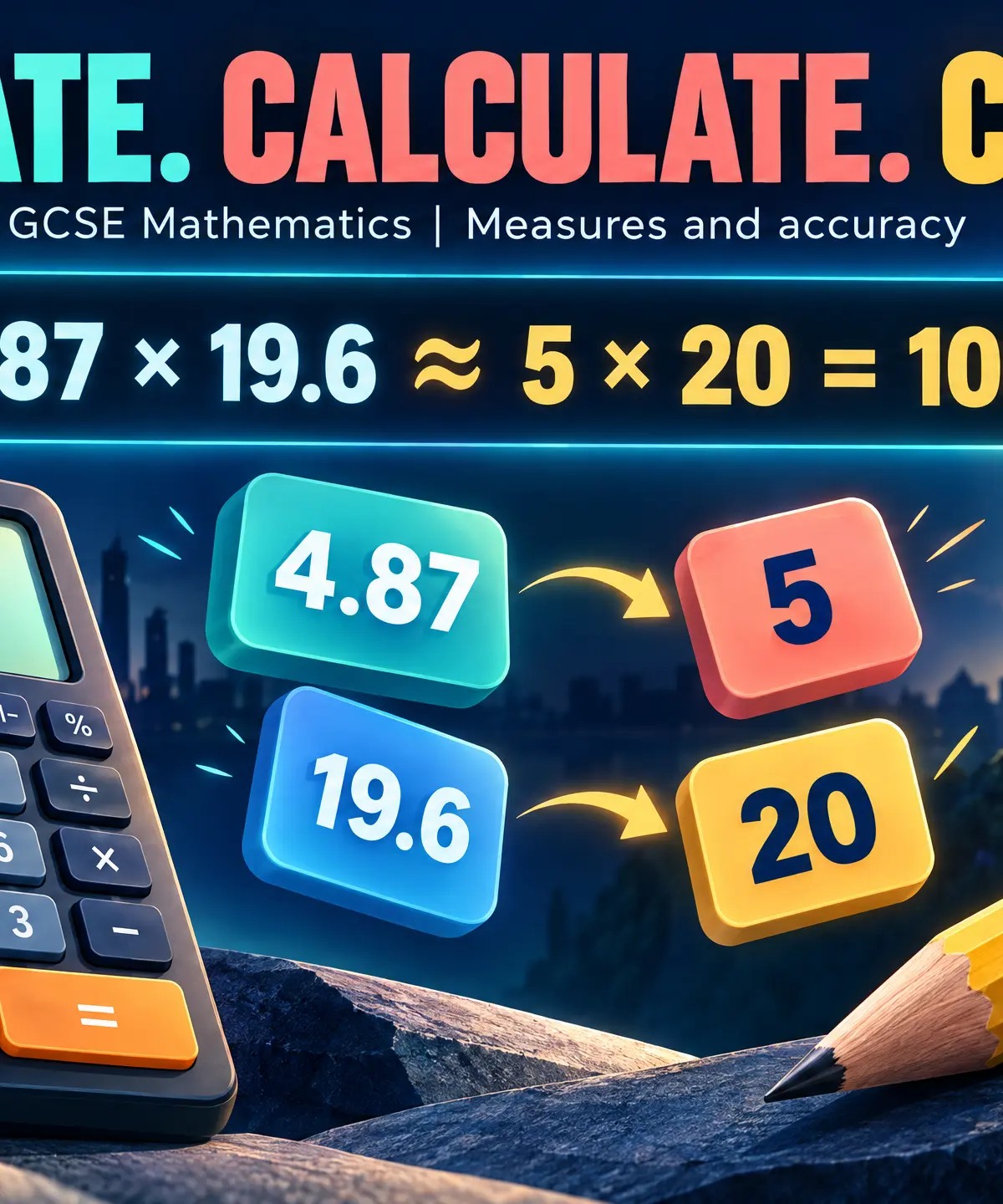
**4.87 × 19.6 ≈ 5 × 20 = 100.**The original calculation is approximately equal to the rounded calculation. The rounded calculation itself equals 100 exactly. Using ≈ and = correctly shows that you understand the difference.
Calculating 4.87 × 19.6 = 95.452 and then rounding to 100 may give the same number, but it does not demonstrate the intended input-rounding method. Do not assume that every such response automatically receives zero: the question-specific scheme determines credit. The safe exam approach is to write the rounded expression before evaluating it.
An estimate is allowed to differ from the exact value. Its purpose is to give a manageable answer of a sensible size. A more precise-looking answer is not necessarily a better response to the command word Estimate.
2. Rounding to one significant figure
The first significant figure is the first non-zero digit when reading from the left. Keep it, inspect the next digit, and preserve its place value. If that next digit is 5 or more, round upwards; if it is below 5, leave the retained digit unchanged.
Thus 612 ≈ 600, 29 ≈ 30, 4.87 ≈ 5 and 19.6 ≈ 20. Rounding to one significant figure is different from rounding to the nearest whole number: 612 is already a whole number, but it still becomes 600 to one significant figure.
For 0.048, the first significant digit is 4 in the hundredths position. The next digit is 8, so 0.048 ≈ 0.05, not 0.0. Leading zeros preserve the scale. Similarly, 0.073 ≈ 0.07 and 0.49 ≈ 0.5. If rounding creates a new place value, keep it: 9.8 ≈ 10 and 980 ≈ 1000.
Cover and recall: Without looking back, round 612, 0.048 and 0.073 to one significant figure. Then explain why the zeros in 0.048 cannot simply be discarded.
3. Calculate with the rounded values
Write the simplified expression on its own line. For division:
**612 ÷ 29 ≈ 600 ÷ 30 = 20.**You can divide numerator and denominator by 10 to obtain 60 ÷ 3. For a more demanding decimal example:
**(0.048 × 19.6) ÷ 0.49 ≈ (0.05 × 20) ÷ 0.5 = 1 ÷ 0.5 = 2.**One divided by a half is two because two halves fit into one. Division does not always make a positive number smaller. Dividing by a positive number below 1 makes it larger.
Retain brackets and the order of operations. A fraction bar groups the entire numerator. If an expression includes a final subtraction, it still happens after the multiplication or division above it. Rounding simplifies numbers, not the structure of the expression.
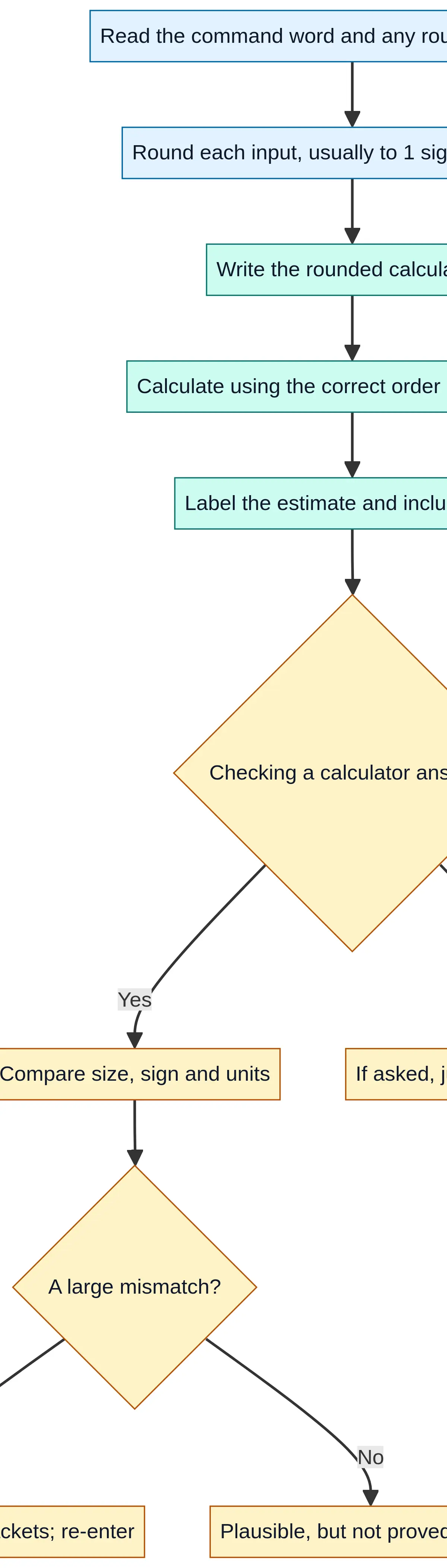
Use this workflow while practising. Then cover it and reconstruct the steps from memory.
4. Choose approximations that answer the question
Follow any prescribed accuracy. If the question says to round every input to one significant figure, do that even if another choice would be easier. If no accuracy is prescribed, sensible compatible numbers or a known inequality may be more useful than mechanically rounding everything.
Do not routinely round familiar exact constants such as a stated number of equal sides or the 60 minutes in an hour as though they were uncertain measurements. Retain their exact meaning unless the question explicitly instructs otherwise.
Beware of cancellation. Rounding both 5.2 and 4.8 to 5 makes their difference zero, although the original difference is non-zero. In a denominator, that would create an undefined calculation. Where you can choose the approximation, use enough accuracy to preserve a useful non-zero difference. Where accuracy is specified, show the requested rounding and explain why it does not produce a usable estimate.
The final estimate need not itself have one significant figure. For example, adding two rounded subtotals can produce a multi-digit estimate. Do not introduce another rounding stage unless requested or helpful in context.
5. Check calculator and technology answers
Estimate before entering a long calculation. For
(48.7 × 19.6) ÷ 0.49, estimate (50 × 20) ÷ 0.5 = 2000.
A display of 194.8 is about ten times smaller than this estimate, so investigate the entry. A misplaced decimal is a possible cause, but the estimate alone cannot identify the exact mistake. Check every digit, brackets and the divisor, then re-enter the expression. The correct calculation is 1948, which is consistent with an estimate of 2000.
Check the sign and units as well as size. Positive distance divided by positive time should give a positive speed. A cost should not acquire square-centimetre units. An inverse calculation can provide another check: if a ÷ b = q, then q × b should reproduce a, apart from any rounding.
Important limitation: A result near an estimate is plausible, not proved correct. Coarse rounding can hide smaller errors. Never claim that every result far from a poor estimate is necessarily wrong either: first decide whether your approximation was suitable.
Cover and recall: What three entry features would you check if your calculator result were about ten times too small?
6. Explain overestimates and underestimates
An overestimate is above the true value; an underestimate is below it. Your explanation must describe the effect of the input changes on the operation, not merely announce that rounding occurred.
For a product of positive values, increasing both factors increases the product. Since 4.87 rounds up to 5 and 19.6 rounds up to 20, the estimate 100 is an overestimate. Decreasing both positive factors gives an underestimate. Opposite rounding directions have competing effects, so those directions alone do not determine the outcome.
For a positive quotient, increasing the numerator increases the result, while increasing the denominator decreases it. Therefore numerator up with denominator down gives an overestimate. Numerator down with denominator up gives an underestimate. If both change in the same direction, further comparison is needed.
In 612 ÷ 29 ≈ 20, the numerator rounded down and the denominator rounded up, so the estimate is below the true quotient. You can also verify this without calculating the exact quotient: 20 × 29 = 580, and 612 > 580, so 612 ÷ 29 > 20.
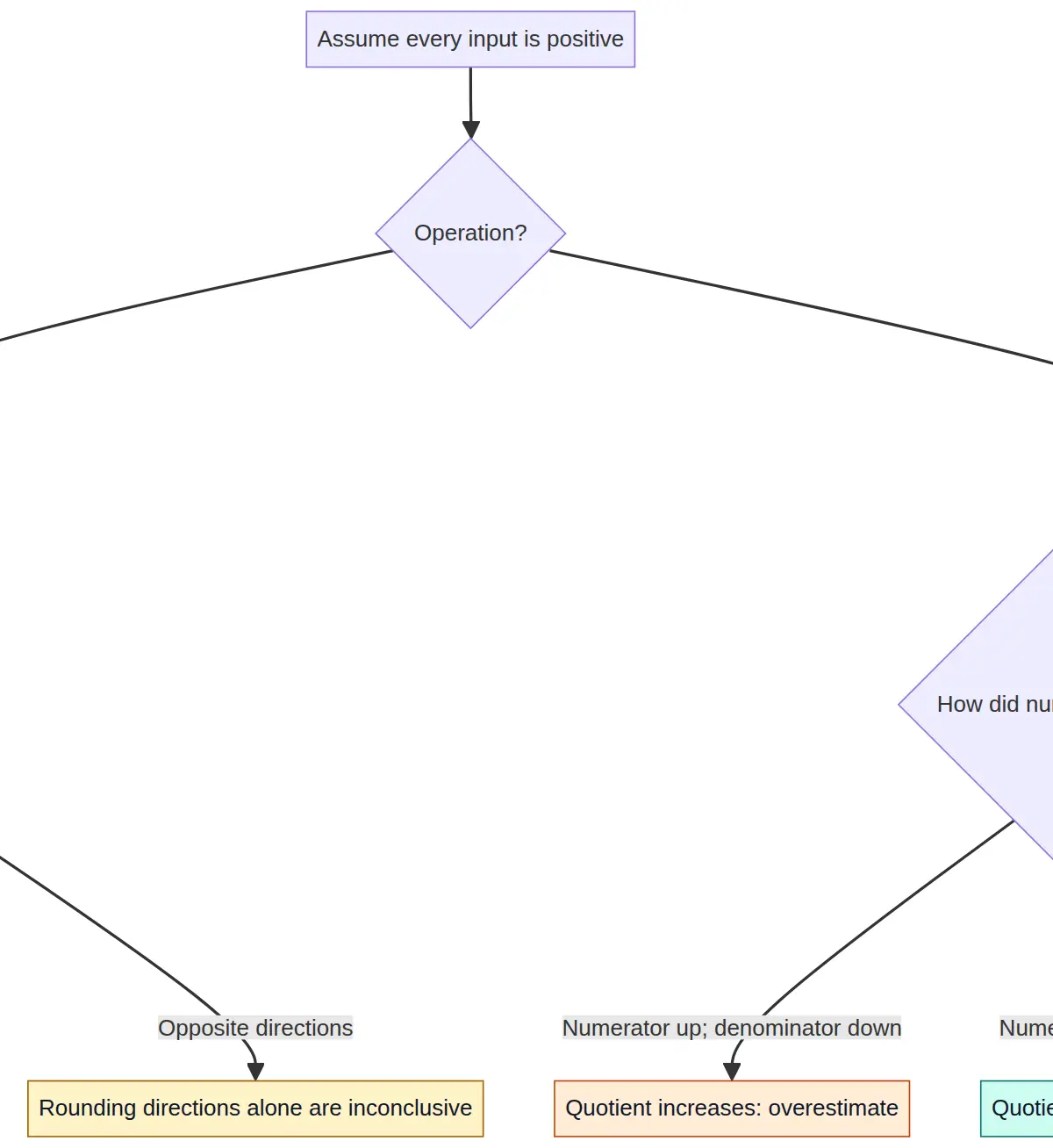
These rules assume positive inputs. Do not transfer them unchanged to negative values. For addition, increasing both terms increases the sum. For a subtraction a − b, increasing a and decreasing b increases the result. In a multi-step expression, consider the whole calculation, especially quantities being subtracted.
Why does this work? Explain why dividing the same positive amount among fewer equal groups makes each group's share larger.
7. Estimate square roots using anchors
To locate a positive square root, find neighbouring square numbers. Since 7² = 49 and 8² = 64, we have 49 < 50 < 64, so 7 < √50 < 8. This gives a justified interval without a calculator.
If asked for a nearest integer, the interval alone is not enough in every example: compare with the square of the halfway value. For √50, 7.5² = 56.25 and 50 < 56.25, so √50 < 7.5 and the nearest integer is 7. If asked only for two consecutive integers, stop at 7 and 8.
Basic square-number reasoning supports both tiers through roots and powers. Pearson's Higher N14 guidance also develops estimation of more complex powers and roots. Formal calculations with upper and lower measurement bounds are a Higher-only extension under N16, beyond the core estimation method here. A rough estimate is not a rigorous measurement bound. 1 2
Mathematical Relationships
There is no special estimation formula supplied on the formula sheet. The following relationships must be understood and recalled; the approximation sign means 'approximately equal'.
Must memorise: If a ≈ A and b ≈ B, use a + b ≈ A + B, a − b ≈ A − B, ab ≈ AB, and a ÷ b ≈ A ÷ B when B ≠ 0 and the chosen approximations are suitable. Lowercase letters denote original inputs and capitals their approximations. These are estimation relationships, not promises of a small error in every expression.
Must memorise: For x ≥ 0, n ≥ 0 and n² < x < (n + 1)², then n < √x < n + 1. Here n is an integer anchor. For an inverse check, a ÷ b = q implies qb = a when b ≠ 0.
Must memorise, for contextual checks: total cost = number of items × cost per item; profit or money remaining = income − costs; rectangle area A = lw; cuboid volume V = lwh. Here l, w and h are compatible lengths. Area uses square units; volume uses cubic units.
Given on formula sheet: volume of a prism = cross-sectional area × length. Estimate its measurements or cross-sectional area as instructed, then use the formula. Pearson's 2026 Foundation exam aid supplies this relationship; it does not supply the significant-figure method. 4
Practical Applications and Units
Tickets at £19.95 each, with 395 sold and £6000 costs, give an estimated surplus of 20 × 400 − 6000 = £2000. Both income factors increased, while costs stayed unchanged, so this is an overestimate of the surplus. Pearson uses this type of context to combine number work with reasoning. 2
A rectangular floor measuring 4.87 m by 3.06 m has an estimated area of 5 × 3 = 15 m². Because one length increased and the other decreased, the rounding directions alone do not justify saying overestimate or underestimate. This is precisely why explanations must fit the actual calculation.
Convert units before comparing or substituting. Must memorise: 1 m = 100 cm, 1 km = 1000 m, 1 kg = 1000 g, £1 = 100 p and 1 hour = 60 minutes. An hour is not 100 minutes. For area, 1 m² = 10 000 cm²; for volume, 1 m³ = 1 000 000 cm³. The conversion factor is squared or cubed because there are two or three dimensions.
There is no required practical experiment for this Mathematics topic. For graph-linked checks, read axis labels, units and scale intervals before estimating a coordinate or value. A graph read-off is approximate because of the scale; do not assume it requires rounding every coordinate to one significant figure.
Exam Technique and Active Revision
Pearson papers each allow 90 minutes for 80 marks, an average of 67.5 seconds per mark. Aim roughly for one minute per mark on straightforward estimation, leaving checking time across the paper. Paper 1 is non-calculator; Papers 2 and 3 allow calculators, but estimation remains relevant on all three. 1
A real marking example is June 2023 Paper 1F, question 11(b): P1 for rounding evidence, a dependent P1 for beginning a ticket-sales process and A1 for an accepted rounded calculation result. Part 11(c) adds C1 for an overestimate supported by an input-rounding reason, with a dependency on earlier process marks. This shows why candidates should display their rounded working. The actual scheme accepts more than one suitable result; there is no universal fixed M1/A1 pattern for every estimate. 3
Try a worked example, cover its solution, and reproduce it. Then attempt a practice question before checking the model answer. Revisit an unanswered question tomorrow and mix it with a different topic several days later. Ask yourself: why did my method work, and what would change if the divisor were smaller than one?
Ten-Minute Tutor Podcast
Listen actively: introduction 00:00–01:00; core concepts 01:00–06:00; exam tips 06:00–08:00; recall quiz 08:00–09:00; summary 09:00–10:00. Answer quiz prompts aloud before hearing the explanation. Pause and work through a calculation whenever needed.
References
Complete Guide Download
Visual Resources
2 diagrams and illustrations

Interactive Diagrams
2 interactive diagrams to visualise key concepts
Conceptual Flow Outline
A reusable estimation and calculator-check workflow. Every node label is quoted.
Conceptual Flow Outline
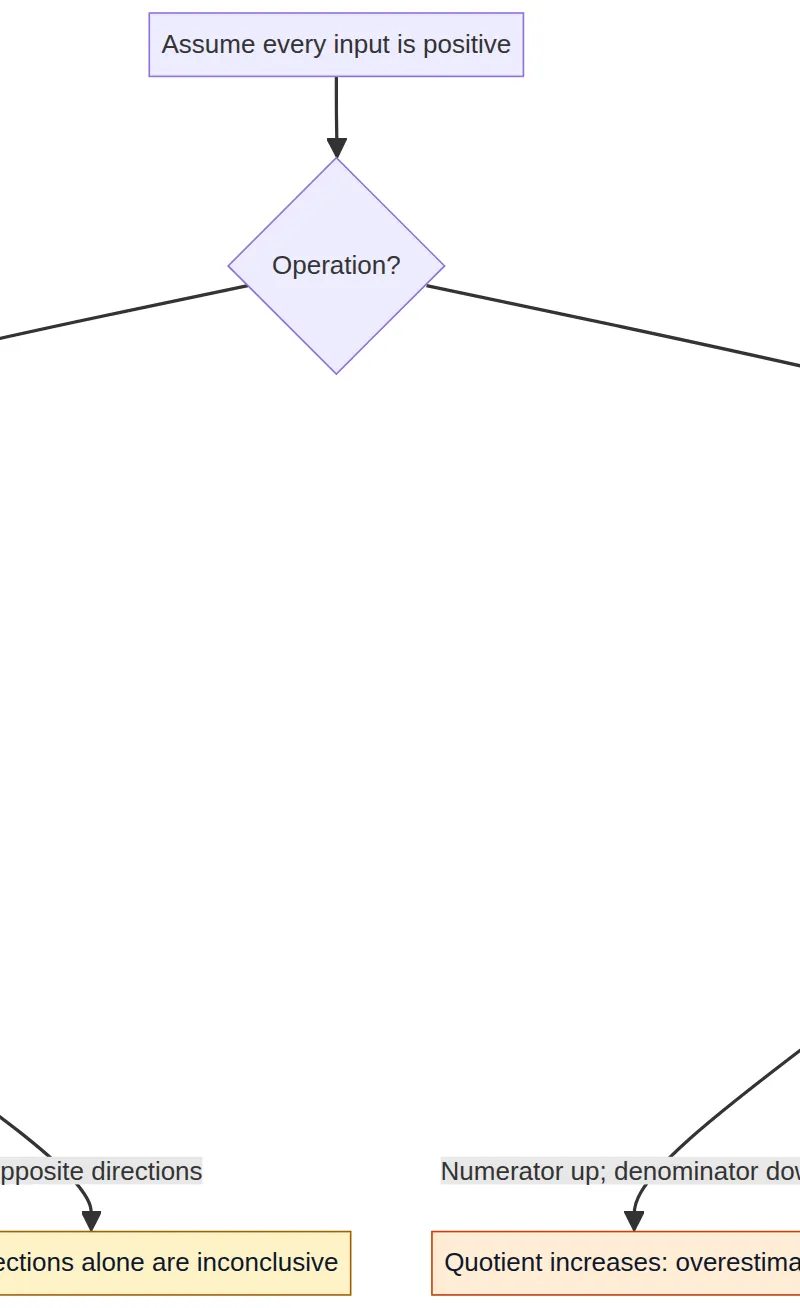
Positive-input rules for overestimates and underestimates, including cases where rounding directions alone are inconclusive.
Worked Examples
4 worked examples — open one to explore the question and available guidance.
Practice Questions
Try the question, then reveal an answer plan or example response
Original Edexcel-style practice; marks are illustrative. Estimate 3.18 × 7.9 by rounding each number to 1 significant figure. From the rounding changes alone, can you decide whether the estimate is an overestimate or an underestimate? Explain.
Hint: Write the two rounded values first, then compare whether each original positive factor went up or down.
Original Edexcel-style practice; marks are illustrative. (a) Estimate 548 ÷ 27 by rounding each number to 1 significant figure. (2 marks) (b) Without doing a decimal division, show whether 548 ÷ 27 is greater than or less than 20. (2 marks)
Hint: To compare a positive quotient with 20, multiply 20 by the original divisor 27.
Original Edexcel-style practice; marks are illustrative. Without using a calculator, prove that √70 is between 8 and 9.
Hint: Find the consecutive square numbers on either side of 70.
Original Edexcel-style practice; marks are illustrative. (a) Estimate (0.072 × 38.5) ÷ 0.81 by rounding each number to 1 significant figure. (2 marks) (b) Can the direction of this estimate be decided solely from the directions of the three rounding changes? Explain. (1 mark) (c) A calculator gives 3.422222... . State whether the estimate is an overestimate or an underestimate. (1 mark)
Hint: Keep the decimal scale and calculate the numerator before dividing.
Original Edexcel-style practice; marks are illustrative. A student evaluates (63.5 × 28.8) ÷ 0.32 and writes 571.5. (a) Make an estimate using 1-significant-figure inputs. (2 marks) (b) Use it to decide whether 571.5 is sensible. (1 mark) (c) Calculate the correct value. (1 mark) (d) Suggest one input error that could produce 571.5. (1 mark)
Hint: Dividing by 0.3 should make 1800 larger, not smaller.
Original Edexcel-style practice; marks are illustrative. Let R = (51.7 × 19.3) ÷ 0.48. (a) Estimate R using 1-significant-figure inputs. (2 marks) (b) Can the direction of this estimate be determined solely from the directions of the rounding changes? Explain. (1 mark) (c) Which is the plausible calculator answer, 207.9 or 2078.8? Justify your choice using the estimate. (2 marks)
Hint: Estimate the whole expression first. Then compare the size and place value of each proposed answer.
Exam technique
How to turn what you know into marks
How to approach the question
Identify Estimate, Calculate, Explain, Check or Prove. Note any specified rounding accuracy, units and brackets. Round each input appropriately, write the rounded expression, evaluate it, then answer any direction or technology-check part using explicit mathematical evidence.
How to structure your answer
For a 1-mark reasonableness explanation, give a short numerical comparison that proves the stated answer is implausible. For a simple 2-mark illustrative estimate, show rounded inputs and the resulting calculation. For 3–6-mark multipart questions, label the parts and show every required estimate, comparison and reason. Real Pearson allocations and dependencies vary: June 2023 1F Q11(b) uses P1 + P1 + A1, with C1 for the separate explanation in Q11(c).
Timing
Each Pearson Edexcel 1MA1 paper is 90 minutes for 80 marks: 67.5 seconds per mark on average. As a practical target, spend roughly 3 minutes on 3 straightforward marks or 6 minutes on 6 marks, retaining checking time. This is guidance, not an official question-level time limit.
Common pitfalls
- Calculating exactly and then rounding the answer instead of displaying input rounding. Show the simplified calculation first; individual schemes decide credit.
- Rounding 0.048 to 0.0 or 5. Retain the place-holding zeros and use 0.05.
- Confusing nearest whole number with one significant figure. 612 becomes 600 to 1 significant figure.
- Using an equals sign for an approximation. Write 4.87 × 19.6 ≈ 5 × 20 = 100.
- Saying both values rounded up means an overestimate for every operation. For positive division, increasing the denominator decreases the quotient.
- Treating a plausible calculator result as proof of correctness. Estimate checks can miss small errors; use another check where appropriate.
- Rounding away a denominator or a small difference. Consider whether the approximation is useful and obey any prescribed accuracy.
- Writing the estimate with false precision or rounding its result again unnecessarily. Give the value from your rounded calculation unless another instruction applies.
What the command words want
- Check
- Use an estimate, inverse operation or other valid numerical comparison to judge the proposed answer, and state the conclusion with evidence.
- Compare
- Make a direct numerical comparison, using greater than, less than, difference or ratio as appropriate. Specify which quantity is being compared.
- Explain
- Give a mathematical reason linked to the operation. For example: both positive factors increased, so the product increased.
- Describe
- Describe the relevant numerical feature or relationship using precise language, such as about ten times too small. Follow the actual context rather than a generic essay template.
- Estimate
- Replace inputs with suitable simpler values, usually to 1 significant figure, and show the approximate calculation. Follow any explicitly stated accuracy.
- Evaluate
- In a mathematical expression, find its numerical value. This does not normally mean write a balanced discussion.
- State/Give
- Give the requested value or conclusion clearly, with units where needed. If the instruction also says give a reason, the conclusion alone is insufficient.
- Prove/Show that
- Use logically sufficient working, such as 49 < 50 < 64 implying 7 < √50 < 8. A calculator approximation alone does not prove the required inequality.
- Calculate/Work out
- Work out the value requested, show appropriate steps and units, and obey its accuracy instruction. Do not substitute a rough estimate for an exact calculation.
Watch or listen (optional)
Test your understanding of Number - Measures and accuracy: estimate answers; check calculations using approximation and estimation, including answers obtained using technology
Active recall beats re-reading. Take an instant quiz now to test what you’ve learned and lock it into long-term memory.
7 days Premium · Then the free plan continues · No card, no charge