Hardware and Software: Your GCSE & A-Level Exam Guide
You're probably in one of two places right now. Either you can write bits of code but still feel oddly fuzzy about what the computer is physically doing, or you know the definitions of CPU, RAM and operating system, yet your exam answers still come out too vague for the top marks.
That gap is common. A lot of students can say “hardware is the physical parts” and “software is the programs”, but then freeze when an OCR or AQA question asks them to explain how an instruction moves through memory, or why system software matters before an application can run.
Teachers notice this too. Students often revise hardware and software as separate flashcard topics, then meet a six-marker that expects them to join the ideas together. That's where marks disappear.
Why Your Code and Your Computer Feel Disconnected
You type a line of Python. You press run. Something happens on screen.
But what happened?
For a lot of GCSE and A-Level students, that's the frustrating part. You can follow the code logic, maybe even complete a trace table, but the machine itself still feels like a black box. The screen updates, the CPU “processes”, the RAM “stores”, and somehow that all turns into output. If that sounds familiar, you're not behind. You've just met a real teaching gap.
Spiceworks notes that hardware and software are rarely taught as an integrated system in UK GCSE/A-Level Computer Science curricula, with assessment often treating them as siloed topics, leaving students unable to explain how software instructions physically execute on hardware. That's exactly why high-mark questions can feel harder than they should.
High marks usually go to students who connect the layers, not students who recite isolated facts.
Where the confusion usually starts
Students often learn these as separate revision boxes:
- Hardware facts like CPU, RAM, ROM, input and output devices
- Software facts like operating systems, utility software and applications
- Programming facts like variables, loops and algorithms
The trouble starts when an exam question mixes them. For example:
- a trace table that depends on understanding memory changes
- a “describe” question on the fetch-decode-execute cycle
- an “explain” question about why a game needs certain hardware
- a question on system software acting as the link between user programs and devices
That's why a connected mental model matters more than a memorised list.
What to aim for instead
Try thinking of code as the plan, and hardware as the machinery that carries it out. The machinery doesn't “understand Python” in a human sense. It follows instructions step by step, through components you can name in exam language.
If you want structured support while rebuilding those links between topics, tools built for AI Powered Revision can help you practise the exact kind of joined-up explanations exam boards reward.
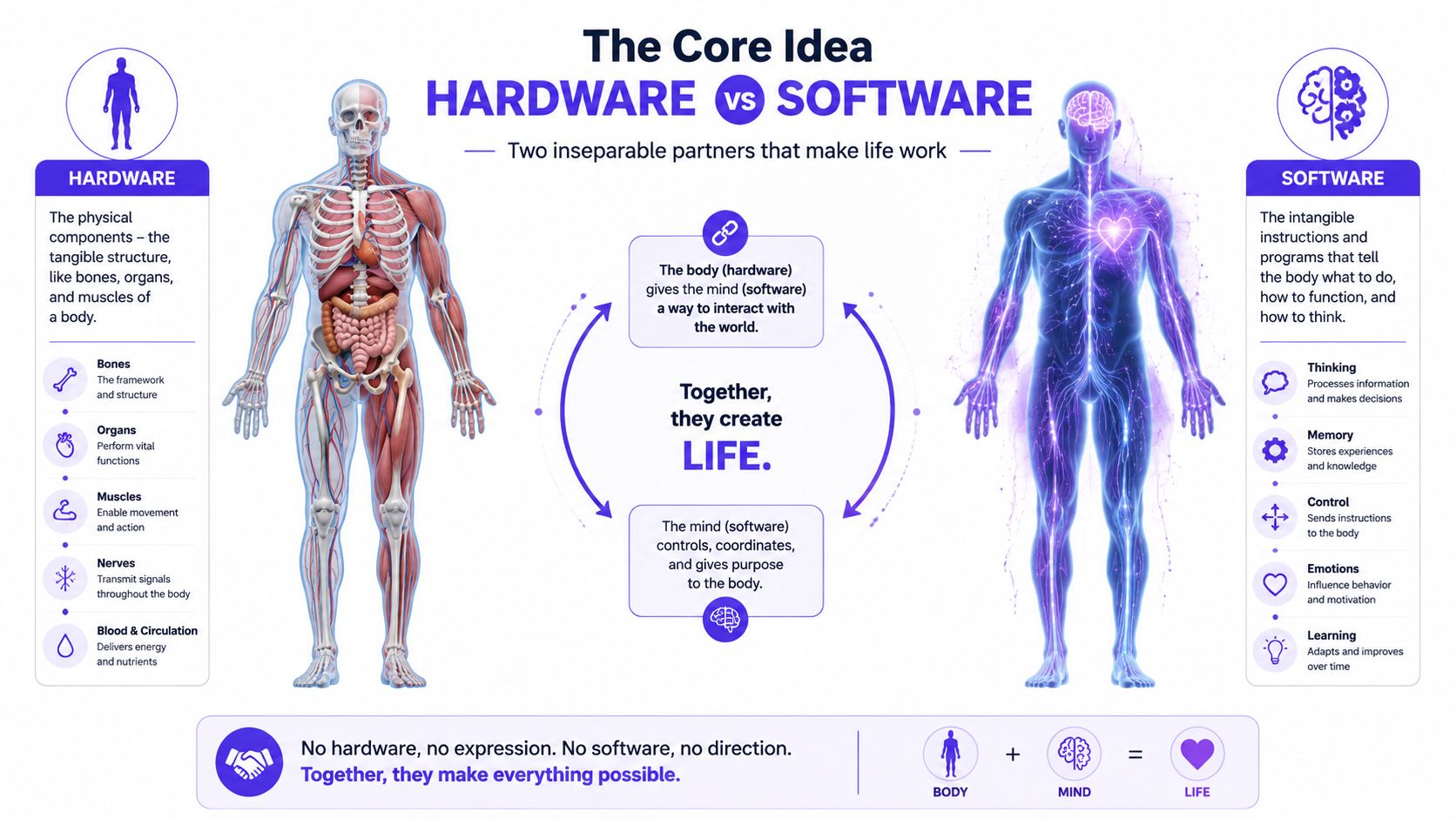
The Core Idea Hardware vs Software
If you strip everything back, the difference is simple.
Hardware is the physical equipment you can touch.
Software is the set of instructions that tells that equipment what to do.
That's the definition examiners want. Short, clear, accurate.
A simple analogy that actually helps
A good way to remember it is the body and mind idea.
- The body is like hardware. It's the physical structure.
- The mind is like software. It holds instructions, decisions and actions.
A body with no thoughts won't do anything useful. Thoughts with no body can't physically act in the world. Computers work in the same paired way. Hardware and software need each other.
If you prefer a different analogy, think of a guitar and a song:
- the guitar is hardware
- the music being played is software
You can hold the guitar. You can't hold the song. But without the guitar, the song can't be heard. Without the song, the guitar just sits there.
What counts as hardware
Hardware includes the parts inside and outside the computer:
- CPU for processing instructions
- RAM for temporary storage while programs run
- SSD or hard drive for longer-term storage
- Keyboard, mouse, microphone as input devices
- Monitor, speakers, printer as output devices
A quick exam rule helps here.
Practical rule: If you could point to it, plug it in, or replace it as a physical component, it's hardware.
What counts as software
Software is not physical. It's data and instructions.
Examples include:
- Operating systems such as Windows
- Applications such as a web browser or a game
- Utility software such as antivirus or file tools
- Drivers that help the operating system communicate with hardware
- Firmware, which is software stored in a device to control basic functions
Students sometimes think software is less “real” because you can't touch it. In computing terms, it's still fully real. It's just not tangible.
Why this matters outside the classroom
This isn't a tiny niche topic. SME Capital reports that the UK IT hardware market is projected to exceed £36 billion by 2025, while the UK software market is expected to reach £55 billion in the same period. That scale is one reason exam boards keep returning to hardware and software. They sit at the centre of modern computing.
A useful real-world extension is what happens when physical devices reach the end of their use. If you want a grounded example of how organisations handle old equipment, the ITAD process explained is worth reading because it shows that hardware has a whole life cycle beyond just “buy and use”.
How Hardware and Software Actually Talk to Each Other
The big leap in understanding comes when you stop treating hardware and software as separate topics and start seeing them as a conversation.
A program gives an instruction. The hardware carries it out. Then the result may go back into memory, onto the screen, or to another device.
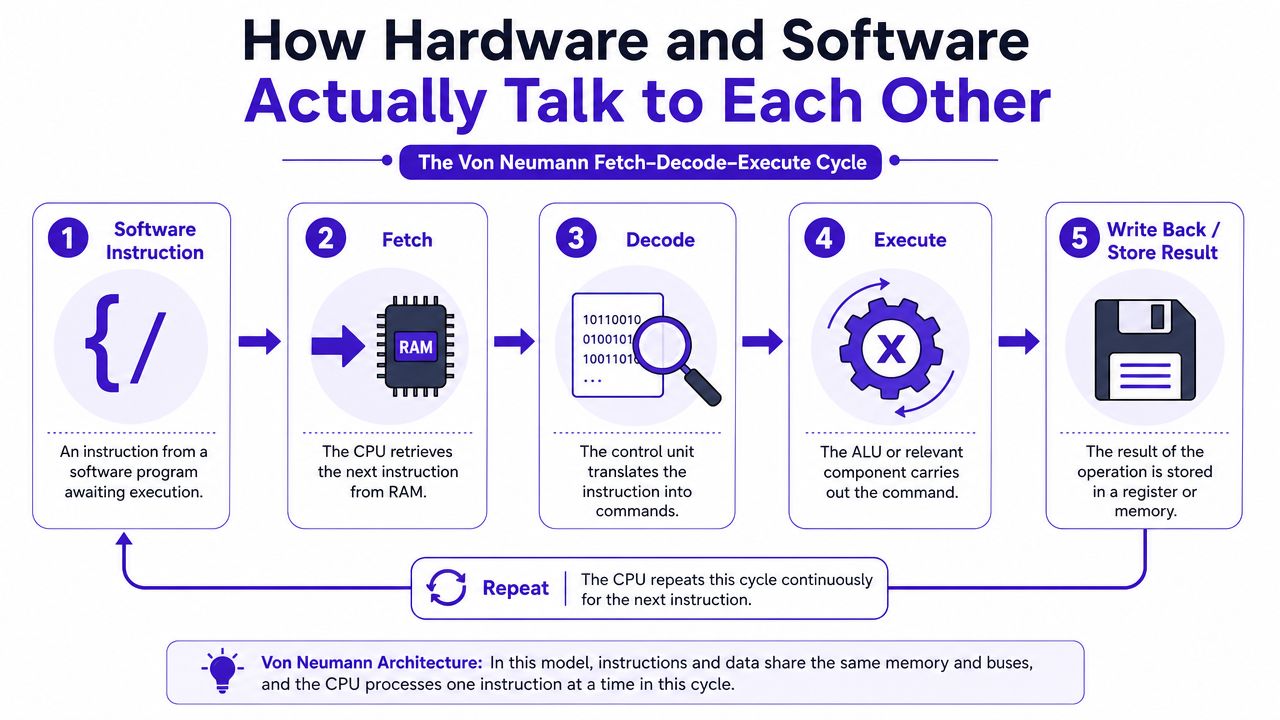
That's the idea behind the Von Neumann architecture and the fetch-decode-execute cycle.
A visual makes this much easier to hold in your head.
The key parts in the story
Before the cycle itself, know the cast:
| Component | Job in exam language |
|---|---|
| CPU | Processes instructions |
| RAM | Stores data and instructions currently in use |
| Control Unit | Manages the execution of instructions |
| ALU | Performs calculations and logic operations |
| System bus | Carries data, addresses and control signals |
| Input and output devices | Send data in or present results out |
Understanding the CPU's true nature often confuses students. The CPU isn't one tiny magic box doing everything in one go. It contains parts with different roles, and exam questions may want those roles named properly.
The fetch-decode-execute cycle in plain English
Let's say a program contains an instruction to add two numbers.
Fetch
The CPU fetches the next instruction from RAM.Decode
The control unit works out what that instruction means.Execute
The CPU carries out the instruction. If it's a calculation, the ALU may handle it.Store or write back
The result may be stored in a register, written to memory, or sent to an output device.
Then the cycle repeats.
If you can describe that sequence cleanly, you're already in much better shape for standard exam questions.
A short video can help if you want to see the process explained another way.
What the system bus actually does
The system bus is often taught as a labelled diagram, then forgotten. Don't let that happen. It's easier if you think of it as the route that links components together.
It includes:
- Data bus for the actual data
- Address bus for where the data should go or come from
- Control bus for signals that coordinate activity
A common exam mistake is writing “the bus stores data”. It doesn't. It transfers data and signals between components.
A concrete example
Suppose you press the letter A on a keyboard in a text editor.
- The keyboard sends input.
- The operating system and relevant driver help the computer interpret that input.
- The CPU processes the instruction.
- Data moves through memory as needed.
- The monitor displays the character.
That one simple action involves both hardware and software at every stage.
This matters far beyond school. Mordor Intelligence states that the UK ICT market is projected to reach USD 309.46 billion by 2031, primarily driven by IT services, which command 33.78% of spending. In simple terms, the value increasingly comes from what systems do, not just the box sitting on the desk.
The Different Flavours of Software and Hardware
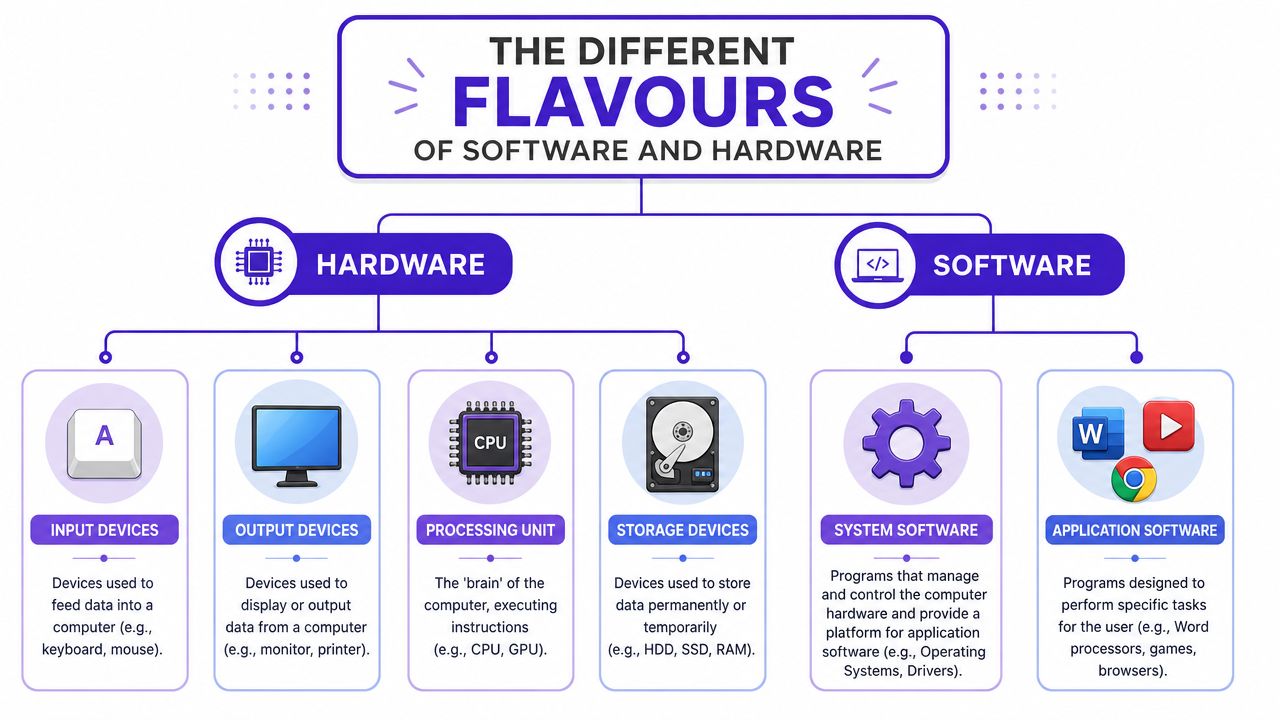
Definitions are only the start. Exams often move quickly to classification.
If a question asks for a type of software, “software” alone is too broad. If it asks for a hardware device used for storage, naming a monitor loses the mark. You need organised categories.
Hardware categories you should know cold
A neat way to sort hardware is by function.
Input devices
These send data into the system.
Examples include:
- Keyboard
- Mouse
- Microphone
- Scanner
The user or another device provides the data. The computer receives it.
Output devices
These present data from the system.
Examples:
- Monitor
- Printer
- Speakers
- Projector
The computer has already processed something. The output device lets the user see or hear the result.
Processing hardware
The main computational work is carried out.
- CPU handles general processing
- GPU is often used for graphics and parallel processing
If you've ever looked at gaming setups to think about why certain hardware suits certain tasks, Gamer Hardware recommendations can be a useful everyday example of how device choice affects user experience.
Storage hardware
Students often mix up storage and memory, so be careful with wording.
- RAM stores data temporarily while programs run
- SSD and hard drives store data long term
RAM is usually treated separately in teaching because it's volatile, but in exam answers it still belongs in the wider storage and memory conversation.
Software categories that exam boards love
Software is usually split into two major groups, with one special category that causes confusion.
System software
This runs the computer itself and supports the hardware.
Examples include:
- Operating systems
- Device drivers
- Utility software
Without system software, the user usually can't run application software properly.
Application software
This helps the user perform specific tasks.
Examples:
- Word processors
- Web browsers
- Games
- Photo editing tools
The purpose here is user-focused. That's the easiest way to separate it from system software.
Firmware
Firmware deserves its own mention because students regularly misclassify it.
Firmware is software stored inside a device to control low-level operations. It isn't hardware, even though it is closely tied to hardware.
Firmware is best thought of as software that lives very close to the machine.
A fast comparison table
| Category | Main purpose | Typical examples |
|---|---|---|
| System software | Runs and manages the computer | Operating system, drivers, utilities |
| Application software | Helps the user do tasks | Browser, game, spreadsheet |
| Firmware | Controls basic device functions | Software stored in routers, printers, embedded devices |
This also holds practical importance. The ONS reports that 66.8% of all digital infrastructure investment between 1997 and 2022 was allocated to software, databases, and telecoms equipment. That helps explain why software categories aren't a side note. They are central to how modern systems function.
If you want to sharpen this area specifically, it helps to practice Computer Science for UK exams using question styles that force you to sort examples accurately rather than just reread notes.
Busting Common Hardware and Software Myths
In these situations, easy marks slip away. A lot of wrong answers sound nearly right.
Myth 1 Firmware is hardware
It isn't. Firmware is software.
The confusion happens because firmware is closely linked to a device and often stored permanently enough that students think “it must be hardware”. But hardware is the physical component. Firmware is the coded instruction set stored for that device's basic operation.
Myth 2 More RAM always makes a computer fast
Not always.
More RAM can help if the system is struggling because it doesn't have enough working memory for active programs. But if the real bottleneck is the CPU, storage speed, or poor software optimisation, extra RAM won't magically fix everything.
Myth 3 The operating system is just another app
Not in exam classification.
The operating system is system software. It manages hardware resources, provides a platform for applications, and handles core services. A game or word processor depends on the operating system to run properly.
Don't put the OS in the same category as application software unless the question is about examples of software in the broadest possible sense.
Myth 4 Software wears out like hardware
Software doesn't physically wear out in the way a drive or keyboard can. Files can become corrupted, versions can become outdated, and bugs can cause failures, but that isn't physical wear.
A broken SSD and a buggy program are two different kinds of problem.
Myth 5 The CPU does everything alone
This one shows up in rushed six-markers. The CPU is central, but it works with memory, buses, input devices, output devices, system software and often specialist hardware too.
If your answer says “the CPU does it” and stops there, it's probably too thin for full marks.
Nailing the Exam Questions on Hardware and Software
Knowing the content isn't enough. You need to match your answer to the command word and the assessment objective.
That's the bit strong students do almost automatically. You can train it.
Read the command word before the topic
If the question says identify, you usually need a short, precise response.
If it says describe, give the key features or sequence.
If it says explain, link cause and effect. Show why something happens.
If it says compare, make both sides clear.
A simple way to think about exam demands is this:
| Command word | What the examiner usually wants |
|---|---|
| Identify | Name it |
| Describe | Say what happens |
| Explain | Say why or how |
| Compare | Show similarities or differences |
Connect your answer to the assessment objective
For hardware and software topics, questions often test two things:
- AO1 style knowledge. Facts, definitions, processes
- AO2 style application. Using that knowledge in a scenario
So if a question asks you to describe the fetch-decode-execute cycle, that leans heavily on recall. If it asks why video editing software benefits from certain hardware, that needs application.
A worked approach
Take a question like this:
Explain why a graphics-intensive game needs both suitable hardware and suitable software to run effectively.
A weaker answer says:
- it needs a good computer and the right software
That's too vague.
A stronger answer would include points like:
- The game is application software, so it needs system software, such as the operating system, to load and manage resources.
- The CPU processes instructions and the GPU helps render graphics.
- RAM is needed to hold data and instructions currently in use.
- Output hardware such as the monitor displays the final result.
- If the hardware is too weak, the software may run poorly or not at all because the instructions still need physical components capable of carrying them out.
That's better because it names components, uses correct categories, and links software demands to hardware capability.
Good answers don't just define terms. They apply them to the situation in the question.
What top-mark answers usually do
They tend to include three habits:
- Accurate vocabulary like RAM, operating system, driver, control unit
- Clear chains of logic instead of loose statements
- Scenario links so the answer stays relevant to the question
If you want to practise that under realistic pressure, Exam Practice for A-Level style drills are useful because they force you to respond to command words properly instead of passively reading model answers.
Your Smart Revision Plan for Exam Mastery
Cramming definitions the night before won't build the links this topic needs. A better revision plan makes you retrieve, connect and explain.
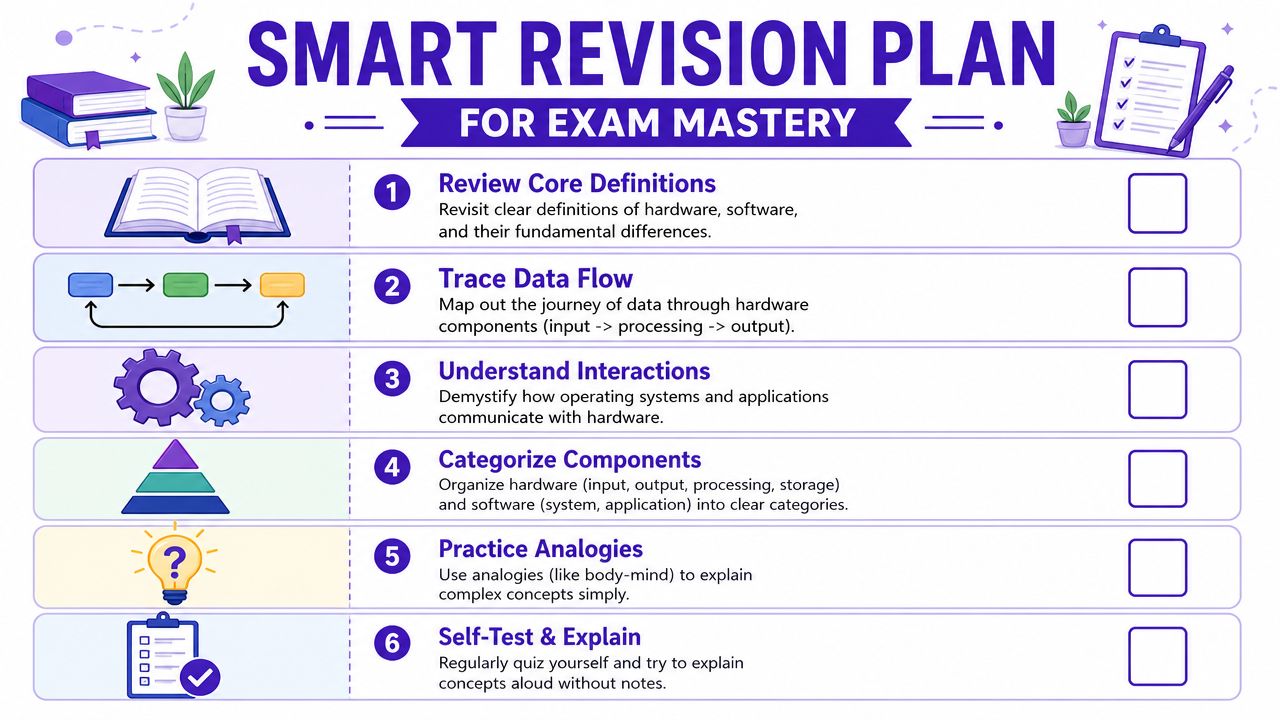
Try this checklist.
- Review core definitions. Be able to define hardware, software, firmware, system software and application software without notes.
- Trace one instruction. Practise explaining how an instruction moves through RAM, CPU and output using the fetch-decode-execute cycle.
- Sort examples into categories. Put devices and programs into input, output, processing, storage, system software and application software.
- Use blurting. Close your notes and write everything you can remember about one topic, then fill the gaps.
- Explain out loud. If you can teach the difference between RAM and storage in plain English, you probably understand it well enough for the exam.
- Mix question types. Don't only do flashcards. Use short-answer questions, extended responses and trace-based tasks.
This works because active recall and repeated retrieval push your brain to rebuild knowledge, not just recognise it.
There's a future reason to care as well as an exam one. Luminary Brands reports that in 2026, the UK digital market includes over 310,000 businesses, with the median salary for a software developer at £55,000 and senior engineers commanding averages of £110,200. These topics aren't just exam content. They sit under real jobs people are paid well to do.
If you want to make revision more concrete, work through GCSE Past Papers and tag each question by whether it tests definition, process, classification or application.
If you want one place to practise Computer Science the way UK exams test it, MasteryMind gives you examiner-aligned revision for GCSEs and A-Levels, with command-word practice, AO-focused feedback, mixed-topic retrieval, and guided support for tricky areas like trace tables, binary and hardware-software questions.
Ready to master this topic?
Practise with quizzes, blurt exercises and exam questions on MasteryMind.
7 days Premium · Then free forever · No card, no charge