OCR Computer Science Revision: Ace Your 2026 Exams
You've probably landed here in one of two moods. Either you've looked at the OCR Computer Science spec and realised you've done far less than you meant to, or you're already decent and want the difference between a safe pass and a top grade.
Both groups need the same thing. Not more notes. Not another generic checklist. You need a method that matches how OCR awards marks, because too many students revise content but never train themselves to answer in the format the paper wants. That's why the same mistakes keep showing up. OCR examiner reports for 2023 and 2024 highlight that students often misapply command words like ‘describe' vs ‘explain' in algorithm-related questions and fail to show intermediate steps in trace tables, yet few revision guides turn that into practical drills with AO-mapped feedback, as noted in Seneca's OCR revision discussion.
That gap is exactly where grades get stuck.
The Game Plan for Your OCR Computer Science Revision
If you're cramming, you need triage. If you're aiming high, you need precision. Either way, OCR Computer Science revision works best when you stop treating every topic as equal and stop pretending reading counts as practice.
Most students lose marks in predictable places. They know roughly what an algorithm does, but they don't show the intermediate steps. They understand a concept in class, then throw away marks because they answered an explain question like it was a describe question. That's not a knowledge problem. It's an exam method problem.
What actually moves your grade
Three things matter more than anything else:
- Spec awareness: know what OCR can ask.
- Answer discipline: know how OCR wants it answered.
- Targeted repetition: repeat the exact weak skill, not the whole topic.
Practical rule: If a revision method doesn't force you to retrieve, write, calculate, trace, or justify, it probably feels productive and does very little.
Students who are behind often waste time trying to feel “caught up”. High-achievers waste time polishing topics they already own. Both should work from the same rulebook. Start with the specification. Turn it into a checklist. Then train by question type, command word, and common error.
Teachers tend to be sceptical of broad revision advice, and rightly so. Generic “revise little and often” advice doesn't fix weak pseudocode, poor trace table layout, or vague evaluation points. A sharper option is to use structured tools that mirror board-specific demands, such as Online Revision for GCSE, alongside class resources and official materials.
The students who recover fastest usually do one thing differently. They stop asking, “Have I revised this topic?” and start asking, “Can I prove this under exam pressure?”
First Step Decode the OCR Specification
Before you do a single flashcard or past paper, decode the spec. The specification isn't admin. It's the paper blueprint.
For GCSE, this matters even more than students think. Under the OCR GCSE J277 specification, 40% of the written exam marks are devoted to algorithms and programming, including standard search and sort algorithms and trace tables, according to CSNewbs' breakdown of the OCR 2020 specification. If you're revising everything with equal effort, you're making your life harder.
Read the spec like a map
Students often skim the specification as if it's just a list of topics. That's too passive. Read it as a set of promises from OCR. If it's on the spec, it can appear. If wording repeats, it matters. If a skill is named directly, you should practise it directly.
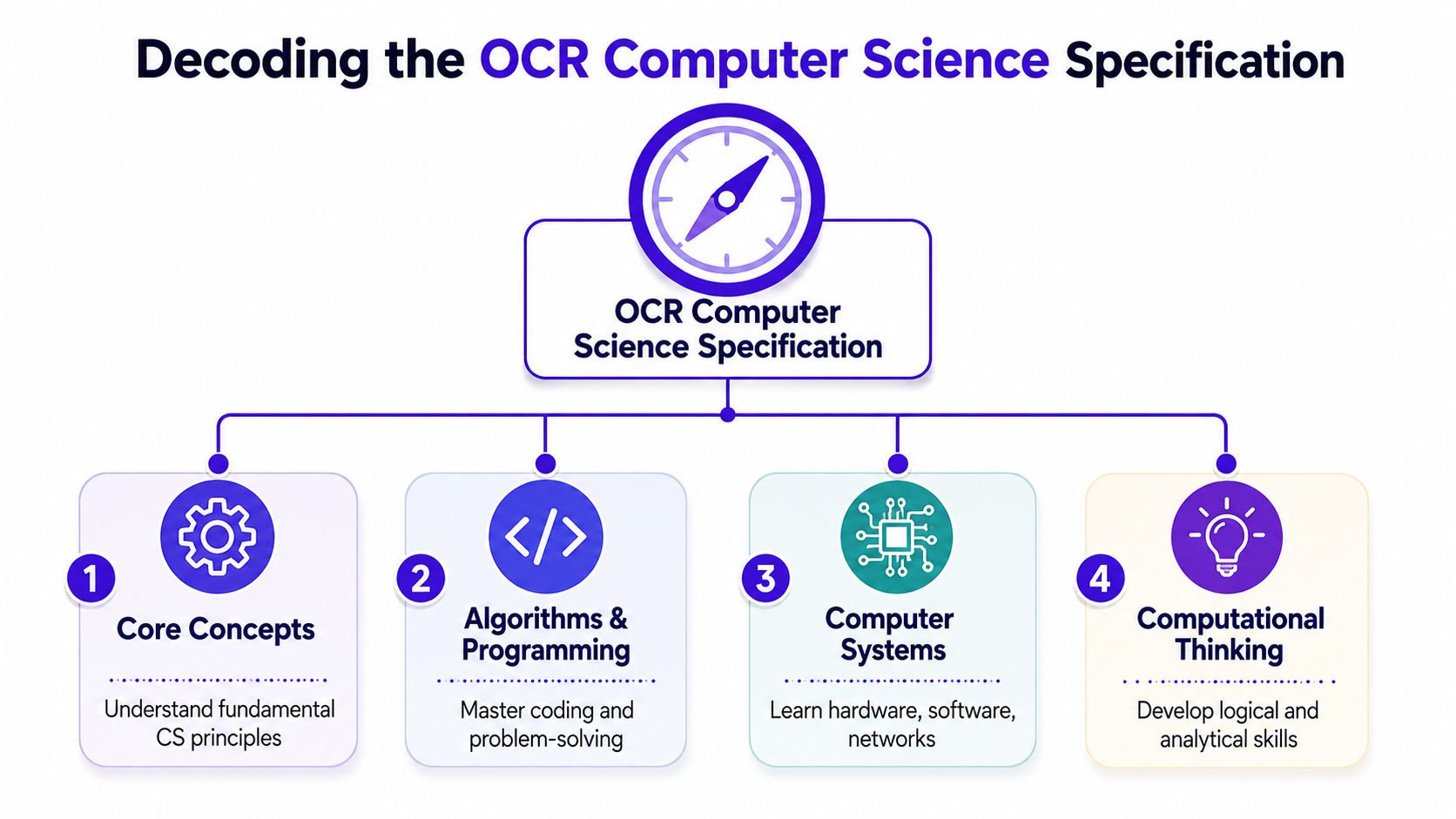
For GCSE and A-Level alike, pull out four broad buckets:
Core concepts
These are your definitions, principles, and standard knowledge. Data representation, systems, security, architecture, ethical issues.Algorithms and programming
This is the high-value ground. Tracing, writing, debugging, following logic, using pseudocode, solving unfamiliar problems.Computer systems and networks
Students often know the facts here but answer too vaguely. You need exact language and clean chains of reasoning.Computational thinking
Stronger students pull away here. They don't just remember content. They apply it.
Turn spec points into revision actions
Don't write “revise algorithms”. That's useless. Rewrite each line of the spec into a task you can do.
Try this format:
| Spec area | Bad revision task | Better revision task |
|---|---|---|
| Search and sort algorithms | Read the page on sorts | Write and trace each algorithm from memory |
| CPU architecture | Highlight textbook notes | Answer three short explain questions without notes |
| Cyber security | Re-read class slides | Compare threats and protections in exam-style paragraphs |
| Data representation | Watch a video | Convert values by hand and check every step |
That's the jump from vague revision to real revision.
What GCSE students should prioritise
If you're doing J277, start with the areas that most often punish weak technique:
- Algorithms: especially tracing, sequencing, iteration, selection, and standard algorithms
- Programming logic: writing small solutions, spotting errors, debugging
- Data representation: binary, hexadecimal, conversions, sound and image basics
- Systems and networks: the topics that produce lots of short and mid-mark questions
What A-Level students should prioritise
A-Level students need to treat the spec less like a memory test and more like a problem-solving document. Big-mark questions reward structure. If you know the content but your written logic drifts, your marks drift too.
Strong OCR students don't revise topics in isolation. They pair each topic with the way it's examined.
A simple rule works well. Every spec point should link to one of these:
- define it
- apply it
- trace it
- evaluate it
- compare it
- code it
If you can't do at least one of those for a spec point, you haven't revised it properly. You've just looked at it.
From Passive Reading to Active Recall
Reading notes feels safe because your brain recognises the information. Recognition is not recall. In OCR Computer Science, that difference hurts. If you can't pull the idea out of your head on command, it won't show up cleanly in the exam.
Stop highlighting and start retrieving
A student can spend an hour re-reading bubble sort, TCP/IP, or CPU components and feel prepared. Then the paper asks them to write steps, justify a method, or complete a trace table, and suddenly the knowledge vanishes.
That's why Active Recall should sit at the centre of your revision. It forces you to retrieve information without prompts. That retrieval is what strengthens memory and exam performance.
Use blunt methods. They work.
- Blank page blurts: write everything you know about one topic from memory, then check what's missing.
- Pseudocode from memory: cover your notes and write an algorithm cold.
- Draw and label: recreate diagrams for networks, architecture, or memory structure without peeking.
- One-minute definitions: explain key terms out loud in simple language.
Make recall topic-specific
Computer Science rewards active recall most when it's tied to the exact thing you'll have to produce in the exam.
For example:
| Topic | Weak method | Strong method |
|---|---|---|
| Bubble sort | Re-read worked example | Write pseudocode and trace one pass by hand |
| Cyber security | Memorise terms list | Explain one threat and one defence in linked sentences |
| Binary shifts | Watch tutorial | Complete five quick conversions on paper |
| SQL injection | Read textbook paragraph | Answer a short “explain how” question from memory |
If you can explain a concept only when the textbook is open, you don't know it yet.
Spaced repetition beats panic revision
The other mistake students make is massing one topic into one giant session. It feels efficient and then disappears from memory a week later. Spaced repetition is better. Revisit topics after a short gap, then a longer one, then another. That gap matters because your brain has to work to bring the answer back.
A simple pattern is enough:
- Learn the topic properly.
- Test yourself the next day.
- Re-test later that week.
- Re-test again after another gap.
- Revisit it in mixed-topic practice.
You don't need an elaborate system. You need consistency.
Here's a useful walkthrough if you want a visual reset on how retrieval-based revision should look in practice.
The method that top students use without making a fuss about it
Top students often make revision look effortless because they aren't spending their time on low-value tasks. They test themselves constantly. They let themselves struggle. They revisit weak material before it vanishes. And they mix content with production.
Try this mini-cycle for any OCR Computer Science topic:
- Recall: blurt or speak everything you know.
- Check: compare against notes or the spec.
- Produce: answer one exam-style question.
- Repeat: come back to it later without warning yourself.
That's how content starts sticking. Not by staring at it longer, but by dragging it out of memory repeatedly.
Mastering OCR Exam Technique and Command Words
The distinction between grades becomes clear. A Grade 7 student often knows a lot. A Grade 9 student usually writes what the mark scheme can reward.
OCR papers punish vague answers. They also punish sloppy process. That's why command words and answer structure matter so much. Examiners for OCR A-Level Computer Science note that students who fail to maintain a consistent trace table format frequently lose 3–5 easy marks per question, even when the underlying logic is correct, according to Sherpa Online's OCR A-Level guide.
Command words are not interchangeable
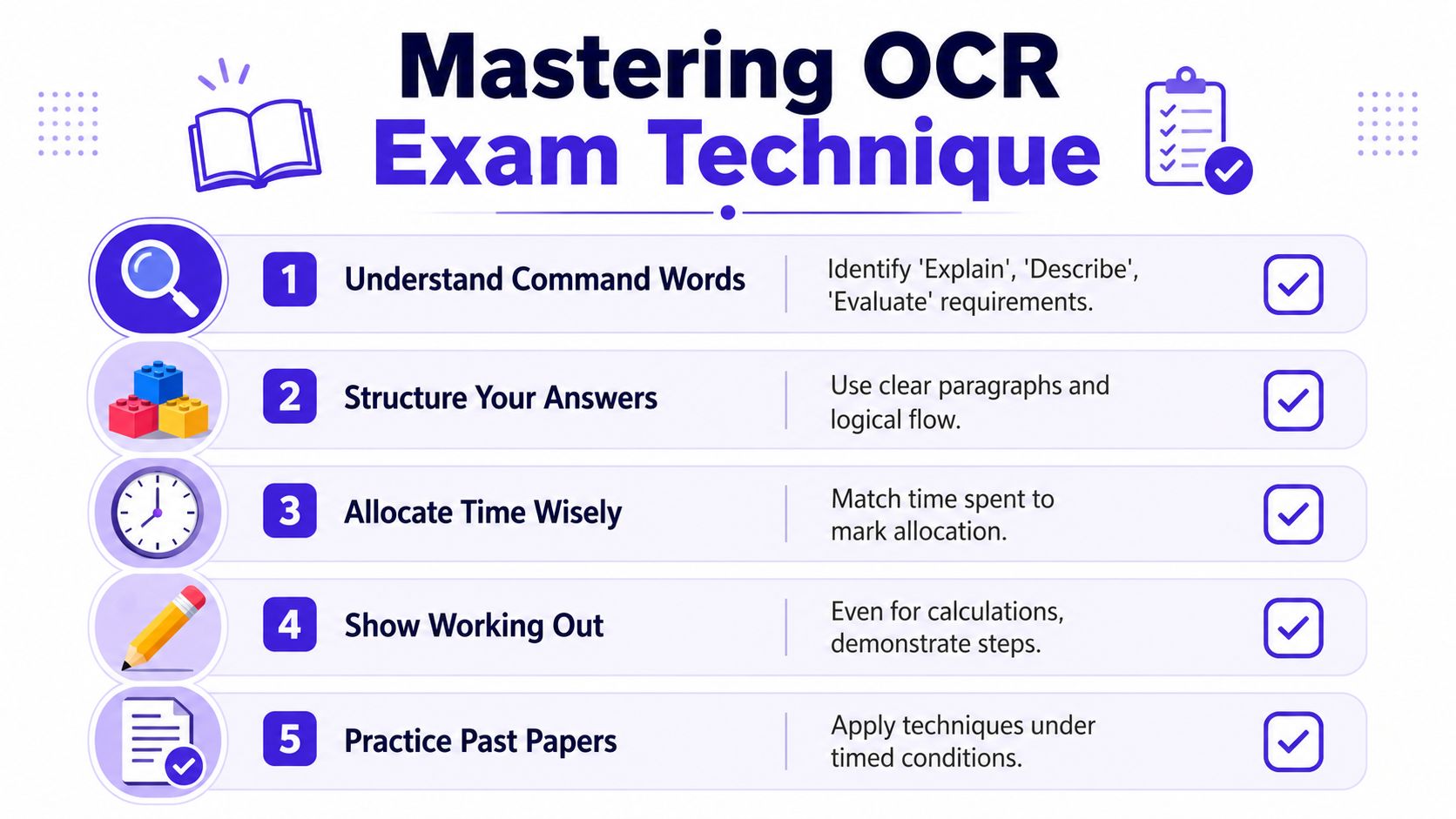
Students throw marks away because they treat all longer answers as “write what you know”. OCR doesn't mark like that.
Here's the practical difference:
| Command word | What OCR wants from you | What students do wrong |
|---|---|---|
| Describe | State what happens or what something is like | They start giving reasons instead of clear facts |
| Explain | Give the reason, mechanism, or chain of cause and effect | They describe only the surface detail |
| Compare | Show similarities and differences | They write about one side only |
| Evaluate | Judge, weigh up, and support a conclusion | They list points with no judgement |
How to answer them properly
Describe
Keep it concrete. Say what happens. Keep it accurate. Don't wander into a long essay.
Example approach:
- state the process
- include the relevant detail
- avoid unnecessary justification
Explain
Build a chain. Use because, therefore, this means, as a result. If there isn't a reason in your sentence, it probably isn't an explanation.
Compare
Use paired structure. Don't write one paragraph on A and one on B with no links. Compare in the sentence itself.
Example:
- both methods do X
- however, method A does Y while method B does Z
Evaluate
This is where stronger students clean up. You need both sides and a decision. Not a fake balanced answer. A real judgement.
Examiner mindset: Marks go to the student who answers the question set, not the student who writes the most.
A trace table method that actually holds up under pressure
Most trace table mistakes are avoidable. Students rush, skip columns, or try to do the whole thing in their head. Don't.
Use this process every time:
Write every variable as a column heading
Include counters, arrays, flags, outputs, anything that changes.Add rows one step at a time
Don't combine operations mentally.Update values immediately after each line runs
Not when you think you've finished the loop.Watch boundaries carefully
Loop starts, loop ends, array positions, condition checks.Record outputs separately
Don't hide printed values inside another column.
A clean layout matters. It prevents small logic slips from spreading through the whole answer.
Where students usually drop marks
- forgetting the initial value before the first iteration
- skipping the row where a condition is checked
- updating the wrong variable
- mixing up array index and array value
- losing track of outputs
That's why timed drills help. A few well-marked trace questions beat an hour of passive algorithm reading.
Quick wins in short-answer technical questions
Some marks should be easy. Students lose them because they panic or don't show enough.
Use these habits:
- Write the working for conversions: especially binary and hexadecimal
- Underline the object of the question: what exactly are you being asked about
- Match time to marks: don't spend ages on a tiny question
- Use the wording of the topic: protocols, registers, RAM, threats, validation, each has specific language
If you want to rehearse this under realistic conditions, Exam Practice for GCSE is one way to work through board-aligned questions by command word and mark value without drifting into random revision.
The difference between a decent answer and a top answer
A decent answer contains knowledge. A top answer contains knowledge in the right shape.
That means:
- exact terminology
- visible reasoning
- clear structure
- enough development for the marks available
Students often think top grades come from knowing obscure content. Usually they come from doing ordinary things with more discipline. Better layout. Better command word control. Better judgement about what the examiner can credit.
How to Build a Revision Timetable That Works
A revision timetable fails when it's fantasy. If you build one around guilt, you won't follow it. If you build one around short, repeatable blocks and clear tasks, you usually will.
The fix is simple. Stop planning subjects. Start planning actions.
Two timetable models that actually help
The first is for students who need a recovery plan fast. The second is for students who want steadier improvement with less panic.
The 6-week rescue mission
This works if you're behind and need structure now.
Your weekly rhythm should look like this:
- two sessions focused on weak content
- two sessions focused on exam questions
- one session for review and reattempts
- one lighter mixed recap slot
Keep sessions short enough that you'll start them. Aim for a realistic pattern, not a dramatic one.
The 3-month mastery plan
This suits students who want stronger retention and sharper technique.
Across the week:
- rotate topics instead of blocking one unit for hours
- revisit old material while learning current material
- build in regular command-word practice
- keep one slot for past paper analysis, not just completion
Mixed-topic practice beats neat-topic revision
Students love tidy revision. Monday is networks. Tuesday is architecture. Wednesday is ethics. It feels organised and often doesn't hold.
Mixed-topic practice is uglier and better. A single session might include a short retrieval task on CPU components, one algorithm question, then a quick binary conversion set. That switching forces your brain to discriminate between topics instead of relying on context clues.
Revising one topic for too long can fool you into thinking you've mastered it. Mixed practice reveals whether you can still perform when the topic changes suddenly.
A sample week you can copy
| Day | Session 1 (45 mins) | Session 2 (45 mins) | Session 3 (20 mins) |
|---|---|---|---|
| Monday | Algorithms retrieval and pseudocode practice | Short exam questions on systems | Flashcards on key terms |
| Tuesday | Data representation problems | Trace table drills | Error log review |
| Wednesday | Networks recall and explain questions | Mixed-topic mini-test | Relearn weakest question |
| Thursday | Cyber security and ethics answers | Programming logic practice | Binary conversions |
| Friday | Past paper section under timed conditions | Self-mark and corrections | Rewrite missed definitions |
| Saturday | Mixed-topic question set | Command word practice | Quick blurt on weak area |
| Sunday | Light review of mistake log | Reattempt old questions | Plan next week |
What to schedule and what to avoid
A good timetable includes the things students usually skip.
Include:
- Retrieval blocks: blurts, speaking, blank-page recall
- Production blocks: questions, tracing, coding, evaluating
- Review blocks: checking mistakes and reattempting
- Light repetition: short recap sessions to stop forgetting
Avoid:
- Massive catch-up sessions: they look heroic and collapse quickly
- Planning by chapter only: too vague
- Filling every evening: exhaustion kills consistency
- Treating weak areas as optional: they need the most repetition
Build an error log into the timetable
This is one of the least glamorous and most effective tricks.
Keep a single running list with entries like:
- confused explain with describe on network question
- forgot to update loop counter in trace table
- weak on sound file size calculation
- evaluation answers have no final judgement
Then schedule that log into your week. Don't leave it as a sad pile of red marks at the back of a notebook.
Teachers and tutors should push this harder
Students improve faster when feedback gets converted into scheduled action. “Revise algorithms” is vague. “On Thursday, reattempt the two trace questions where you lost process marks” is useful.
A timetable should answer three things:
- what exactly am I doing
- how will I know if I improved
- when will I revisit it
If your timetable can't answer those, rewrite it. A revision plan should reduce stress, not decorate it.
The Ultimate Practice Paper and Feedback Loop
Past papers are where OCR Computer Science revision becomes real. They expose whether you can perform, not whether you've convinced yourself you can.
But most students waste them.
They sit a paper, circle a score, feel bad or pleased for a bit, and move on. That leaves the biggest benefit untouched. The primary value comes from the loop after the paper. Data shows that students who systematically work through past papers, annotate each question with mark-scheme language, and re-attempt questions where they lost marks typically see a 1–2 grade boundary improvement over their mock baselines, according to Save My Exams' discussion of Computer Science outcomes.
The student who finally stopped “doing papers” badly
A common pattern goes like this. A student sits an OCR paper and thinks it went alright. Then they mark it and realise something painful. They didn't lose most of their marks because they knew nothing. They lost them because they answered slightly off-task, skipped working, or gave half-formed explanations.
That's the moment things improve.
One student might find that every low-mark algorithm answer had the same issue. They understood the logic but didn't show intermediate steps. Another might realise their evaluation questions were just lists. Another sees they keep missing wording in command-word questions.
Those are fixable problems, but only if you diagnose them properly.

The three-part loop that actually raises marks
1. Practice under exam conditions
Sit the paper properly.
- timed
- no notes
- no pausing every few minutes
- no checking the answer because you're “just learning”
You need a truthful performance, not a comfort-performance.
2. Mark like an examiner, not like your own lawyer
Many students often go soft. They award themselves marks for what they meant. OCR does not mark intentions. It marks what's on the page.
When you self-mark:
- use the mark scheme precisely
- highlight where your wording matched
- circle where the mark scheme demanded more
- note every dropped method mark and process mark
Be ruthless in marking and calm in response. Brutal honesty now is much cheaper than disappointment later.
3. Improve only the weak skill, not the entire subject
This is the part students skip. They get the score and then go back to revising “Computer Science” in general. That's too broad.
Instead, build a correction sheet with three columns:
| Question issue | What actually went wrong | Next action |
|---|---|---|
| Trace table error | Missed variable updates each loop cycle | Do two fresh trace drills with full column layout |
| Explain question weak | Described effect but gave no reason | Practise three “explain how” responses |
| Binary conversion slip | No written working | Redo conversion set and show each step |
| Evaluation answer flat | No final judgement | Rewrite with one clear conclusion sentence |
That's what a useful feedback loop looks like.
Reattempting is where the gain happens
A lot of students are oddly proud of “getting through loads of papers”. It's the wrong target. One paper analysed and reworked properly is worth more than several rushed attempts.
Reattempt the exact questions you got wrong. Then do another question of the same type. Here, patterns break.
If your weakness is algorithm design, train algorithm design. If your weakness is command words, train command words. If your weakness is trace table layout, repeat the layout until it becomes automatic.
For students who want OCR-specific drilling by topic and question type, GCSE Past Papers can be useful because it breaks questions down rather than forcing you to sit a full paper every time.
A better way to review every paper
After each practice paper, answer these five questions:
- Which topic lost me the most marks?
- Which command word caused problems?
- Which mistakes were knowledge gaps?
- Which mistakes were technique gaps?
- What exact question type am I doing next?
That turns a paper from a judgement into a tool.
The hidden difference between improving students and stuck students
Improving students treat errors as categories. Stuck students treat errors as bad luck.
An improving student says:
- I keep dropping marks on explain questions because I don't link cause and effect
- I lose process marks in trace tables because my layout is messy
- I rush short calculations and don't show steps
A stuck student says:
- I'm just bad at papers
- OCR asks weird questions
- I knew it really, I just didn't write it
That second mindset goes nowhere.
Teachers can use the same loop without adding chaos
This method isn't just for independent revision. It works well in class and intervention too. Teachers can get stronger outcomes by grouping mistakes by type instead of reteaching an entire topic every time. One set of students may need command-word repair. Another may need process-mark discipline. Another may need precise vocabulary.
That's more efficient and more honest. Most weak papers aren't weak in one single way. They contain a mix of content gaps and exam-delivery gaps. The loop separates them.
If you want one sentence to remember, keep this one: practice reveals, marking diagnoses, reattempting improves.
Your Final Checklist From Revision to Results
The students who do best in OCR Computer Science usually aren't the ones who revised in the prettiest way. They're the ones who trained for the paper they were going to sit.
Keep your final checklist simple.
The three rules that matter most
- Revise actively: retrieve, trace, calculate, explain, write
- Train exam technique: command words, layout, process marks, timing
- Use feedback properly: every mistake should create a next action
That same mindset matters for coursework too. A 2023 Ofqual report highlighted inconsistent student preparation for the NEA, suggesting a need for more structured frameworks that help students manage project stages effectively, as discussed in the Dixons revision guide referencing that issue. Treat the NEA like a planned build, not a last-minute side task.
Don't let admin errors sabotage good work
Keep your notes and draft materials organised. Clean files, clear naming, and readable annotations save stress later. If you're refining project documents or feedback sheets on a laptop, a tool that helps you edit PDFs easily on Mac can make that tidying process much less annoying.
The final jump in grade usually comes from doing ordinary things with consistency, not from finding a secret shortcut.
Walk into the exam knowing exactly how you revise, exactly how you answer, and exactly how you fix mistakes. That's what confidence is. Not wishful thinking. Preparation that's been tested.
If you want a structured way to practise OCR-style Computer Science questions, check weak topics, and get examiner-style feedback while you revise, take a look at MasteryMind.
Ready to master this topic?
Practise with quizzes, blurt exercises and exam questions on MasteryMind.
7 days Premium · Then free forever · No card, no charge