OCR · GCSE · Computer Science
Course version: J277 · Version from Sept 2022
How to use sub programs (functions and procedures) to produce structured…
Full specification wording
Additional programming techniques: How to use sub programs (functions and procedures) to produce structured code
Sub programs break a program into named, self-contained blocks that can be called whenever needed.
Checked against the OCR J277 specification on .
- Point 6 of 7
- 4 key terms
Study notes
From the checked teaching notes for this specification point.
The idea
Sub programs break a program into named, self-contained blocks that can be called whenever needed. A procedure performs an action and may display or update data without returning a value; a function performs a calculation and returns a value to the caller. Parameters pass data in, and arguments are the actual values supplied. Using sub programs produces structured code: each block has one clear job, so programs are easier to read, test, debug and reuse. For example, a function areaCircle(radius) can return 3.142 × radius², while a procedure displayMenu() can print options. Calling these blocks avoids duplicating code and lets one change fix every use.
What earns the marks
- Defines a sub program as a named block of code that is defined once and called by name when required.
- Distinguishes a procedure, which carries out a task and need not return a value, from a function, which returns a value to the point of call.
- Explains that parameters are placeholders in the definition and arguments are the actual values passed when the sub program is called.
- Describes how sub programs produce structured code by separating concerns, reducing duplication and making programs easier to read, test, debug and maintain.
- Applies the idea to a concrete example, such as a function that returns the area of a circle from a radius parameter or a procedure that outputs a menu.
- Explains how data flows into and out of a sub program, including local variables and the returned value of a function.
Common mistakes and how to put them right
Saying a procedure always returns a value.
Put it right by stating that a procedure performs a task, whereas a function returns a value.
Confusing parameters with arguments.
Put it right by saying parameters appear in the definition and arguments are the values supplied at the call.
Writing one long program with repeated code instead of extracting reusable blocks.
Put it right by identifying repeated tasks and moving each into its own sub program.
Exam tips
- When asked to compare functions and procedures, state the return-value difference and give one short example of each.
- When writing code, define each sub program with a meaningful name and show clearly how it is called, including any arguments.
- When explaining structured code, link sub programs to at least two benefits such as reduced duplication and easier debugging.
Try the lesson
The start of the Additional programming techniques: How to use sub programs (functions and procedures) to produce structured code lesson, made from checked teaching notes for this specification point.
Have a go first
Which term describes a named block of code that performs a task and can be called from other parts of a program?
Listen
Sub programs break a program into named, self-contained blocks that can be called whenever needed. A procedure performs an action and may display or update data without returning a value; a function performs a calculation and returns a value to the caller. Parameters pass data in, and arguments are the actual values supplied. Using sub programs produces structured code: each block has one clear job, so programs are easier to read, test, debug and reuse. For example, a function areaCircle(radius) can return 3.142 × radius², while a procedure displayMenu() can print options. Calling these blocks avoids duplicating code and lets one change fix every use. A strong answer earns marks for these points. Defines a sub program as a named block of code that is defined once and called by name when required. Distinguishes a procedure, which carries out a task and need not return a value, from a function, which returns a value to the point of call. Explains that parameters are placeholders in the definition and arguments are the actual values passed when the sub program is called. Describes how sub programs produce structured code by separating concerns, reducing duplication and making programs easier to read, test, debug and maintain. A common slip: Saying a procedure always returns a value. Instead, stating that a procedure performs a task, whereas a function returns a value. Exam tip: When asked to compare functions and procedures, state the return-value difference and give one short example of each.
See it

Key words
Say what each word means before you turn the card.
Structured programming
Try answering aloud or in your head before turning the card.
Code reuse
Try answering aloud or in your head before turning the card.
Parameters and arguments
Try answering aloud or in your head before turning the card.
Functions versus procedures
Try answering aloud or in your head before turning the card.
See every definition
- Structured programming
- Breaking a program into named, self-contained blocks, each with one clear job, so programs are easier to read, test, debug and reuse.
- Code reuse
- Calling the same named block whenever needed, which avoids duplicating code and lets one change fix every use.
- Parameters and arguments
- Parameters are placeholders in the definition, while arguments are the actual values supplied when the sub program is called.
- Functions versus procedures
- A procedure performs an action and may display or update data without returning a value, whereas a function performs a calculation and returns a value to the caller.
Label the diagram
Some boxes have lost their names. Pick the right name for each number.
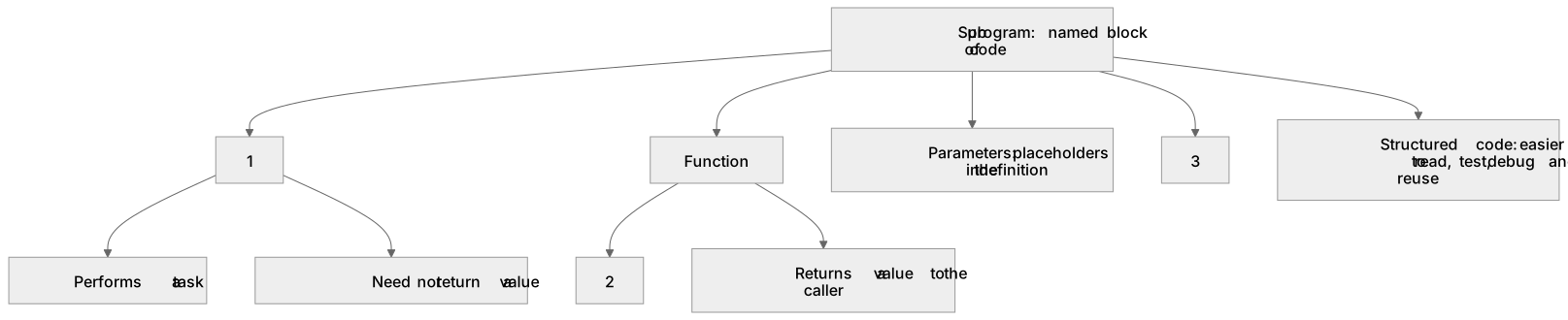
1Box 1
2Box 2
3Box 3
There is more to this lesson
The full lesson goes on to check your understanding and help you earn the marks. Create a free account to carry on, with your progress saved.
A week of Premium from your first lesson · Then the free plan continues · No card, no charge
Test your understanding of Additional programming techniques: How to use sub programs (functions and procedures) to produce structured code
Active recall beats re-reading. Take an instant quiz now to test what you’ve learned and lock it into long-term memory.
A week of Premium from your first lesson · Then the free plan continues · No card, no charge