OCR · GCSE · Computer Science
Course version: J277 · Version from Sept 2022
Additional programming techniques: The use of SQL to search for data
SQL (Structured Query Language) searches relational databases.
Checked against the OCR J277 specification on .
- Point 4 of 7
- 4 key terms
Study notes
From the checked teaching notes for this specification point.
The idea
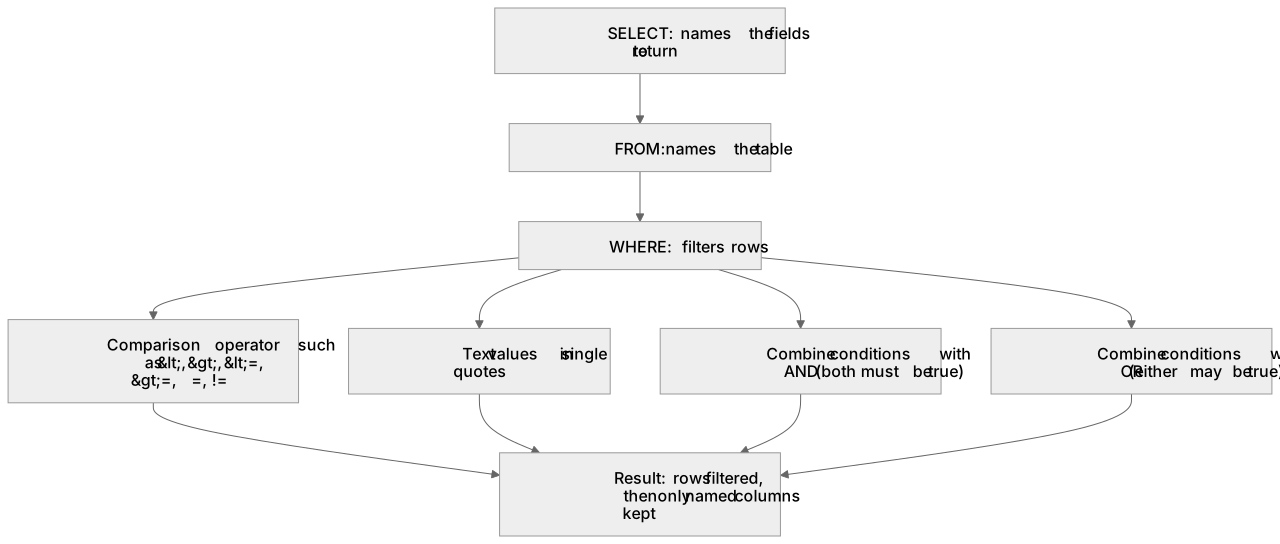
SQL (Structured Query Language) searches relational databases. OCR J277 requires the commands SELECT, FROM and WHERE. SELECT names the fields to return, FROM names the table, and WHERE filters rows. For example, `SELECT Name FROM Stock WHERE Price < 10` returns the Name value only for records whose Price is below 10. Text values are enclosed in single quotes, for example `WHERE Town = 'Norwich'`. Conditions may be combined with AND when both must be true or OR when either may be true. Candidates must interpret given queries, predict their exact output, and write syntactically correct statements in the order SELECT, FROM, WHERE.
What earns the marks
- Identifies SELECT as choosing which columns appear in the result, and uses * only when every column is wanted.
- Uses FROM to name the correct table, copying table and column names exactly as given in the question.
- Applies WHERE with a correct comparison operator (such as <, >, <=, >=, =, !=) to filter rows, enclosing text values in single quotes.
- Combines two or more conditions with AND or OR, showing correct logic where multiple criteria are required.
- Predicts the exact output of a given query by filtering rows with WHERE first, then keeping only the columns named in SELECT.
- Writes a complete statement in the order SELECT ... FROM ... WHERE, with clauses in the correct sequence.
Common mistakes and how to put them right
Writing SELECT * when the question asks for specific columns.
Put it right: The error is returning unwanted data, so the correction is to list only the named columns after SELECT.
Omitting quotes around text values, for example WHERE Town = 'Norwich' written without quotes.
Put it right: The error is that the database treats the word as a column name, so the correction is to include single quotes.
Confusing AND with OR in a filter.
Put it right: The error is returning too few or too many rows, so the correction is to test each condition separately and choose AND only when both must be true.
Putting WHERE before FROM or SELECT.
Put it right: The error is a syntax error, so the correction is to write the clauses in the order SELECT, FROM, WHERE.
Using a programming-language equality operator in a WHERE clause.
Put it right: Use the SQL comparison operator shown in the specification or question.
Exam tips
- Underline the table, the wanted columns and every condition in the question before writing anything, then map each underlined part to a clause.
- When asked for the output of a query, trace the rows through the WHERE filter first, then keep only the columns specified in the SELECT clause.
- As OCR J277 is an untiered exam, all candidates must be prepared to write full SQL statements from scratch, ensuring exact syntax for SELECT, FROM and WHERE clauses.
Try the lesson
The start of the Additional programming techniques: The use of SQL to search for data lesson, made from checked teaching notes for this specification point.
Have a go first
Which SQL keyword is used to choose the columns that should be returned from a table?
Listen
SQL (Structured Query Language) searches relational databases. OCR J277 requires the commands SELECT, FROM and WHERE. SELECT names the fields to return, FROM names the table, and WHERE filters rows. For example, SELECT Name FROM Stock WHERE Price < 10 returns the Name value only for records whose Price is below 10. Text values are enclosed in single quotes, for example WHERE Town = 'Norwich'. Conditions may be combined with AND when both must be true or OR when either may be true. Candidates must interpret given queries, predict their exact output, and write syntactically correct statements in the order SELECT, FROM, WHERE. A strong answer earns marks for these points. Identifies SELECT as choosing which columns appear in the result, and uses * only when every column is wanted. Uses FROM to name the correct table, copying table and column names exactly as given in the question. Applies WHERE with a correct comparison operator (such as , =, =, !=) to filter rows, enclosing text values in single quotes. Combines two or more conditions with AND or OR, showing correct logic where multiple criteria are required. A common slip: Using a programming-language equality operator in a WHERE clause. Instead, use the SQL comparison operator shown in the specification or question. Exam tip: Underline the table, the wanted columns and every condition in the question before writing anything, then map each underlined part to a clause.
See it
Key words
Say what each word means before you turn the card.
SELECT
Try answering aloud or in your head before turning the card.
FROM
Try answering aloud or in your head before turning the card.
WHERE
Try answering aloud or in your head before turning the card.
AND
Try answering aloud or in your head before turning the card.
See every definition
- SELECT
- Names the fields to return, and uses * only when every column is wanted.
- FROM
- Names the table, copying table and column names exactly as given in the question.
- WHERE
- Filters rows using a correct comparison operator, enclosing text values in single quotes.
- AND
- Combines conditions when both must be true, while OR is used when either may be true.
Label the diagram
Some boxes have lost their names. Pick the right name for each number.
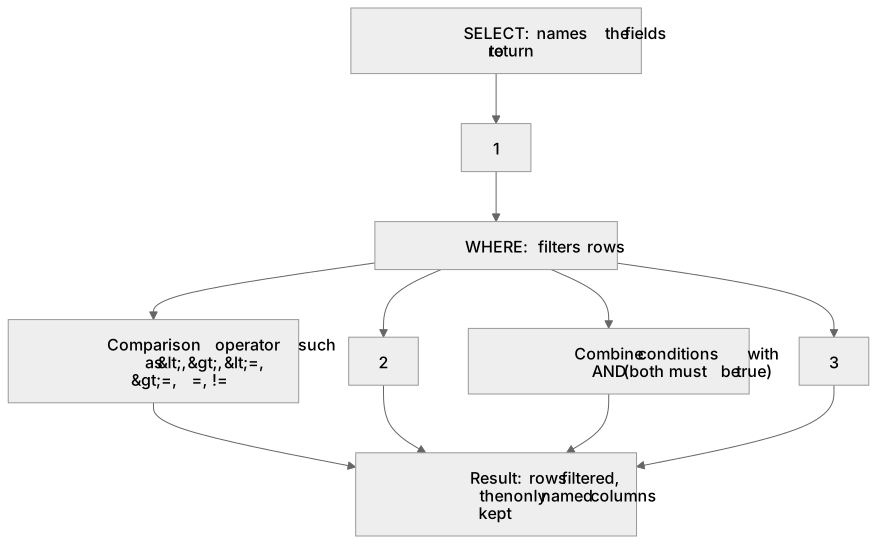
1Box 1
2Box 2
3Box 3
There is more to this lesson
The full lesson goes on to check your understanding and help you earn the marks. Create a free account to carry on, with your progress saved.
A week of Premium from your first lesson · Then the free plan continues · No card, no charge
Test your understanding of Additional programming techniques: The use of SQL to search for data
Active recall beats re-reading. Take an instant quiz now to test what you’ve learned and lock it into long-term memory.
A week of Premium from your first lesson · Then the free plan continues · No card, no charge