OCR · GCSE · Computer Science
Course version: J277 · Version from Sept 2022
How to convert positive denary whole numbers to binary numbers (up to and…
Full specification wording
Data storage: How to convert positive denary whole numbers to binary numbers (up to and including 8 bits) and vice versa
Denary is base 10, using digits 0–9.
Checked against the OCR J277 specification on .
- Point 1 of 13
- 3 key terms
Study notes
From the checked teaching notes for this specification point.
The idea
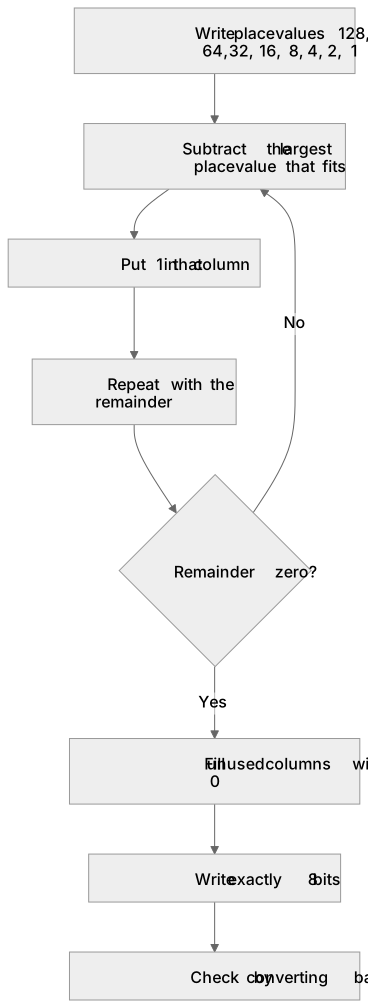
Denary is base 10, using digits 0–9. Binary is base 2, using only 0 and 1. An 8-bit binary number uses place values 128, 64, 32, 16, 8, 4, 2 and 1. To convert denary to binary, subtract the largest place value that fits, put 1 in that column, and repeat with the remainder until zero, filling unused columns with 0. For example, 157 = 128 + 16 + 8 + 4 + 1, so 157 in 8-bit binary is 10011101. To convert binary to denary, add the place values where the bit is 1. For example, 00101101 = 32 + 8 + 4 + 1 = 45. Always write exactly 8 bits when the question asks for 8-bit binary.
What earns the marks
- Identify the place values for 8-bit binary: 128, 64, 32, 16, 8, 4, 2, 1.
- Convert denary to binary by repeatedly subtracting the largest possible place value and recording 1s and 0s.
- Convert binary to denary by adding the place values of all bits that are 1.
- Produce an 8-bit result, including leading zeros where necessary, for example 45 as 00101101.
- Check the result by converting back to the original number or by ensuring the sum of place values equals the denary value.
Common mistakes and how to put them right
Writing fewer than 8 bits when 8-bit binary is requested.
Put it right: Pad with leading zeros on the left until there are exactly 8 bits.
Using the wrong place values, such as starting at 1 instead of 128.
Put it right: Write the place values 128 to 1 above the columns before converting.
Adding all place values instead of only those with a 1.
Put it right: For binary to denary, sum only the columns containing 1.
Exam tips
- Write the place values 128, 64, 32, 16, 8, 4, 2, 1 above your working to avoid column errors.
- For denary to binary, work left to right, placing 1 where the place value fits and 0 where it does not.
- Check your answer by converting back; the sum of the place values with 1s must equal the original denary number.
Try the lesson
The start of the Data storage: How to convert positive denary whole numbers to binary numbers (up to and including 8 bits) and vice versa lesson, made from checked teaching notes for this specification point.
Have a go first
What is the denary value of the 8-bit binary number 00000101?
Listen
Denary is base 10, using digits 0–9. Binary is base 2, using only 0 and 1. An 8-bit binary number uses place values 128, 64, 32, 16, 8, 4, 2 and 1. To convert denary to binary, subtract the largest place value that fits, put 1 in that column, and repeat with the remainder until zero, filling unused columns with 0. For example, 157 = 128 + 16 + 8 + 4 + 1, so 157 in 8-bit binary is 10011101. To convert binary to denary, add the place values where the bit is 1. For example, 00101101 = 32 + 8 + 4 + 1 = 45. Always write exactly 8 bits when the question asks for 8-bit binary. A strong answer earns marks for these points. Identify the place values for 8-bit binary: 128, 64, 32, 16, 8, 4, 2, 1. Convert denary to binary by repeatedly subtracting the largest possible place value and recording 1s and 0s. Convert binary to denary by adding the place values of all bits that are 1. Produce an 8-bit result, including leading zeros where necessary, for example 45 as 00101101. A common slip: Writing fewer than 8 bits when 8-bit binary is requested. Instead, pad with leading zeros on the left until there are exactly 8 bits. Exam tip: Write the place values 128, 64, 32, 16, 8, 4, 2, 1 above your working to avoid column errors.
See it
Key words
Say what each word means before you turn the card.
Number bases
Try answering aloud or in your head before turning the card.
Binary place value
Try answering aloud or in your head before turning the card.
8-bit representation
Try answering aloud or in your head before turning the card.
See every definition
- Number bases
- Denary is base 10, using digits 0–9, while binary is base 2, using only 0 and 1.
- Binary place value
- An 8-bit binary number uses place values 128, 64, 32, 16, 8, 4, 2 and 1.
- 8-bit representation
- Always write exactly 8 bits when the question asks for 8-bit binary, including leading zeros where necessary.
There is more to this lesson
The full lesson goes on to check your understanding and help you earn the marks. Create a free account to carry on, with your progress saved.
A week of Premium from your first lesson · Then the free plan continues · No card, no charge
Test your understanding of Data storage: How to convert positive denary whole numbers to binary numbers (up to and including 8 bits) and vice versa
Active recall beats re-reading. Take an instant quiz now to test what you’ve learned and lock it into long-term memory.
A week of Premium from your first lesson · Then the free plan continues · No card, no charge