OCR · GCSE · Computer Science
Course version: J277 · Version from Sept 2022
The effect of colour depth and resolution on The quality of the image The…
Full specification wording
Data storage: The effect of colour depth and resolution on The quality of the image The size of an image file
In a bitmap image, resolution is the number of pixels, often expressed as width × height.
Checked against the OCR J277 specification on .
- Point 11 of 13
- 4 key terms
Study notes
From the checked teaching notes for this specification point.
The idea
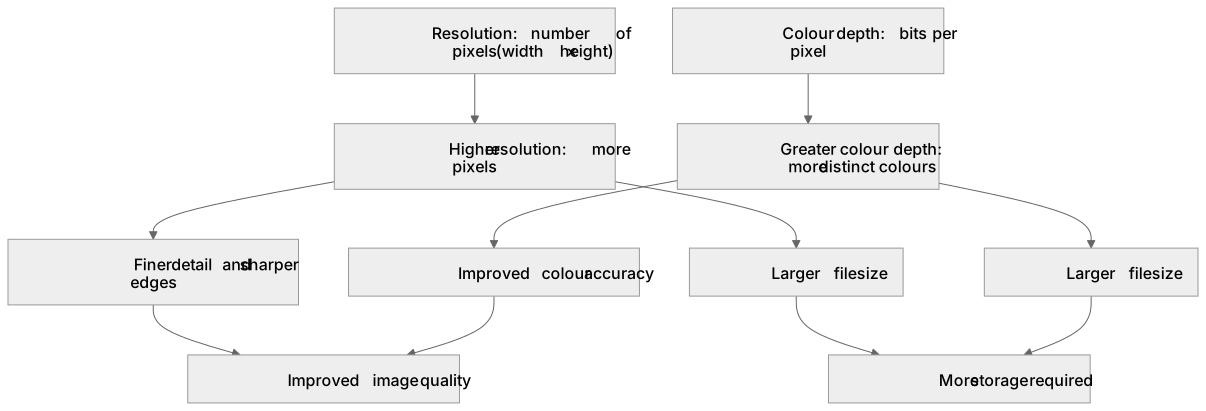
In a bitmap image, resolution is the number of pixels, often expressed as width × height. Colour depth is the number of bits used to represent each pixel's colour. Increasing resolution adds more pixels, allowing finer detail, but increases file size. Increasing colour depth allows more distinct colours, improving colour accuracy, but also increases file size as each pixel needs more bits. Uncompressed file size in bits is calculated as width × height × colour depth. For example, a 1000 × 800 image at 24-bit colour depth has 19,200,000 bits. Dividing by 8 gives 2,400,000 bytes, which is 2.4 MB (using base-10 conversions: 1000 bytes = 1 kB, 1000 kB = 1 MB). Higher resolution or colour depth improves quality but requires more storage.
What earns the marks
- States that resolution is the number of pixels in an image, often given as width × height, and that higher resolution means more pixels.
- Explains that increasing resolution improves image quality by allowing finer detail and sharper edges, but increases file size because more pixels are stored.
- States that colour depth is the number of bits used per pixel and that a greater colour depth allows more distinct colours.
- Explains that increasing colour depth can improve colour accuracy and reduce banding, but increases file size because each pixel requires more bits.
- Uses the relationship file size in bits = width × height × colour depth to calculate or compare image file sizes.
- Explains that file size also depends on compression and metadata, so the calculated value is an estimate of uncompressed size.
- Compares the relative effects of changing resolution versus changing colour depth on quality and file size.
Common mistakes and how to put them right
Confusing resolution with colour depth.
Put it right: Resolution is the number of pixels, while colour depth is the number of bits per pixel.
Thinking that increasing colour depth always makes an image look sharper.
Put it right: Colour depth affects the number of colours and colour accuracy, while resolution affects detail and sharpness.
Forgetting to convert between bits, bytes, and larger units correctly.
Put it right: Divide by 8 to convert bits to bytes, then by 1000 for kB, and 1000 again for MB, as OCR uses base-10.
Assuming file size is exactly width × height × colour depth in all cases.
Put it right: This gives uncompressed size; compression and metadata can change the actual file size.
Exam tips
- Write the formula clearly: file size in bits = width × height × colour depth, then convert to bytes or larger units if required.
- When comparing, state which factor changes and how it affects both quality and file size, for example doubling colour depth doubles the uncompressed file size.
- Use correct units and show your working, especially when converting bits to bytes, kB, or MB using base-10 (1000).
- Link quality to the specific factor: resolution affects detail and sharpness, while colour depth affects the range and accuracy of colours.
Try the lesson
The start of the Data storage: The effect of colour depth and resolution on The quality of the image The size of an image file lesson, made from checked teaching notes for this specification point.
Have a go first
What is meant by the resolution of a bitmap image?
Listen
In a bitmap image, resolution is the number of pixels, often expressed as width × height. Colour depth is the number of bits used to represent each pixel's colour. Increasing resolution adds more pixels, allowing finer detail, but increases file size. Increasing colour depth allows more distinct colours, improving colour accuracy, but also increases file size as each pixel needs more bits. Uncompressed file size in bits is calculated as width × height × colour depth. For example, a 1000 × 800 image at 24-bit colour depth has 19,200,000 bits. Dividing by 8 gives 2,400,000 bytes, which is 2.4 MB (using base-10 conversions: 1000 bytes = 1 kB, 1000 kB = 1 MB). Higher resolution or colour depth improves quality but requires more storage. A strong answer earns marks for these points. States that resolution is the number of pixels in an image, often given as width × height, and that higher resolution means more pixels. Explains that increasing resolution improves image quality by allowing finer detail and sharper edges, but increases file size because more pixels are stored. States that colour depth is the number of bits used per pixel and that a greater colour depth allows more distinct colours. Explains that increasing colour depth can improve colour accuracy and reduce banding, but increases file size because each pixel requires more bits. A common slip: Confusing resolution with colour depth. Instead, resolution is the number of pixels, while colour depth is the number of bits per pixel. Exam tip: Write the formula clearly: file size in bits = width × height × colour depth, then convert to bytes or larger units if required.
See it
Key words
Say what each word means before you turn the card.
Resolution
Try answering aloud or in your head before turning the card.
Colour depth
Try answering aloud or in your head before turning the card.
File size calculation
Try answering aloud or in your head before turning the card.
Image quality
Try answering aloud or in your head before turning the card.
See every definition
- Resolution
- The number of pixels in an image, often expressed as width × height; higher resolution means more pixels and allows finer detail.
- Colour depth
- The number of bits used to represent each pixel's colour; a greater colour depth allows more distinct colours and improves colour accuracy.
- File size calculation
- Uncompressed file size in bits is calculated as width × height × colour depth, then divided by 8 for bytes and by 1000 for kB and MB.
- Image quality
- Improved by higher resolution, which allows finer detail, or greater colour depth, which improves colour accuracy, but each increases file size.
There is more to this lesson
The full lesson goes on to check your understanding and help you earn the marks. Create a free account to carry on, with your progress saved.
A week of Premium from your first lesson · Then the free plan continues · No card, no charge
Test your understanding of Data storage: The effect of colour depth and resolution on The quality of the image The size of an image file
Active recall beats re-reading. Take an instant quiz now to test what you’ve learned and lock it into long-term memory.
A week of Premium from your first lesson · Then the free plan continues · No card, no charge