OCR · GCSE · Computer Science
Course version: J277 · Version from Sept 2022
The purpose and functionality of operating systems User interface Memory…
Full specification wording
Operating systems: The purpose and functionality of operating systems User interface Memory management and multitasking Peripheral management and drivers User management File management
An operating system (OS) is system software that manages hardware and provides services so application software and users can work with the computer.
Checked against the OCR J277 specification on .
- 4 key terms
Study notes
From the checked teaching notes for this specification point.
The idea
An operating system (OS) is system software that manages hardware and provides services so application software and users can work with the computer. The user interface lets a person interact with the system, commonly through a graphical user interface (GUI) or command line. Memory management allocates RAM to programs, keeps track of free and used areas, and enables multitasking by rapidly switching between processes. Peripheral management uses device drivers to translate OS commands into signals hardware understands, and handles input and output. User management creates accounts, sets permissions and manages passwords. File management organises files in folders, handles naming, moving, copying, deleting and access rights.
For example: An OS can run a music player while a word processor is open, save a document to a folder and send it to a printer.
What earns the marks
- The OS manages hardware and provides an environment in which application software can run.
- The user interface allows interaction with the computer, for example a GUI with windows and icons or a command-line interface using typed commands.
- Memory management allocates RAM to open programs, tracks free memory and prevents programs overwriting each other.
- Multitasking allows several processes to appear to run at once by sharing processor time, often through rapid switching.
- Peripheral management controls input and output devices, and device drivers translate OS instructions into signals the hardware can use.
- User management creates and removes accounts, sets access levels and permissions, and supports authentication such as passwords.
- File management creates, names, stores, moves, copies and deletes files and folders, and controls who can access them.
Common mistakes and how to put them right
Saying the OS runs application software.
Put it right: The OS provides services and manages resources, while application software performs user tasks.
Confusing RAM with storage.
Put it right: Memory management deals with volatile RAM, whereas file management deals with persistent secondary storage.
Thinking a driver is the same as a peripheral.
Put it right: A driver is software that enables the OS to communicate with the hardware device.
Exam tips
- Match each OS function to a concrete example, such as a driver allowing a printer to print a document.
- Use correct terminology: process, RAM allocation, permissions, driver and interface.
- For scenario questions, identify the OS function involved and explain the benefit to the user or system.
Try the lesson
The start of the Operating systems: The purpose and functionality of operating systems User interface Memory management and multitasking Peripheral management and drivers User management File management lesson, made from checked teaching notes for this specification point.
Have a go first
Which of these is a function of an operating system?
Listen
An operating system (OS) is system software that manages hardware and provides services so application software and users can work with the computer. The user interface lets a person interact with the system, commonly through a graphical user interface (GUI) or command line. Memory management allocates RAM to programs, keeps track of free and used areas, and enables multitasking by rapidly switching between processes. Peripheral management uses device drivers to translate OS commands into signals hardware understands, and handles input and output. User management creates accounts, sets permissions and manages passwords. File management organises files in folders, handles naming, moving, copying, deleting and access rights. For example, an OS can run a music player while a word processor is open, save a document to a folder and send it to a printer. A strong answer earns marks for these points. The OS manages hardware and provides an environment in which application software can run. The user interface allows interaction with the computer, for example a GUI with windows and icons or a command-line interface using typed commands. Memory management allocates RAM to open programs, tracks free memory and prevents programs overwriting each other. Multitasking allows several processes to appear to run at once by sharing processor time, often through rapid switching. Exam tip: Match each OS function to a concrete example, such as a driver allowing a printer to print a document.
See it

Key words
Say what each word means before you turn the card.
User interface
Try answering aloud or in your head before turning the card.
Memory management
Try answering aloud or in your head before turning the card.
Multitasking
Try answering aloud or in your head before turning the card.
Peripheral management
Try answering aloud or in your head before turning the card.
See every definition
- User interface
- The part of the system that lets a person interact with the computer, commonly through a graphical user interface or command line.
- Memory management
- Allocates RAM to programs, keeps track of free and used areas, and prevents programs overwriting each other.
- Multitasking
- Allows several processes to appear to run at once by sharing processor time, often through rapid switching.
- Peripheral management
- Uses device drivers to translate OS commands into signals hardware understands, and handles input and output.
Label the diagram
Some boxes have lost their names. Pick the right name for each number.
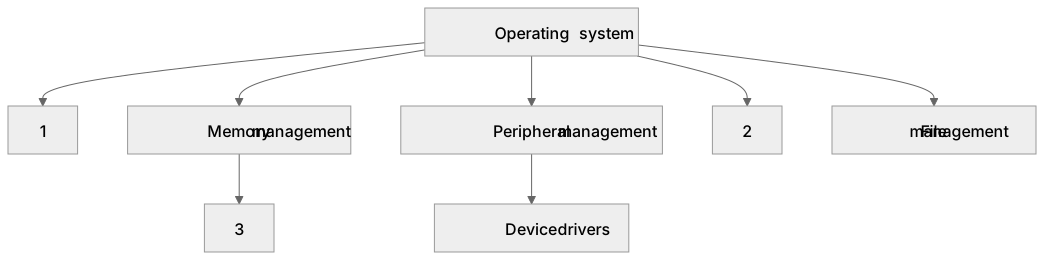
1Box 1
2Box 2
3Box 3
There is more to this lesson
The full lesson goes on to check your understanding and help you earn the marks. Create a free account to carry on, with your progress saved.
A week of Premium from your first lesson · Then the free plan continues · No card, no charge
Test your understanding of Operating systems: The purpose and functionality of operating systems User interface Memory management and multitasking Peripheral management and drivers User management File management
Active recall beats re-reading. Take an instant quiz now to test what you’ve learned and lock it into long-term memory.
A week of Premium from your first lesson · Then the free plan continues · No card, no charge