OCR · GCSE · Computer Science
Course version: J277 · Version from Sept 2022
Secondary storage: The need for secondary storage
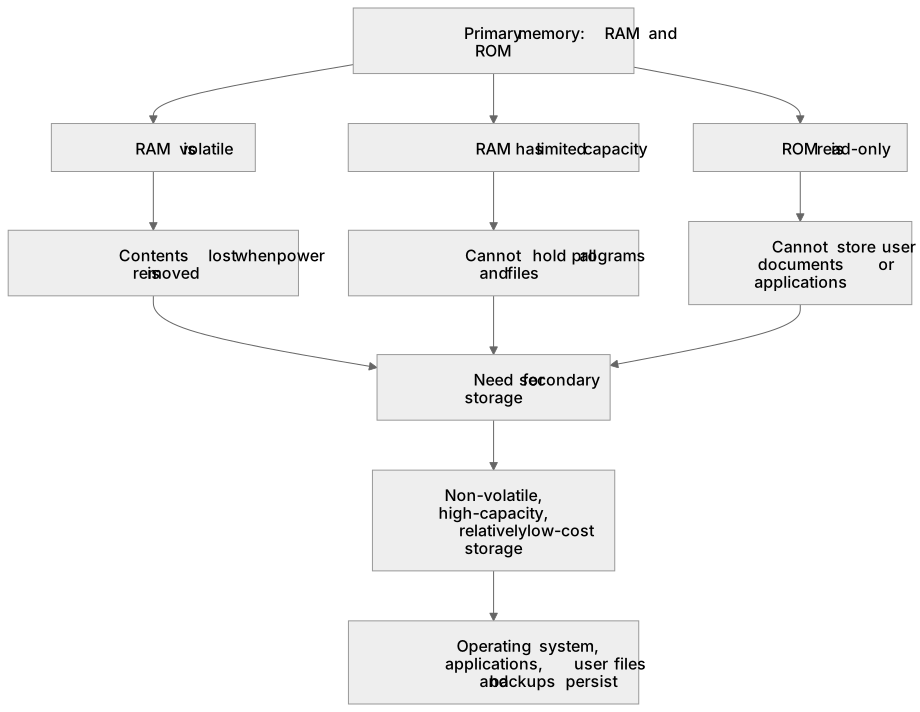
Secondary storage is needed because primary memory (RAM and ROM) is limited in capacity, is volatile in the case of RAM, and is directly addressable by the CPU only while power is maintained.
Checked against the OCR J277 specification on .
- Point 1 of 4
- 2 key terms
Study notes
From the checked teaching notes for this specification point.
The idea
Secondary storage is needed because primary memory (RAM and ROM) is limited in capacity, is volatile in the case of RAM, and is directly addressable by the CPU only while power is maintained. RAM holds currently running programs and data but loses its contents when power is removed, so it cannot preserve files, documents, operating systems or saved games between sessions. ROM is non-volatile but is read-only and too small for user files. Secondary storage provides non-volatile, high-capacity, relatively low-cost storage for programs and data that must persist. For example, a school laptop needs an SSD or HDD to store the operating system, applications and student work when switched off; without it, all work would be lost. Secondary storage also allows data to be transferred between systems and backs up important files.
What earns the marks
- Primary memory such as RAM is volatile, so its contents are lost when power is removed; secondary storage is non-volatile and retains data without power.
- RAM has a limited capacity compared with secondary storage, so it cannot hold all programs and files that a user needs to keep.
- ROM is non-volatile but read-only and stores only the bootstrap/firmware, so it cannot store user documents or applications.
- Secondary storage provides high-capacity, long-term storage for the operating system, applications, user files and backups.
- Secondary storage allows data and programs to be transferred between different computer systems.
- Secondary storage is generally cheaper per gigabyte than RAM, making it suitable for storing large volumes of data.
Common mistakes and how to put them right
Stating that RAM is non-volatile.
Put it right: RAM is volatile and loses its contents when power is removed; secondary storage is non-volatile.
Claiming that ROM can store user files because it is non-volatile.
Put it right: ROM is read-only and typically stores only the bootstrap loader/firmware, not user data.
Saying secondary storage is needed because the CPU cannot access RAM directly.
Put it right: The CPU can access RAM directly; secondary storage is needed for non-volatile, high-capacity storage.
Confusing secondary storage with primary memory.
Put it right: Primary memory is directly accessible by the CPU and includes RAM and ROM; secondary storage is not directly executed from and includes HDDs, SSDs and optical media.
Exam tips
- Link each reason for secondary storage to a specific limitation of RAM or ROM, such as volatility, capacity or read-only nature.
- Use the term non-volatile accurately and contrast it with volatile in the same answer.
- Give a concrete example, such as saving a document before shutting down a computer, to show why persistence matters.
- Avoid listing storage devices when the question asks why secondary storage is needed; focus on the need, not the types.
Try the lesson
The start of the Secondary storage: The need for secondary storage lesson, made from checked teaching notes for this specification point.
Have a go first
Why does a computer system need secondary storage?
Listen
Secondary storage is needed because primary memory (RAM and ROM) is limited in capacity, is volatile in the case of RAM, and is directly addressable by the CPU only while power is maintained. RAM holds currently running programs and data but loses its contents when power is removed, so it cannot preserve files, documents, operating systems or saved games between sessions. ROM is non-volatile but is read-only and too small for user files. Secondary storage provides non-volatile, high-capacity, relatively low-cost storage for programs and data that must persist. For example, a school laptop needs an SSD or HDD to store the operating system, applications and student work when switched off; without it, all work would be lost. Secondary storage also allows data to be transferred between systems and backs up important files. A strong answer earns marks for these points. Primary memory such as RAM is volatile, so its contents are lost when power is removed; secondary storage is non-volatile and retains data without power. RAM has a limited capacity compared with secondary storage, so it cannot hold all programs and files that a user needs to keep. ROM is non-volatile but read-only and stores only the bootstrap/firmware, so it cannot store user documents or applications. Secondary storage provides high-capacity, long-term storage for the operating system, applications, user files and backups. A common slip: stating that RAM is non-volatile. Instead, RAM is volatile and loses its contents when power is removed; secondary storage is non-volatile. Exam tip: Link each reason for secondary storage to a specific limitation of RAM or ROM, such as volatility, capacity or read-only nature.
See it
Key words
Say what each word means before you turn the card.
Volatility and data persistence
Try answering aloud or in your head before turning the card.
Data transfer and backup between systems
Try answering aloud or in your head before turning the card.
See every definition
- Volatility and data persistence
- RAM is volatile and loses its contents when power is removed, so secondary storage is needed to provide non-volatile storage for data that must persist.
- Data transfer and backup between systems
- Secondary storage allows data and programs to be transferred between different computer systems and backs up important files.
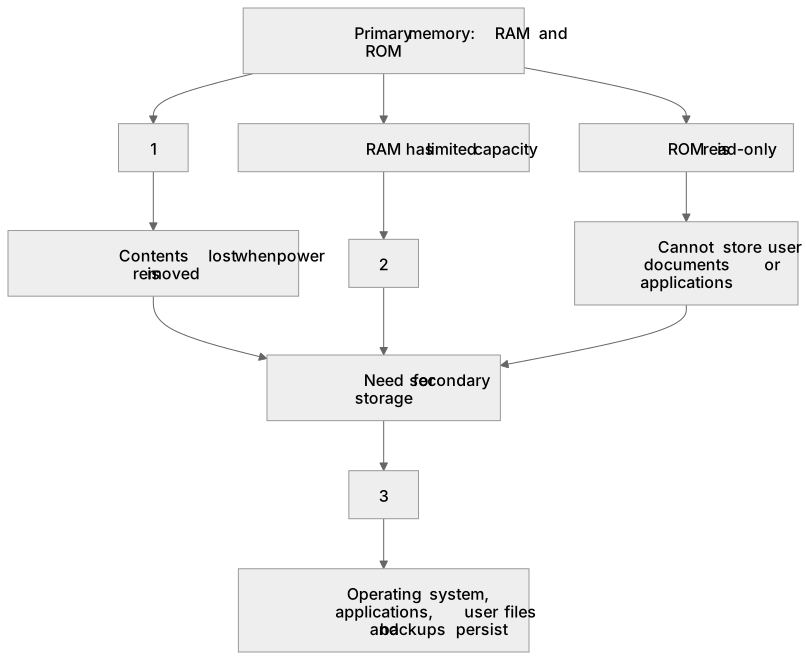
Label the diagram
Some boxes have lost their names. Pick the right name for each number.
1Box 1
2Box 2
3Box 3
There is more to this lesson
The full lesson goes on to check your understanding and help you earn the marks. Create a free account to carry on, with your progress saved.
A week of Premium from your first lesson · Then the free plan continues · No card, no charge
Test your understanding of Secondary storage: The need for secondary storage
Active recall beats re-reading. Take an instant quiz now to test what you’ve learned and lock it into long-term memory.
A week of Premium from your first lesson · Then the free plan continues · No card, no charge