OCR · GCSE · Computer Science
Course version: J277 · Version from Sept 2022
How data needs to be converted into a binary format to be processed by a…
Full specification wording
Units: How data needs to be converted into a binary format to be processed by a computer
A computer's processor works with electrical signals that are either on or off, so all data must be represented as binary patterns of 0s and 1s before processing.
Checked against the OCR J277 specification on .
- Point 2 of 3
- 4 key terms
Study notes
From the checked teaching notes for this specification point.
The idea
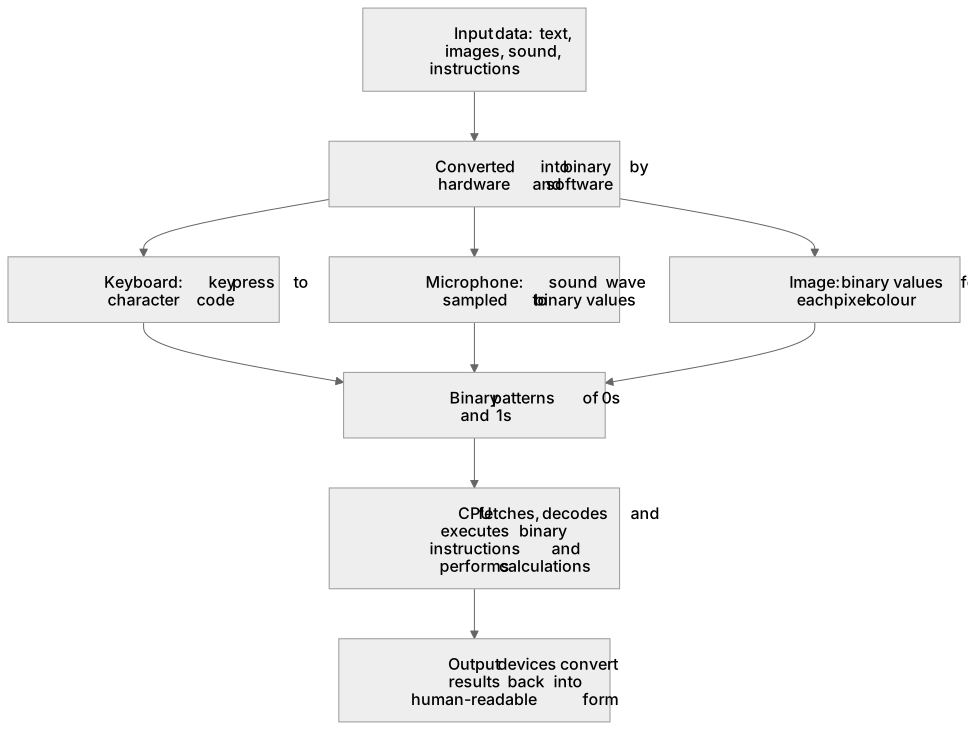
A computer's processor works with electrical signals that are either on or off, so all data must be represented as binary patterns of 0s and 1s before processing. Input such as text, images, sound and instructions is converted into binary by hardware and software. A keyboard converts each key press into a character code, such as the 8-bit ASCII code for 'A', which is 01000001. A microphone samples a sound wave and stores each sample as a binary number. An image is stored as binary values for the colour of each pixel. Once data is binary, the CPU can fetch, decode and execute instructions and perform calculations on it. Results are converted back into a human-readable form, such as text on a screen or sound from a speaker, by output devices.
What earns the marks
- Explains that a computer processes data using two states, often described as on and off or 1 and 0.
- States that all input data, including text, images, sound and program instructions, must be converted into binary before processing.
- Describes a conversion method for one data type, for example a keyboard producing a character code such as 01000001 for 'A', or a microphone sampling sound into binary values.
- Explains that the CPU can only fetch, decode and execute binary instructions and operate on binary data.
- Recognises that binary results are converted back into a human-readable form by output devices such as monitors, speakers or printers.
Common mistakes and how to put them right
Saying a computer understands letters and pictures directly.
Put it right by explaining that these are converted into binary codes before the CPU can use them.
Claiming conversion happens only inside the CPU.
Put it right by noting that input devices and software convert data to binary before it reaches the processor.
Describing binary as decimal digits 0 to 9.
Put it right by stating that binary uses only the two digits 0 and 1.
Exam tips
- Link each example of conversion to the device or process that performs it, such as keyboard to character code or microphone to sampled values.
- Use the phrase 'on and off' or 'two states' when explaining why binary suits electronic circuits.
- Include one input example and one output example to show that conversion works in both directions.
Try the lesson
The start of the Units: How data needs to be converted into a binary format to be processed by a computer lesson, made from checked teaching notes for this specification point.
Have a go first
Which format must data be converted into before a computer can process it?
See it
Key words
Say what each word means before you turn the card.
Two states
Try answering aloud or in your head before turning the card.
Binary
Try answering aloud or in your head before turning the card.
Input devices
Try answering aloud or in your head before turning the card.
Output devices
Try answering aloud or in your head before turning the card.
See every definition
- Two states
- The condition of a computer's electrical signals being either on or off, which is why all data must be represented as binary patterns of 0s and 1s.
- Binary
- A format of patterns of 0s and 1s into which all data must be converted before a computer can process it.
- Input devices
- Hardware that converts data such as text, images, sound and instructions into binary, for example a keyboard producing a character code.
- Output devices
- Devices such as monitors, speakers or printers that convert binary results back into a human-readable form.
Label the diagram
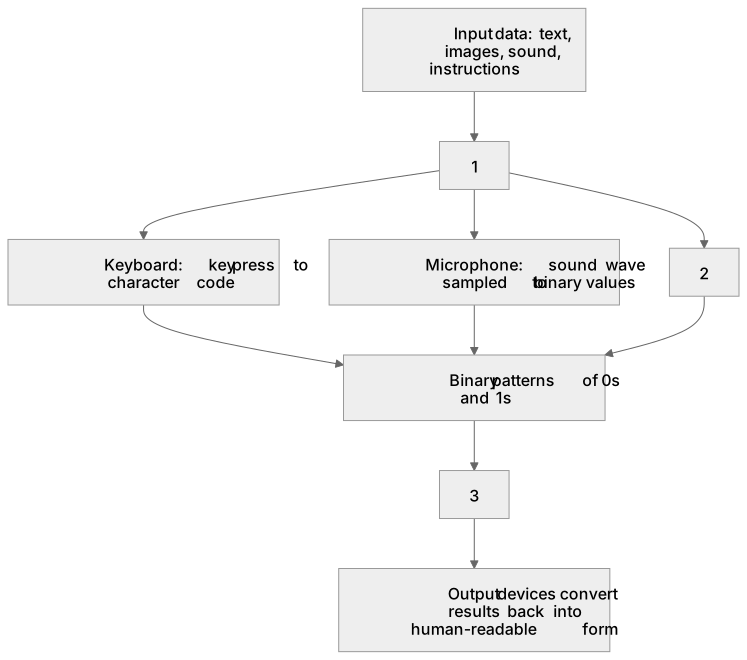
Some boxes have lost their names. Pick the right name for each number.
1Box 1
2Box 2
3Box 3
There is more to this lesson
The full lesson goes on to check your understanding and help you earn the marks. Create a free account to carry on, with your progress saved.
A week of Premium from your first lesson · Then the free plan continues · No card, no charge
Test your understanding of Units: How data needs to be converted into a binary format to be processed by a computer
Active recall beats re-reading. Take an instant quiz now to test what you’ve learned and lock it into long-term memory.
A week of Premium from your first lesson · Then the free plan continues · No card, no charge