Database Design Mastery for GCSE & A-Level 2026

You've probably got the same problem a lot of students hit in computer science: the data starts simple, then it turns messy fast. One spreadsheet for a club list, one for payments, one for attendance, and suddenly you're hunting through duplicated names, mismatched IDs, and half-fixed rows that don't agree with each other. That's exactly where database design earns its marks in an exam, because it turns chaos into a structure you can explain clearly, draw accurately, and justify under pressure.

A good way to think about it is knowledge management for data, where the goal is to store information so it can be found, checked, and reused without mess. If you want a simple parallel for revision habits, the guide to knowledge management gives a useful outside example of how organising information beats leaving it scattered. For GCSE and A-Level, the aim is simpler, learn the core ideas once, then apply them cleanly in any scenario, whether that's a school club, a game leaderboard, or a hospital booking system. If you need a structured place to practise, Online Revision for GCSE fits neatly into that routine.
Why Spreadsheets Fail and Databases Prevail
A school football club keeps player names, kit sizes, and match availability in a spreadsheet. At first it looks fine, until one person's name appears three times with three slightly different spellings, one row gets edited but the others don't, and the coach can't tell which shirt size is current. That's the kind of mess databases were built to fix, and examiners love seeing you explain why the fix matters, not just naming the tool.
A spreadsheet is flat and flexible, but that flexibility becomes a weakness when lots of people touch the same file. A database separates data into linked tables, so each fact lives once, and that reduces duplication and inconsistency. Microsoft's database design guidance stresses exactly that idea, divide information into subject-based tables, choose primary keys, record each fact just once, and use relationships for joins and accuracy (Microsoft database design basics).
What examiners want you to notice
If a question gives you a messy spreadsheet scenario, the mark scheme usually wants the problem named properly. Use terms like redundancy, inconsistency, and update anomalies when the same data is repeated in several places and can drift apart. If you can also say that relational design supports joins and integrity, you're already sounding like someone who understands the model rather than memorising labels.
Practical rule: if the same fact is being typed more than once, ask whether a table split would protect it better.
That's why databases prevail in school systems, gaming platforms, and public services. They're not just “more advanced spreadsheets”, they're structured systems where the data can be checked, linked, and queried without the same copy being edited five different ways. For exam answers, that's the first big point to keep straight, databases reduce duplication and protect integrity, spreadsheets don't give you that protection automatically.
The Blueprint with Entity-Relationship Modelling
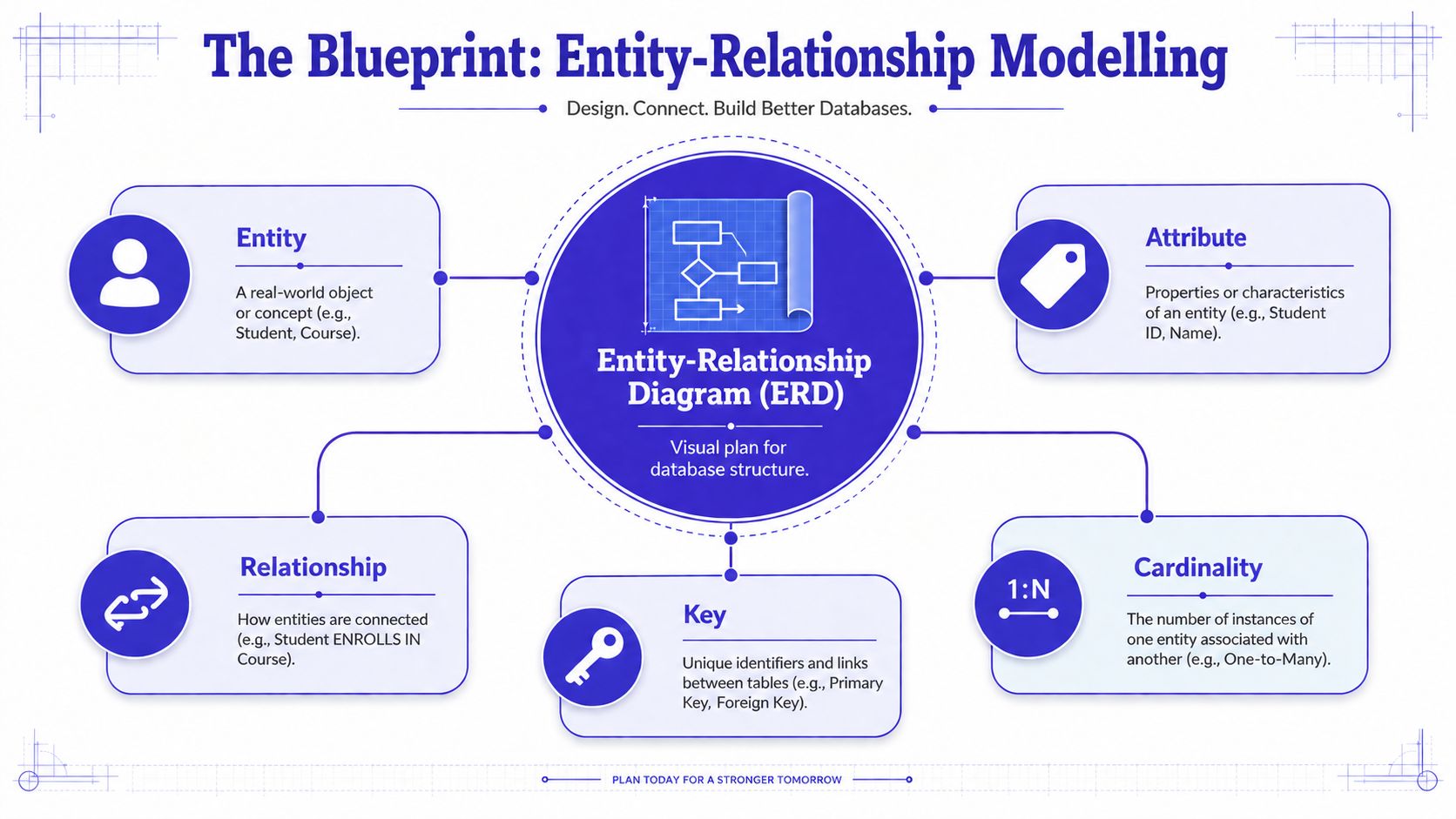
Before anyone builds tables, they need a plan. In database terms, that plan is an Entity-Relationship Diagram, usually called an ERD, and it works a bit like drawing a school map before reorganising the timetable system. If you're tracking students, teachers, and subjects, you don't start by guessing table names, you first work out what exists, what describes it, and how the parts connect.
Entities, attributes, and relationships
An entity is the thing you care about, like Student, Teacher, or Course. An attribute is a detail about that thing, like StudentName or DateOfBirth. A relationship shows how entities connect, such as a student enrols in a course, or a teacher teaches a class.
An ERD is the blueprint, not the finished building.
That wording matters in exams because students often jump straight into tables and miss the modelling stage. If a question gives you a scenario, first underline the nouns for entities, the facts for attributes, and the verbs for relationships. That method works well because examiners can see you're converting text into a design, not just copying words into boxes.
Cardinality is where marks are often lost
Cardinality means how many of one entity match how many of another. A student can enrol in many courses, so that's one-to-many from student to enrolment. A course can also have many students, which is why many-to-many usually needs extra handling later in the schema.
The easiest exam trick is to ask, “from this table, how many linked records can there be?” That question helps you decide whether the line is one-to-one, one-to-many, or many-to-many. If you're revising from practice questions, the AI-powered CS practice page can be a useful way to drill that decision until it becomes automatic.
A strong ERD answer doesn't just list features. It shows that you understand the shape of the data before you start building it, which is exactly what a top-grade response should do.
From Diagram to Data with the Relational Schema
A clear ERD still needs to be translated into something a database can store and check. The relational schema is that translation, the table plan that turns each entity into a table and each relationship into a real link. At this point, the design begins to look like a structure you could build in SQL, and primary keys and foreign keys act as the connections that keep the whole system organised.
Turning school data into tables
Take a Student table. Each student needs a unique identifier, such as StudentID, because names can repeat and spellings can change. That unique field is the primary key, so every row can be identified without confusion.
Now look at an Enrolment table. If a student joins several subjects, you do not copy all their details into every subject row. The Enrolment table stores StudentID as a foreign key, pointing back to the Student table, so one record can be linked to another without repeating the same facts. This matches standard design advice, divide information into subject-based tables, choose primary keys, record each fact once, and use relationships to support joins and accuracy (Microsoft database design basics).
Why this structure earns marks
In exam answers, write that foreign keys preserve referential integrity. That phrase tells the examiner you understand that a database does more than store values, it checks that links make sense. If an enrolment row points to a student that does not exist, the design has failed, so a good schema prevents that error before it can appear.
A common mistake is to describe foreign keys as only “connecting tables”. That is too vague for higher marks. Say they connect tables and keep the relationship valid, because that is their job.
You can also use this section to show why relational databases became dominant. The move from older hierarchical and network structures to table-based design followed the wider adoption of the relational model after E. F. Codd's 1970 paper, IBM's System R prototype in 1974, Oracle's commercial release in 1979, and IBM's SQL database release in 1981, which established the table-and-key structure still used today (history of database design). In an exam, that historical context helps if a question asks why relational design became the standard.
Keeping It Clean with Normalisation
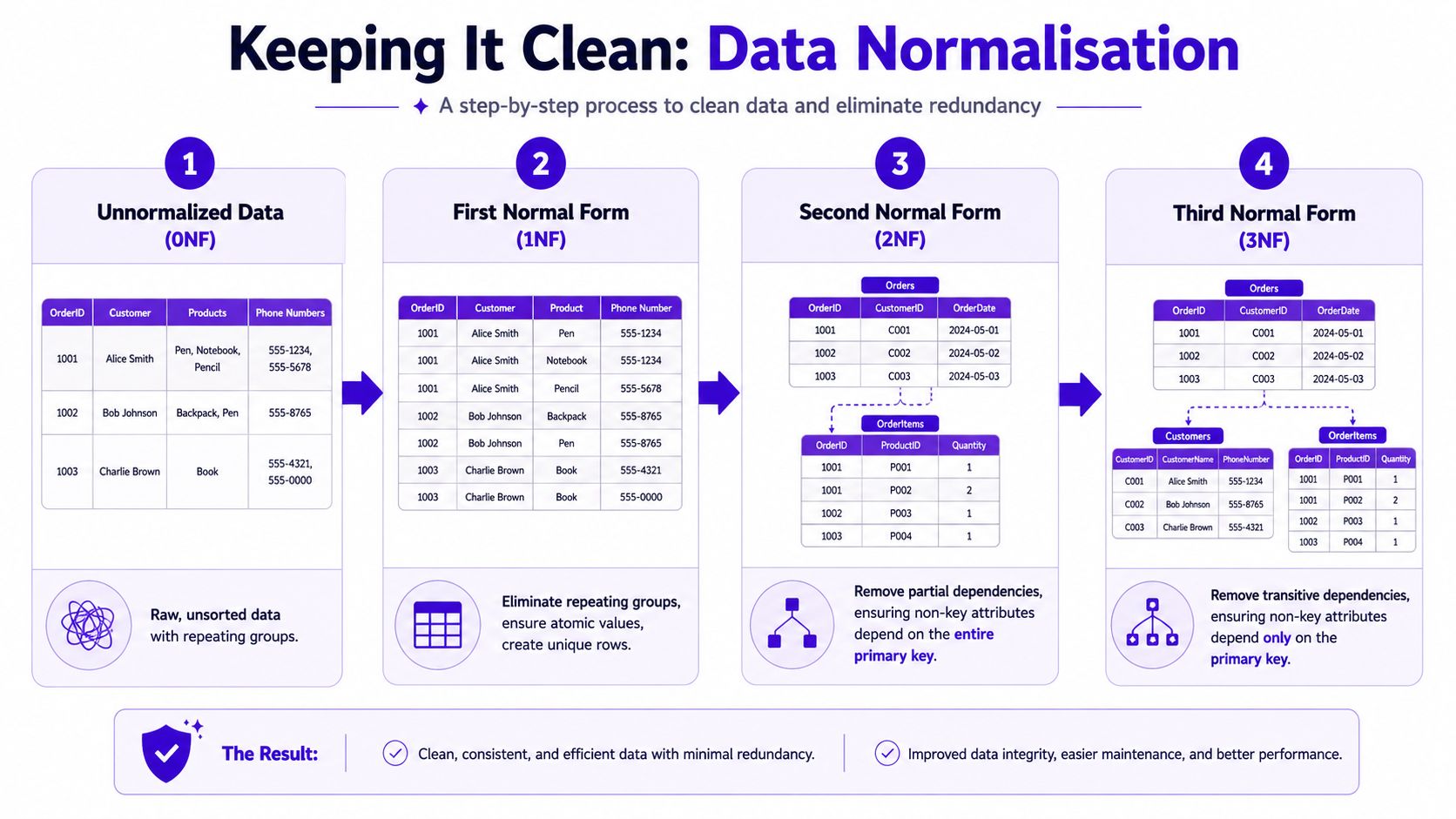
Normalisation is where a lot of students either panic or overcomplicate things. It's really a cleaning process, and the best way to remember it is this, you start with a messy table, then you split it until each fact has one home and no repeated clutter. The reason this matters is straight from design guidance, a solid baseline is to model core entities in 3NF first, then denormalise only after measuring a real workload bottleneck, because normalisation reduces redundancy and update anomalies while denormalisation adds maintenance complexity (database design guide).
1NF means one value per cell
First Normal Form means every field holds a single value, not a list. If a student row stores several club memberships in one cell, that's a repeating group, and examiners will expect you to split it. In 1NF, the table becomes easier to search, easier to sort, and easier to check.
A clean way to write this in an answer is, 1NF removes repeating groups and ensures atomic values. That's the key phrase, because it shows you know what changes in the structure, not just the name of the form.
2NF removes partial dependency
Second Normal Form matters when a table has a composite key, which means more than one field is acting as the identifier. If a non-key field depends on only part of that key, the table is not in 2NF. The usual fix is to split the table so each non-key attribute depends on the whole key, not just one piece of it.
That sounds technical, but the exam version is simple. If one field describes the student and another describes the course in the same enrolment table, the student details should move out if they depend only on StudentID. That split removes repetition and makes updates safer.
3NF removes indirect dependence
Third Normal Form goes one step further. Non-key fields must depend only on the primary key, not on another non-key field. So if StudentID determines TutorID, and TutorID then determines TutorName, TutorName doesn't belong in the student table.
Examiner-friendly line: in 3NF, every non-key attribute depends on the key, the whole key, and nothing but the key.
That wording is worth learning because it's short, accurate, and easy to deploy under time pressure. If you can explain the table before and after each split, you'll show the kind of control that earns high marks.
The Rules of the Game with Keys and Constraints
Keys and constraints are how a database keeps order after the tables are designed. Through them, answers move from “I know the words” to “I understand how the system protects itself”. In exam terms, it's the difference between naming a feature and explaining its job.
Different keys do different jobs
A candidate key is any field, or set of fields, that could uniquely identify a row. One of those becomes the primary key, the main identifier chosen for the table. An alternate key is a candidate key that wasn't chosen as the primary key, while a composite key uses two or more fields together to make the row unique.
If you write that clearly, you're showing precision. A student record might use StudentID as the primary key, while Email could be an alternate key if it's unique. That kind of answer tells the examiner you can distinguish between uniqueness, selection, and structure.
Constraints keep bad data out
NOT NULL means a field must have a value. UNIQUE stops duplicate values appearing where they shouldn't. CHECK limits values to valid ranges or categories. Those are database-level rules, not just app ideas, and that distinction matters because integrity should live in the database itself rather than relying on application logic for consistency (common design mistakes).
Practical rule: if the database can enforce a rule, put the rule in the database.
That line is very useful for exam questions about data validation and integrity. It shows you understand that the database should protect the data even if the front end fails or someone bypasses the app.
Quick exam examples
A date of birth field can be NOT NULL if every student must have one. An email field can be UNIQUE if each student needs a separate contact address. An exam score can be CHECKed so it stays within an allowed range. Those examples are easy to remember, and they make your answer concrete instead of abstract.
A Practical Design Workflow from Start to Finish
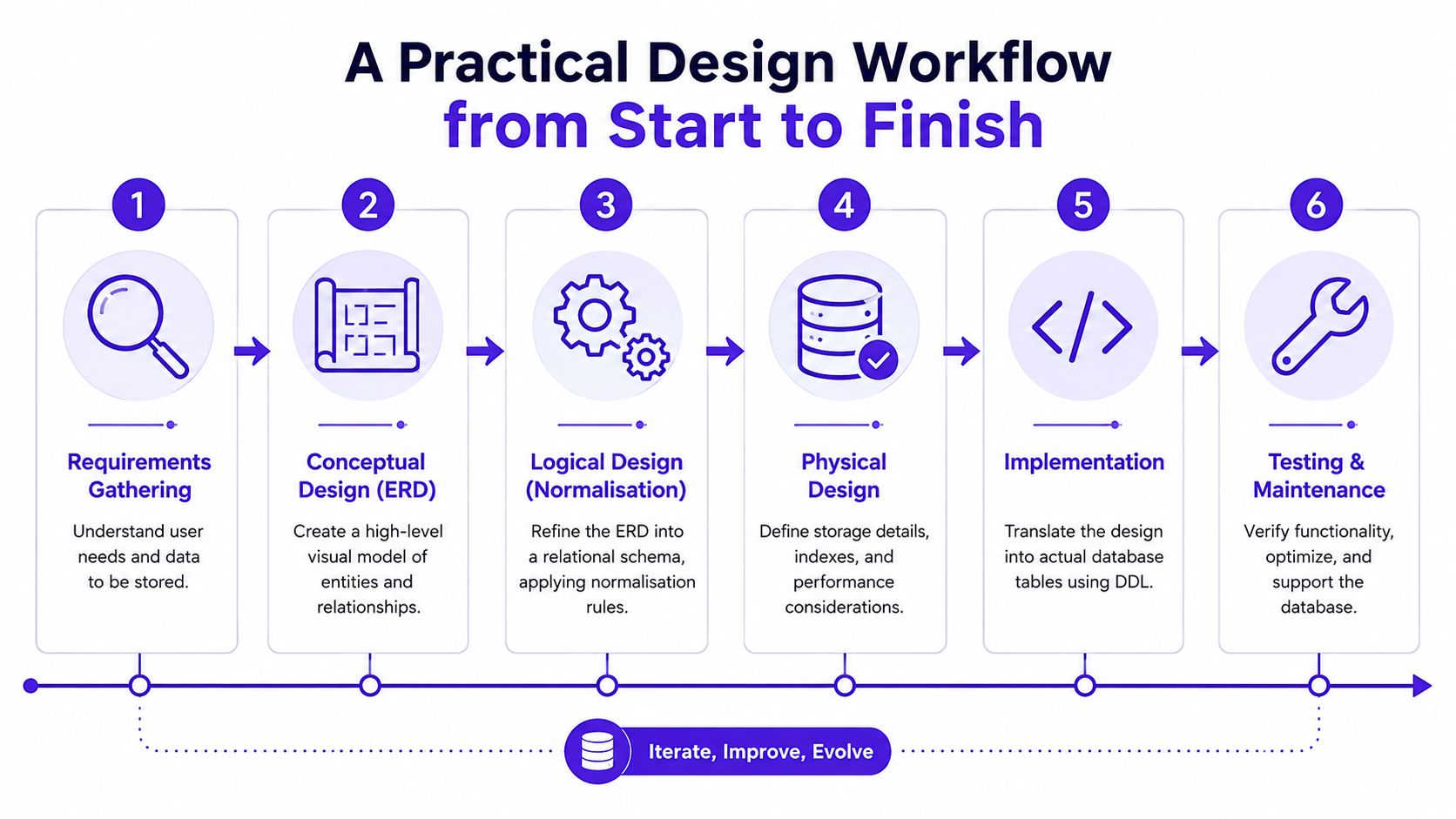
A strong exam answer follows a sensible order. You read the brief, identify what data matters, map it, structure it, clean it, and then lock in the rules. That sequence matters because design mistakes usually happen when students jump ahead and skip the analysis stage.
A local library example
A library wants to track members, books, and loans. First, you identify the requirements, who needs the data, what gets borrowed, and what needs reporting. Then you draw the ERD, which might include Member, Book, and Loan entities with the correct relationships.
After that, you turn the ERD into a relational schema and normalise the tables so repeated book or member details don't get copied everywhere. Then you add constraints, such as unique member numbers or required fields for loan dates. If you need to compress your revision notes into something easy to carry, a Squeeze pdf can help you tidy them into a lighter format without changing the content.
What to do in an exam
A good sequence to remember is this.
- Analyse the brief. Underline the nouns and verbs, because they point to entities and relationships.
- Draw the ERD. Show entities, attributes, and cardinality clearly.
- Build the schema. Convert entities to tables and use keys properly.
- Normalise the tables. Aim for 3NF unless the question specifically asks otherwise.
- Add constraints and indexes where needed. Use them to protect data and support the expected queries.
That order reflects good design guidance, which recommends defining access patterns, regulatory constraints, and operational boundaries during requirements analysis, then translating them into indexing, partitioning, and security models in physical design (database design step by step). For revision, it's also a strong checklist because it stops you from forgetting the logic behind the structure.
If you want a focused place to practise that exact process, Exam Practice for A-Level gives you a good route into timed work. The goal is not just to recognise the steps, but to carry them out cleanly when the question is new.
Common Mistakes and Examiner Insights
A lot of marks disappear because of small design errors that look harmless at first. Examiners usually do not punish one awkward phrase, but they do notice when the structure is wrong, the key choice is weak, or the answer stops before the database is usable. To write a stronger answer, think like a marker and ask what would make the design unsafe, repetitive, or hard to defend.
The mistakes that come up again and again
Examiner's comment: choosing a name or email as the main key without checking whether it can change or repeat is risky.
A safer choice is a stable unique identifier, because a primary key must identify each row reliably. If the question gives you an obvious ID field, use it. If it does not, explain why your chosen key still stays unique and does not change in a way that would break the table, because that is the kind of judgement examiners reward.
Examiner's comment: confusing one-to-many with many-to-many usually leads to an invalid schema.
Many-to-many relationships need a join table, just like a school club register needs a separate list for members and clubs rather than trying to squeeze both into one row. Relational databases handle one-to-many links directly, but a many-to-many relationship becomes messy unless you split it properly. If you skip the join table, your schema usually repeats data or forces column layouts that do not fit the problem.
Examiner's comment: stopping at 1NF or 2NF leaves redundancy in the design.
This often happens when students know the names of the normal forms but do not carry the process through to the end. If the question asks for a well-designed database, 3NF is usually the safest target unless there is a clear reason to stop earlier. That answer shows you understand why the design is tidy, not just what the rule is called.
Don't hide rules in the app
A common design error is putting business rules only in the application code and leaving the database loose. Examiners want to see that you understand constraints as part of data protection, because they keep invalid values out even when the app makes a mistake. The same idea appears in design guidance on common design mistakes, which also warns that indexing has to be chosen carefully because extra indexes can slow writes instead of helping. In an exam, that kind of point shows design judgement, not just drawing skill.
For revision, use GCSE Past Papers to see how these mistakes are phrased in real questions. Practise writing short, precise answers with the right terms in the right order, because that is how you turn knowledge into marks. If you can explain the key, the relationship, and the normal form clearly, you are already much closer to a full-mark response.
Ready to master this topic?
Practise with quizzes, blurt exercises and exam questions on MasteryMind.
7 days Premium · Then free forever · No card, no charge