How to Write Pseudocode for GCSE & A-Level Exams

You're probably in one of two places right now. Either you've left Computer Science revision later than planned and a pseudocode question feels like a guaranteed mark-loser, or you're aiming high and you know those algorithm marks can separate a decent paper from a top one.
Both students need the same thing. A way to turn a messy exam question into clear steps that an examiner can follow. That's what pseudocode is for. It isn't there to trap you with fussy syntax. It's there to show that you can think logically, organise a solution, and express it clearly under pressure.
Teachers tend to be sceptical of pseudocode guides because too many of them oversimplify the topic or teach a fake “one true format”. Students then memorise a style sheet instead of learning how to solve problems. That's not useful in an exam hall. What matters is writing an algorithm that makes sense, is structured well, and can be checked before you commit to it.
Why Pseudocode Is Your Secret Weapon for Exams
A lot of students panic because they think pseudocode is another language they're supposed to know perfectly. It isn't. If you treat it like Python without the brackets, or Java without the semicolons, you'll make the whole thing harder than it needs to be.
The first thing to lock in is this. There is no single standardised syntax for pseudocode. UK exam boards such as AQA, Edexcel, and OCR allow any familiar version, and they focus on logical clarity rather than one exact keyword set, as explained by BBC Bitesize's pseudocode guidance. That should remove a lot of fear straight away.
If your school uses INPUT name and another school writes GET name, both can be fine. If you write SET total TO 0 and someone else writes total = 0, the examiner isn't hunting for one sacred version. They're asking a simpler question. Can another person understand your logic?
What examiners are really rewarding
Examiners want to see that you can do three things well:
- Read the problem carefully and spot what the algorithm must do
- Organise the steps in a sensible order so the solution works
- Show control clearly so decisions and loops are easy to follow
That means pseudocode is a scoring tool. It helps you get method marks even if you don't write the world's prettiest answer.
Practical rule: If your pseudocode is clear enough that a classmate could turn it into code without guessing what you meant, you're in a strong position.
Why pseudocode helps under pressure
In a real exam, pseudocode gives you a thinking frame. Instead of staring at a six-mark question and hoping an answer appears, you break the problem into actions. Input. Process. Output. Decision. Repeat if needed.
That structure matters even more when your revision hasn't gone perfectly. You don't need flawless memory for every keyword. You need calm, readable logic.
For students rebuilding confidence, that's a huge win. For stronger students chasing top marks, it's also efficient. A clear algorithm often saves time and reduces silly mistakes.
If you want broader support alongside class revision, Online Revision for GCSE can help you practise the same kind of exam thinking across topics.
The Building Blocks of Clear Pseudocode
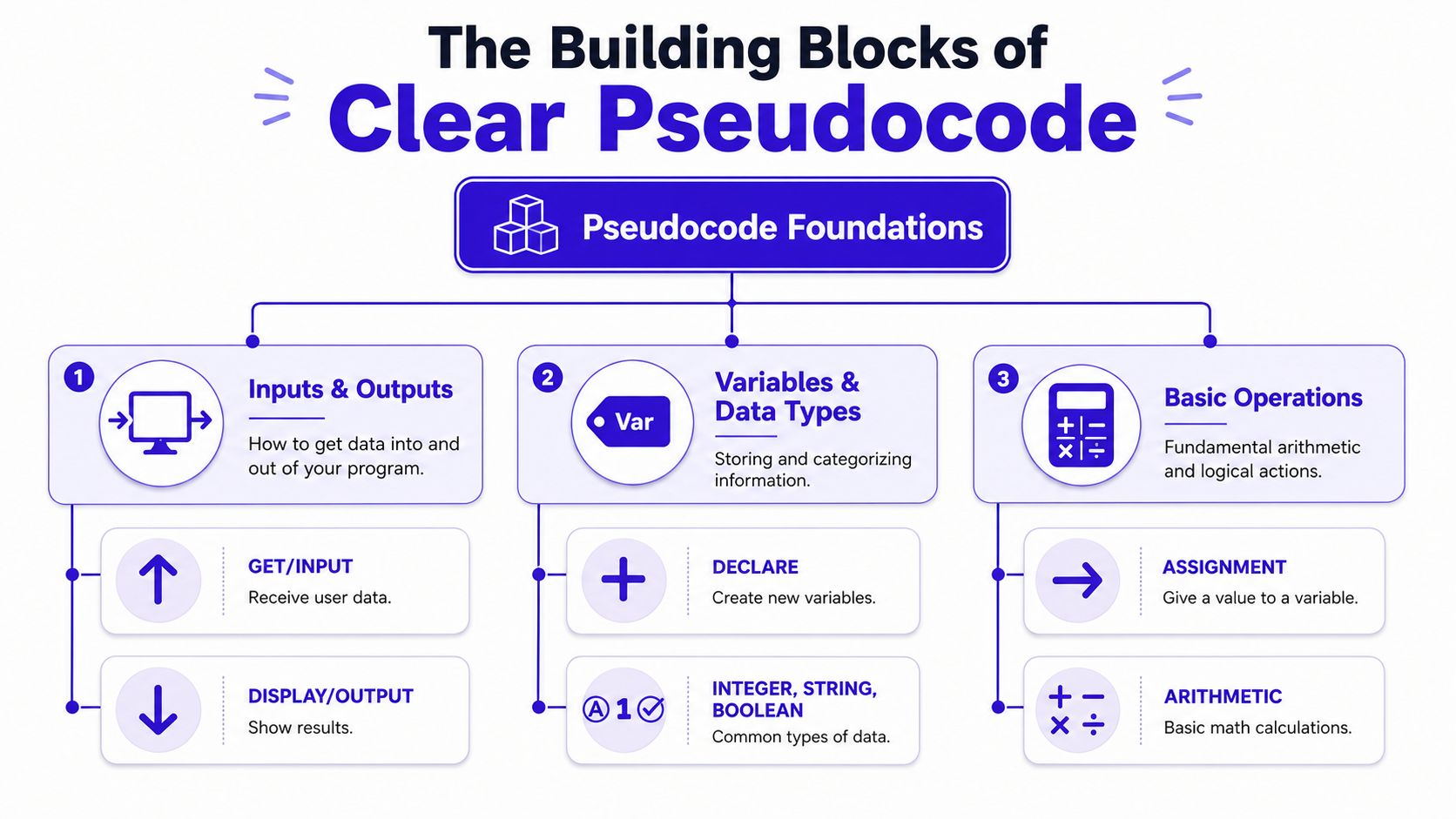
Before you tackle loops and harder logic, get comfortable with the small parts that appear in almost every answer. Pseudocode is non-executable and human-readable, and exam guidance expects one action per line with clear indentation so the logic stays unambiguous, as outlined in Study Rocket's OCR pseudocode revision page.
That sounds formal, but the idea is simple. Keep each line focused. Don't cram multiple actions into one sentence. Show blocks clearly so the examiner can see where a loop or decision starts and ends.
Start with input output and variables
Most exam algorithms begin with data coming in, being stored, and then being used.
Here's a clean reference table you can use.
| Keyword | Purpose | Example |
|---|---|---|
| INPUT | Receive data from a user | INPUT age |
| OUTPUT | Show a result | OUTPUT "Pass" |
| SET ... TO | Assign a value to a variable | SET total TO 0 |
| IF ... THEN | Make a decision | IF mark >= 50 THEN |
| ELSE | Handle the other outcome | ELSE |
| FOR | Repeat a fixed number of times | FOR i = 1 TO 10 |
| WHILE | Repeat while a condition stays true | WHILE choice <> "quit" |
| REPEAT ... UNTIL | Repeat until a condition becomes true | REPEAT ... UNTIL valid = TRUE |
You don't need every keyword in every answer. You need the right ones for the problem in front of you.
One line one action
Students often lose clarity because they write like this:
INPUT name and mark then if mark >= 50 output pass else output fail
That isn't impossible to understand, but it makes the logic harder to track. This version is better:
INPUT name
INPUT mark
IF mark >= 50 THEN
    OUTPUT "Pass"
ELSE
    OUTPUT "Fail"
ENDIF
Each step has a job. That makes errors easier to spot and marks easier to award.
Indentation does a lot of the work
Indentation is one of the most useful habits in pseudocode. It shows which instructions belong inside an IF, a WHILE, or a FOR loop.
Compare these.
Bad version:
IF age >= 18 THEN
OUTPUT "Allowed"
ELSE
OUTPUT "Not allowed"
Better version:
IF age >= 18 THEN
    OUTPUT "Allowed"
ELSE
    OUTPUT "Not allowed"
ENDIF
The second version is easier to read at a glance. In an exam, that matters. Examiners shouldn't have to untangle your structure.
Clear indentation is like paragraphing in English. The ideas may be the same, but the organised version is much easier to follow.
Keep your variable names meaningful
A weak answer might say:
INPUT a
INPUT b
SET c TO a * b
OUTPUT c
That could be fine in some contexts, but it's vague. If the question is about ticket price and quantity, write:
INPUT ticketPrice
INPUT quantity
SET totalCost TO ticketPrice * quantity
OUTPUT totalCost
The logic suddenly looks more secure because the names explain the purpose.
A quick checklist before you move on:
- Use familiar commands that you can apply consistently
- Write one instruction per line so the order is obvious
- Indent blocks clearly inside loops and conditionals
- Choose sensible variable names that match the question
- Show all essential inputs and outputs instead of leaving them implied
If you're building confidence in algorithm questions, AI-powered Computer Science exam prep can give you more structured practice with the same style of exam-friendly thinking.
Controlling the Flow with Loops and Conditionals
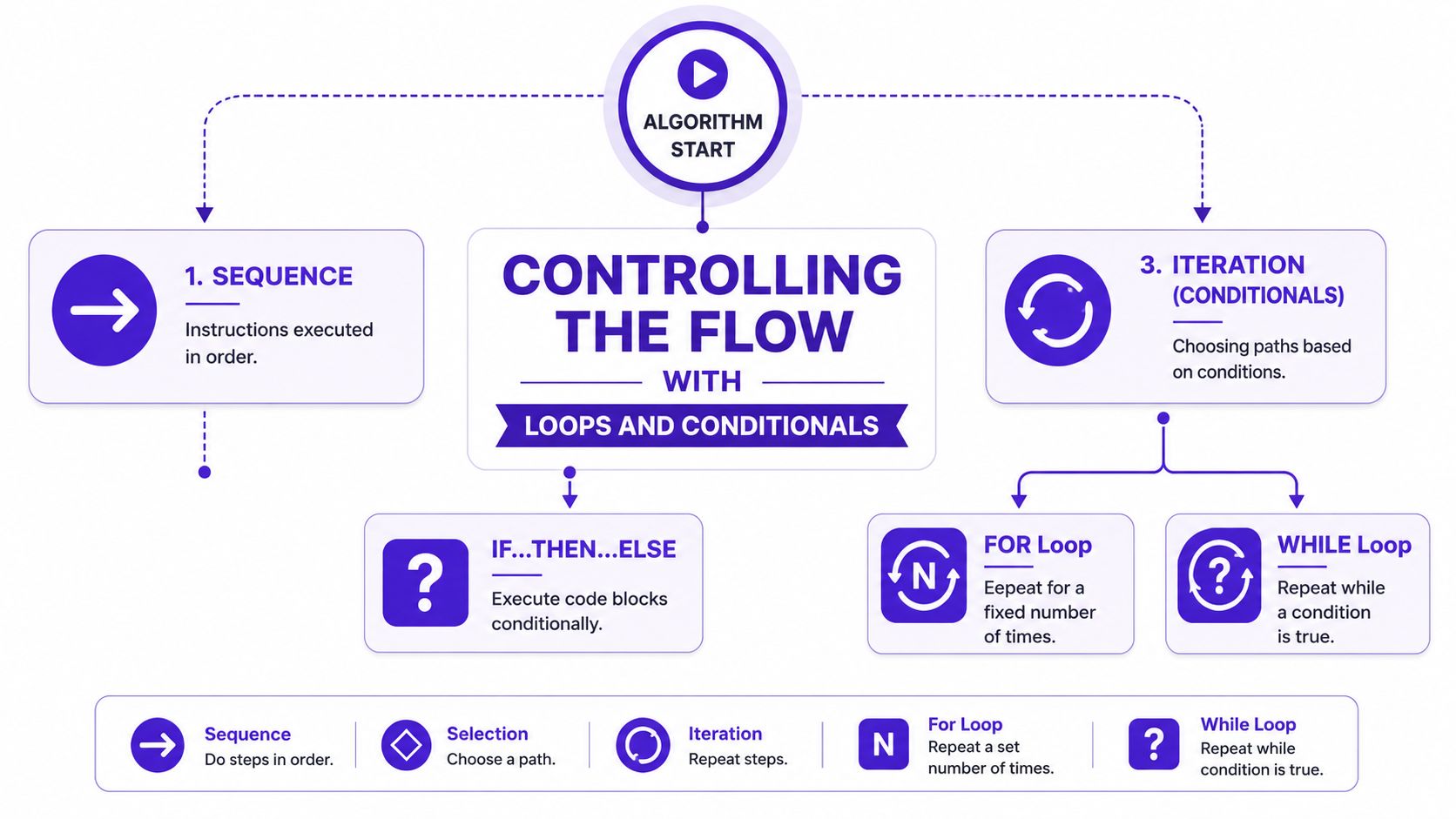
An algorithm becomes interesting when it has to make choices or repeat actions. That's where selection and iteration come in. In exam terms, a simple list of steps thereby transforms into a proper solution.
A good way to understand this is to follow one problem from start to finish.
A realistic problem
Suppose the question asks you to keep accepting test scores until the user enters -1, then output the highest score entered.
That problem needs both repetition and decision-making.
You have to:
- keep asking for scores
- stop at the right time
- compare each score with the current highest
- output the final answer
Why a WHILE loop fits here
A WHILE loop works well when you don't know in advance how many times something will repeat.
You might sketch the logic like this:
SET highest TO -1
INPUT score
WHILE score <> -1 DO
    IF score > highest THEN
        SET highest TO score
    ENDIF
    INPUT score
ENDWHILE
OUTPUT highest
This works because the condition controls the repetition. As long as the input isn't -1, the algorithm carries on.
Where the IF statement earns marks
The IF statement is doing the comparison work. It checks whether the new score should replace the current highest one.
That's the heart of selection. The algorithm isn't just collecting data. It's making a decision based on a condition.
Students sometimes write a loop but forget the comparison step inside it. Then the program repeats correctly but never updates the answer. That's the kind of error that looks busy but scores poorly.
Here's the same idea in plain English:
- Start with a highest value
- Ask for a score
- If the score beats the current highest, update it
- Keep going until the stopping value appears
That's exactly how to think in pseudocode. Not in programming jargon first, but in actions and decisions.
A short visual explanation often helps before you write your own version.
When to use FOR WHILE and REPEAT UNTIL
Students often mix up the loop types, so use this rule of thumb.
| Loop type | Best used when | Example situation |
|---|---|---|
FOR | You know how many times to repeat | Entering 5 names |
WHILE | You repeat while a condition is true | Keep asking until a sentinel value |
REPEAT UNTIL | You want the block to run at least once | Validate input after the first attempt |
A FOR loop for fixed repetition might look like this:
SET total TO 0
FOR i = 1 TO 5
    INPUT number
    SET total TO total + number
ENDFOR
OUTPUT total
That's ideal when the number of repetitions is already known.
A REPEAT UNTIL loop can be useful for validation:
REPEAT
    INPUT password
UNTIL password = "secure123"
OUTPUT "Access granted"
The key difference is that the loop body runs before the condition is checked.
If the question says “enter 10 values”, think
FOR.
If it says “keep entering values until...”, thinkWHILEorREPEAT UNTIL.
Efficiency and clarity
At higher levels, examiners also notice whether your control structure makes sense for the task. You don't need a fancy answer. You need an appropriate one.
Using FOR when the number of iterations is unknown can make your solution awkward. Using WHILE for a fixed count can be done, but it often looks less direct. Strong pseudocode feels natural for the problem.
That's one reason top answers read cleanly. They don't just work. They fit.
From Exam Question to Perfect Pseudocode
A lot of students can follow examples but freeze when the wording changes. The fix is to use the same method every time. Deconstruct. Plan. Verify. That gives you something solid to do even if the question feels unfriendly.
This verification stage matters more than most revision guides admit. A critical gap in many resources is how to verify pseudocode, and BBC Bitesize notes a related issue in this area, including that 68% of UK computer science students lose marks on algorithmic logic rather than syntax. That's why trace tables deserve proper attention.

Deconstruct the question
Take this exam-style task:
Write pseudocode to input six temperatures, count how many are above 20, and output the count.
Don't rush into writing lines yet. Pull the question apart first.
- Input. Six temperature values
- Process. Compare each one to 20 and keep a count
- Output. Final count
That alone makes the task feel smaller.
Plan the logic before writing
Once the pieces are clear, the structure becomes obvious. You need a counter and a fixed loop.
A sensible rough plan is:
- Set the counter to zero
- Repeat six times
- Input a temperature
- If it is above 20, increase the counter
- Output the counter
That rough version is valuable. Many students skip it and then write themselves into a corner.
Write the pseudocode cleanly
Now turn the plan into pseudocode:
SET aboveCount TO 0
FOR i = 1 TO 6
    INPUT temperature
    IF temperature > 20 THEN
        SET aboveCount TO aboveCount + 1
    ENDIF
ENDFOR
OUTPUT aboveCount
This scores well because the flow is clear and every part of the task has been handled.
Notice what's good about it:
- the counter is initialised before the loop
- the loop matches the fixed number of inputs
- the conditional only updates the counter when needed
- the output appears after processing is complete
Verify it with a trace table
Now do the part many students miss. Test the logic by hand.
Suppose the six temperatures are:
18, 21, 25, 19, 22, 17
Your trace table could look like this:
| Step | temperature | aboveCount |
|---|---|---|
| Start | 0 | |
| 1 | 18 | 0 |
| 2 | 21 | 1 |
| 3 | 25 | 2 |
| 4 | 19 | 2 |
| 5 | 22 | 3 |
| 6 | 17 | 3 |
The final output should be 3.
That quick check tells you whether the algorithm behaves the way you expect. It's the nearest thing pseudocode has to proof.
A trace table forces your logic to reveal itself. If a variable changes at the wrong time, or never changes at all, you'll spot it much faster on paper than in your head.
What students usually catch during verification
A dry run often exposes mistakes like these:
- A counter that wasn't set to zero before the loop started
- An output placed inside the loop so it prints repeatedly
- A condition written the wrong way round
- A missing input line that means the loop doesn't process new values properly
For teachers, pseudocode transforms vague planning into assessable reasoning. Students aren't just inventing steps. They're checking the behaviour of an algorithm in a disciplined way.
For students, it's a safety net. If your answer feels uncertain, trace it.
If you want more exam-style algorithm questions to test this process, GCSE Past Papers are one of the best places to practise turning messy wording into precise steps.
Common Pseudocode Mistakes That Cost Marks
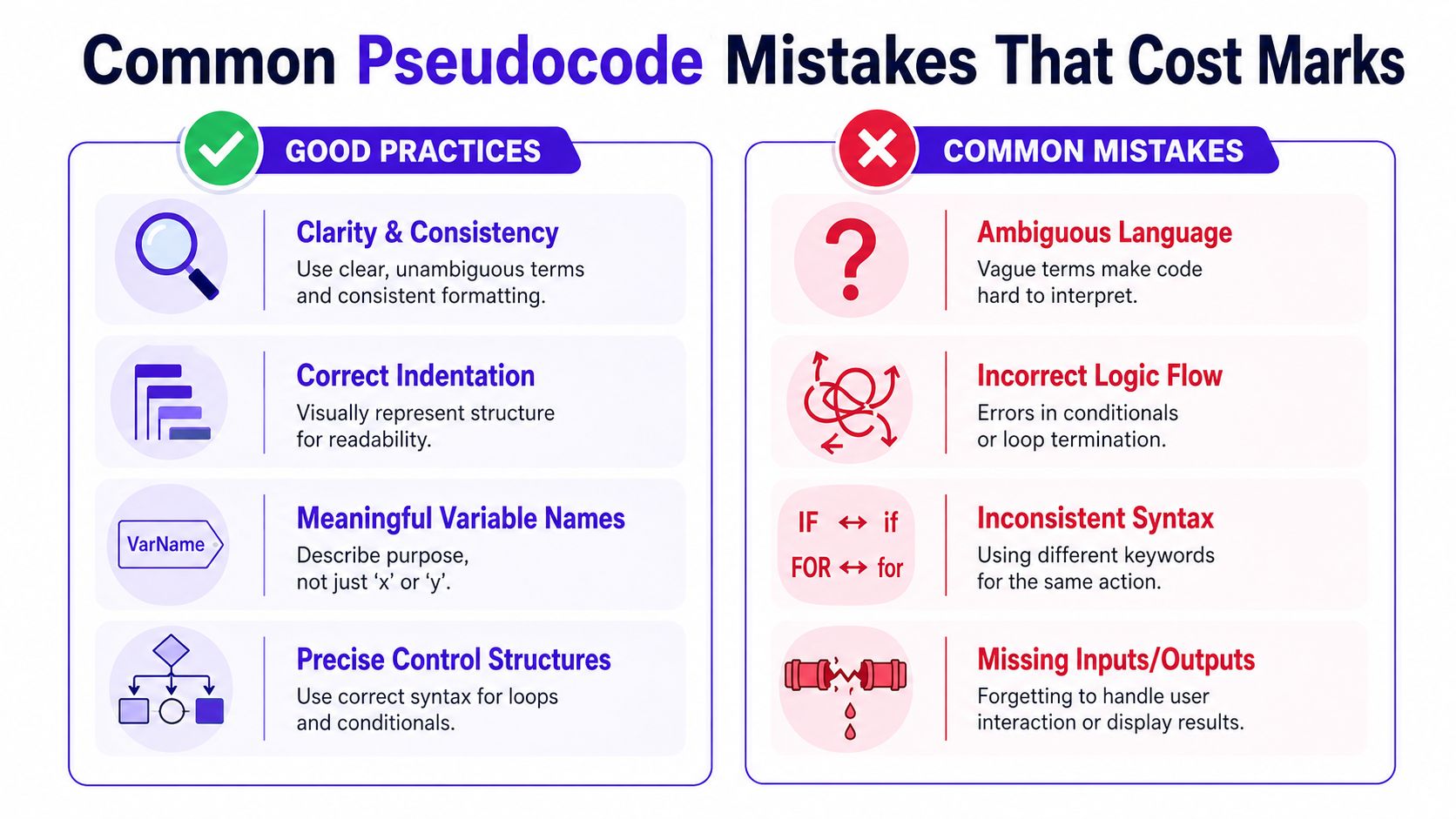
Weak pseudocode often looks nearly right. That's what makes it dangerous. The student can feel confident because the answer contains loops, variables, and an IF statement, but one small logic slip can break the whole algorithm.
The best way to improve is to look at mistakes side by side with better versions.
Off by one errors
This happens when the loop runs too many or too few times.
Bad:
FOR i = 1 TO 5
    INPUT number
ENDFOR
If the question asked for six numbers, this misses one.
Better:
FOR i = 1 TO 6
    INPUT number
ENDFOR
The fix sounds obvious when you see it written down, but under time pressure students often misread the range.
Examiner's view: A correct loop boundary shows that you've matched the algorithm to the exact task, not just written a generic loop.
Assignment and comparison confusion
Another common issue is mixing up giving a value and testing a value.
Bad:
IF valid = TRUE THEN
    OUTPUT "Accepted"
This may be acceptable in some pseudocode styles, but it can become unclear if your notation is inconsistent across the answer. If you're using = for comparison, stay consistent. If your class uses a different style, keep that consistent instead.
Better:
IF valid = TRUE THEN
    OUTPUT "Accepted"
ENDIF
Or even clearer:
IF valid THEN
    OUTPUT "Accepted"
ENDIF
The important thing isn't loyalty to one symbol set. It's avoiding ambiguity.
Vague variable names
Bad:
INPUT x
INPUT y
SET z TO x * y
OUTPUT z
Better:
INPUT length
INPUT width
SET area TO length * width
OUTPUT area
When names match the question, the logic reads more convincingly. That helps both the examiner and you.
Messy indentation and broken structure
Bad:
IF age >= 16 THEN
OUTPUT "Can apply"
ELSE
    OUTPUT "Too young"
Better:
IF age >= 16 THEN
    OUTPUT "Can apply"
ELSE
    OUTPUT "Too young"
ENDIF
In the bad version, the block structure is uneven. In a more complex answer, that sort of formatting can hide a genuine logic mistake.
Missing part of the task
Students sometimes answer only half the question. They process the data but forget the final output, or they collect input but never store the result properly.
A useful final scan is:
- Did I input everything required
- Did I process it correctly
- Did I output the final answer
- Did I handle all branches of the decision
That last point matters with IF statements. If the question implies two possible outcomes, your algorithm should usually show both.
Practice Problems and Examiner Tips
You get better at pseudocode by writing it, checking it, and correcting it. Reading a guide helps, but improvement comes from repeated attempts. That matters even more because GCSE results are competitive. In England, the proportion of top GCSE grades 9 to 7 in 2024 rose by just under 1% compared with 2023, according to Schools Week's reporting on 2024 GCSE results. Small mark gains matter.
Practice problem one
Write pseudocode to input five numbers into a list, then output the largest number.
Model answer:
SET largest TO -9999
FOR i = 1 TO 5
    INPUT number
    IF number > largest THEN
        SET largest TO number
    ENDIF
ENDFOR
OUTPUT largest
Start value choice matters. Pick an initial value that won't block valid inputs, or use the first input as the starting largest value if that feels safer.
Practice problem two
Write pseudocode to input a username. If the username is blank, output Invalid. Otherwise output Accepted.
Model answer:
INPUT username
IF username = "" THEN
    OUTPUT "Invalid"
ELSE
    OUTPUT "Accepted"
ENDIF
Handle both outcomes. Students often write the valid case and forget the invalid one, which leaves the algorithm incomplete.
What good practice looks like
The strongest students don't just write more answers. They review them more sharply.
- Test with sample values so you can see whether variables change as expected
- Execute each line step-by-step and ask what happens next
- Match the loop to the question instead of forcing the same structure every time
- Keep your notation consistent from the first line to the last
If you want timed, exam-style repetition, Exam Practice for GCSE is the kind of routine that helps turn pseudocode from a weak spot into a dependable source of marks.
MasteryMind is built for UK learners who want revision that feels like the actual exam, not random practice. It covers GCSEs and A-Levels across major exam boards, with examiner-style feedback, trace-table support for Computer Science, adaptive questions, and structured guidance that helps students improve without cutting corners. If you want a revision platform that supports both last-minute recovery and top-grade ambition, explore MasteryMind.
Ready to master this topic?
Practise with quizzes, blurt exercises and exam questions on MasteryMind.
7 days Premium · Then free forever · No card, no charge