Your Guide to Acing the OCR GCSE Computer Science Exam
You're probably in one of two camps right now. Either OCR GCSE Computer Science has crept up on you and the subject feels like a pile of binary, networks, Python and mark schemes all mashed together. Or you already like the subject, but you know that liking Computer Science and scoring highly in the exam aren't quite the same thing.
That gap matters.
A lot of students revise OCR GCSE Computer Science by reading notes, watching a few videos, then hoping the exam will reward “roughly knowing it”. It usually doesn't. OCR J277 rewards students who know the content, yes, but also students who understand what the question is really asking, what kind of answer earns marks, and where the easy mistakes happen under pressure.
Teachers know this too. You can teach the whole course well and still watch students lose marks on conversion slips, trace table errors, vague extended answers, or command words they didn't fully decode.
Your Roadmap to OCR GCSE Computer Science Success
If you feel behind, the good news is that this course is very recoverable. OCR GCSE Computer Science has a lot of content, but the exam doesn't reward random revision. It rewards focused revision on the topics and question styles that come up again and again.
If you're aiming high, the challenge is different. You probably know most of the material already. The issue is precision. Grade 8 and 9 students usually don't miss marks because they've never heard of the topic. They miss them because they gave a description instead of an explanation, forgot one technical keyword, or rushed a method question.
What strong revision actually looks like
Good revision for OCR GCSE Computer Science usually has four parts:
- Know the course structure: You need a clear picture of what Paper 1 and Paper 2 are really testing.
- Target the heavy hitters: Some topics connect to lots of other areas. Binary and data representation are classic examples.
- Train for mark schemes: Many students frequently underperform. They revise facts, but not answer style.
- Practise under pressure: Timed application matters. So does spotting your own error patterns.
Practical rule: Don't ask only “Have I revised this topic?” Ask “Could I score marks on this topic in an OCR exam tomorrow?”
That small change in mindset is huge.
Why this subject can feel so strange
Computer Science is unusual because it mixes exact knowledge with problem-solving. One minute you need a firm definition. The next, you're tracing an algorithm or explaining why one method is better than another. That's why cramming isolated facts rarely feels enough.
It also helps to zoom out. If you want to compare computer science learning paths, it's useful to see where GCSE content fits in the bigger journey from school computing to more advanced study. For day-to-day exam prep, though, a tighter specification-aligned routine matters more, and that's where structured support such as Online Revision for GCSE can help students keep practice organised.
Two starting points, both workable
If you're in rescue mode, start with the topics that produce the most marks for the least wasted time: data representation, systems, algorithm tracing, and programming basics.
If you're already secure, start with exam language. Push yourself on command words, extended responses, and error-free workings.
Both groups need the same final skill. You have to stop thinking like someone who is “revising Computer Science” and start thinking like someone who is answering OCR questions.
Deconstructing the OCR J277 Exam
Before you can improve your grade, you need a clean mental model of the exam you're sitting. OCR's GCSE Computer Science is assessed under the J277 specification, and the subject has grown fast in England. Ofqual's review reported that entries rose from about 6,700 in 2012 to more than 84,000 by 2020, an increase of roughly 1,160% over eight years, which helps explain why the qualification is treated with such seriousness and standardisation in assessment in Ofqual's review of GCSE Computer Science standards.
The two papers in plain English
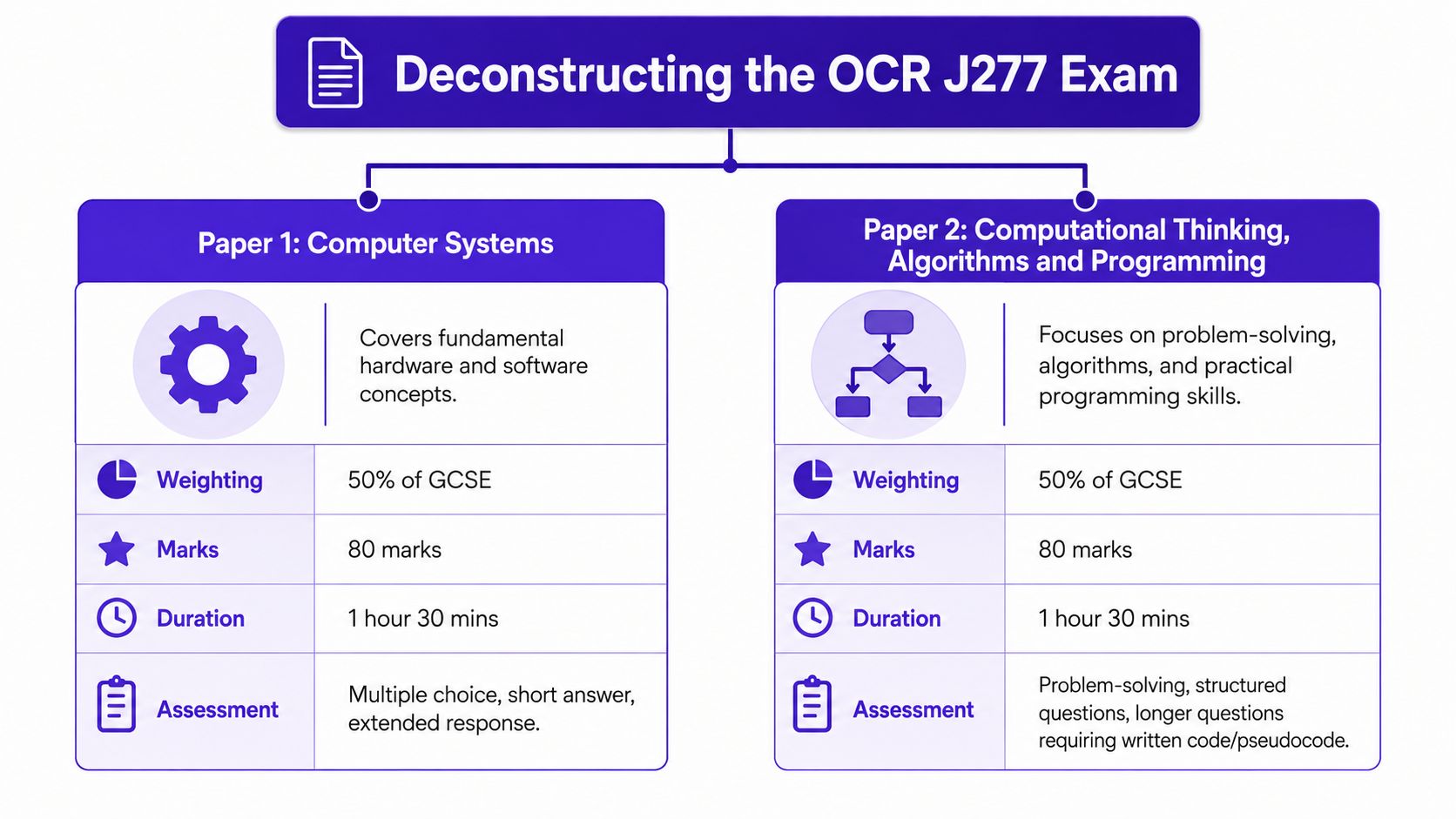
The exam is split evenly:
| Paper | Focus | Format |
|---|---|---|
| Paper 1 | Computer Systems | Multiple choice, short answers, extended responses |
| Paper 2 | Computational Thinking, Algorithms and Programming | Problem-solving, structured questions, longer code or pseudocode responses |
Each paper is worth 50% of the GCSE, carries 80 marks, and lasts 1 hour 30 minutes. That balance matters. Students sometimes treat Paper 1 as “the theory paper” and Paper 2 as “the coding paper”, but that simplification can be misleading. Both papers need precise written answers.
For topic-by-topic specification coverage, many students use focused resources for OCR GCSE Computer Science so they can match revision directly to J277 rather than revising generic GCSE computing content.
What the papers actually test
Paper 1 tends to reward secure technical knowledge. You need to know hardware, software, memory, storage, networks, security, and wider issues. But “know” doesn't just mean recognise the term. OCR often wants you to apply it to a situation.
Paper 2 is where many students feel exposed. It includes algorithms, trace tables, logic, programming concepts, and problem-solving. It's not enough to vaguely understand a binary search or a loop. You need to follow it step by step and write clearly.
The students who improve fastest are usually the ones who stop calling one paper “easy theory” and the other “hard coding”. Both papers are really about accurate thinking.
Reading the assessment logic
A useful way to interpret OCR J277 is through the common assessment habits behind the questions:
- Recall: Can you state facts, definitions, rules and technical terms accurately?
- Apply: Can you use that knowledge in a specific context, such as a storage calculation or a system scenario?
- Analyse and evaluate: Can you compare, justify, spot errors, or explain consequences?
That's why simple note-reading often feels less effective than expected. The exam doesn't just ask, “Do you know this?” It often asks, “Can you use this correctly, in this form, under time pressure?”
Why this matters for revision planning
If your revision is all flashcards and no problem practice, you're underpreparing.
If your revision is all past papers without filling knowledge gaps, you're also underpreparing.
OCR GCSE Computer Science works best when revision mirrors the papers. That means one part content security, one part application, and one part exam technique. Once students understand that structure, their revision usually becomes much more efficient.
Mastering the High-Impact Topics
Not every topic in OCR GCSE Computer Science pulls equal weight in your revision time. Some areas are like hubs. They connect to lots of other questions and expose common mistakes quickly. If you want smarter revision, start with those hubs.
Data representation first
A foundational fact in OCR teaching materials is that the course is built around binary data representation. Students are expected to know that a bit is the smallest unit, that 4 bits = 1 nibble, 8 bits = 1 byte, and that decimal-based storage units are used such as 1,000 bytes = 1 kilobyte, 1,000 kilobytes = 1 megabyte, and 1,000 megabytes = 1 gigabyte in OCR-aligned teaching material on data storage and units.
This topic matters because OCR-style questions often make you calculate or convert across several steps. Students often don't lose marks because the maths is difficult. They lose marks because they rush the unit change or mix up bits and bytes.
A simple habit helps. Write the unit at every step.
- If the question gives bits, keep writing bits
- If you convert to bytes, label the new value
- If you move to kilobytes or megabytes, show the division clearly
That feels basic, but it prevents a lot of avoidable errors.
Character sets and low-level detail
Students often think they “know” ASCII and Unicode because they can recite a definition. Then the exam asks why Unicode matters, or asks them to apply that knowledge to real data, and they freeze.
The issue isn't usually lack of theory. It's shallow theory. You need to know when the idea becomes useful. If a character set question appears, OCR usually wants more than the label. It wants the reason.
If your answer could fit almost any computing question, it's probably too vague for full marks.
Algorithms that reward precision
The J277 specification explicitly includes binary search and merge sort, and expects students to trace algorithms using trace tables and identify common errors. The specification-linked guidance also notes the efficiency contrast: binary search operates at O(log n) and merge sort at O(n log n), while less efficient methods such as linear search and bubble sort are slower in the usual comparisons in this OCR J277 specification summary.
What should you revise here?
Focus on these three things
Pre-conditions
Binary search only works on sorted data. Students often know the steps but forget the condition.Tracing
Don't just memorise the algorithm. Practise followinglow,high, andmidcarefully.Explaining choice
If OCR asks why one algorithm is efficient, you need to connect the method to the number of comparisons or the way the data is split.
Programming fundamentals that keep appearing
Programming revision often gets left too late because students tell themselves they'll “just practise some Python later”. That's risky. OCR rewards method. You need to be comfortable with variables, selection, iteration, arrays or lists, subroutines, testing and debugging logic.
A lot of weak answers come from this pattern:
| Student thought | What goes wrong |
|---|---|
| “I know what a loop is” | They can't predict output accurately |
| “I've seen pseudocode before” | They panic when the syntax looks unfamiliar |
| “I can code on a computer” | They struggle to write code by hand under exam conditions |
The fix is to alternate modes of practice. Write code. Trace code. Correct faulty code. Explain code.
That mix is what turns knowledge into marks.
Thinking Like an Examiner to Maximise Marks
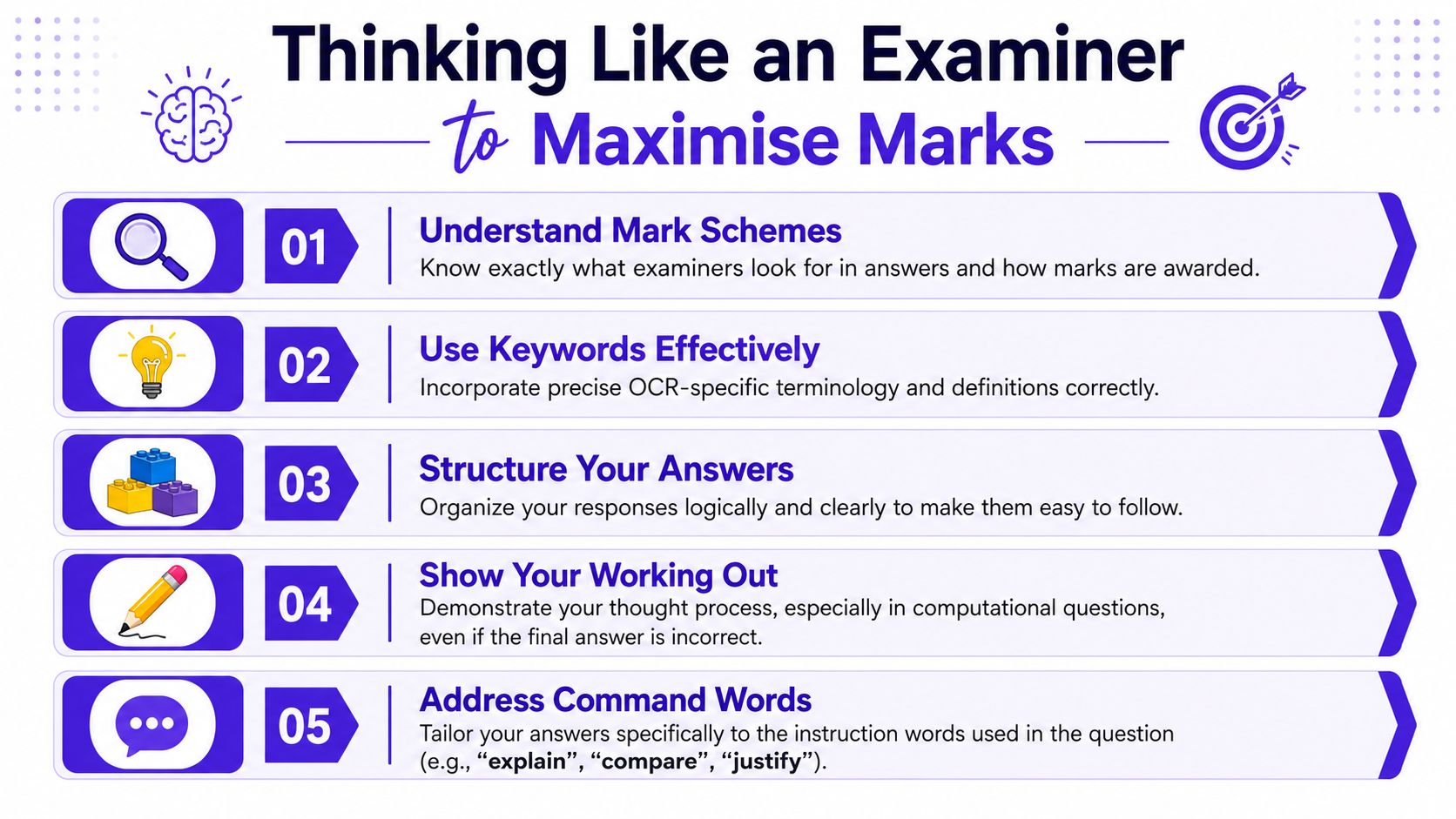
Most students spend too much time asking, “What topic is this?” and not enough time asking, “What answer shape does OCR want?” That second question is often the one that changes a grade.
A major weak spot in OCR GCSE Computer Science revision is that students get lots of content support, but far less direct teaching on command words and mark-scheme logic. OCR's assessment model makes that gap important, especially for students wondering what counts as a strong longer answer on OCR's GCSE Computer Science assessment page.
The command word changes the job
Students often treat these as interchangeable. They aren't.
- Describe usually wants accurate features or steps.
- Explain wants cause and effect. Why does it happen? How does one thing lead to another?
- Compare needs both sides, not just one.
- Evaluate needs judgement, often with a supported conclusion.
- Justify means you must defend a choice, not merely name it.
If a student writes a perfect description for an explain question, it can still fall short.
Use the mark count as a clue
The number of marks usually tells you how much development OCR expects. A short question may need one clear point. A longer one usually needs several distinct developed ideas.
Here's a practical rule of thumb:
| Marks on question | What to aim for |
|---|---|
| 1 to 2 | One accurate point, tightly stated |
| 3 to 4 | More than one point, with some development |
| Longer response | Multiple developed points, organised clearly, with technical vocabulary |
That's why revision materials for OCR students can be useful when they show not just the right answer, but why that answer earns marks and where a weaker one falls short.
A helpful video can reinforce this style of thinking:
A reliable structure for longer answers
For extended responses, use a simple examiner-friendly pattern:
- Answer the question directly
- Add a technical reason
- Develop the consequence
- If needed, compare or judge
For example, if asked to explain why solid-state storage may be suitable in a given situation, don't stop at “it is faster”. Add what that means for the user or device.
Strong answers don't sound fancy. They sound precise.
Common written-answer mistakes
- Giving examples instead of explanations
- Repeating the question wording without adding meaning
- Using everyday language where a technical term is needed
- Writing one long paragraph with no clear separate points
When students improve here, their marks often rise faster than they expect, because they already know more content than they realise. They just haven't been packaging it in the way the mark scheme rewards.
Exam Question Walkthrough A Binary Search Trace Table
This is one of those OCR GCSE Computer Science tasks that looks scary until you have a method. Once you do, it becomes mechanical.
The J277 algorithmic assessment expects students to use standard efficient techniques including binary search and to trace execution using trace tables while spotting common errors. That tracing and debugging focus sits right at the heart of AO2 computational thinking in this OCR J277 summary.
Start with the condition students forget
Binary search only works if the list is sorted.
Check that first. Every time.
Now take a simple sorted list:
[3, 7, 12, 18, 21, 29, 34]
Suppose the target is 21.
You're usually tracking three values:
- low
- high
- mid
A trace table might look like this:
| Step | low | high | mid | value at mid | Action |
|---|---|---|---|---|---|
| Start | 0 | 6 | 3 | 18 | Target is bigger, move low |
| Next | 4 | 6 | 5 | 29 | Target is smaller, move high |
| Next | 4 | 4 | 4 | 21 | Found |
Narrate the process calmly
At the start, low = 0 and high = 6 because there are seven items and the final index is 6.
Now find the middle index. In this example, mid = 3. The value at index 3 is 18. Since 21 is bigger than 18, the lower half is no use now, so move low to one above mid.
That gives low = 4, high = 6. Recalculate mid. Now mid = 5. The value there is 29. This time the target is smaller, so move high to one below mid.
Now low = 4, high = 4. The middle is 4. Index 4 contains 21, so the search ends.
Where students usually lose marks
The mistakes are very consistent:
- Off-by-one errors: Moving
loworhighincorrectly - Midpoint slips: Calculating the middle index wrongly
- Using values instead of indices: Confusing position with content
- Rushing the stop condition: Carrying on after the target is already found
Binary search questions reward patience more than speed.
If you want to practise this properly, use GCSE Past Papers and force yourself to write each line of the trace table, not just think it through mentally. That's what the exam demands.
A method you can repeat in the exam
Use this checklist every time:
- Confirm the list is sorted
- Write the start values for low and high
- Calculate mid carefully
- Compare target with value at mid
- Update only one boundary
- Repeat until found or no range remains
Students who do that steadily often outperform students who “kind of get binary search” but try to do it all in their head.
Your Practical 8-Week Revision Plan
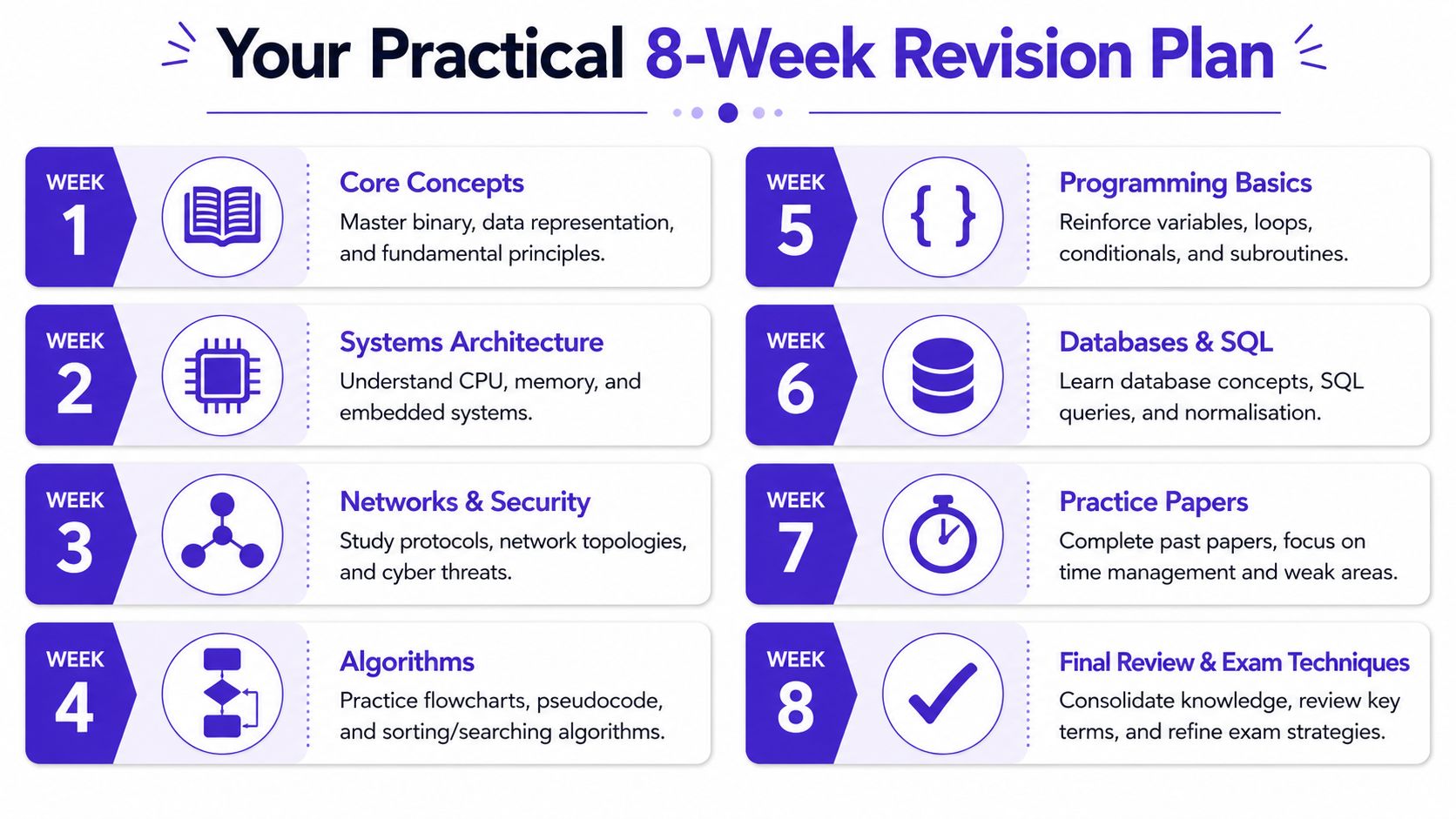
When students say they're overwhelmed by OCR GCSE Computer Science, the problem is often structural. They haven't broken the subject into a workable routine. A clear plan fixes that.
Weeks 1 to 4 build the core
Use the first half to secure the content that causes the most repeat errors.
Week 1
Rebuild the basics. Focus on binary, storage units, conversion, and key terminology. Keep sessions short, but insist on written practice.Week 2
Cover systems architecture, memory, storage and embedded systems. Mix recall with short explain questions.Week 3
Study networks and security. Practise giving clear differences between terms instead of muddled definitions.Week 4
Work on algorithms. Trace tables should be a priority. Don't just read worked examples. Complete them yourself.
Weeks 5 to 8 turn knowledge into marks
The second half should shift from learning to performance.
| Week | Main focus | What to do |
|---|---|---|
| 5 | Programming basics | Write, trace, and debug short code snippets |
| 6 | Databases and SQL | Practise terminology and applied questions |
| 7 | Practice papers | Work under timed conditions and review weak spots |
| 8 | Final review | Tighten command words, common mistakes, and exam routines |
How to use each study session
A lot of revision time gets wasted because sessions are too passive. Use a three-part rhythm instead:
Recall first
Start by writing what you remember without notes.Check and correct
Compare with trusted materials and fix gaps.Apply
Finish with exam questions, not more reading.
That structure keeps revision active.
Ten minutes of retrieval plus one exam question usually beats forty minutes of highlighting.
If you're behind, simplify
You do not need a perfect colour-coded timetable. You need consistency.
If motivation is low, aim for one Paper 1 task and one Paper 2 task each weeknight, then a longer mixed session at the weekend. If motivation is high, don't turn that into endless note-making. Push it into timed answers and self-correction instead.
The best revision plans are not the prettiest ones. They're the ones you'll follow.
The MasteryMind Edge From Theory to Examiner-Ready
By this point, the pattern should be clear. OCR GCSE Computer Science isn't only about memorising facts. Students need to recognise common traps, answer to the command word, and practise the exact thinking style the paper rewards.
That's especially true in the areas students regularly stumble over. Public OCR revision walkthroughs repeatedly point to binary, hexadecimal, and character sets as troublesome areas, with the bigger gap being not the facts themselves but the error patterns students make under timed conditions in this OCR revision walkthrough on Paper 1 weak spots.

What students usually need next
Most learners don't need more random information. They need better feedback.
They need to know:
- Which mistakes keep repeating
- Which command words they mishandle
- Whether they can apply knowledge under time pressure
- Whether they can move from recall into explanation and judgement
That's where a revision platform can be useful, if it mirrors the actual specification rather than throwing out generic quizzes.
Turning practice into something measurable
One practical option is MasteryMind, which is built around UK exam specifications and includes OCR-aligned revision tasks, examiner-style feedback, AO breakdowns, and support for tasks such as trace tables and binary or hexadecimal practice. Used properly, that kind of tool can help students move from “I revised this” to “I can score on this”.
For teachers, the value is straightforward. You can direct students towards practice that matches J277 language and question style rather than asking them to decode the exam format alone.
For students, the value is just as practical. You get quicker feedback on whether your answer would likely earn marks, not just whether it sounds plausible to you.
The real edge
The students who do best in OCR GCSE Computer Science usually combine three habits:
- They know the content accurately
- They understand how OCR asks for it
- They practise enough to catch their own mistakes
That's the difference between being revision-busy and being examiner-ready.
If you want a structured way to practise OCR GCSE Computer Science with examiner-style questions, feedback tied to command words, and revision that matches UK specifications, take a look at MasteryMind. It's a practical next step if you want to turn revision into mark-scoring performance.
Ready to master this topic?
Practise with quizzes, blurt exercises and exam questions on MasteryMind.
7 days Premium · Then free forever · No card, no charge