Pearson Edexcel · GCSE · Computer Science
Binary
Mastering binary is essential for understanding how computers store and process all data. This topic covers converting between number bases, performing binary arithmetic, understanding shifts, and recognizing overflow — key skills that frequently appear in exams and form the foundation of computer science.
- 7 min read
- 3 worked examples
- 5 practice questions
- 6 key terms
Study Notes
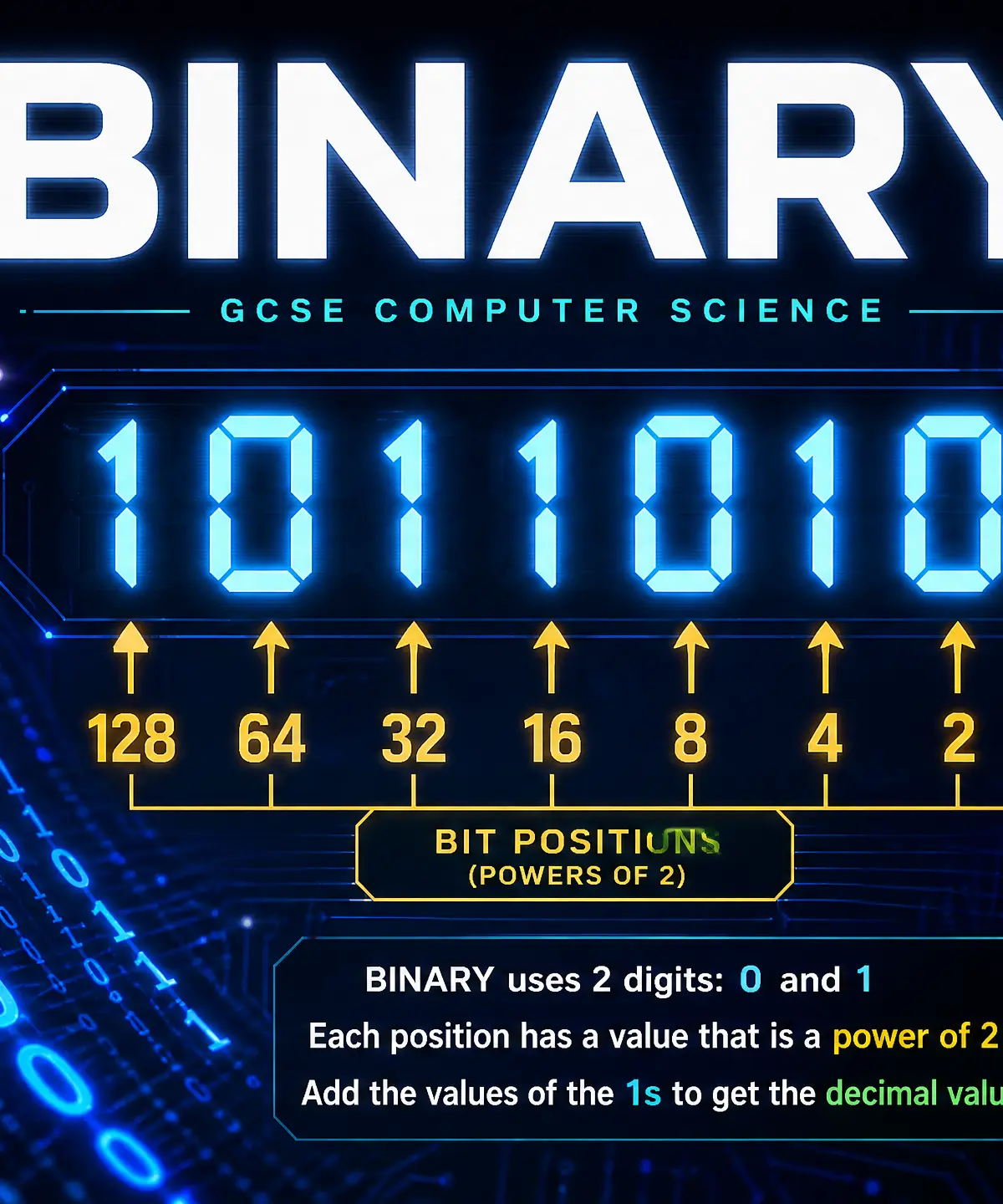
Overview
Welcome to Topic 2.1: Binary. At its core, a computer is just a massive collection of microscopic electronic switches called transistors. Because these switches can only be in one of two states — ON or OFF — computers must represent all data using a system that only has two states. This is the binary number system, which uses only the digits 0 and 1.
Understanding binary is absolutely fundamental to Computer Science. It connects to almost every other topic you will study, from how images and sound are stored (data representation) to how processors execute instructions (CPU architecture). In your exam, you will frequently be asked to convert between number bases, perform calculations, and explain the effects of binary shifts. These are often straightforward marks if you know the methods, so mastering this topic is a great way to boost your grade.
Listen to the revision podcast below for a comprehensive walk-through of these concepts:

Key Concepts
Concept 1: Number Bases and Place Value
In our everyday lives, we use the denary (or decimal) number system. This is Base-10, meaning it uses ten digits (0-9), and each column's place value is 10 times greater than the column to its right (1s, 10s, 100s, 1000s).
Computers use binary, which is Base-2. It uses only two digits (0 and 1), and each column's place value is 2 times greater than the column to its right. For an 8-bit binary number (a byte), the place values from right to left are: 1, 2, 4, 8, 16, 32, 64, and 128.
Example: The binary number 10110101.
To find its denary value, simply add up the column values where there is a 1:
128 + 0 + 32 + 16 + 0 + 4 + 0 + 1 = 181.
Concept 2: Converting Denary to Binary
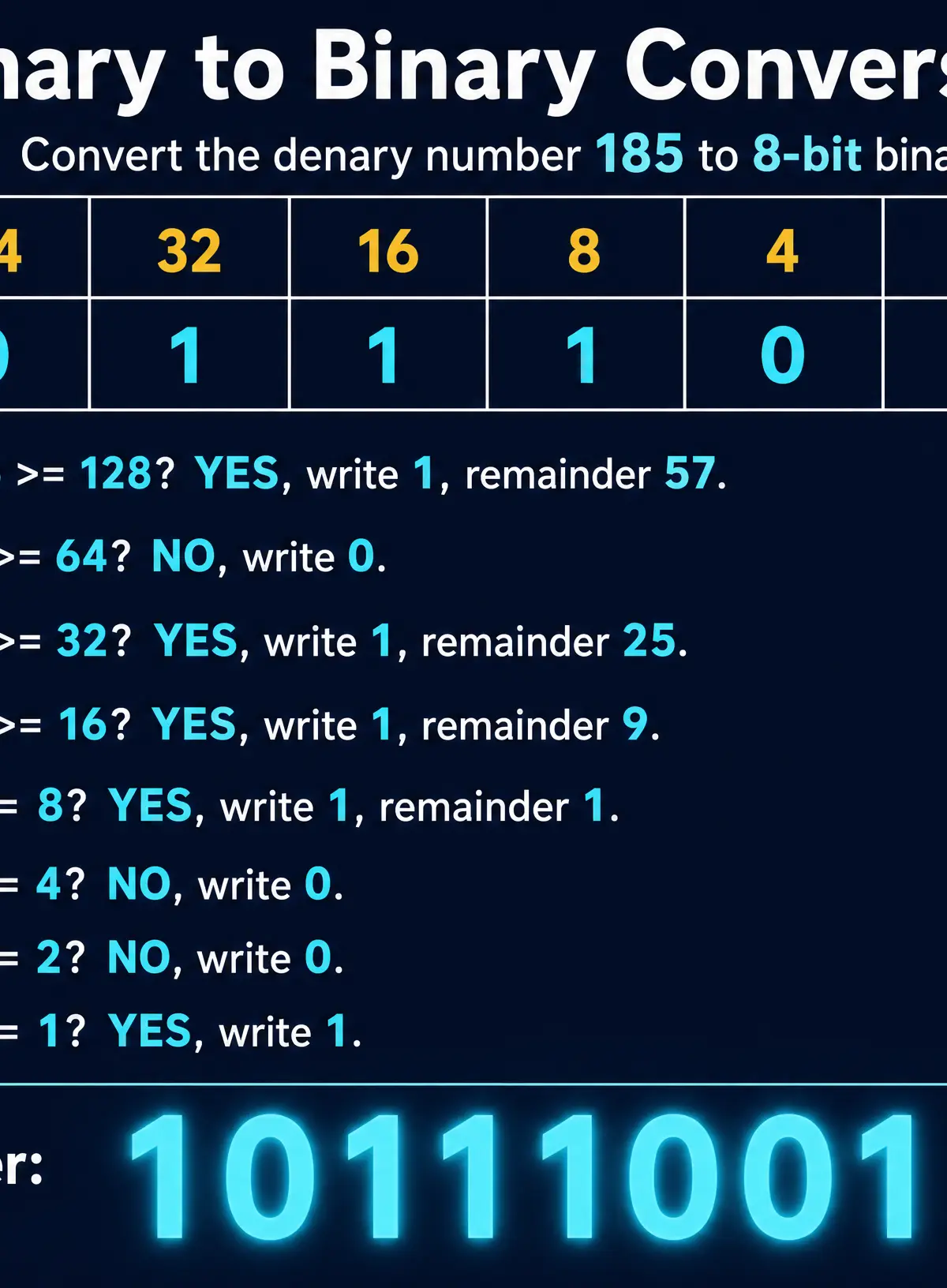
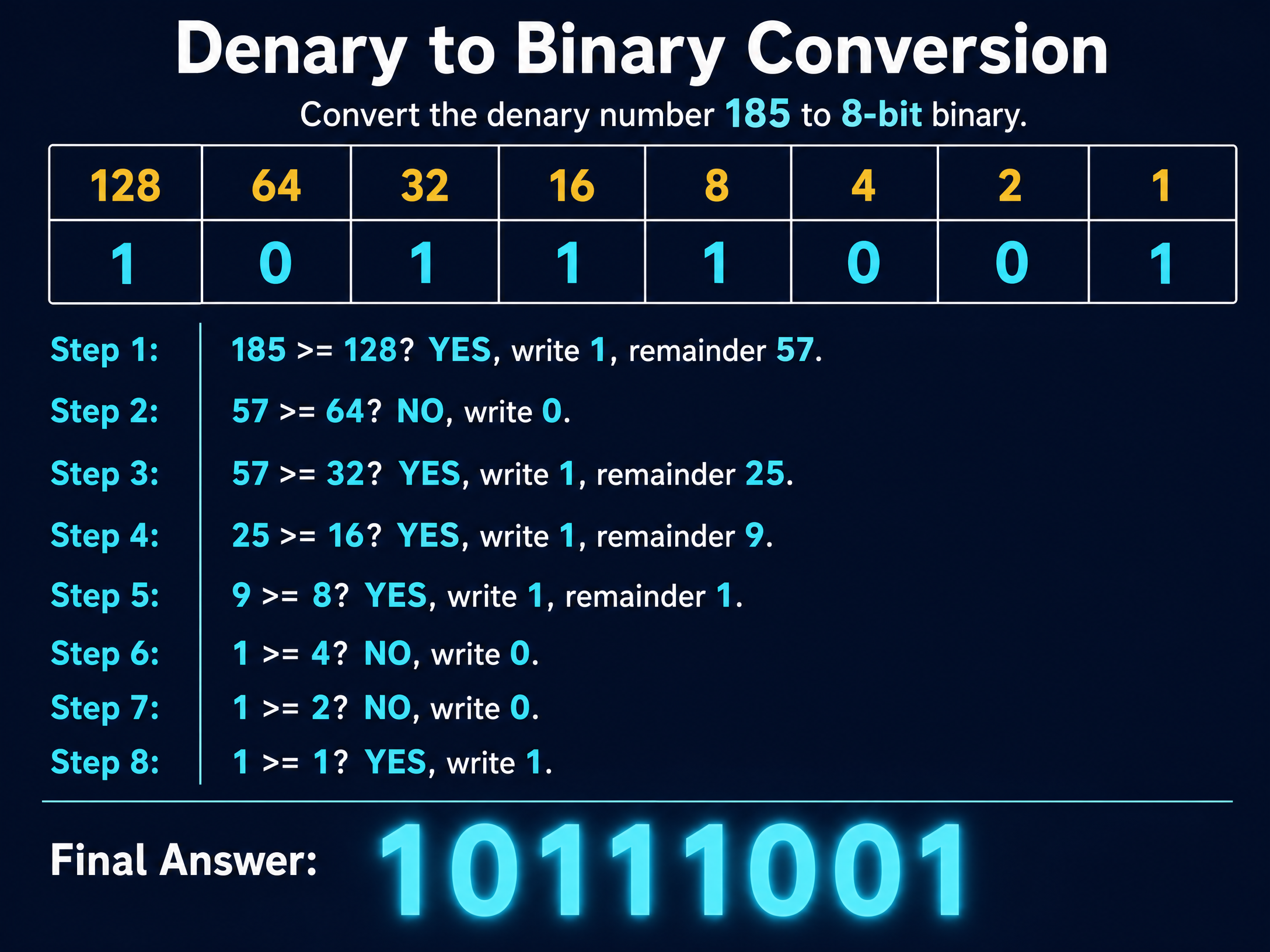
To convert a denary number into 8-bit binary, we use the subtraction method. Start from the largest column value (128) on the left and work your way down to 1.
Ask yourself: "Is my current number greater than or equal to the column value?"
- If YES: Write a
1in that column, subtract the column value from your number, and carry the remainder to the next column. - If NO: Write a
0in that column and carry the current number to the next column.
Concept 3: Binary Addition and Overflow
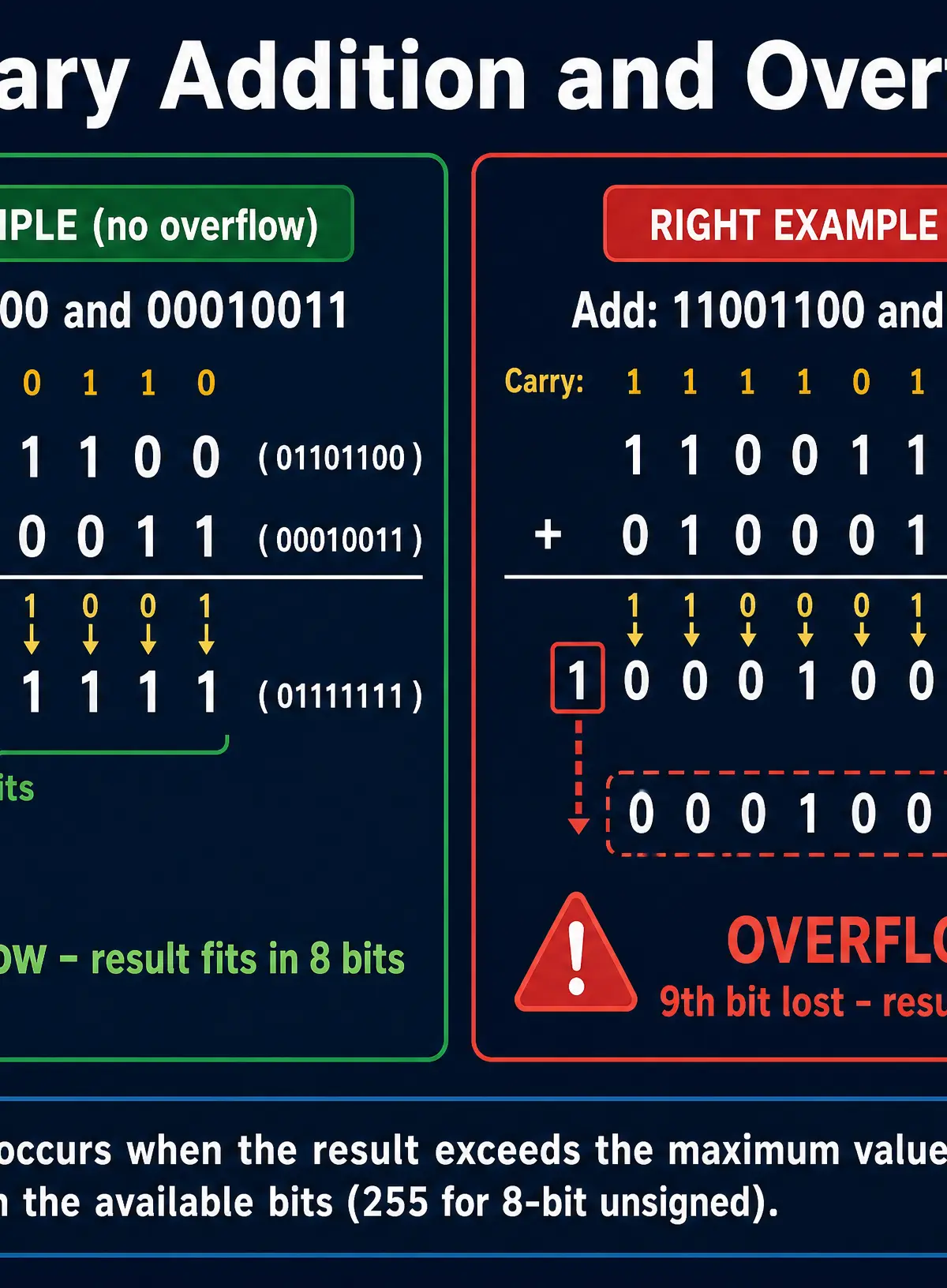
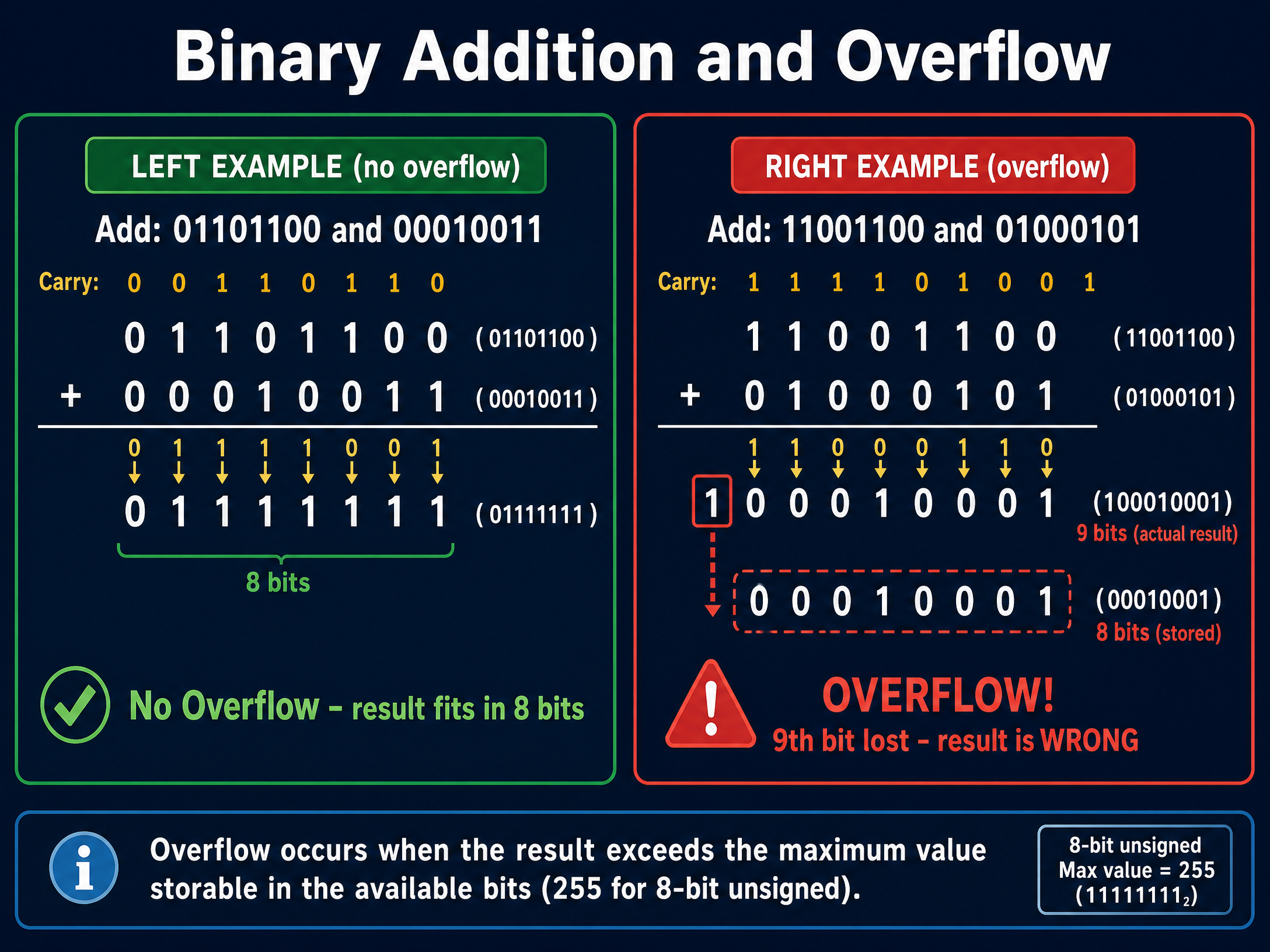
Adding binary numbers is similar to adding denary numbers using column addition. You work from right to left. There are four simple rules to remember:
0 + 0 = 01 + 0 = 11 + 1 = 0, carry1(because 2 in denary is10in binary)1 + 1 + 1 = 1, carry1(because 3 in denary is11in binary)
Overflow occurs when the result of an addition requires more bits than are available to store it. For example, adding two 8-bit numbers might produce a 9-bit result. Because the computer can only store 8 bits, the 9th bit (the most significant bit) is lost, resulting in an incorrect stored value.
Concept 4: Binary Shifts
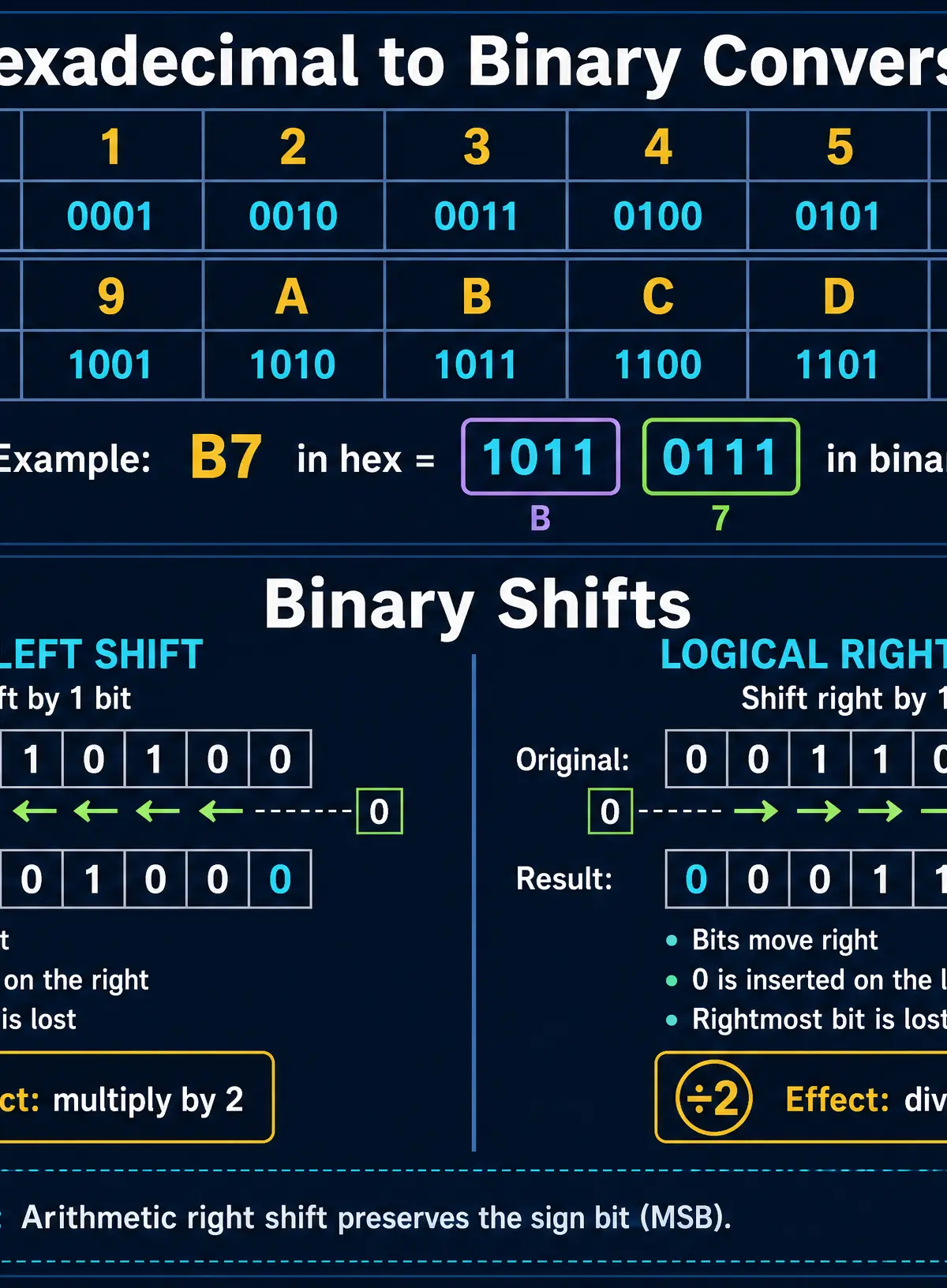
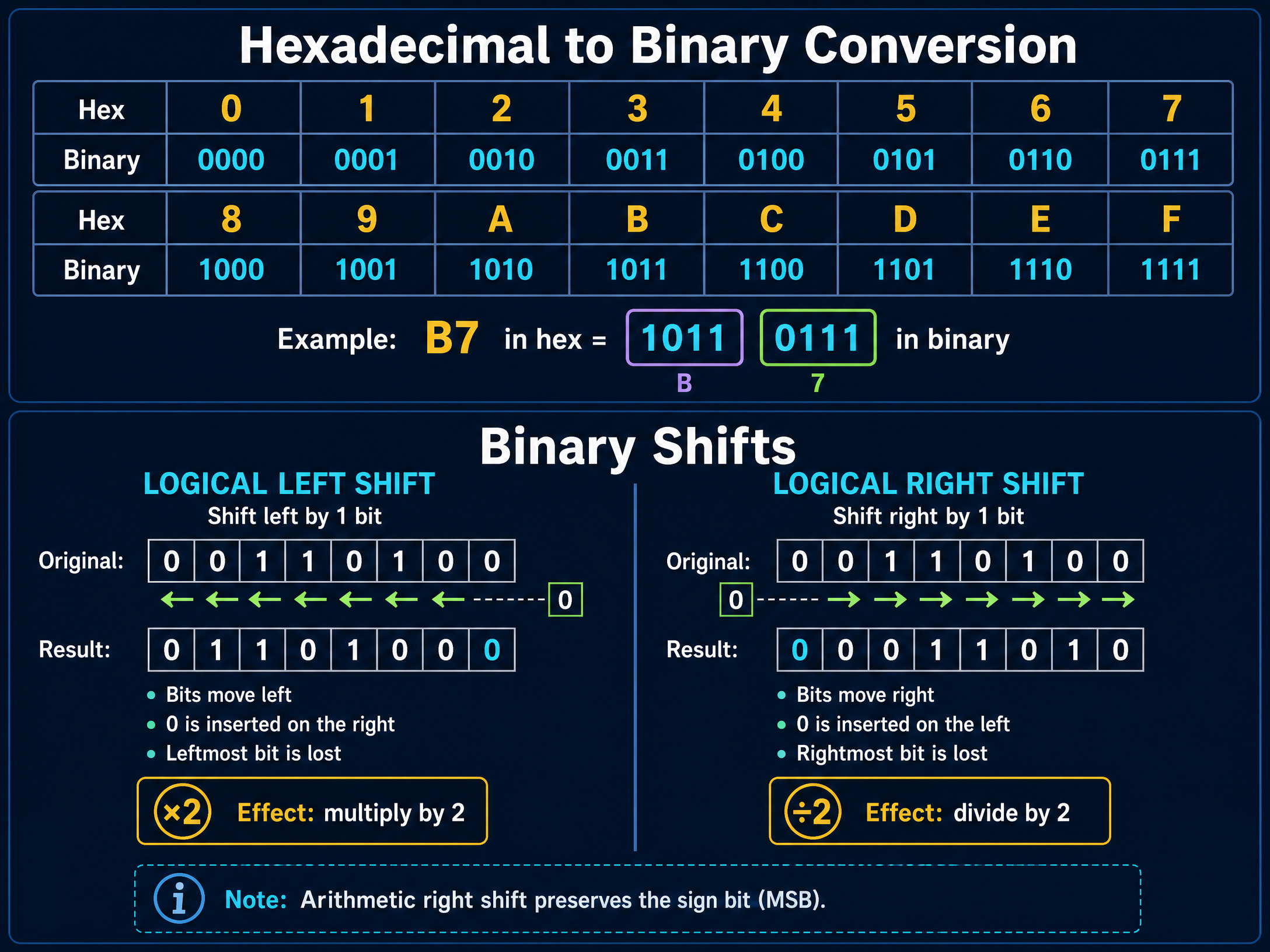
A binary shift moves all the bits in a binary pattern to the left or right.
- Logical Left Shift: Moves all bits to the left. The leftmost bit is discarded, and a
0is inserted on the right. Effect: Multiplies the number by 2. - Logical Right Shift: Moves all bits to the right. The rightmost bit is discarded, and a
0is inserted on the left. Effect: Divides the number by 2 (discarding any remainder). - Arithmetic Right Shift: Moves all bits to the right, but instead of inserting a
0on the left, it copies the original sign bit (the leftmost bit). Effect: Divides a signed (two's complement) number by 2 while preserving its positive/negative sign.
Concept 5: Hexadecimal (Base-16)
Hexadecimal (or hex) is a Base-16 number system. It uses 16 digits: 0-9 and then the letters A-F (where A=10, B=11, C=12, D=13, E=14, F=15).
Why use hex? Because it is much easier for humans to read and write than long strings of binary. It is less prone to errors.
The golden rule of hex is that one hexadecimal digit perfectly represents four binary bits (a nibble).
To convert binary to hex:
- Split the 8-bit binary number into two 4-bit nibbles.
- Convert each nibble into its denary equivalent (using column values 8, 4, 2, 1).
- Convert that denary value into its hex digit.
Concept 6: Signed Integers (Two's Complement)
Standard binary can only represent positive numbers (unsigned integers). To represent negative numbers, we use Two's Complement.
In an 8-bit Two's Complement number, the Most Significant Bit (MSB - the leftmost bit) acts as a sign bit. If it is 0, the number is positive. If it is 1, the number is negative. The column value of the MSB becomes -128 instead of +128.
To convert a negative denary number to Two's Complement binary:
- Write out the positive version of the number in binary.
- Flip all the bits (change 1s to 0s, and 0s to 1s).
- Add 1 to the result.
Example: Convert -46 to 8-bit Two's Complement.
- Positive 46 in binary:
00101110 - Flip the bits:
11010001 - Add 1:
11010010
Mathematical/Scientific Relationships
Calculating the Number of States
The number of unique combinations (or states) that can be represented by a binary pattern depends on the number of bits available.
Formula: Number of States = 2^n (where n is the number of bits)
- Must memorise
Examples:
- 1 bit = 2^1 = 2 states (0, 1)
- 4 bits (nibble) = 2^4 = 16 states (0 to 15)
- 8 bits (byte) = 2^8 = 256 states (0 to 255)
Data Capacity Units
You must know the standard multipliers for data capacity. Examiners expect you to know that there are 8 bits in a byte.
- Bit (b): A single 0 or 1
- Nibble: 4 bits
- Byte (B): 8 bits
- Kilobyte (KB): 1,000 bytes (or 1024 bytes in binary prefixes)
- Megabyte (MB): 1,000 KB
- Gigabyte (GB): 1,000 MB
- Terabyte (TB): 1,000 GB
Practical Applications
Understanding binary isn't just theoretical math. It has direct, real-world applications in how computers function:
- Color Representation: In digital images, colors are often represented using 24-bit True Color (8 bits for Red, 8 bits for Green, 8 bits for Blue). This is why you often see hex codes for colors in web design, like
#FF0000for pure red. - MAC Addresses: The physical address of a network interface card is written as six pairs of hexadecimal digits (e.g.,
00:1A:2B:3C:4D:5E) because it is much shorter than writing out 48 binary bits. - Memory Dumps: When software crashes, programmers often look at a "hex dump" of the computer's memory to debug the error. Hex is used because it compactly represents the binary data actually stored in the RAM.
Visual Resources
3 diagrams and illustrations
Interactive Diagrams
2 interactive diagrams to visualise key concepts
Conceptual Flow Outline
Flowchart showing the algorithm for converting a negative denary number to Two's Complement binary.
Conceptual Flow Outline
Decision tree for identifying overflow after 8-bit binary addition.
Worked Examples
3 worked examples — open one to explore the question and available guidance.
Practice Questions
Test your understanding — click to reveal model answers
Convert the 8-bit binary number 11001010 to denary. (1 mark)
Hint: Write out the column values 128, 64, 32, 16, 8, 4, 2, 1 and add up the values where there is a 1.
Perform a logical left shift of 2 places on the binary number 00011100. State the new binary number and its denary value. (2 marks)
Hint: Move all bits two spaces left. Fill the two empty spaces on the right with zeros.
Explain why a programmer might choose to display a memory address in hexadecimal rather than binary. (2 marks)
Hint: Think about human readability and error rates.
Calculate the addition of the binary numbers 10011011 and 01110110. Explain whether an overflow error has occurred. (3 marks)
Hint: Perform the addition carefully. Check the leftmost column.
Using Two's Complement, represent the denary number -54 in 8-bit binary. Show your working. (3 marks)
Hint: Find positive 54 first. Then flip the bits. Then add 1.