Pearson Edexcel · GCSE · Computer Science
Data
Master the language of computers. This topic covers how binary underpins everything from text and images to sound and data compression, ensuring you can secure crucial calculation marks in your exam.
- 6 min read
- 3 worked examples
- 5 practice questions
- 6 key terms
Study Notes
Overview
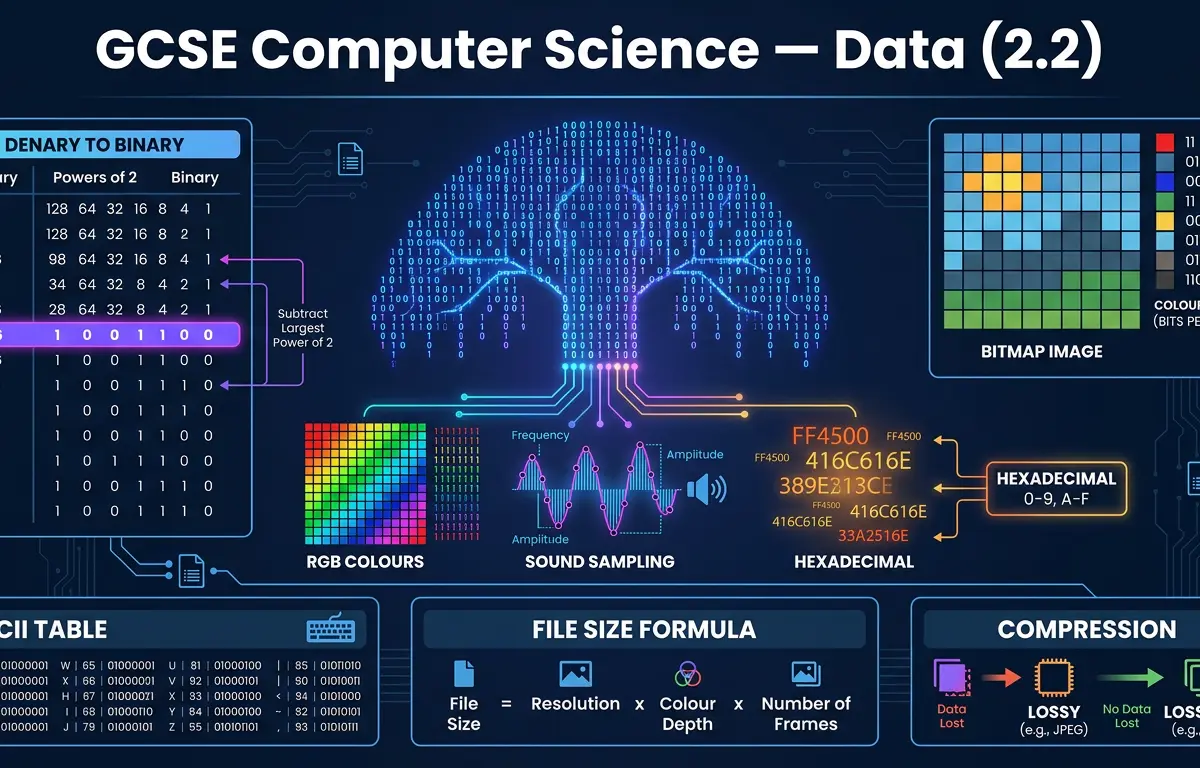
Data representation is the foundational language of computing. Every photo you take, every message you send, and every video you stream is ultimately reduced to a sequence of 1s and 0s. In this topic, we explore how computers achieve this remarkable feat using the binary number system.
This topic is crucial because it forms the basis of computer architecture, networks, and programming. Examiners love to test your understanding here through calculations (converting between number systems, calculating file sizes) and explanations (comparing compression techniques). A solid grasp of binary arithmetic and data formats will secure you significant marks across both exam papers.
Listen to the Revision Podcast
Before diving into the detailed notes, listen to our 10-minute audio guide. It covers all the core concepts, common exam mistakes, and includes a quick-fire recall quiz.

Key Concepts
Concept 1: Number Systems (Denary, Binary, and Hexadecimal)
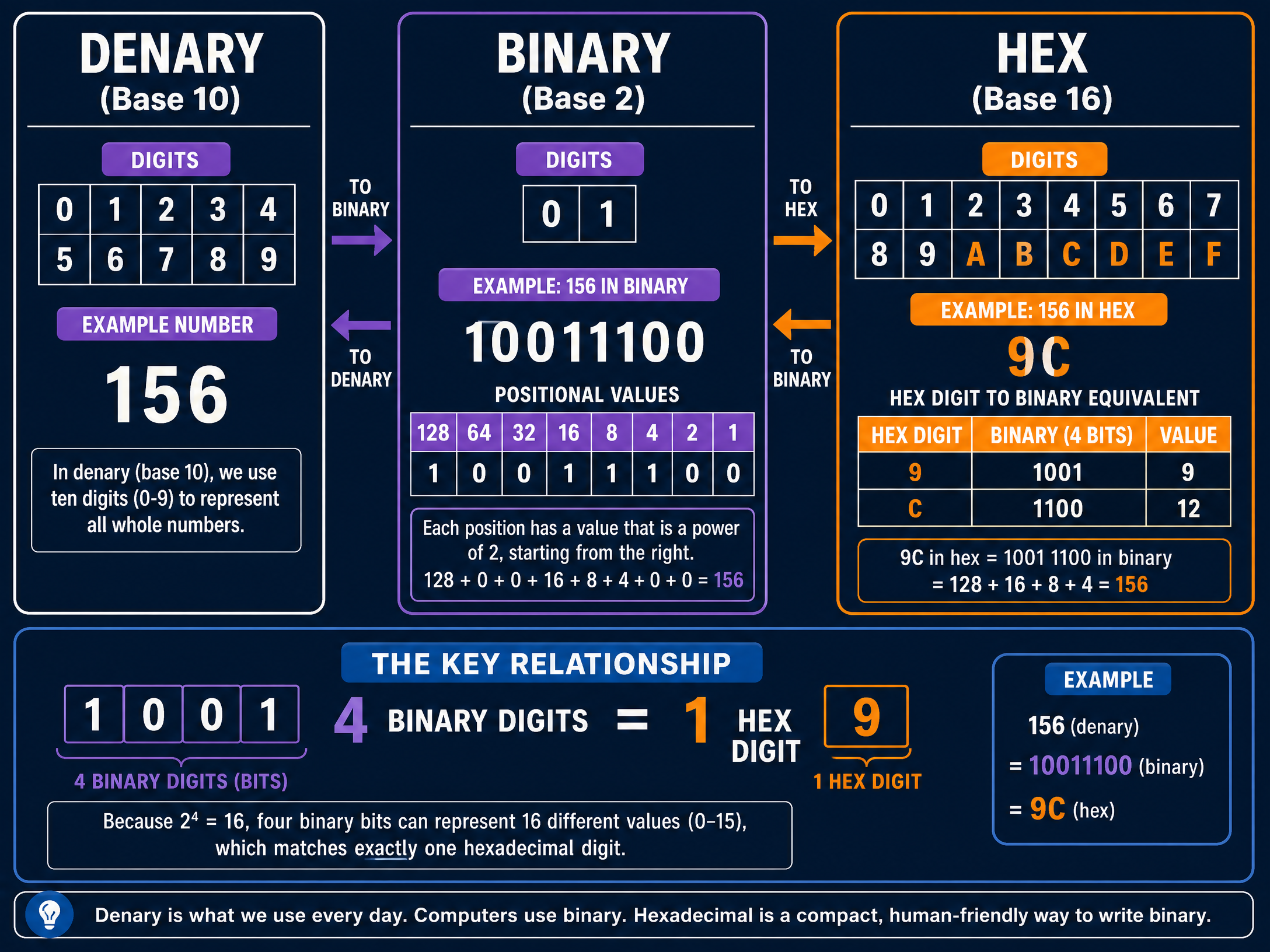
Humans use denary (base-10), which has 10 digits (0-9). Computers use binary (base-2) because their processors are made of billions of microscopic switches (transistors) that can only be in one of two states: ON (1) or OFF (0).
To make binary easier for humans to read, we use hexadecimal (base-16). Hexadecimal uses 16 digits: 0-9, followed by A-F (where A=10, B=11, C=12, D=13, E=14, F=15).
The magic rule of hexadecimal is that exactly 4 binary digits (a nibble) equal 1 hexadecimal digit. This makes converting between the two incredibly fast and efficient.
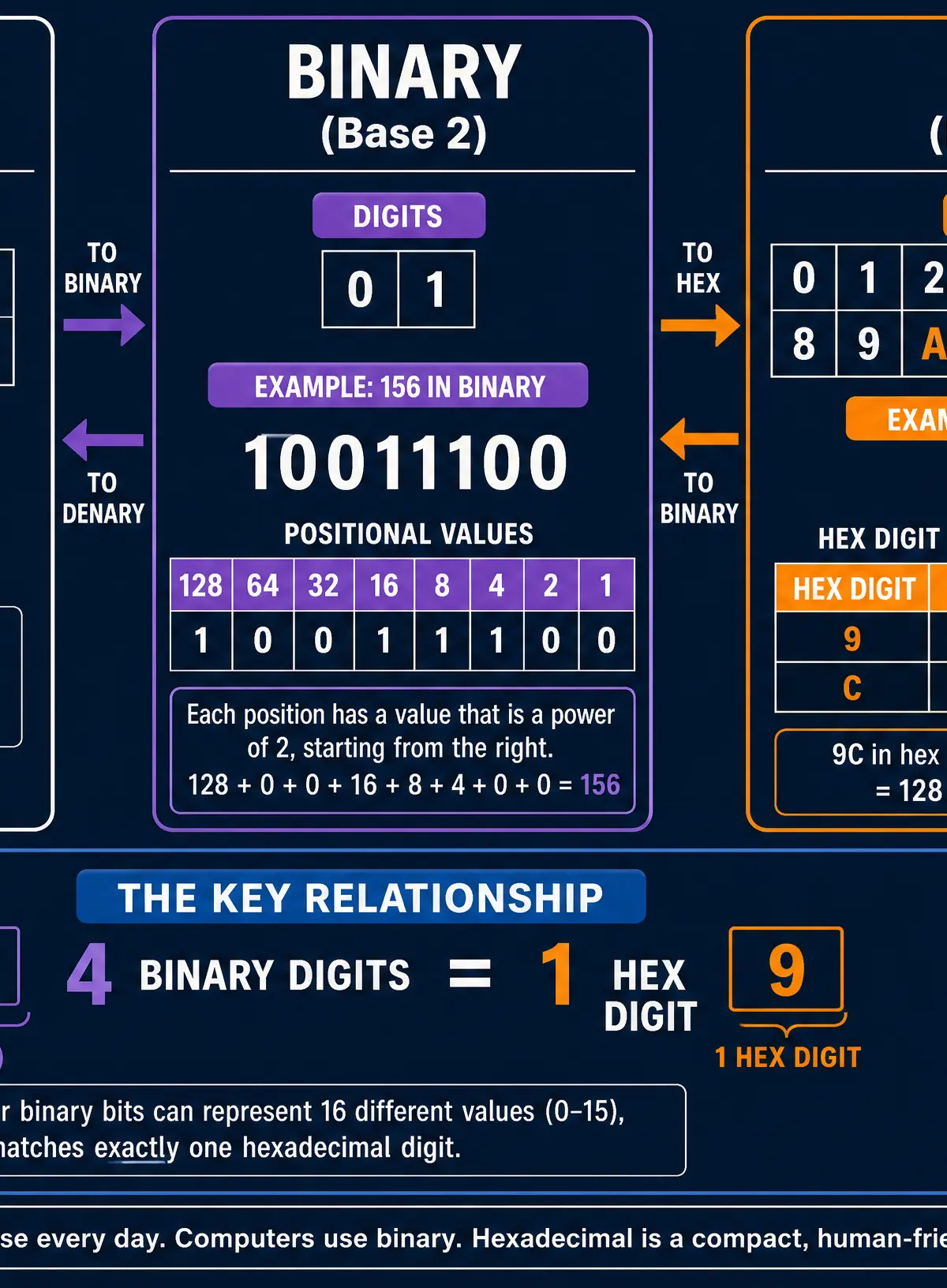
Example: To convert the denary number 156 to binary, we use positional values (powers of 2: 128, 64, 32, 16, 8, 4, 2, 1).
156 = 128 + 16 + 8 + 4.
Placing a 1 under those values gives us 10011100.
To convert 10011100 to hexadecimal, split it into two 4-bit nibbles: 1001 and 1100.
1001= 91100= 12 (which is C in hex)
So, 156 in denary is9Cin hexadecimal.
Concept 2: Binary Arithmetic and Shifts
Computers must perform calculations using binary. You need to know how to add two 8-bit binary numbers.
The rules are:
- 0 + 0 = 0
- 0 + 1 = 1
- 1 + 1 = 10 (0, carry 1)
- 1 + 1 + 1 = 11 (1, carry 1)
If adding two 8-bit numbers results in a 9-bit answer, this is called an overflow error. The computer cannot store the extra bit, leading to an inaccurate result.
A binary shift moves all the bits in a binary number left or right.
- A logical left shift of 1 place multiplies the number by 2.
- A logical right shift of 1 place divides the number by 2 (discarding any remainder).
Concept 3: Representing Text
Computers represent text by assigning a unique binary number to every character. This mapping is called a character set.
- ASCII: Uses 7 bits per character, allowing for 128 unique characters (enough for the English alphabet, numbers, and basic punctuation).
- Extended ASCII: Uses 8 bits, allowing for 256 characters.
- Unicode: Uses 16 or 32 bits, allowing for millions of characters, encompassing every language in the world, plus emojis.
Concept 4: Representing Images and Sound
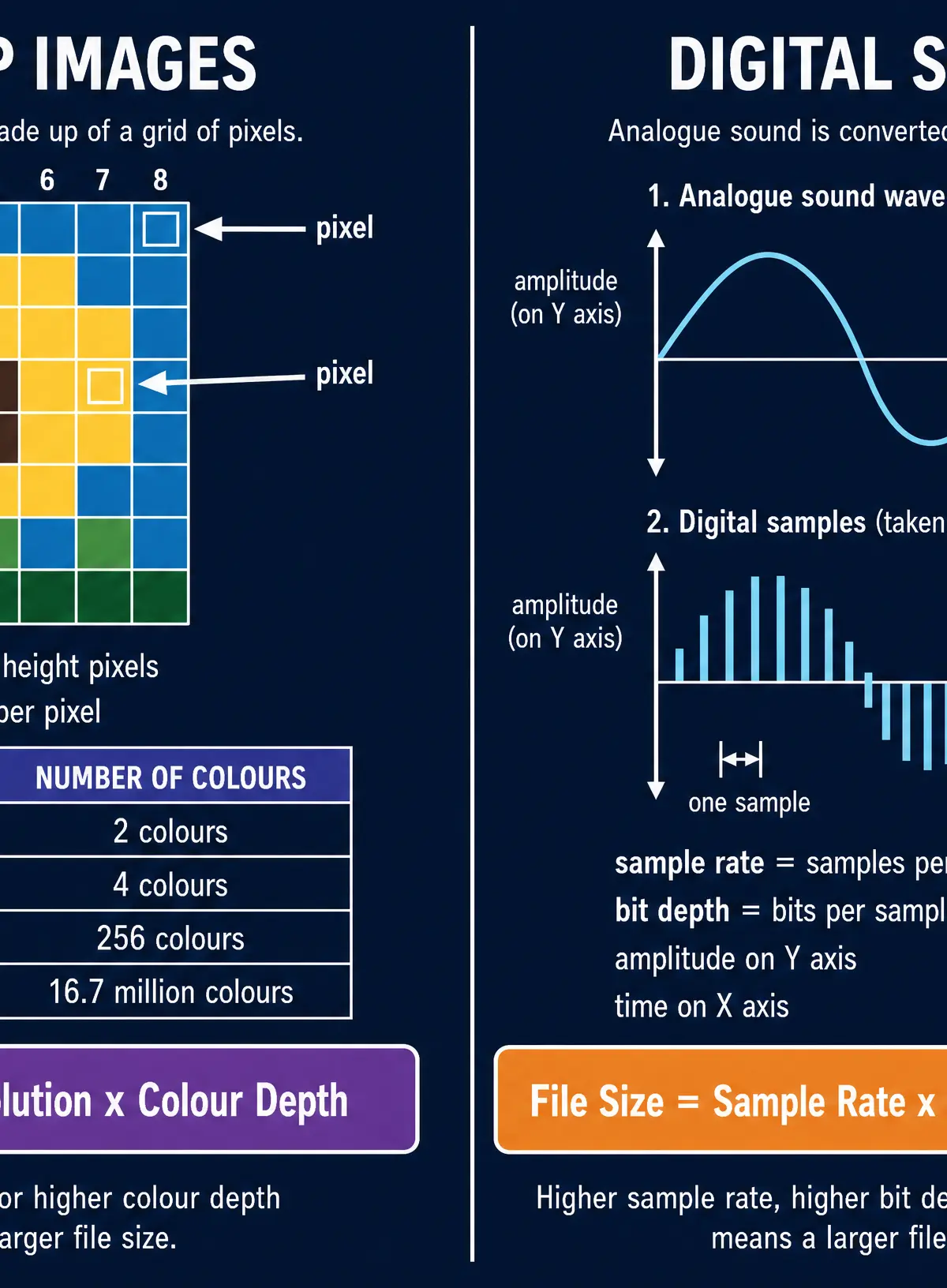
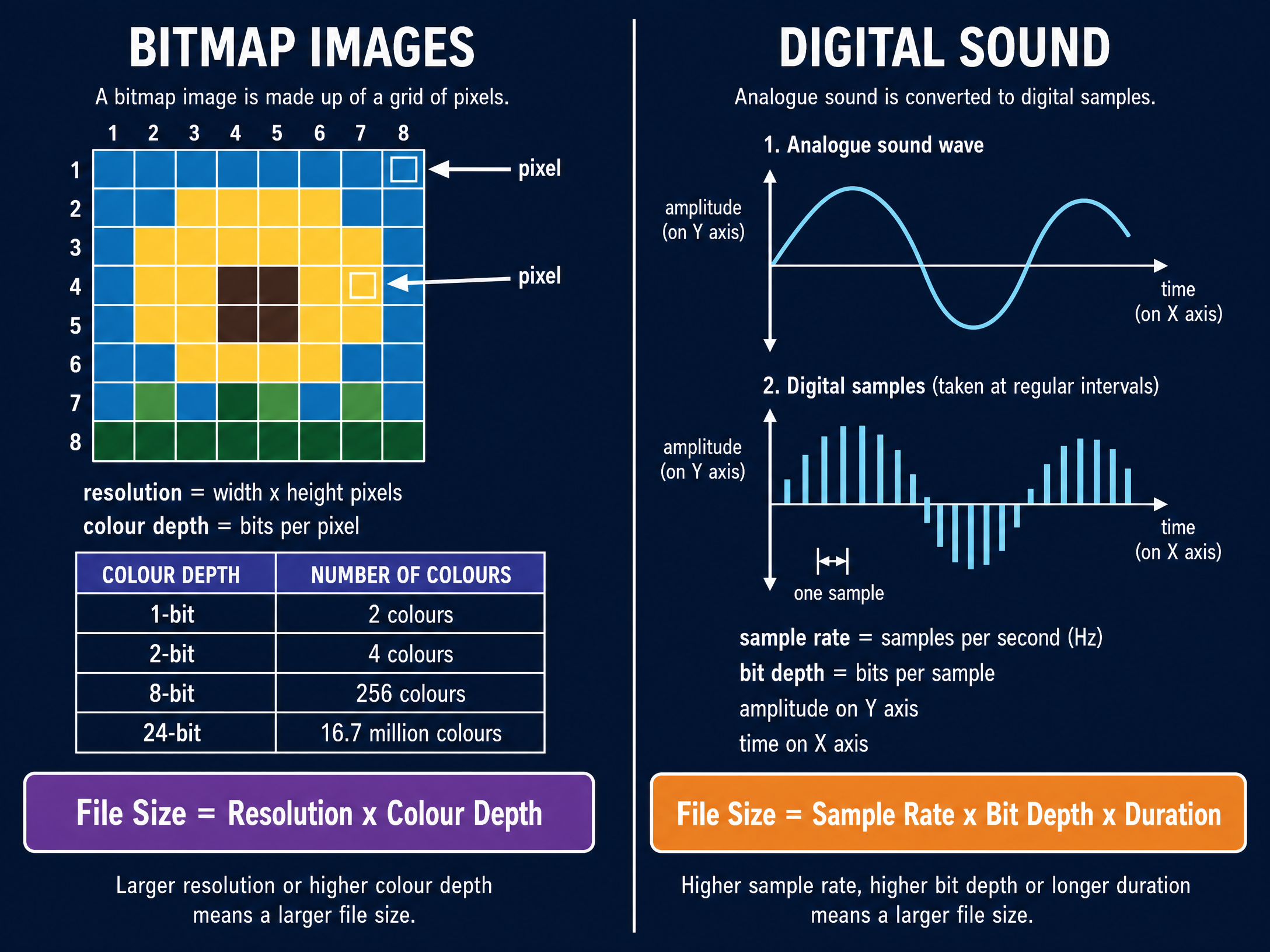
Images are stored as a grid of tiny squares called pixels (picture elements).
- Resolution is the total number of pixels (width × height).
- Colour depth is the number of bits used to represent the colour of a single pixel. A 1-bit colour depth gives 2 colours (black and white). An 8-bit colour depth gives 256 colours.
Sound is analogue (continuous). To store it digitally, the sound wave must be sampled at regular intervals.
- Sample rate: How many samples are taken per second (measured in Hertz, Hz).
- Bit depth: The number of bits used to record the amplitude of each sample.
Higher sample rates and bit depths improve audio quality but increase the file size.
Concept 5: Data Compression
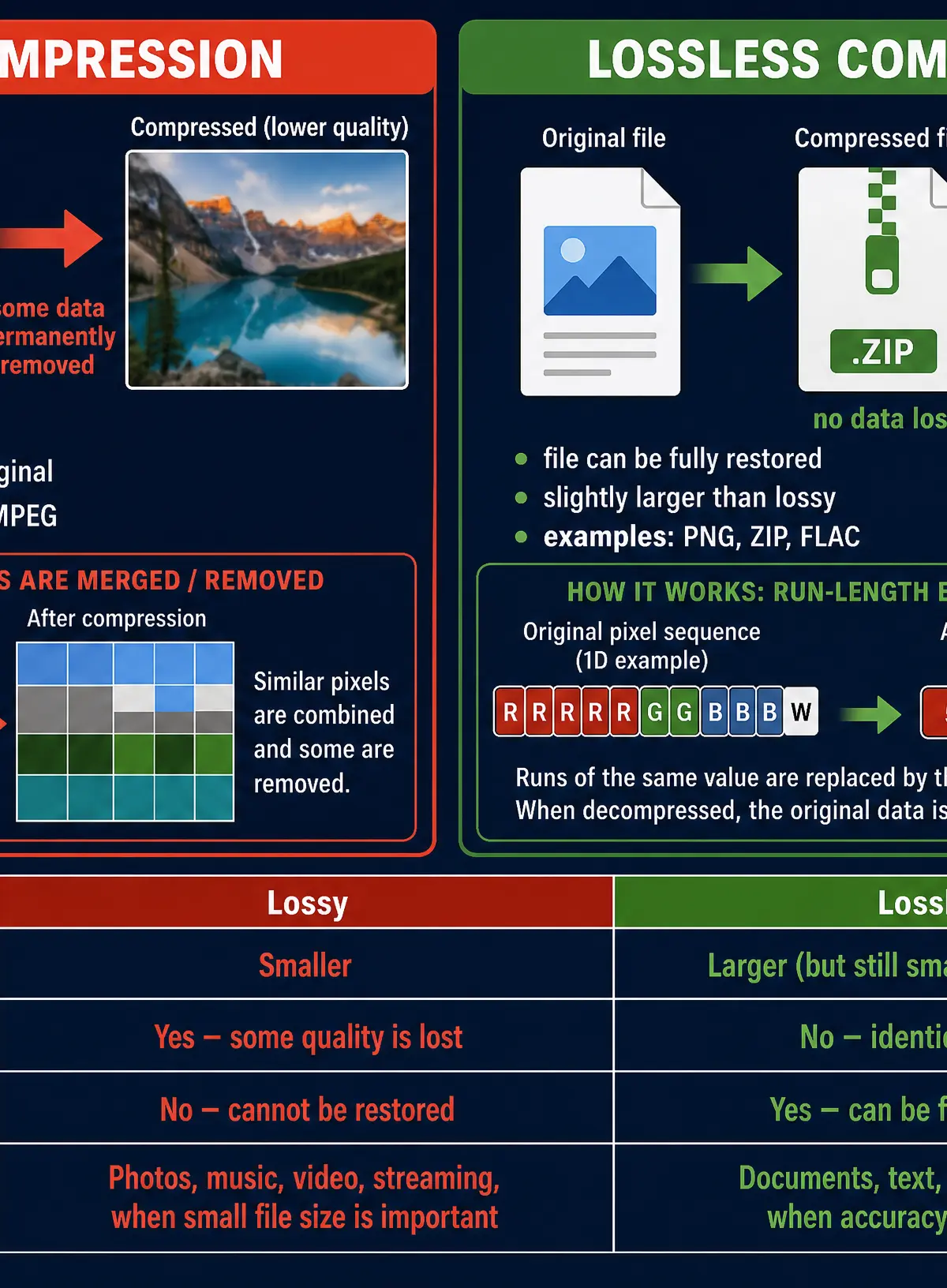
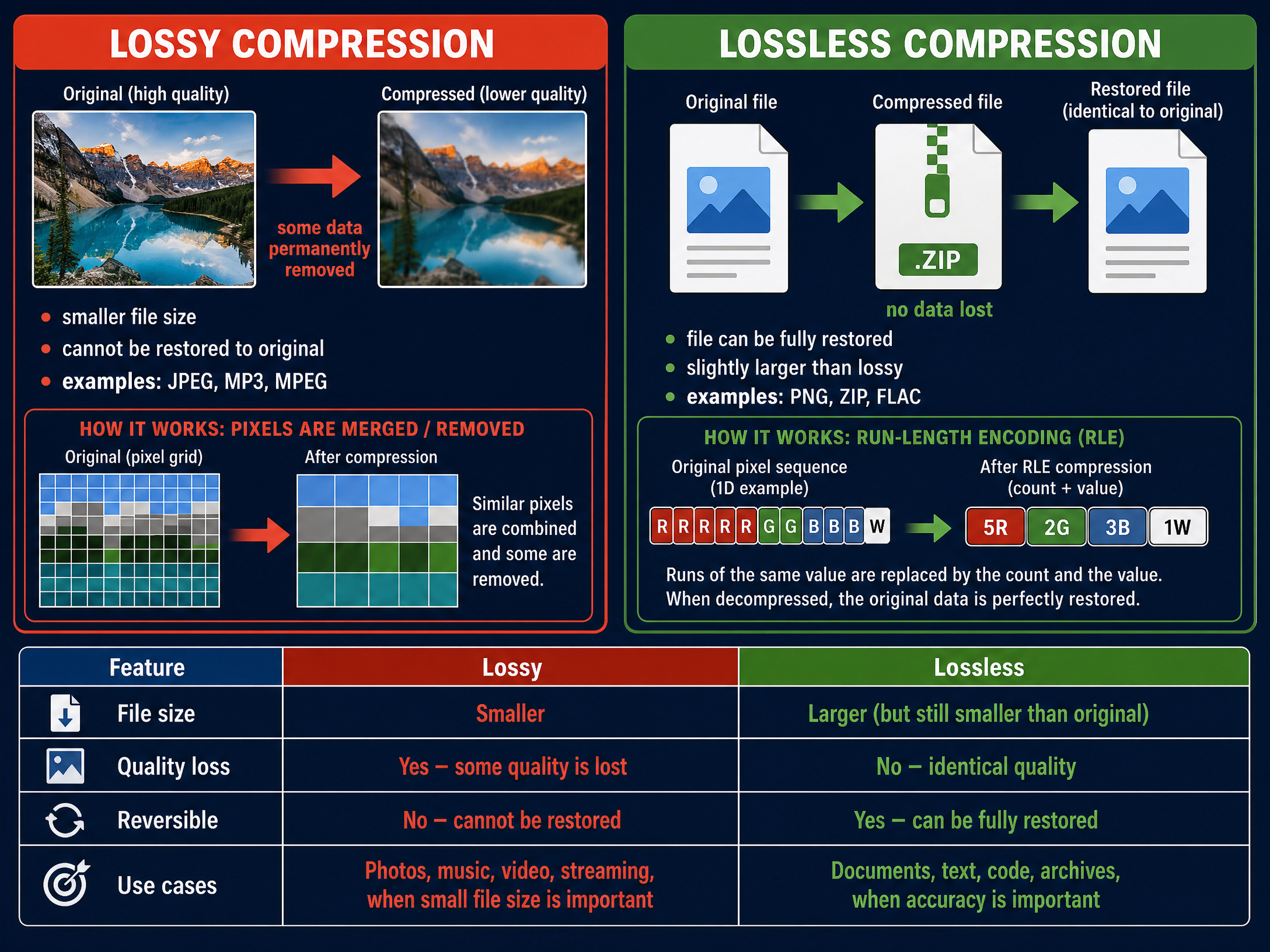
Compression reduces the size of a file. This is vital because it saves storage space on the disk and reduces the time (and bandwidth) required to transmit the file over a network.
- Lossy Compression: Permanently removes data that humans are unlikely to notice (e.g., very high audio frequencies or slight colour variations). The file cannot be restored to its exact original state. Used for JPEGs and MP3s.
- Lossless Compression: Reduces file size without losing any data, often by looking for repeating patterns (like Run Length Encoding). The file can be perfectly reconstructed. Used for text documents, code, and PNG images.
Mathematical/Scientific Relationships
You must memorise the following formulas and units for the exam.
**Data Units (Binary Multiples)**Examiners expect you to use base-2 multiples, not base-10.
- 1 Nibble = 4 bits
- 1 Byte = 8 bits
- 1 Kilobyte (KB) = 1024 bytes
- 1 Megabyte (MB) = 1024 KB
- 1 Gigabyte (GB) = 1024 MB
- 1 Terabyte (TB) = 1024 GB
Image File Size Formula
File Size (bits) = Image Width × Image Height × Colour Depth
(To convert to bytes, divide the result by 8)
Sound File Size Formula
File Size (bits) = Sample Rate (Hz) × Bit Depth × Duration (seconds)
(Multiply by 2 if the audio is stereo)
Practical Applications
- Hexadecimal in Web Design: HTML and CSS use hexadecimal codes to represent colours. For example,
#FF0000represents pure red.FFis the maximum value (255) for the red channel, while green and blue are00. - Compression in Streaming: Services like Netflix and Spotify rely heavily on lossy compression algorithms. Without compression, streaming a 4K movie over a standard internet connection would be impossible due to the massive file sizes.
Visual Resources
3 diagrams and illustrations
Interactive Diagrams
2 interactive diagrams to visualise key concepts
Conceptual Flow Outline
The process of converting analogue sound to digital data.
Conceptual Flow Outline
Step-by-step process of converting Binary to Hexadecimal.
Worked Examples
3 worked examples — open one to explore the question and available guidance.
Practice Questions
Test your understanding — click to reveal model answers
Add the following two 8-bit binary numbers: 01101011 and 00111100. (2 marks)
Hint: Write them out one above the other and remember the rule: 1+1 = 0 carry 1.
Explain why a programmer might choose to use hexadecimal to represent colours in a program instead of binary. (2 marks)
Hint: Think about how many digits are needed for a 24-bit colour in binary versus hex.
A student is recording a podcast. Explain how increasing the sample rate will affect the recording. (3 marks)
Hint: Think about both the quality of the audio and the impact on the computer's storage.
A text file contains 5000 characters. The computer uses standard ASCII. Calculate the file size in kilobytes. Show your working. (3 marks)
Hint: How many bits are in standard ASCII? Once you have total bits, convert to bytes, then KB.
Explain why lossy compression is suitable for a video streaming service but not suitable for a text document. (4 marks)
Hint: What happens to data in lossy compression? Does it matter if a video loses a tiny bit of data? Does it matter if a text file does?