Pearson Edexcel · GCSE · Computer Science
Data storage and compression
Master the fundamentals of binary data storage and the critical importance of compression. This topic is calculation-heavy and frequently tested, requiring you to confidently convert between binary units and understand the trade-offs between lossless and lossy compression methods.
- 6 min read
- 3 worked examples
- 5 practice questions
- 6 key terms
Study Notes
Overview
Data Storage and Compression is a fundamental topic in Computer Science because it underpins how every single piece of information—from a simple text message to a high-definition movie—is managed by a computer system. At the lowest level, all data is stored as binary digits (bits), either 0 or 1. As the amount of data we generate and consume grows exponentially, understanding how to measure it accurately and compress it efficiently has never been more important. This topic connects directly to networks (how quickly data can be transmitted) and hardware (how much data can be stored on a secondary storage device).
In your exam, you can expect calculation questions asking you to determine file sizes or convert between units, as well as explanation questions requiring you to justify why a specific compression method is appropriate for a given scenario. To succeed, you must master the binary unit hierarchy and the distinct differences between lossless and lossy compression.
Listen to the revision podcast below for a comprehensive overview of this topic:

Key Concepts
Concept 1: The Binary Data Unit Hierarchy
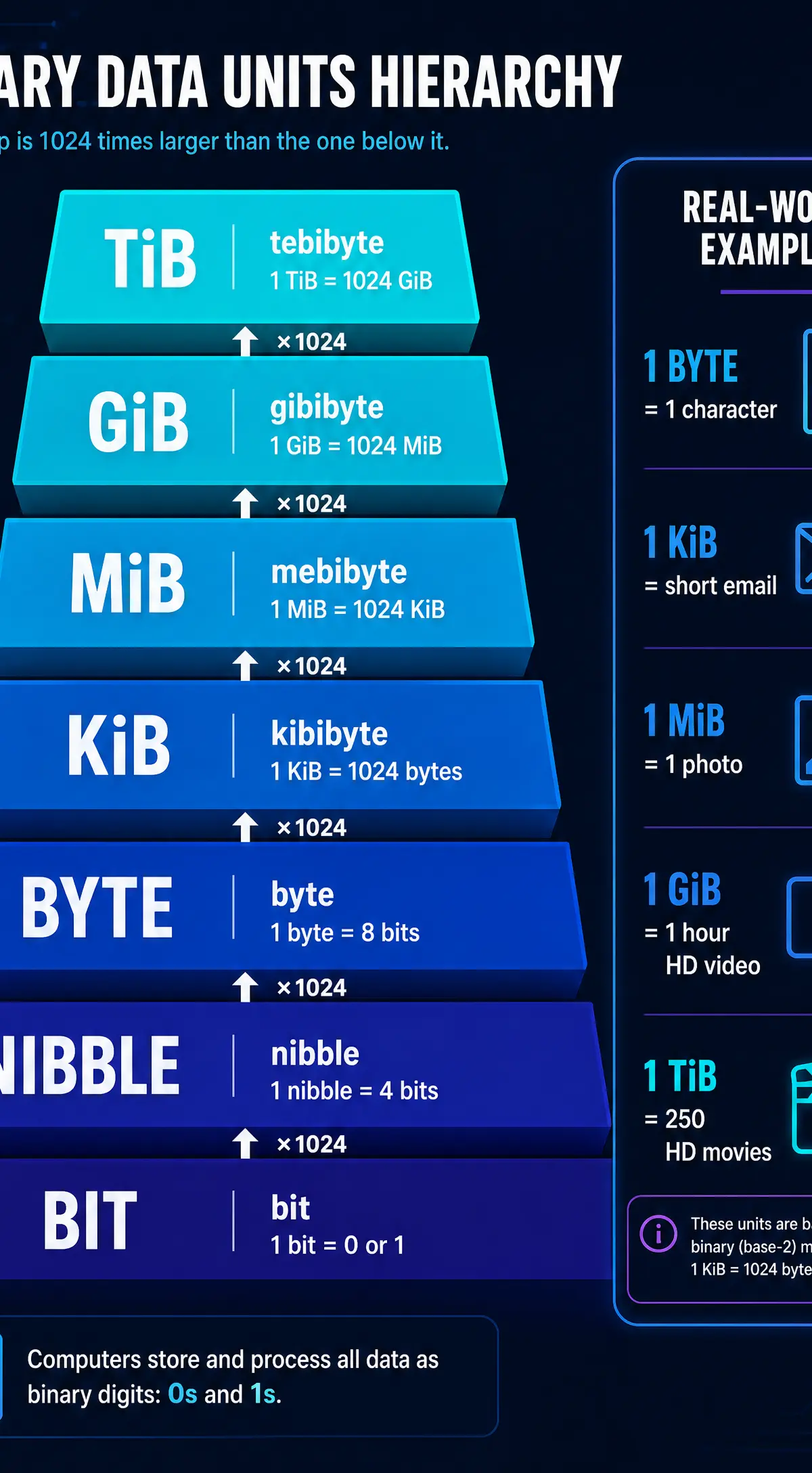
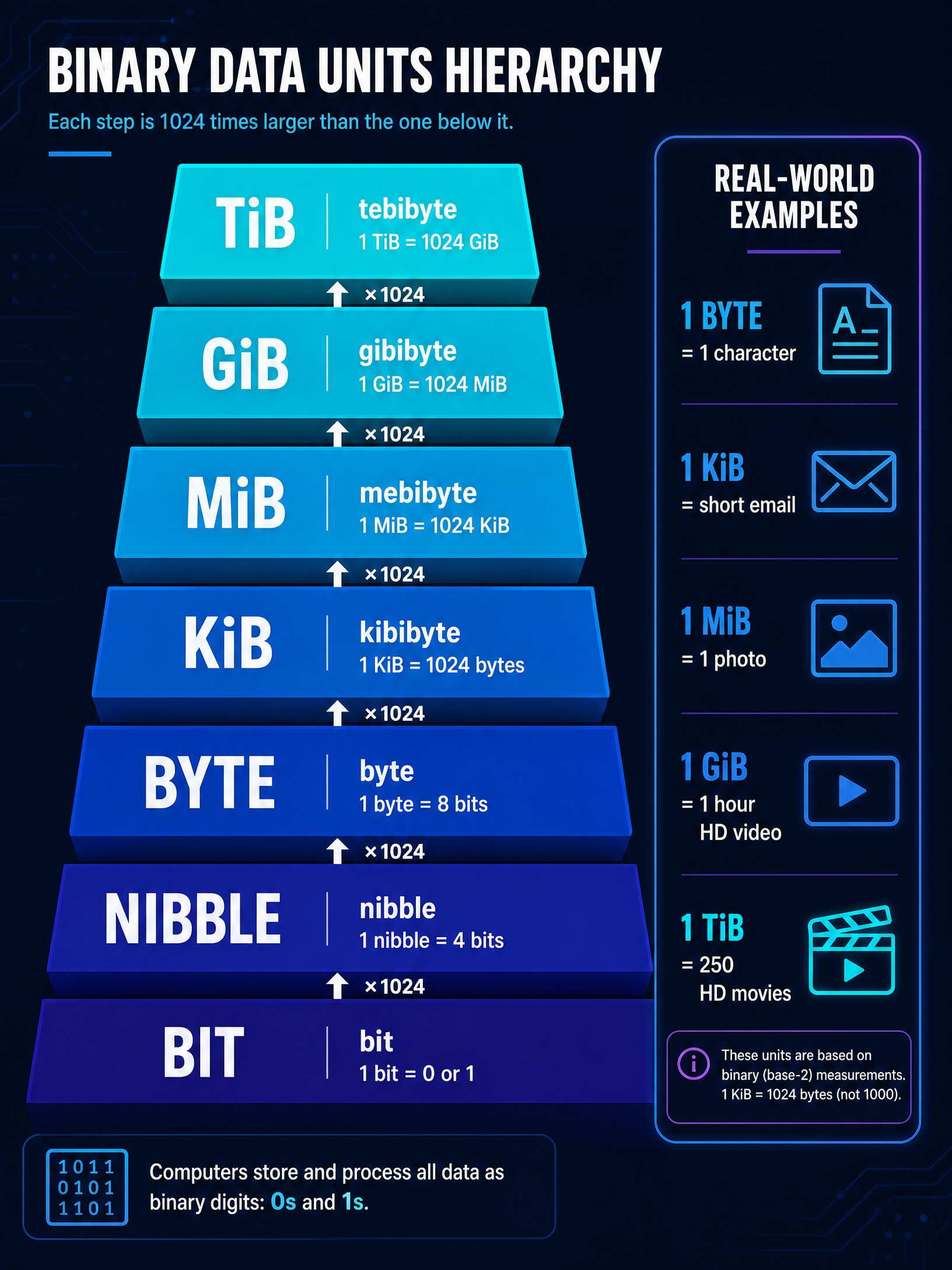
Computers use a base-2 (binary) system, meaning all storage measurements are based on powers of 2. While we often use decimal prefixes like kilobyte (KB) in everyday life (where 1 KB = 1000 bytes), in Computer Science, we must use binary prefixes. Each step up the hierarchy is a multiple of 1024 (which is 2^{10}).
- Bit (b): A single binary digit (0 or 1).
- Nibble: 4 bits (half a byte).
- Byte (B): 8 bits. One byte can store a single character of text.
- Kibibyte (KiB): 1024 bytes.
- Mebibyte (MiB): 1024 KiB.
- Gibibyte (GiB): 1024 MiB.
- Tebibyte (TiB): 1024 GiB.
Example: If a text file contains 4096 characters, it requires 4096 bytes of storage. To convert this to kibibytes, you divide by 1024. 4096 \div 1024 = 4 KiB.
Concept 2: The Need for Compression
Data compression involves encoding information using fewer bits than the original representation. But why do we need it?
- Storage Space: Uncompressed files (especially video and audio) take up massive amounts of secondary storage. Compression allows us to store more files on a single device.
- Transmission Speed: Smaller files require less bandwidth to transmit over a network, resulting in faster download/upload times and less buffering when streaming.
- Cost: Hosting and transmitting large amounts of data is expensive. Compression reduces these costs for service providers.
Concept 3: Lossless Compression
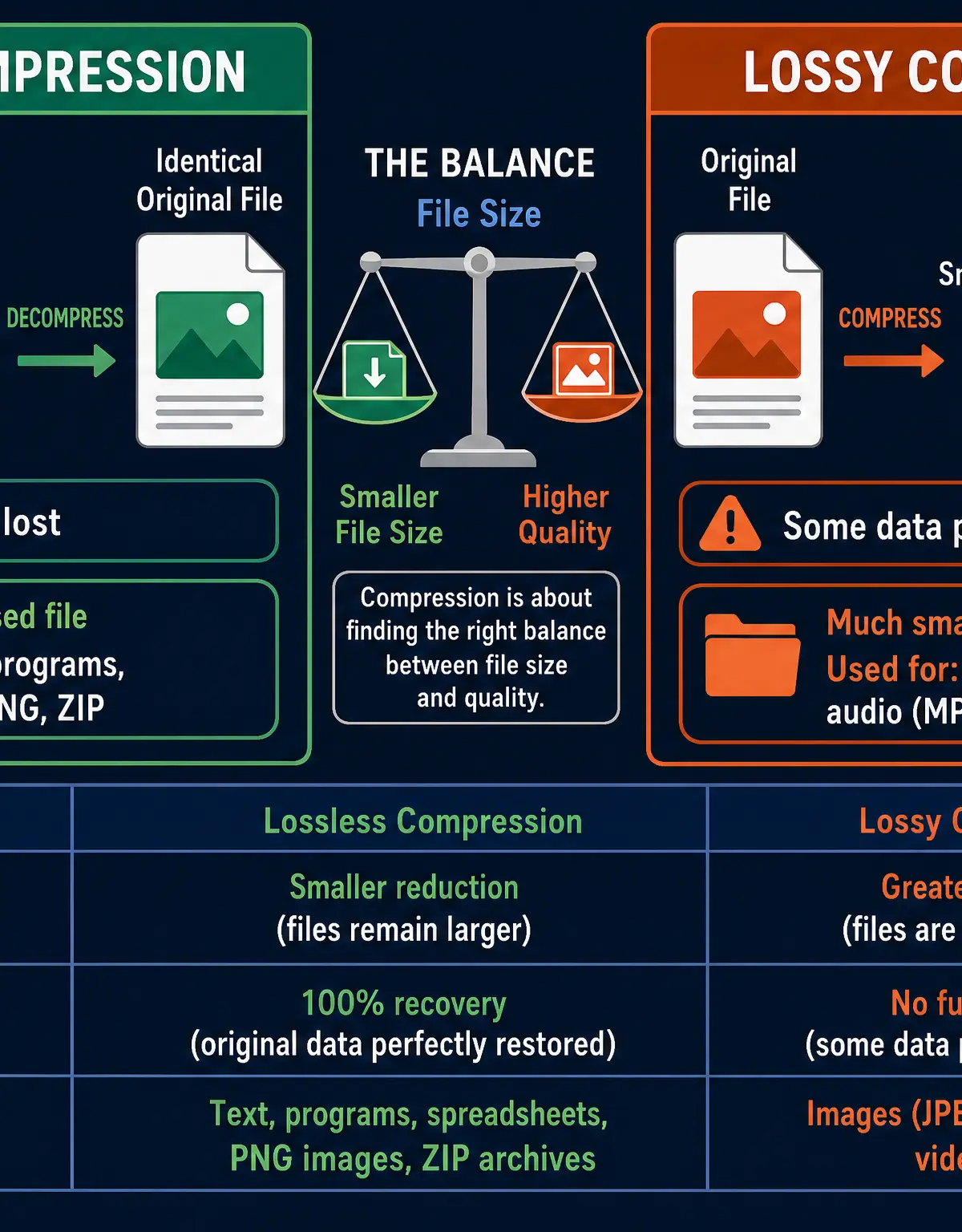
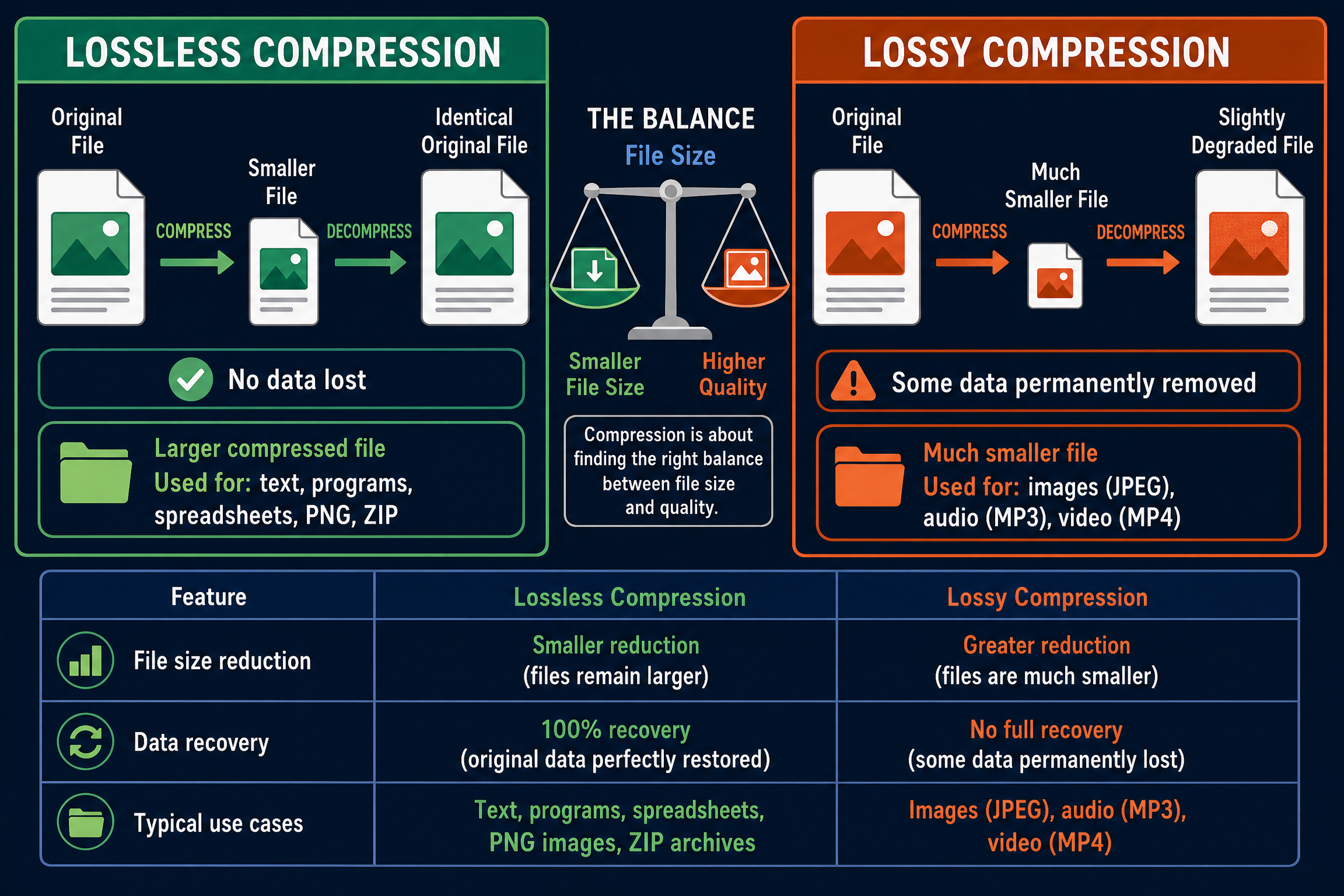
Lossless compression reduces the file size without losing any data whatsoever. When the file is decompressed, the resulting data is a perfect, 100% identical match to the original. This is achieved by finding patterns and redundancies in the data and encoding them more efficiently (e.g., using Run Length Encoding or Huffman Coding).
- When to use it: When accuracy is critical and no data can be lost. Examples include text documents, spreadsheets, executable programs, and high-quality archival images.
- Common formats: ZIP, PNG, GIF, FLAC.
Concept 4: Lossy Compression
Lossy compression achieves much greater reductions in file size by permanently removing some data. The algorithm specifically targets data that humans are unlikely to notice—for example, removing very high-frequency sounds from audio, or averaging out subtle colour differences in an image. Once the file is compressed, the removed data cannot be recovered; the loss is permanent.
- When to use it: When a significant reduction in file size is required and a slight drop in quality is acceptable. Examples include streaming video, digital music, and photos for social media.
- Common formats: JPEG, MP3, MP4.
Mathematical/Scientific Relationships
To calculate file sizes, you need to understand the relationships between the dimensions of the file and its data requirements.
Image File Size
To calculate the uncompressed size of a bitmap image:
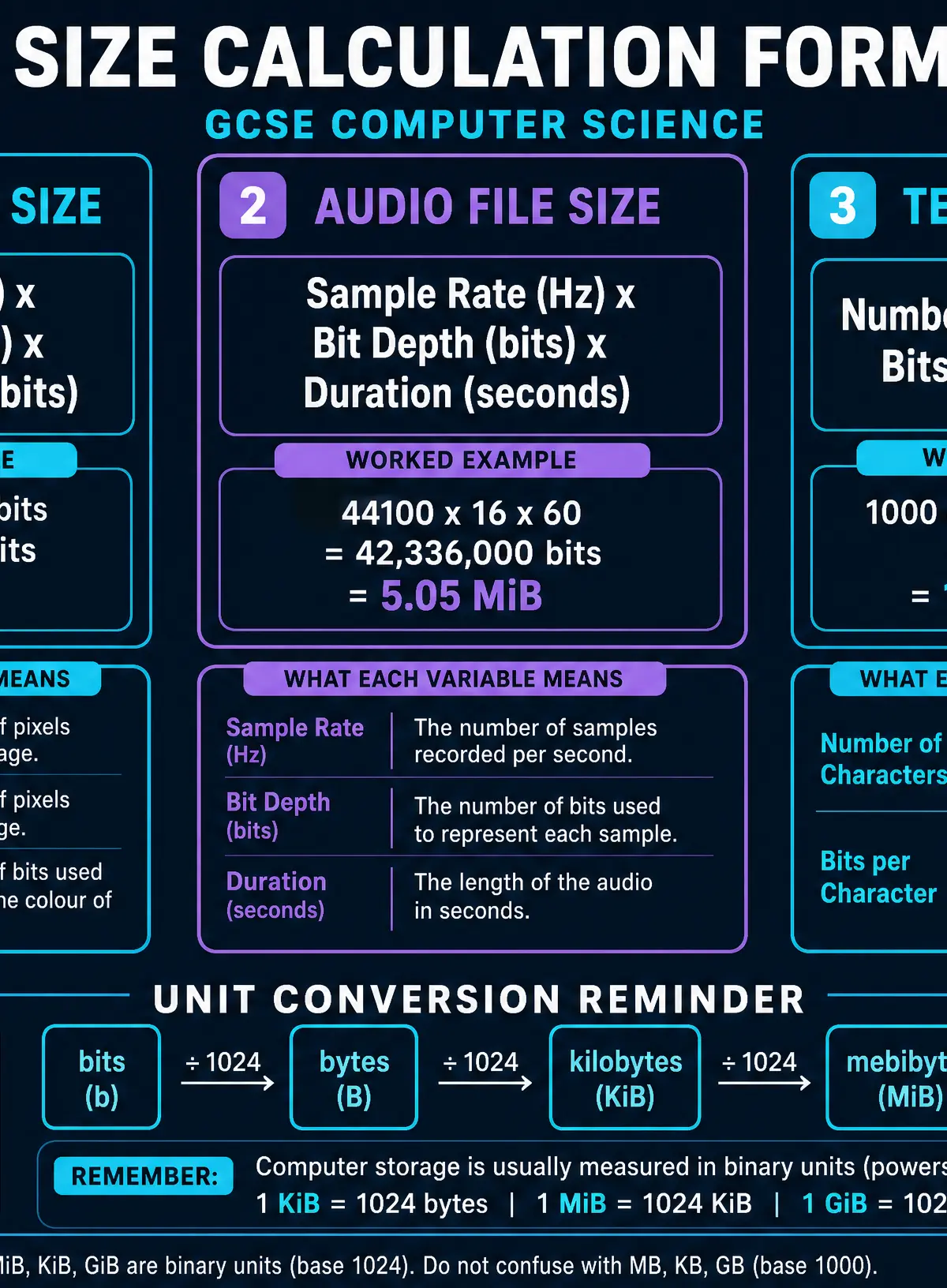
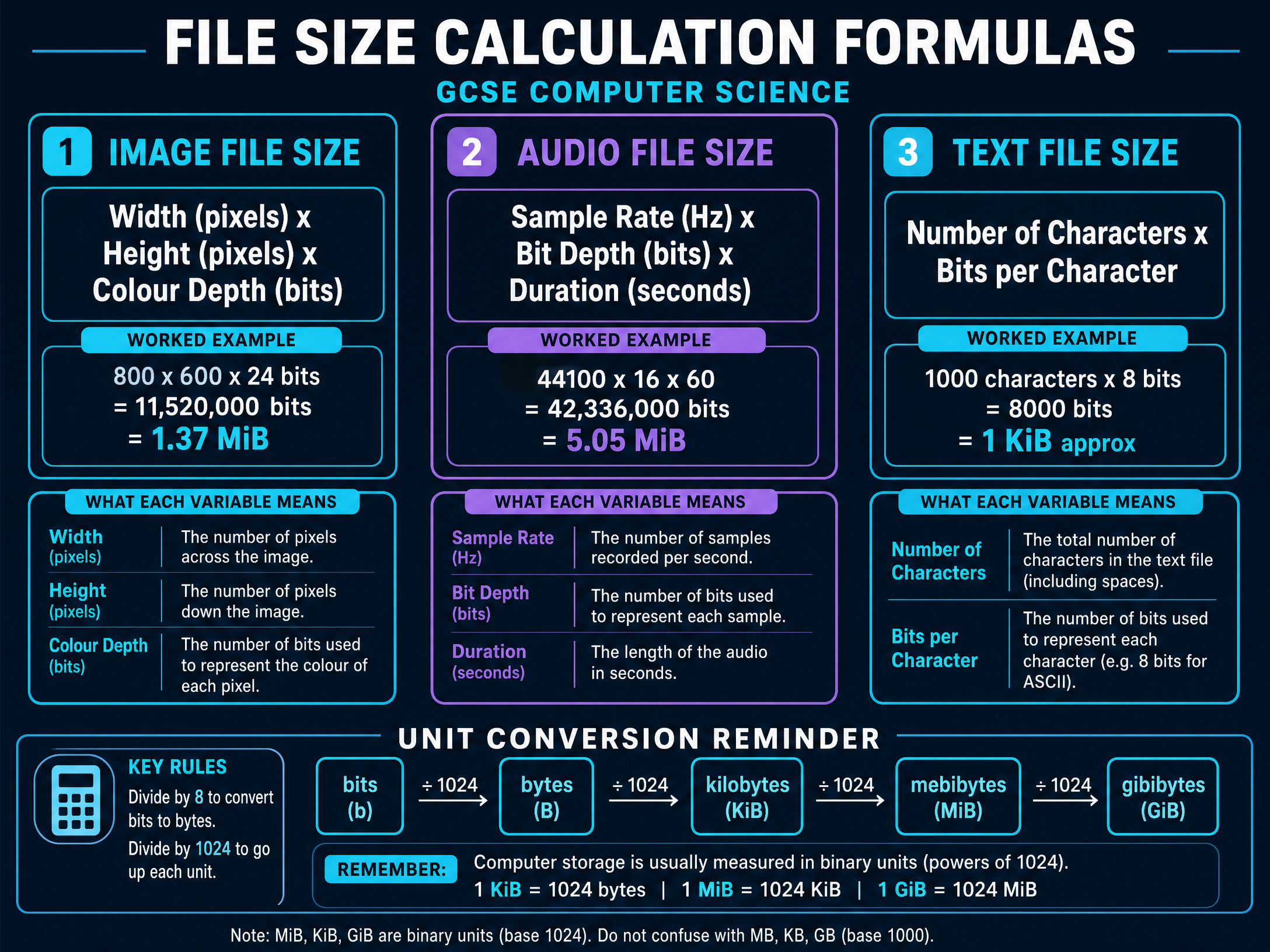
File Size (bits) = Image Width (pixels) × Image Height (pixels) × Colour Depth (bits)
- Colour Depth is the number of bits used to represent the colour of a single pixel.
Audio File Size
To calculate the uncompressed size of a sound file:
File Size (bits) = Sample Rate (Hz) × Bit Depth (bits) × Duration (seconds)
- Sample Rate is the number of samples taken per second.
- Bit Depth is the number of bits used to record each sample.
Text File Size
To calculate the uncompressed size of a text file:
File Size (bits) = Number of Characters × Bits per Character
- Standard ASCII uses 7 or 8 bits per character; Unicode can use 16 or 32 bits.
Practical Applications
Understanding compression is vital for modern software engineering and network architecture. For example, Netflix and YouTube rely heavily on advanced lossy compression algorithms to stream high-definition video to millions of users simultaneously without overwhelming internet infrastructure. Conversely, medical imaging systems (like MRI or X-ray machines) strictly use lossless compression, because losing even a tiny detail in an image could lead to a misdiagnosis.
Visual Resources
3 diagrams and illustrations
Interactive Diagrams
2 interactive diagrams to visualise key concepts
Conceptual Flow Outline
Decision tree for selecting the appropriate compression method based on the data type.
Conceptual Flow Outline
The sequence of operations for converting binary data units.
Worked Examples
3 worked examples — open one to explore the question and available guidance.
Practice Questions
Test your understanding — click to reveal model answers
State how many bits are in a nibble. (1 mark)
Hint: Think about how a nibble relates to a byte.
A sound file has a sample rate of 44,100 Hz, a bit depth of 16 bits, and a duration of 30 seconds. Calculate the file size in mebibytes (MiB). Give your answer to 2 decimal places. (4 marks)
Hint: Remember the formula: Sample Rate × Bit Depth × Duration. Don't forget to convert bits all the way up to MiB.
Explain one reason why data compression is often necessary when streaming video files over the internet. (2 marks)
Hint: Think about the size of uncompressed video and the limitations of a user's internet connection.
A software developer has written a new application and wants to distribute it online. Explain whether they should use lossless or lossy compression to compress the executable file. (3 marks)
Hint: What would happen if even a single 0 or 1 was changed in a computer program?
An image has dimensions of 400 x 400 pixels and uses 256 different colours. Calculate the uncompressed file size in kibibytes (KiB). (4 marks)
Hint: First, determine the colour depth. If there are 256 colours, how many bits are needed to represent each pixel? (Think powers of 2).