Pearson Edexcel · GCSE · Computer Science
Topic 1: Computational thinking
Master the art of problem-solving with Computational Thinking, the foundation of Computer Science. This guide covers decomposition, abstraction, algorithms, and logic gates to help you think like a computer and ace your GCSE exams.
- 6 min read
- 3 worked examples
- 5 practice questions
- 6 key terms
Study Notes
Overview
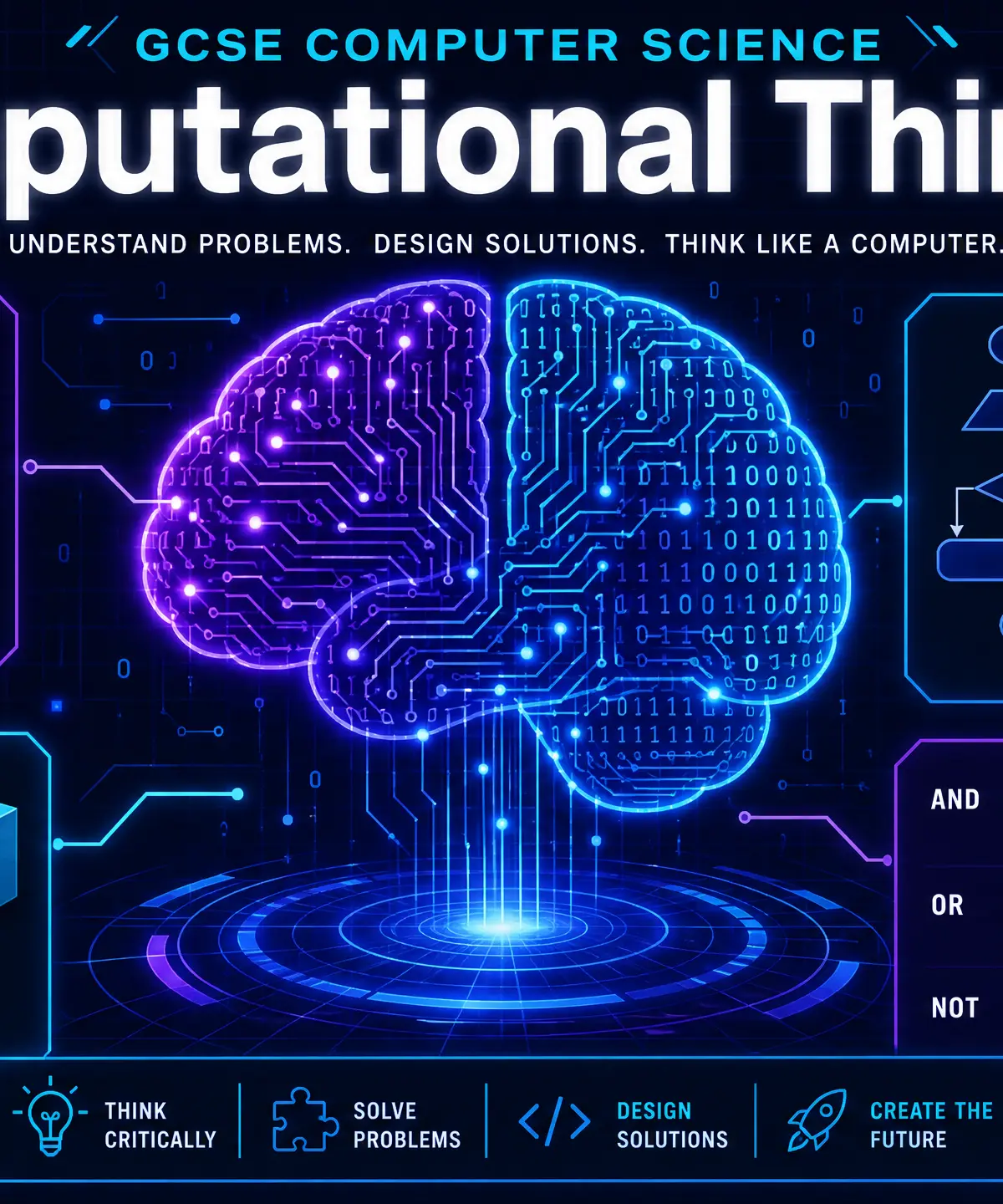
Welcome to Topic 1: Computational Thinking. This is arguably the most important topic in your entire GCSE Computer Science course because it teaches you how to think like a computer scientist. Before you can write a single line of code, you need to know how to break down complex problems, identify the essential information, and design step-by-step solutions.
In this topic, you'll learn the key pillars of computational thinking: Decomposition and Abstraction. You'll also learn how to write and trace Algorithms using pseudocode and flowcharts, understand the three types of Errors, evaluate Standard Sorting and Searching Algorithms, and construct Truth Tables for logic gates.
Examiners love testing this topic because it proves you understand the logic behind programming, not just the syntax. You can expect questions asking you to decompose a scenario, trace variable values in an algorithm, or evaluate the efficiency of a sorting method.
Listen to the companion podcast for a deep dive into these concepts:

Key Concepts
Concept 1: Decomposition and Abstraction
Computational thinking starts with two powerful problem-solving techniques.
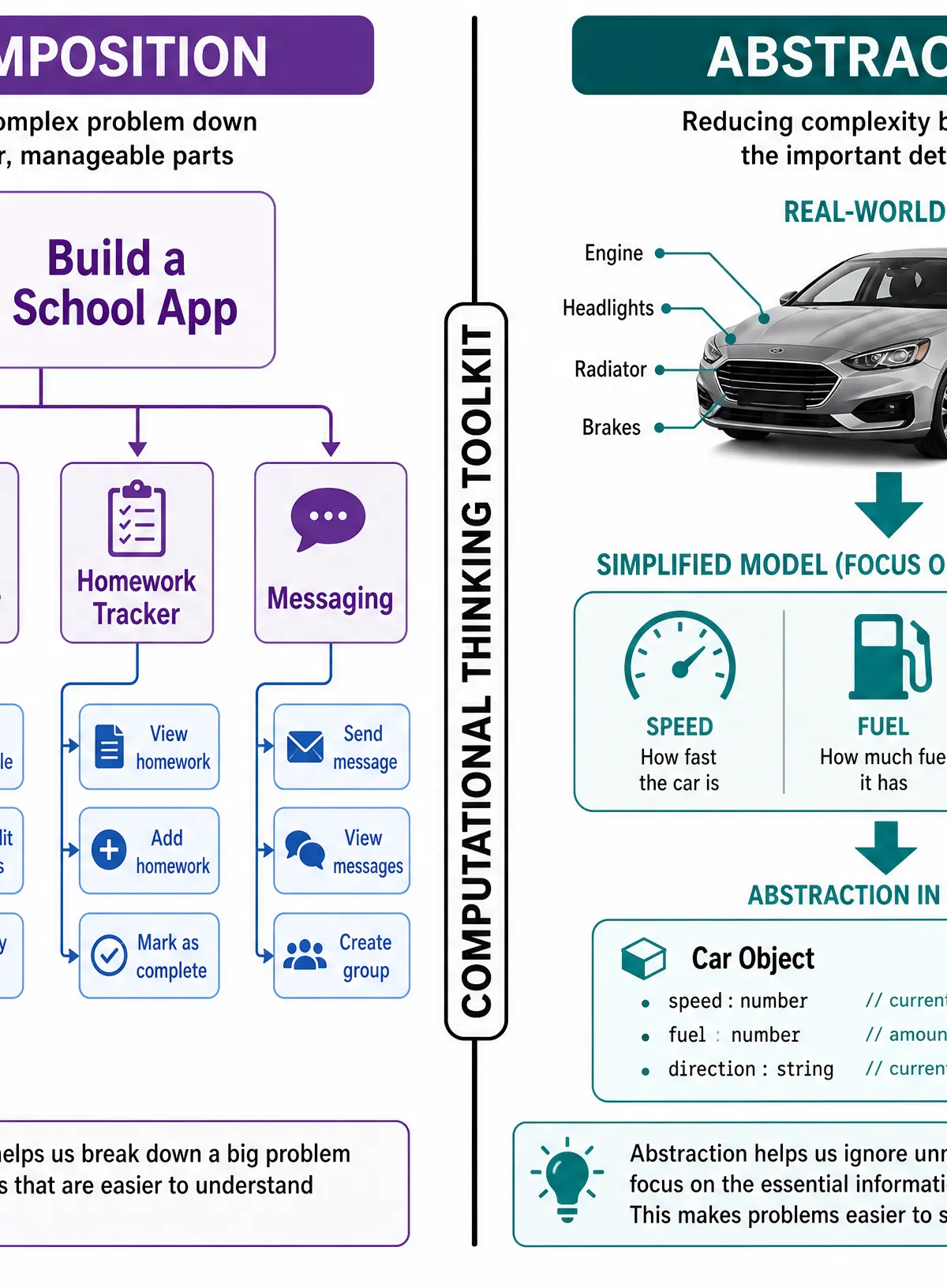
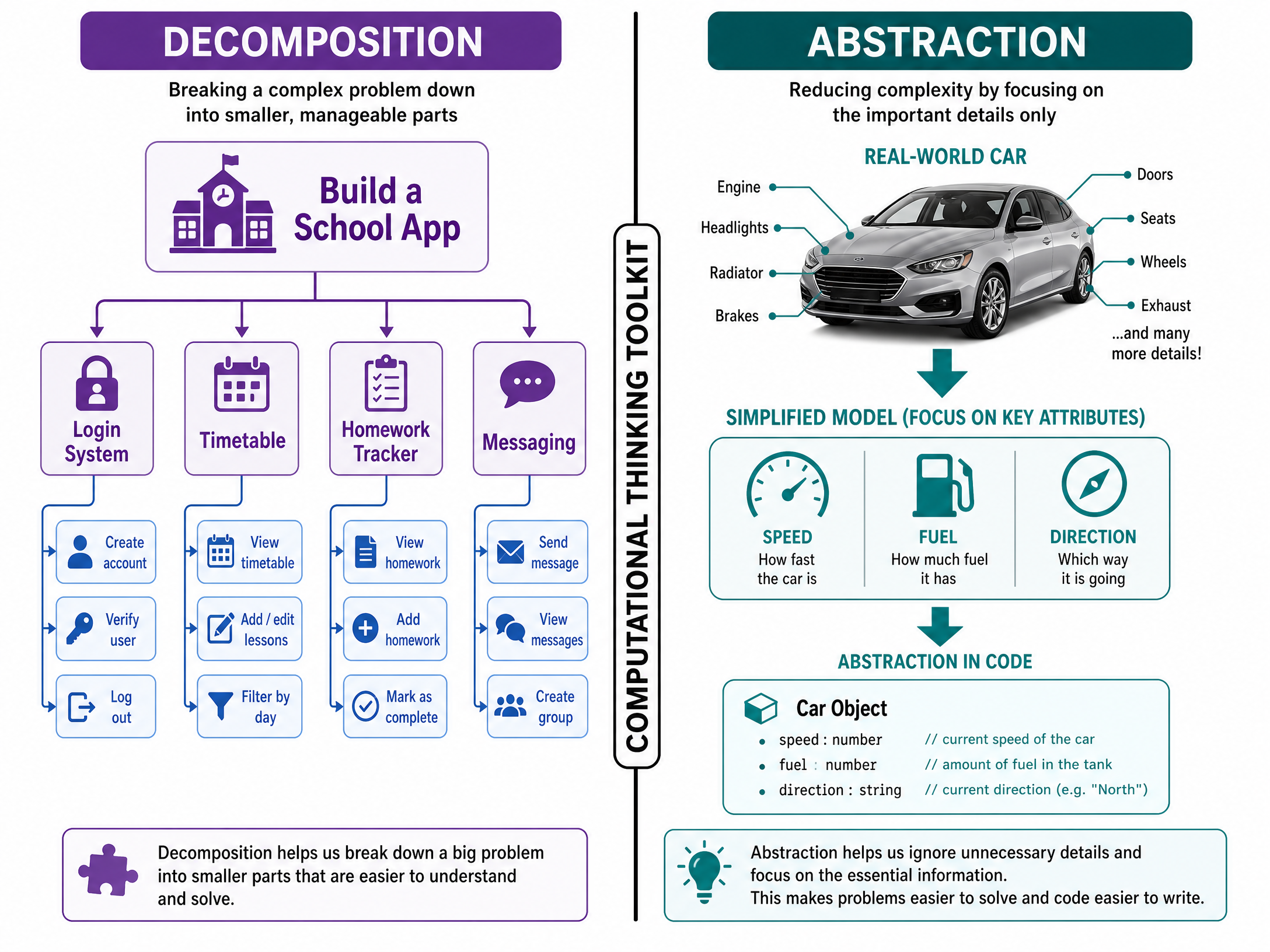
Decomposition is the process of breaking down a complex problem into smaller, more manageable sub-problems. Why does this work? Because large problems are overwhelming and difficult to solve all at once. By breaking them down, each sub-problem becomes a small, achievable task that a programmer can write code for.
Abstraction is the process of removing unnecessary detail and focusing only on the essential information needed to solve the problem. Think of the London Underground map: it doesn't show exact geographical distances or street names above ground; it only shows stations and the lines connecting them. It abstracts away the real-world complexity to make navigation simple.
Concept 2: Algorithms
An algorithm is a step-by-step set of instructions designed to perform a specific task or solve a problem. All algorithms are built using three fundamental constructs:
- Sequence: Executing instructions in order, one after the other.
- Selection: Making decisions based on conditions (e.g.,
IF... THEN... ELSE). - Iteration: Repeating instructions (looping) until a condition is met (e.g.,
FOR,WHILE,REPEAT... UNTIL).
You must be able to represent algorithms using both Flowcharts (using standard symbols like diamonds for decisions and parallelograms for input/output) and Pseudocode (a text-based way of writing algorithms that looks like code but isn't tied to a specific programming language).
Concept 3: Standard Algorithms
You need to understand four standard algorithms for sorting and searching data:
- Linear Search: Checks each item in a list one by one until the target is found. Works on unsorted data but is slow for large datasets.
- Binary Search: Checks the middle item of a sorted list, then discards the half where the target cannot be. Repeats until found. Much faster than linear search, but requires the data to be sorted first.
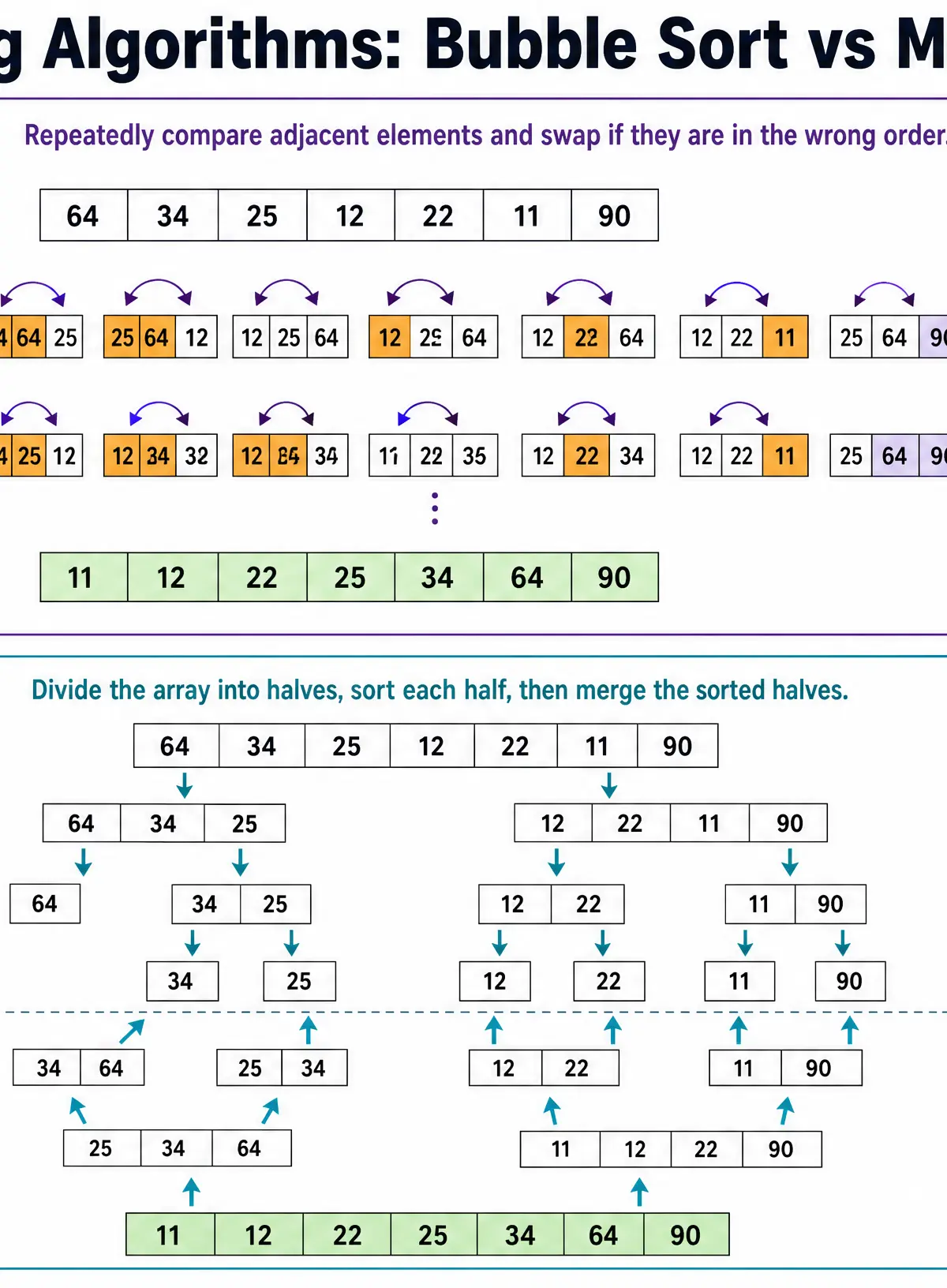
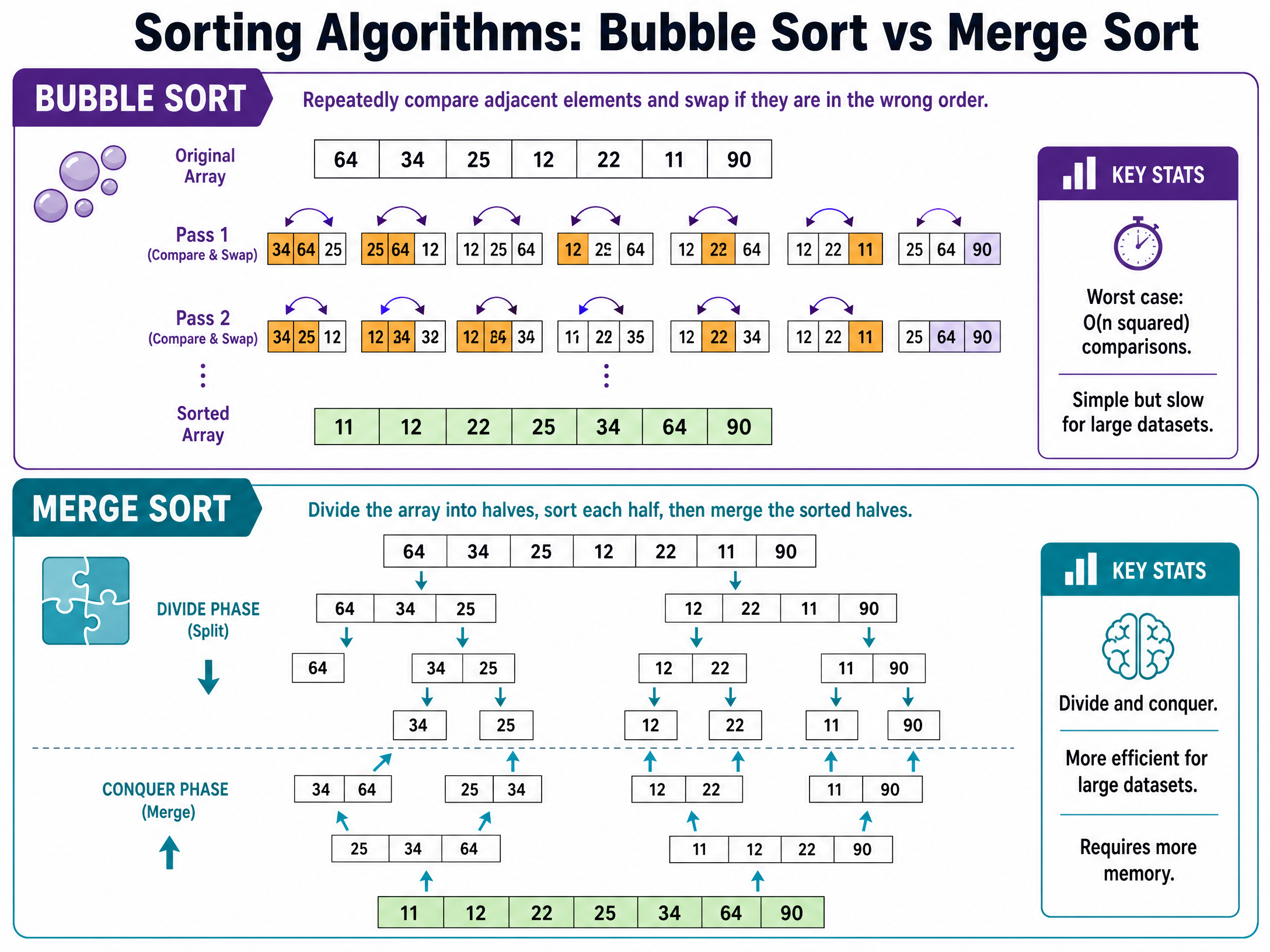
- Bubble Sort: Repeatedly steps through the list, compares adjacent elements, and swaps them if they are in the wrong order. Simple to write but very inefficient (slow) for large lists.
- Merge Sort: A 'divide and conquer' algorithm that splits the list into single elements, then merges them back together in the correct order. Very efficient for large lists, but requires more memory.
Concept 4: Logic Gates and Truth Tables
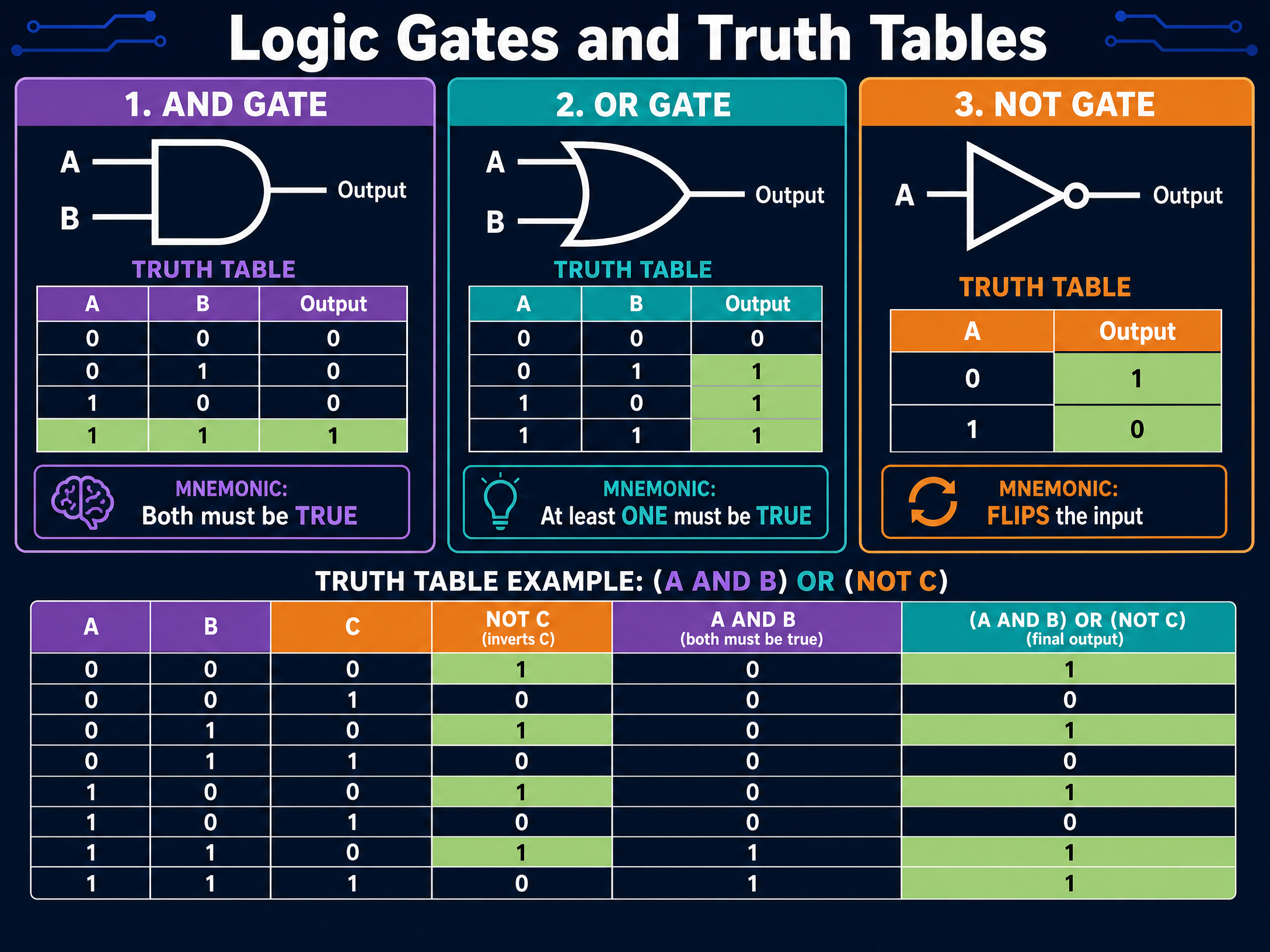
Computers process data using binary logic (1s and 0s, or True and False). You need to know three basic logic gates:
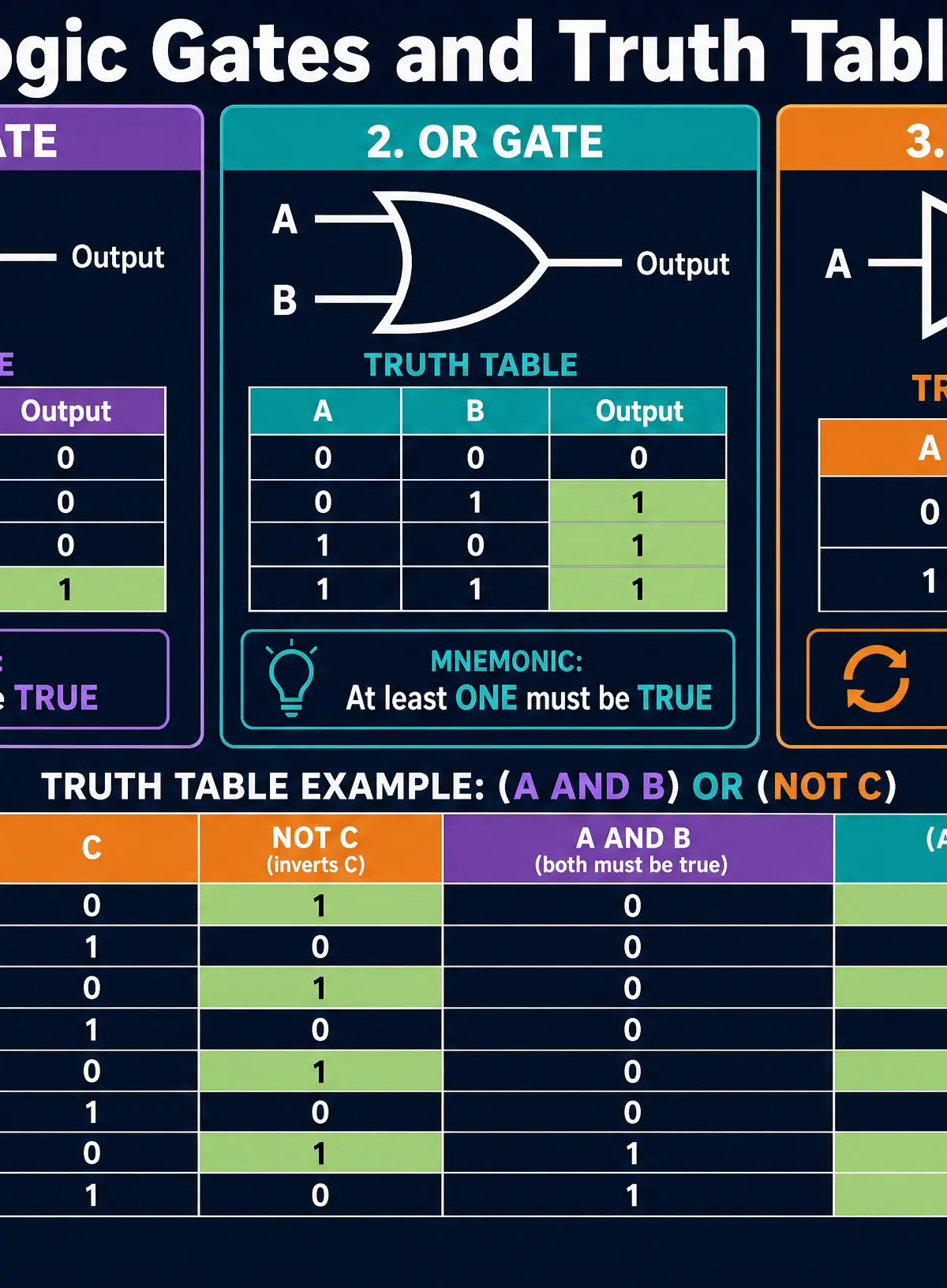
- AND Gate: Outputs True (1) ONLY if both inputs are True.
- OR Gate: Outputs True (1) if at least one input is True.
- NOT Gate: Inverts the input (True becomes False, False becomes True).
You will be asked to complete truth tables for logic circuits with up to three inputs. A three-input truth table will always have 8 rows (2^3 = 8).
Mathematical/Scientific Relationships
- Number of Truth Table Rows: Rows = 2^n (where n is the number of inputs). For 2 inputs, there are 2^2 = 4 rows. For 3 inputs, there are 2^3 = 8 rows.
- Algorithm Efficiency (Time Complexity):
- Linear Search: O(n) - time increases linearly with data size.
- Binary Search: O(\log n) - highly efficient, halves the search space each step.
- Bubble Sort: O(n^2) - inefficient, time squares as data grows.
- Merge Sort: O(n \log n) - efficient sorting for large datasets.
Practical Applications
- Decomposition in Game Dev: Creating a video game is decomposed into rendering graphics, handling user input, physics engine, and AI logic.
- Abstraction in Weather Apps: A weather app abstracts atmospheric data into simple icons (sun, rain cloud) and a single temperature number.
- Binary Search in Databases: Finding a specific student record in a school database of 2,000 students using binary search takes a maximum of 11 checks, compared to potentially 2,000 checks with linear search.
Visual Resources
3 diagrams and illustrations
Interactive Diagrams
2 interactive diagrams to visualise key concepts
Conceptual Flow Outline
A flowchart algorithm demonstrating Sequence, Selection (IF/ELSE), and Output.
Conceptual Flow Outline
A visual representation of Decomposition.
Worked Examples
3 worked examples — open one to explore the question and available guidance.
Practice Questions
Test your understanding — click to reveal model answers
State the purpose of a trace table. (1 mark)
Hint: Think about what you write down inside the table as the code runs.
A student has written a program to calculate the area of a rectangle. The program runs without crashing, but when they input length 5 and width 4, it outputs 9 instead of 20. Identify the type of error and explain why it occurred. (2 marks)
Hint: The program didn't crash, so it's not syntax or runtime. Look at the math.
Explain one advantage and one disadvantage of using a Merge Sort compared to a Bubble Sort. (4 marks)
Hint: Think about speed vs memory usage.
An algorithm needs to find the word 'Zebra' in an alphabetically sorted list of 500 animal names. Evaluate whether a Linear Search or Binary Search is more appropriate. (4 marks)
Hint: The list is already sorted. Where is 'Zebra' likely to be in the alphabet?
Draw the logic gate symbol for an OR gate and provide its truth table. (3 marks)
Hint: OR gate looks like a curved shield. What happens if at least one input is 1?