OCR · GCSE · Computer Science
Course version: J277 · Version from Sept 2022
Compression: The need for compression
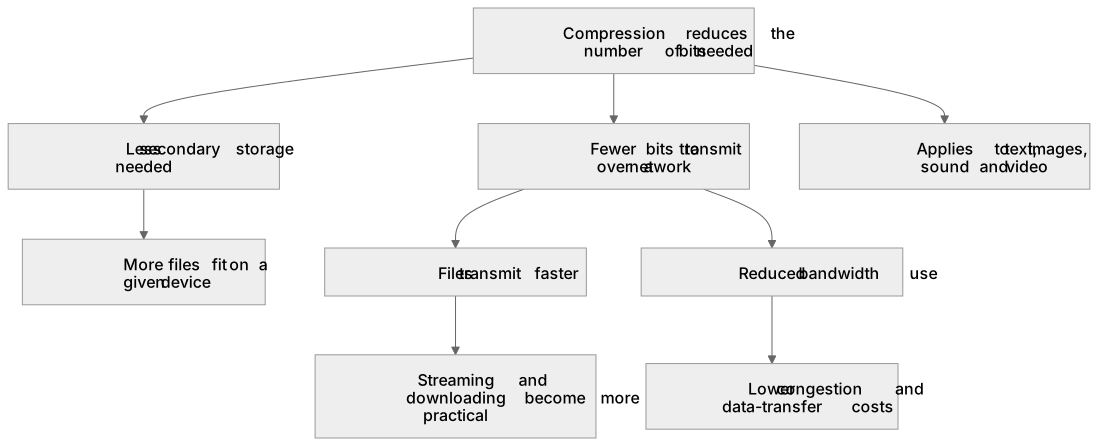
Compression reduces the number of bits needed to store or transmit a file.
Checked against the OCR J277 specification on .
- Point 1 of 2
- 4 key terms
Study notes
From the checked teaching notes for this specification point.
The idea
Compression reduces the number of bits needed to store or transmit a file. It is needed because storage capacity and transmission bandwidth are finite, and because large files take longer to send and cost more to host. For example, a 12 MP photograph might occupy about 36 MB uncompressed; compressing it to 4 MB allows many more images on a 32 GB memory card and makes uploads faster. Compression also reduces network traffic, which matters when many users share a connection. The need applies to text, images, sound and video. Some compression methods remove data permanently, while others allow the original to be reconstructed exactly. Choosing a method depends on whether perfect fidelity is required and on how much reduction is acceptable.
What earns the marks
- Compression reduces file size by encoding the same information using fewer bits.
- Smaller files require less secondary storage, so more files fit on a given device.
- Smaller files transmit faster over a network because fewer bits must be sent.
- Reduced bandwidth use lowers congestion and can reduce data-transfer costs.
- Streaming and downloading become more practical when file sizes are smaller.
- Compression is needed for both storage and transmission, not only one of these.
- The need applies across text, images, sound and video files.
Common mistakes and how to put them right
Stating that compression always makes a file smaller without limit.
Put it right: Compression reduces size but cannot remove all redundancy; some files compress little.
Claiming compression only helps storage.
Put it right: It also reduces transmission time and bandwidth use.
Confusing compression with encryption.
Put it right: Compression reduces size; encryption scrambles data for security, and the two can be combined.
Exam tips
- Link each benefit to a concrete context such as a web page, email attachment or streaming service.
- Use comparative language: 'fewer bits', 'less storage', 'faster transmission'.
- If asked 'why compress?', give at least one storage reason and one transmission reason.
Try the lesson
The start of the Compression: The need for compression lesson, made from checked teaching notes for this specification point.
Have a go first
Why is compression useful when sending a file over the internet?
Listen
Compression reduces the number of bits needed to store or transmit a file. It is needed because storage capacity and transmission bandwidth are finite, and because large files take longer to send and cost more to host. For example, a 12 MP photograph might occupy about 36 MB uncompressed; compressing it to 4 MB allows many more images on a 32 GB memory card and makes uploads faster. Compression also reduces network traffic, which matters when many users share a connection. The need applies to text, images, sound and video. Some compression methods remove data permanently, while others allow the original to be reconstructed exactly. Choosing a method depends on whether perfect fidelity is required and on how much reduction is acceptable. A strong answer earns marks for these points. Compression reduces file size by encoding the same information using fewer bits. Smaller files require less secondary storage, so more files fit on a given device. Smaller files transmit faster over a network because fewer bits must be sent. Reduced bandwidth use lowers congestion and can reduce data-transfer costs. A common slip: stating that compression always makes a file smaller without limit. Instead, compression reduces size but cannot remove all redundancy; some files compress little. Exam tip: Link each benefit to a concrete context such as a web page, email attachment or streaming service.
See it
Key words
Say what each word means before you turn the card.
Efficient use of finite storage
Try answering aloud or in your head before turning the card.
Faster data transmission
Try answering aloud or in your head before turning the card.
Reduced bandwidth and cost
Try answering aloud or in your head before turning the card.
Practical handling of large media files
Try answering aloud or in your head before turning the card.
See every definition
- Efficient use of finite storage
- Compression reduces the number of bits needed to store a file, so more files fit on a given device because storage capacity is finite.
- Faster data transmission
- Smaller files transmit faster over a network because fewer bits must be sent.
- Reduced bandwidth and cost
- Reduced bandwidth use lowers congestion and can reduce data-transfer costs, which matters when many users share a connection.
- Practical handling of large media files
- Streaming and downloading become more practical when file sizes are smaller, and the need applies to text, images, sound and video.
Label the diagram
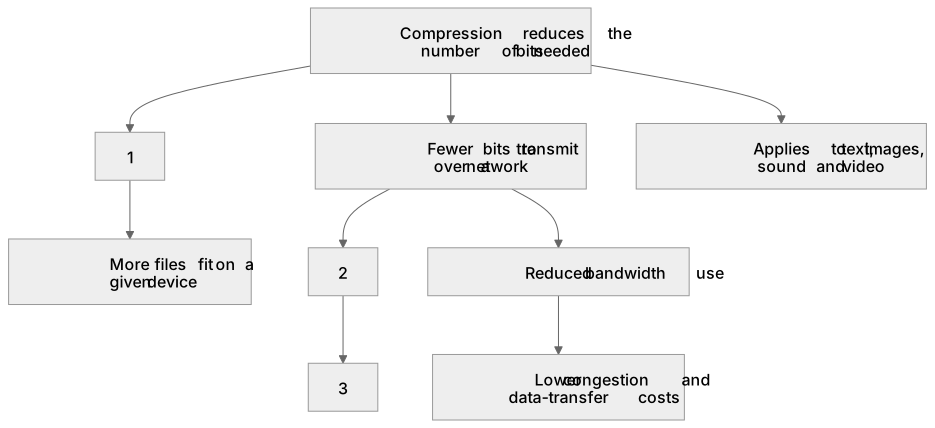
Some boxes have lost their names. Pick the right name for each number.
1Box 1
2Box 2
3Box 3
There is more to this lesson
The full lesson goes on to check your understanding and help you earn the marks. Create a free account to carry on, with your progress saved.
A week of Premium from your first lesson · Then the free plan continues · No card, no charge
Test your understanding of Compression: The need for compression
Active recall beats re-reading. Take an instant quiz now to test what you’ve learned and lock it into long-term memory.
A week of Premium from your first lesson · Then the free plan continues · No card, no charge