OCR · GCSE · Computer Science
Course version: J277 · Version from Sept 2022
Compression: Types of compression Lossy Lossless
Lossy compression permanently removes some data to achieve a smaller file.
Checked against the OCR J277 specification on .
- Point 2 of 2
- 3 key terms
Study notes
From the checked teaching notes for this specification point.
The idea
Lossy compression permanently removes some data to achieve a smaller file. It is used where approximate reproduction is acceptable, such as JPEG images, MP3 audio and MP4 video. Lossless compression reduces file size without losing any data, so the original can be restored exactly. It is used for text, spreadsheets, executables and archives, for example PNG images, FLAC audio and ZIP files. Lossless methods find patterns and store them more efficiently, often using dictionary or run-length techniques. Lossy methods discard detail the human eye or ear is less likely to notice. The choice depends on whether exact reconstruction is required. A ZIP file of a document is lossless; converting a photograph to JPEG is usually lossy.
What earns the marks
- Lossy compression permanently discards some data, so the original cannot be restored exactly.
- Lossless compression reduces file size while allowing exact reconstruction of the original.
- Lossy is suitable for images, audio and video where small quality losses are acceptable.
- Lossless is suitable for text, code, spreadsheets and archives where every bit matters.
- Lossless often works by replacing repeated patterns with shorter codes.
- Lossy can achieve greater size reduction than lossless for media files.
- Examples: JPEG, MP3 and MP4 are typically lossy; PNG, FLAC and ZIP are typically lossless.
Common mistakes and how to put them right
Saying lossless removes no data at all.
Put it right: It removes redundancy but keeps all original information so the file can be rebuilt exactly.
Assuming lossy is always better because files are smaller.
Put it right: Lossy is unsuitable when exact data is required, such as in a text document or program file.
Labelling every image format as lossy or every audio format as lossless.
Put it right: Format alone does not decide; the compression method used does, and some formats support both.
Exam tips
- When comparing, state clearly whether the original can be recreated exactly.
- Match each type to a named file format and a use case to show understanding.
- Avoid saying 'lossy loses quality' without explaining that data is permanently removed.
Try the lesson
The start of the Compression: Types of compression Lossy Lossless lesson, made from checked teaching notes for this specification point.
Have a go first
Which type of compression permanently removes some data from a file?
Listen
Lossy compression permanently removes some data to achieve a smaller file. It is used where approximate reproduction is acceptable, such as JPEG images, MP3 audio and MP4 video. Lossless compression reduces file size without losing any data, so the original can be restored exactly. It is used for text, spreadsheets, executables and archives, for example PNG images, FLAC audio and ZIP files. Lossless methods find patterns and store them more efficiently, often using dictionary or run-length techniques. Lossy methods discard detail the human eye or ear is less likely to notice. The choice depends on whether exact reconstruction is required. A ZIP file of a document is lossless; converting a photograph to JPEG is usually lossy. A strong answer earns marks for these points. Lossy compression permanently discards some data, so the original cannot be restored exactly. Lossless compression reduces file size while allowing exact reconstruction of the original. Lossy is suitable for images, audio and video where small quality losses are acceptable. Lossless is suitable for text, code, spreadsheets and archives where every bit matters. A common slip: saying lossless removes no data at all. Instead, it removes redundancy but keeps all original information so the file can be rebuilt exactly. Exam tip: When comparing, state clearly whether the original can be recreated exactly.
See it

Key words
Say what each word means before you turn the card.
Lossy compression
Try answering aloud or in your head before turning the card.
Lossless compression
Try answering aloud or in your head before turning the card.
Lossless methods
Try answering aloud or in your head before turning the card.
See every definition
- Lossy compression
- Permanently removes some data to achieve a smaller file, used where approximate reproduction is acceptable.
- Lossless compression
- Reduces file size without losing any data, so the original can be restored exactly.
- Lossless methods
- Find patterns and store them more efficiently, often using dictionary or run-length techniques.
Label the diagram
Some boxes have lost their names. Pick the right name for each number.
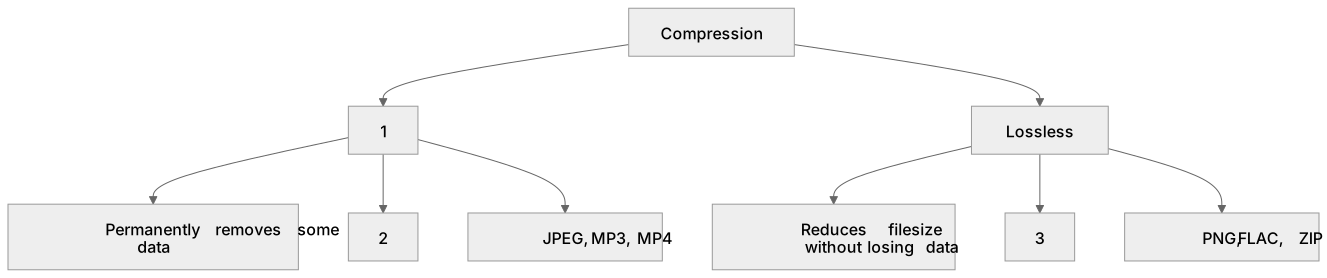
1Box 1
2Box 2
3Box 3
There is more to this lesson
The full lesson goes on to check your understanding and help you earn the marks. Create a free account to carry on, with your progress saved.
A week of Premium from your first lesson · Then the free plan continues · No card, no charge
Test your understanding of Compression: Types of compression Lossy Lossless
Active recall beats re-reading. Take an instant quiz now to test what you’ve learned and lock it into long-term memory.
A week of Premium from your first lesson · Then the free plan continues · No card, no charge