OCR · GCSE · Computer Science
Course version: J277 · Version from Sept 2022
Data storage: The use of binary codes to represent characters
Computers store characters as binary codes because a byte can hold only 0s and 1s.
Checked against the OCR J277 specification on .
- Point 6 of 13
- 3 key terms
Study notes
From the checked teaching notes for this specification point.
The idea
Computers store characters as binary codes because a byte can hold only 0s and 1s. A character set defines which code maps to which character. For example, in ASCII the letter A is decimal 65, which is 01000001 in 8-bit binary. To encode a word, each character is converted to its code and the codes are stored in order. To decode, the binary is split into equal-length codes and each code is looked up in the character set. The same binary pattern can represent different characters in different character sets, so the correct character set must be known. Unicode uses more bits, allowing many more characters from different languages and symbols.
What earns the marks
- Characters are represented by unique binary codes, not by the shape of the character itself.
- A character set provides the mapping between each binary code and a character.
- In ASCII, each character is represented by a 7-bit or 8-bit code, for example A is 01000001.
- To encode text, each character is converted to its binary code and the codes are stored in sequence.
- To decode text, the binary data is divided into equal-length codes and each code is matched to a character using the same character set.
- Unicode uses more bits than ASCII, so it can represent a much larger range of characters, including symbols and characters from many languages.
Common mistakes and how to put them right
Writing that the letter A is stored as the shape of the letter A. Correction: the letter A is stored as a binary code such as 01000001.
Assuming that a binary code always represents the same character in every character set.
Put it right: The same code can represent different characters in different character sets, so the character set must be known.
Confusing the number of bits used with the number of characters available.
Put it right: More bits allow more possible codes, but the actual number of characters depends on the character set.
Exam tips
- When asked to encode a word, convert each character separately and keep the codes in the same order as the characters.
- When asked to decode binary, group the bits into equal-length codes before looking up characters.
- Use the term character set when explaining how binary codes are mapped to characters.
Try the lesson
The start of the Data storage: The use of binary codes to represent characters lesson, made from checked teaching notes for this specification point.
Have a go first
What is used to represent each character when text is stored in a computer's memory?
Listen
Computers store characters as binary codes because a byte can hold only 0s and 1s. A character set defines which code maps to which character. For example, in ASCII the letter A is decimal 65, which is 01000001 in 8-bit binary. To encode a word, each character is converted to its code and the codes are stored in order. To decode, the binary is split into equal-length codes and each code is looked up in the character set. The same binary pattern can represent different characters in different character sets, so the correct character set must be known. Unicode uses more bits, allowing many more characters from different languages and symbols. A strong answer earns marks for these points. Characters are represented by unique binary codes, not by the shape of the character itself. A character set provides the mapping between each binary code and a character. In ASCII, each character is represented by a 7-bit or 8-bit code, for example A is 01000001. To encode text, each character is converted to its binary code and the codes are stored in sequence. A common slip: Writing that the letter A is stored as the shape of the letter A. Instead, the letter A is stored as a binary code such as 01000001. Exam tip: When asked to encode a word, convert each character separately and keep the codes in the same order as the characters.
See it
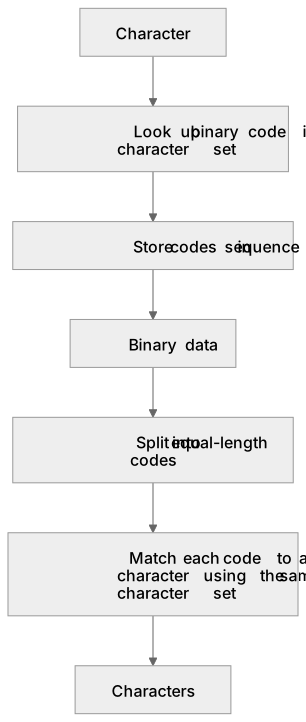
Put it in order
Put these steps in the order they happen.
- 1. Characters
- 2. Match each code to a character using the same character set
- 3. Store codes in sequence
- 4. Split into equal-length codes
- 5. Character
- 6. Look up binary code in character set
- 7. Binary data
Key words
Say what each word means before you turn the card.
Character set
Try answering aloud or in your head before turning the card.
ASCII
Try answering aloud or in your head before turning the card.
Encode
Try answering aloud or in your head before turning the card.
See every definition
- Character set
- A character set provides the mapping between each binary code and a character.
- ASCII
- In ASCII, each character is represented by a 7-bit or 8-bit code, for example A is 01000001.
- Encode
- To encode text, each character is converted to its binary code and the codes are stored in sequence.
Label the diagram
Some boxes have lost their names. Pick the right name for each number.
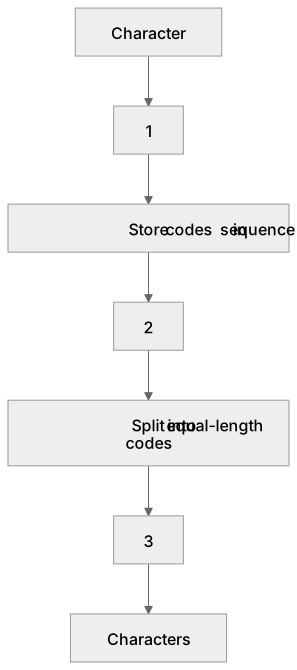
1Box 1
2Box 2
3Box 3
There is more to this lesson
The full lesson goes on to check your understanding and help you earn the marks. Create a free account to carry on, with your progress saved.
A week of Premium from your first lesson · Then the free plan continues · No card, no charge
Test your understanding of Data storage: The use of binary codes to represent characters
Active recall beats re-reading. Take an instant quiz now to test what you’ve learned and lock it into long-term memory.
A week of Premium from your first lesson · Then the free plan continues · No card, no charge