OCR · GCSE · Computer Science
Course version: J277 · Version from Sept 2022
Defensive design considerations Anticipating misuse Authentication
Full specification wording
Defensive design: Defensive design considerations Anticipating misuse Authentication
Defensive design means writing programs that stay reliable and secure even when users behave unexpectedly or maliciously.
Checked against the OCR J277 specification on .
- Point 1 of 3
- 3 key terms
Study notes
From the checked teaching notes for this specification point.
The idea
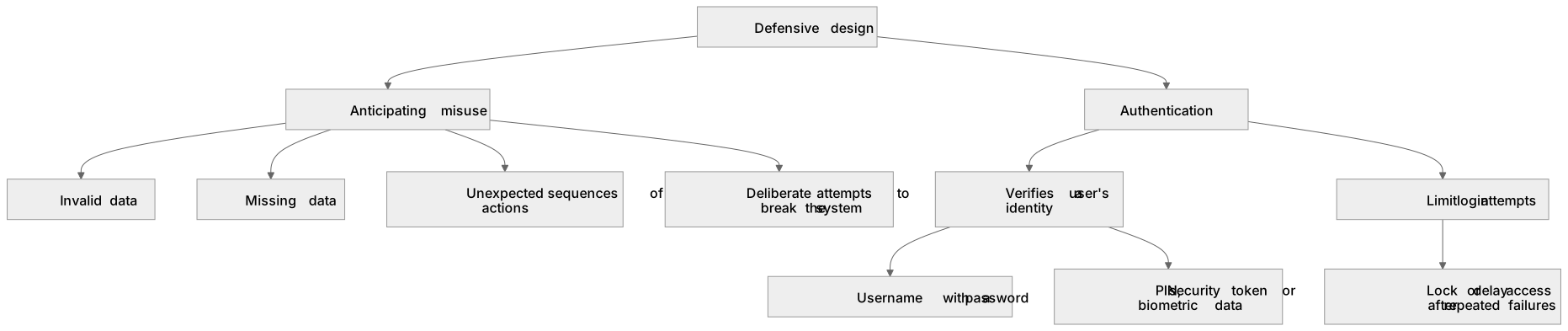
Defensive design means writing programs that stay reliable and secure even when users behave unexpectedly or maliciously. Anticipating misuse involves thinking about every way a user could enter wrong, missing or harmful data, or use the system in an unintended order, and then building safeguards before release. Authentication is the process of confirming that a user is who they claim to be, usually by checking a username with a password, a PIN, a security token or biometric data. Together they reduce crashes, data corruption and unauthorised access.
For example: A login form should limit password attempts, lock an account temporarily after repeated failures and never reveal whether the username or the password was wrong.
What earns the marks
- Defensive design anticipates problems before they occur rather than fixing them after a system fails.
- Anticipating misuse includes considering invalid data, missing data, unexpected sequences of actions and deliberate attempts to break the system.
- Authentication verifies a user's identity, commonly through something the user knows, has or is.
- A typical authentication method combines a username with a password and may add a second factor such as a code sent to a phone.
- Good defensive design limits the number of login attempts and locks or delays access after repeated failures.
- Error messages should be helpful to legitimate users but should not reveal sensitive system details to an attacker.
Common mistakes and how to put them right
Confusing authentication with validation.
Put it right: Authentication checks identity, while validation checks that data is sensible and in the correct format.
Believing that a strong password alone is enough.
Put it right: Authentication also needs secure storage, attempt limits and safe error messages.
Assuming defensive design only matters for large systems.
Put it right: Even a small quiz program should reject unexpected input and protect any stored user data.
Exam tips
- Link each defensive measure to a specific misuse you are preventing, such as limiting attempts to stop repeated password guessing.
- Use correct terminology: state that authentication verifies identity and give a concrete method rather than writing only 'make it secure'.
- When asked to improve a program, name the check, say where it is placed and explain what happens when the check fails.
Try the lesson
The start of the Defensive design: Defensive design considerations Anticipating misuse Authentication lesson, made from checked teaching notes for this specification point.
Have a go first
Which defensive design method checks that a user is who they claim to be before allowing access to a system?
Listen
Defensive design means writing programs that stay reliable and secure even when users behave unexpectedly or maliciously. Anticipating misuse involves thinking about every way a user could enter wrong, missing or harmful data, or use the system in an unintended order, and then building safeguards before release. Authentication is the process of confirming that a user is who they claim to be, usually by checking a username with a password, a PIN, a security token or biometric data. Together they reduce crashes, data corruption and unauthorised access. For example, a login form should limit password attempts, lock an account temporarily after repeated failures and never reveal whether the username or the password was wrong. A strong answer earns marks for these points. Defensive design anticipates problems before they occur rather than fixing them after a system fails. Anticipating misuse includes considering invalid data, missing data, unexpected sequences of actions and deliberate attempts to break the system. Authentication verifies a user's identity, commonly through something the user knows, has or is. A typical authentication method combines a username with a password and may add a second factor such as a code sent to a phone. Exam tip: Link each defensive measure to a specific misuse you are preventing, such as limiting attempts to stop repeated password guessing.
See it
Key words
Say what each word means before you turn the card.
Anticipating misuse
Try answering aloud or in your head before turning the card.
Authentication
Try answering aloud or in your head before turning the card.
Defensive design
Try answering aloud or in your head before turning the card.
See every definition
- Anticipating misuse
- Thinking about every way a user could enter wrong, missing or harmful data, or use the system in an unintended order, and then building safeguards before release.
- Authentication
- The process of confirming that a user is who they claim to be, usually by checking a username with a password, a PIN, a security token or biometric data.
- Defensive design
- Writing programs that stay reliable and secure even when users behave unexpectedly or maliciously.
Label the diagram
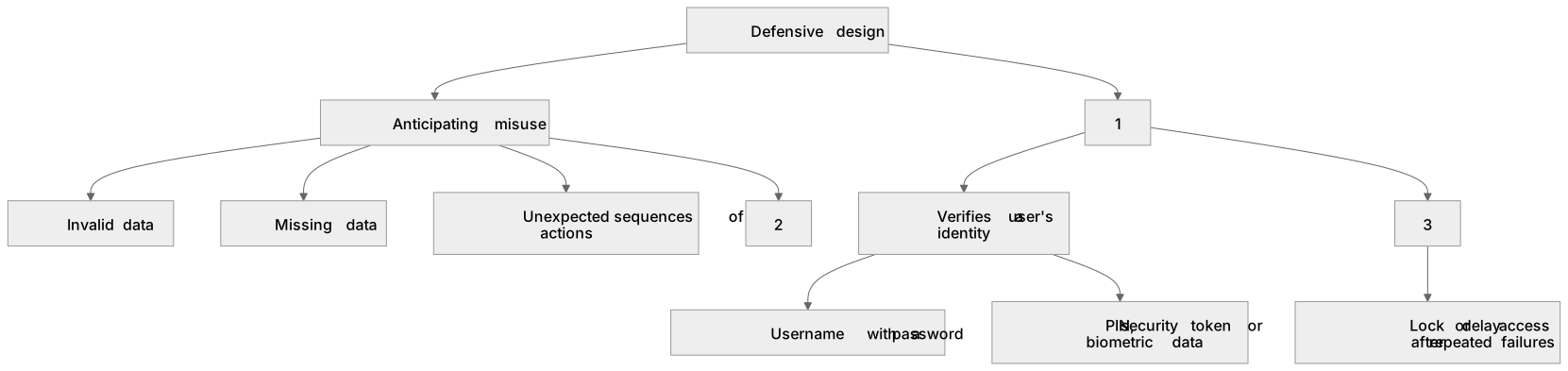
Some boxes have lost their names. Pick the right name for each number.
1Box 1
2Box 2
3Box 3
There is more to this lesson
The full lesson goes on to check your understanding and help you earn the marks. Create a free account to carry on, with your progress saved.
A week of Premium from your first lesson · Then the free plan continues · No card, no charge
Test your understanding of Defensive design: Defensive design considerations Anticipating misuse Authentication
Active recall beats re-reading. Take an instant quiz now to test what you’ve learned and lock it into long-term memory.
A week of Premium from your first lesson · Then the free plan continues · No card, no charge