OCR · GCSE · Computer Science
Course version: J277 · Version from Sept 2022
Defensive design: Input validation
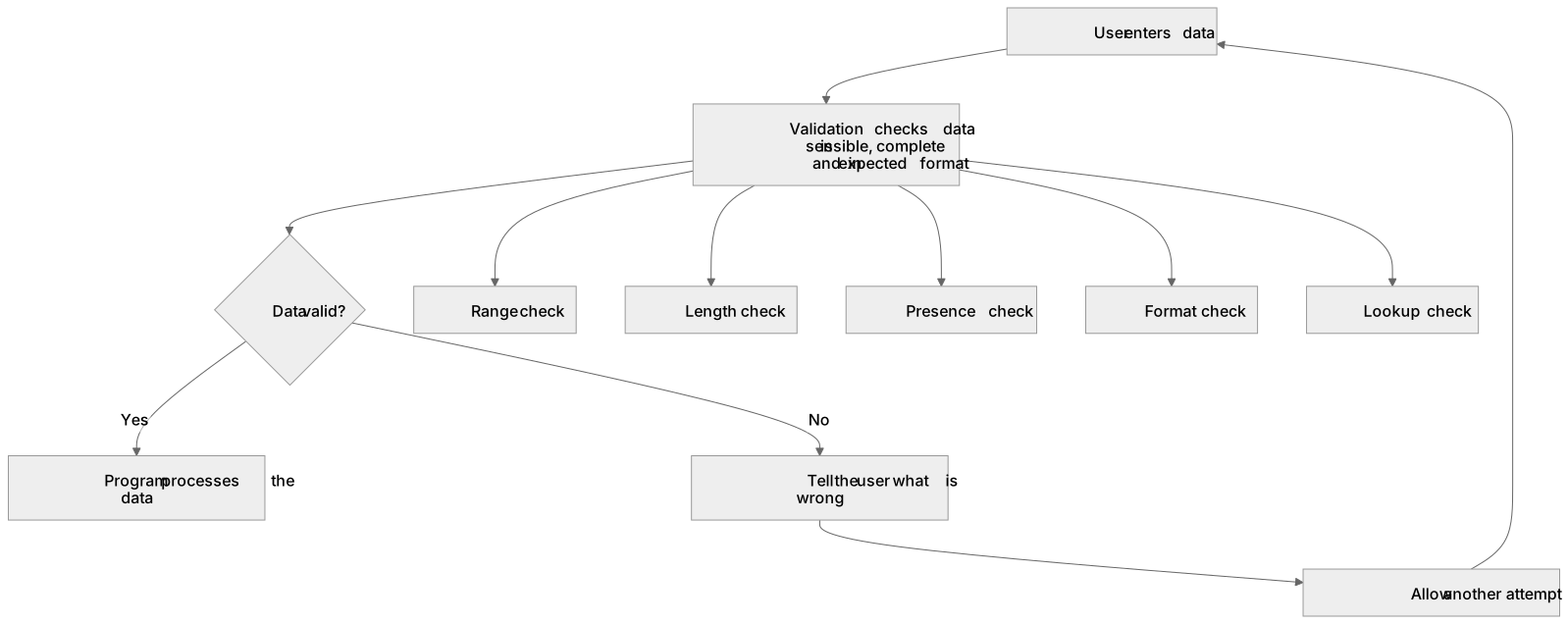
Input validation checks that data entered by a user is sensible, complete and in the expected format before the program processes it.
Checked against the OCR J277 specification on .
- Point 2 of 3
- 4 key terms
Study notes
From the checked teaching notes for this specification point.
The idea
Input validation checks that data entered by a user is sensible, complete and in the expected format before the program processes it. It is a defensive measure because it stops bad data causing crashes, incorrect results or security problems. Common checks include a range check for numbers between limits, a length check for a minimum or maximum number of characters, a presence check for required fields, a format check for patterns such as an email address, and a lookup check against a list of allowed values. For example, a program asking for an exam mark from 0 to 100 should reject 150 and ask again. Validation cannot prove data is true, only that it is reasonable, so it is different from verification.
What earns the marks
- Validation checks that input is reasonable and in the expected format before it is used.
- A range check confirms a value lies between a lower and an upper limit.
- A length check confirms text has an acceptable number of characters.
- A presence check confirms that a required field has not been left empty.
- A format check confirms input matches an expected pattern, such as a postcode or date.
- A lookup check confirms input matches one of a set of allowed values.
- Validation reduces errors and crashes but does not guarantee that data is accurate or truthful.
Common mistakes and how to put them right
Confusing validation with verification.
Put it right: Validation checks that data is sensible, while verification checks that data has been copied or entered accurately.
Using only one type of check when several are needed, such as checking a password's length but not its format.
Forgetting to handle the failed case.
Put it right: A validation check must also tell the user what is wrong and allow another attempt.
Exam tips
- Name the specific validation check and state the exact condition, for example a range check of 0 to 100 inclusive.
- Show the check in pseudocode or program code with a clear condition and a message for invalid input.
- Explain the consequence of missing validation, such as a crash or corrupted stored data, to gain analysis credit.
Try the lesson
The start of the Defensive design: Input validation lesson, made from checked teaching notes for this specification point.
Have a go first
What is the main purpose of input validation in a program?
Listen
Input validation checks that data entered by a user is sensible, complete and in the expected format before the program processes it. It is a defensive measure because it stops bad data causing crashes, incorrect results or security problems. Common checks include a range check for numbers between limits, a length check for a minimum or maximum number of characters, a presence check for required fields, a format check for patterns such as an email address, and a lookup check against a list of allowed values. For example, a program asking for an exam mark from 0 to 100 should reject 150 and ask again. Validation cannot prove data is true, only that it is reasonable, so it is different from verification. A strong answer earns marks for these points. Validation checks that input is reasonable and in the expected format before it is used. A range check confirms a value lies between a lower and an upper limit. A length check confirms text has an acceptable number of characters. A presence check confirms that a required field has not been left empty. Exam tip: Name the specific validation check and state the exact condition, for example a range check of 0 to 100 inclusive.
See it
Key words
Say what each word means before you turn the card.
Input validation
Try answering aloud or in your head before turning the card.
Range check
Try answering aloud or in your head before turning the card.
Presence check
Try answering aloud or in your head before turning the card.
Format check
Try answering aloud or in your head before turning the card.
See every definition
- Input validation
- Checks that data entered by a user is sensible, complete and in the expected format before the program processes it.
- Range check
- Confirms a value lies between a lower and an upper limit.
- Presence check
- Confirms that a required field has not been left empty.
- Format check
- Confirms input matches an expected pattern, such as a postcode or date.
Label the diagram
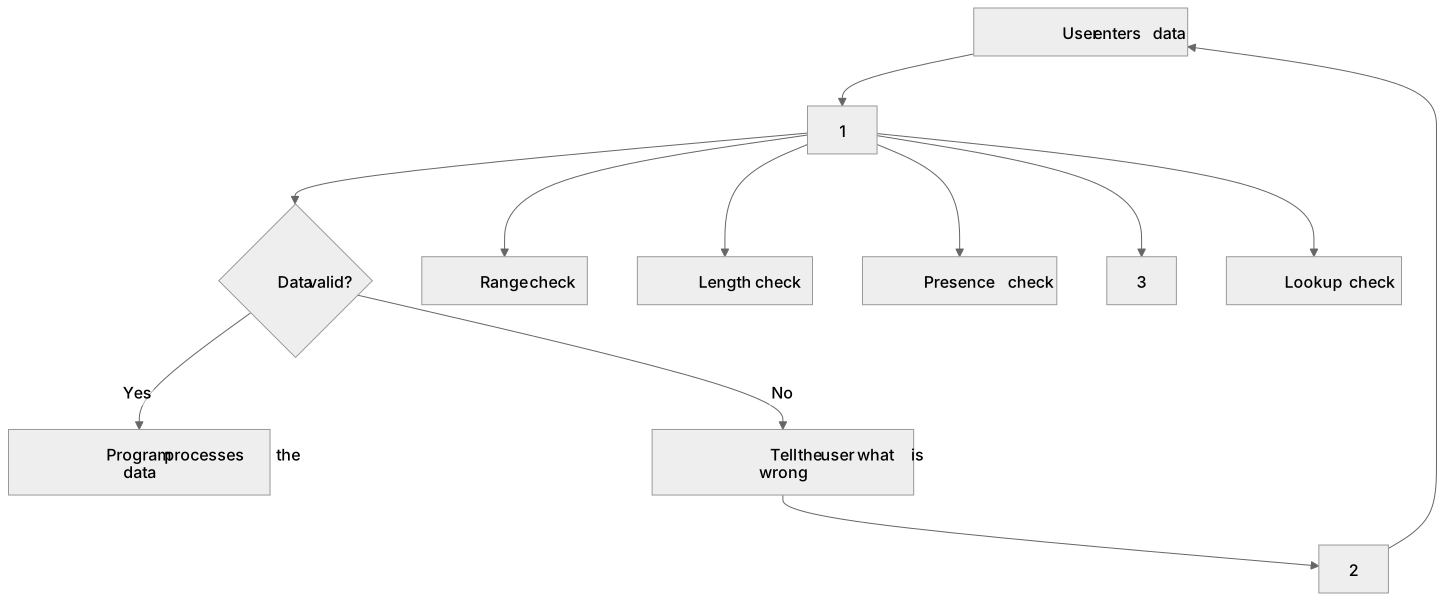
Some boxes have lost their names. Pick the right name for each number.
1Box 1
2Box 2
3Box 3
There is more to this lesson
The full lesson goes on to check your understanding and help you earn the marks. Create a free account to carry on, with your progress saved.
A week of Premium from your first lesson · Then the free plan continues · No card, no charge
Test your understanding of Defensive design: Input validation
Active recall beats re-reading. Take an instant quiz now to test what you’ve learned and lock it into long-term memory.
A week of Premium from your first lesson · Then the free plan continues · No card, no charge