OCR · GCSE · Computer Science
Course version: J277 · Version from Sept 2022
Identify the inputs, processes, and outputs for a problem
Full specification wording
Designing, creating and refining algorithms: Identify the inputs, processes, and outputs for a problem
Every computational problem can be described as a system that takes inputs, transforms them through processes and produces outputs.
Checked against the OCR J277 specification on .
- Point 1 of 5
- 3 key terms
Study notes
From the checked teaching notes for this specification point.
The idea
Every computational problem can be described as a system that takes inputs, transforms them through processes and produces outputs. Inputs are the data or signals entering the system, such as a customer's age typed into a ticket machine. Processes are the operations, calculations or decisions performed on that data, such as checking whether the age is below 16 and calculating the price. Outputs are the results presented or stored, such as displaying the ticket price or writing a record to a file. Identifying these three elements forces you to clarify what data is needed, what must be done with it and what the user or another system receives. This structure supports later algorithm design because each process can become a step, decision or sub-program, and it is assessed by applying the model to scenarios rather than by listing definitions.
What earns the marks
- Identifies inputs as the data or signals that enter the system, naming specific items from the scenario rather than saying 'data'.
- Identifies processes as the operations, calculations or decisions carried out on the inputs, including any comparisons or validation.
- Identifies outputs as the results produced, such as displayed values, printed documents, stored records or control signals.
- Classifies each item correctly when a scenario mixes data entry, calculation and display, avoiding placing a calculation in the input list.
- Links inputs to the processes that use them and processes to the outputs they produce, showing the flow through the system.
- Uses the identified elements to outline a solution, for example turning a process into a step or decision in an algorithm.
Common mistakes and how to put them right
Listing the keyboard or screen as the input or output.
Put it right: The input is the data entered and the output is the information produced, while the device is only the hardware involved.
Putting a calculation such as working out a total in the input list.
Put it right: A calculation is a process because it transforms data rather than supplying it.
Forgetting stored results such as a saved file or updated database record.
Put it right: An output can be stored data as well as something displayed to a user.
Exam tips
- Use the scenario's own words when naming inputs and outputs so each item is clearly tied to the problem.
- Present your answer as three labelled groups, inputs, processes and outputs, so the classification is unambiguous.
- Check each process and ask which input it uses and which output it produces, removing any item that does not fit the flow.
Try the lesson
The start of the Designing, creating and refining algorithms: Identify the inputs, processes, and outputs for a problem lesson, made from checked teaching notes for this specification point.
Have a go first
A program asks the user to enter two numbers, adds them together, and displays the total. What is the input in this program?
Listen
Every computational problem can be described as a system that takes inputs, transforms them through processes and produces outputs. Inputs are the data or signals entering the system, such as a customer's age typed into a ticket machine. Processes are the operations, calculations or decisions performed on that data, such as checking whether the age is below 16 and calculating the price. Outputs are the results presented or stored, such as displaying the ticket price or writing a record to a file. Identifying these three elements forces you to clarify what data is needed, what must be done with it and what the user or another system receives. This structure supports later algorithm design because each process can become a step, decision or sub-program, and it is assessed by applying the model to scenarios rather than by listing definitions. A strong answer earns marks for these points. Identifies inputs as the data or signals that enter the system, naming specific items from the scenario rather than saying 'data'. Identifies processes as the operations, calculations or decisions carried out on the inputs, including any comparisons or validation. Identifies outputs as the results produced, such as displayed values, printed documents, stored records or control signals. Classifies each item correctly when a scenario mixes data entry, calculation and display, avoiding placing a calculation in the input list. A common slip: Listing the keyboard or screen as the input or output. Instead, the input is the data entered and the output is the information produced, while the device is only the hardware involved. Exam tip: Use the scenario's own words when naming inputs and outputs so each item is clearly tied to the problem.
See it
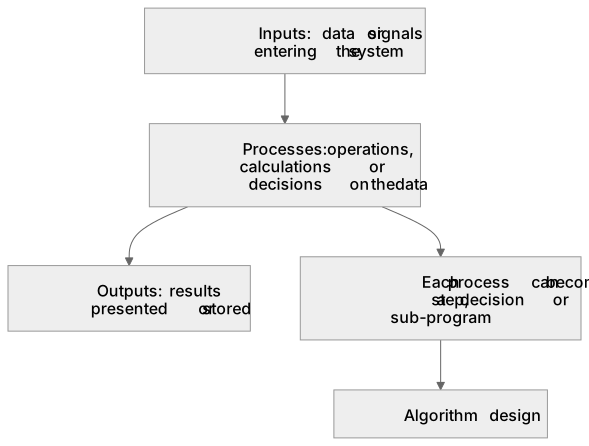
Key words
Say what each word means before you turn the card.
Inputs
Try answering aloud or in your head before turning the card.
Processes
Try answering aloud or in your head before turning the card.
Outputs
Try answering aloud or in your head before turning the card.
See every definition
- Inputs
- The data or signals that enter the system, such as a customer's age typed into a ticket machine.
- Processes
- The operations, calculations or decisions performed on the data, such as checking whether the age is below 16 and calculating the price.
- Outputs
- The results presented or stored, such as displaying the ticket price or writing a record to a file.
Label the diagram
Some boxes have lost their names. Pick the right name for each number.
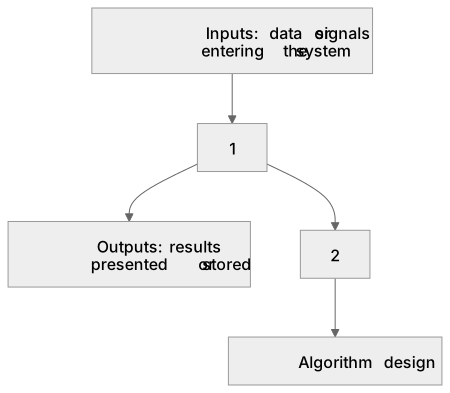
1Box 1
2Box 2
There is more to this lesson
The full lesson goes on to check your understanding and help you earn the marks. Create a free account to carry on, with your progress saved.
A week of Premium from your first lesson · Then the free plan continues · No card, no charge
Test your understanding of Designing, creating and refining algorithms: Identify the inputs, processes, and outputs for a problem
Active recall beats re-reading. Take an instant quiz now to test what you’ve learned and lock it into long-term memory.
A week of Premium from your first lesson · Then the free plan continues · No card, no charge