OCR · GCSE · Computer Science
Course version: J277 · Version from Sept 2022
Designing, creating and refining algorithms: Structure diagrams
A structure diagram is a top-down design tool that breaks a whole problem into successively smaller sub-problems until each part is simple enough to code as a module.
Checked against the OCR J277 specification on .
- Point 2 of 5
- 3 key terms
Study notes
From the checked teaching notes for this specification point.
The idea
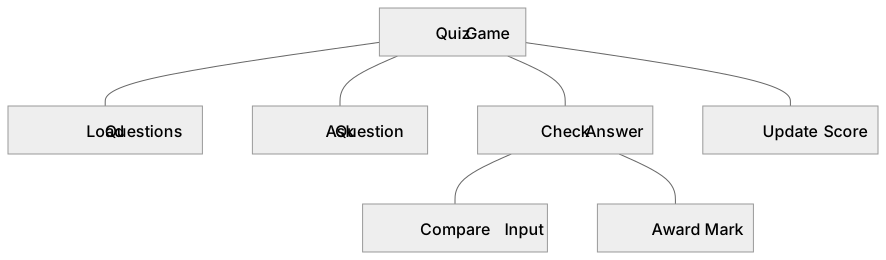
A structure diagram is a top-down design tool that breaks a whole problem into successively smaller sub-problems until each part is simple enough to code as a module. The top box names the overall system; each lower level shows a decomposition of the box above it. For example, a 'Quiz Game' box might split into 'Load Questions', 'Ask Question', 'Check Answer' and 'Update Score', and 'Check Answer' might split again into 'Compare Input' and 'Award Mark'. Reading downwards shows decomposition; reading upwards shows how modules combine. Structure diagrams show hierarchy and sequence of refinement, not the order in which code runs, so they differ from flowcharts, which show control flow. They help plan modular programs, support testing of separate modules and make large problems easier to divide among a team.
What earns the marks
- A structure diagram decomposes a problem from a single top-level box into progressively smaller sub-problems at lower levels.
- Each box represents a module or task, and boxes on the same level are sibling sub-tasks of the parent box directly above them.
- The diagram shows hierarchy and decomposition, not the order of execution, so it is not a flowchart and has no decision diamonds or flow arrows.
- A well-formed diagram stops decomposing when each leaf module is simple enough to be written as a single subroutine or small block of code.
- Structure diagrams support modular design, so modules can be written, tested and maintained independently and work can be shared across a team.
- Interpreting a diagram means tracing from the top-level task down to leaf modules and explaining what each module must do and how it contributes to the whole.
Common mistakes and how to put them right
Drawing a flowchart with arrows and decision symbols instead of a hierarchy.
Put it right: Is to use only boxes connected by plain lines showing parent-child decomposition.
Putting steps in time order across a level.
Put it right: Is to treat boxes on one level as independent sub-tasks, because a structure diagram does not show sequence.
Decomposing forever or stopping too early.
Put it right: Is to stop when each leaf module is small enough to implement as one subroutine, and to check every parent is fully broken down.
Exam tips
- Read the question wording: 'decompose' or 'break down' signals a structure diagram, while 'sequence', 'selection' or 'iteration' signals a flowchart or pseudocode task, so check whether the question asks for a diagram or code.
- When completing a partly drawn diagram, match the level of detail of the boxes already given and keep sibling boxes at a similar size.
- When interpreting, name the top-level task, then state what each lower-level module does and how it combines to solve the whole problem.
Try the lesson
The start of the Designing, creating and refining algorithms: Structure diagrams lesson, made from checked teaching notes for this specification point.
Have a go first
What is a structure diagram used for when designing a solution?
Listen
A structure diagram is a top-down design tool that breaks a whole problem into successively smaller sub-problems until each part is simple enough to code as a module. The top box names the overall system; each lower level shows a decomposition of the box above it. For example, a 'Quiz Game' box might split into 'Load Questions', 'Ask Question', 'Check Answer' and 'Update Score', and 'Check Answer' might split again into 'Compare Input' and 'Award Mark'. Reading downwards shows decomposition; reading upwards shows how modules combine. Structure diagrams show hierarchy and sequence of refinement, not the order in which code runs, so they differ from flowcharts, which show control flow. They help plan modular programs, support testing of separate modules and make large problems easier to divide among a team. A strong answer earns marks for these points. A structure diagram decomposes a problem from a single top-level box into progressively smaller sub-problems at lower levels. Each box represents a module or task, and boxes on the same level are sibling sub-tasks of the parent box directly above them. The diagram shows hierarchy and decomposition, not the order of execution, so it is not a flowchart and has no decision diamonds or flow arrows. A well-formed diagram stops decomposing when each leaf module is simple enough to be written as a single subroutine or small block of code. A common slip: Drawing a flowchart with arrows and decision symbols instead of a hierarchy. Instead, is to use only boxes connected by plain lines showing parent-child decomposition. Exam tip: Read the question wording: 'decompose' or 'break down' signals a structure diagram, while 'sequence', 'selection' or 'iteration' signals a flowchart or pseudocode task, so check whether the question asks for a diagram or code.
See it
Key words
Say what each word means before you turn the card.
Structure diagram
Try answering aloud or in your head before turning the card.
Decomposition
Try answering aloud or in your head before turning the card.
Hierarchy
Try answering aloud or in your head before turning the card.
See every definition
- Structure diagram
- A top-down design tool that breaks a whole problem into successively smaller sub-problems until each part is simple enough to code as a module.
- Decomposition
- Breaking a whole problem into successively smaller sub-problems, shown by reading downwards from the top box to lower levels.
- Hierarchy
- The arrangement of boxes by level, where each lower level shows a decomposition of the box above it and boxes on the same level are sibling sub-tasks.
Label the diagram
Some boxes have lost their names. Pick the right name for each number.
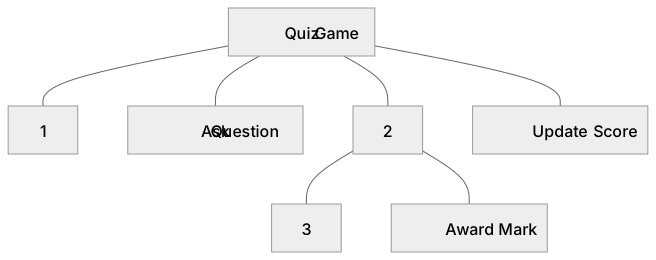
1Box 1
2Box 2
3Box 3
There is more to this lesson
The full lesson goes on to check your understanding and help you earn the marks. Create a free account to carry on, with your progress saved.
A week of Premium from your first lesson · Then the free plan continues · No card, no charge
Test your understanding of Designing, creating and refining algorithms: Structure diagrams
Active recall beats re-reading. Take an instant quiz now to test what you’ve learned and lock it into long-term memory.
A week of Premium from your first lesson · Then the free plan continues · No card, no charge