OCR · GCSE · Computer Science
Course version: J277 · Version from Sept 2022
Primary storage (memory): The purpose of ROM in a computer system
ROM (Read-Only Memory) is non-volatile primary storage that retains its contents when power is removed.
Checked against the OCR J277 specification on .
- Point 3 of 6
- 4 key terms
Study notes
From the checked teaching notes for this specification point.
The idea
ROM (Read-Only Memory) is non-volatile primary storage that retains its contents when power is removed. Its main purpose is to hold the bootstrap program (BIOS/UEFI firmware) that runs when a computer is switched on. The CPU fetches and executes these instructions from ROM to perform the power-on self-test (POST), initialise hardware, and load the operating system from secondary storage into RAM. ROM is typically written during manufacture and cannot be easily altered by normal programs, so it is suited to storing fixed start-up instructions.
For example: A desktop PC has a ROM chip on the motherboard containing firmware; without it, the CPU would have no instructions to execute at start-up and the system could not boot.
What earns the marks
- ROM is non-volatile, meaning it keeps its contents when the power is turned off.
- ROM stores the bootstrap program or firmware (BIOS/UEFI) used at start-up.
- The CPU fetches and executes instructions from ROM when the computer is first switched on.
- ROM is used to run the power-on self-test (POST) and initialise hardware before the operating system loads.
- ROM contents are typically read-only during normal operation, so they are not changed by user programs.
- ROM may hold fixed instructions that load the operating system from secondary storage into RAM.
Common mistakes and how to put them right
Thinking ROM is volatile.
Put it right by stating that ROM is non-volatile and retains data without power, unlike RAM.
Confusing ROM with secondary storage.
Put it right by explaining that ROM is primary storage directly accessible to the CPU and usually stores start-up firmware, not user files.
Saying ROM stores the operating system permanently.
Put it right by clarifying that the operating system is usually stored on secondary storage and loaded into RAM; ROM holds the bootstrap/firmware that starts the loading process.
Exam tips
- Link ROM to a specific start-up task, such as holding the bootstrap program that runs POST and loads the operating system.
- Use the term non-volatile explicitly and contrast it with RAM to show understanding of primary storage.
- If asked to explain, give a cause-and-effect chain: power on → CPU fetches from ROM → POST and hardware initialisation → OS loaded into RAM.
Try the lesson
The start of the Primary storage (memory): The purpose of ROM in a computer system lesson, made from checked teaching notes for this specification point.
Have a go first
What is the main purpose of ROM in a computer system?
Listen
ROM (Read-Only Memory) is non-volatile primary storage that retains its contents when power is removed. Its main purpose is to hold the bootstrap program (BIOS/UEFI firmware) that runs when a computer is switched on. The CPU fetches and executes these instructions from ROM to perform the power-on self-test (POST), initialise hardware, and load the operating system from secondary storage into RAM. ROM is typically written during manufacture and cannot be easily altered by normal programs, so it is suited to storing fixed start-up instructions. For example, a desktop PC has a ROM chip on the motherboard containing firmware; without it, the CPU would have no instructions to execute at start-up and the system could not boot. A strong answer earns marks for these points. ROM is non-volatile, meaning it keeps its contents when the power is turned off. ROM stores the bootstrap program or firmware (BIOS/UEFI) used at start-up. The CPU fetches and executes instructions from ROM when the computer is first switched on. ROM is used to run the power-on self-test (POST) and initialise hardware before the operating system loads. A common slip: Thinking ROM is volatile. Instead, stating that ROM is non-volatile and retains data without power, unlike RAM. Exam tip: Link ROM to a specific start-up task, such as holding the bootstrap program that runs POST and loads the operating system.
See it
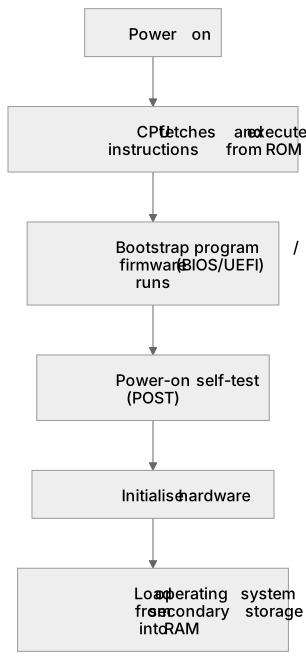
Put it in order
Put these steps in the order they happen.
- 1. Bootstrap program / firmware (BIOS/UEFI) runs
- 2. CPU fetches and executes instructions from ROM
- 3. Power on
- 4. Load operating system from secondary storage into RAM
- 5. Initialise hardware
- 6. Power-on self-test (POST)
Key words
Say what each word means before you turn the card.
Primary storage
Try answering aloud or in your head before turning the card.
Non-volatile memory
Try answering aloud or in your head before turning the card.
Bootstrap and firmware
Try answering aloud or in your head before turning the card.
Computer start-up sequence
Try answering aloud or in your head before turning the card.
See every definition
- Primary storage
- Memory that is directly accessible to the CPU, and ROM is a type of it.
- Non-volatile memory
- Memory that retains its contents when the power is removed, which is true of ROM.
- Bootstrap and firmware
- The program held in ROM, such as BIOS/UEFI firmware, that runs when a computer is switched on.
- Computer start-up sequence
- The CPU fetching and executing instructions from ROM to perform the power-on self-test, initialise hardware and load the operating system from secondary storage into RAM.
Label the diagram
Some boxes have lost their names. Pick the right name for each number.
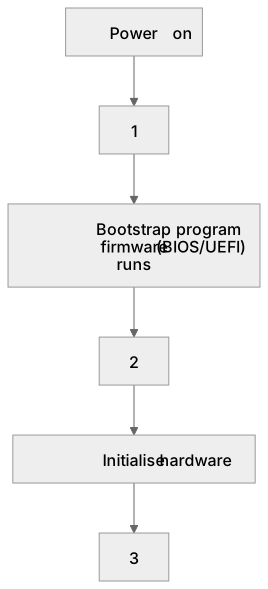
1Box 1
2Box 2
3Box 3
There is more to this lesson
The full lesson goes on to check your understanding and help you earn the marks. Create a free account to carry on, with your progress saved.
A week of Premium from your first lesson · Then the free plan continues · No card, no charge
Test your understanding of Primary storage (memory): The purpose of ROM in a computer system
Active recall beats re-reading. Take an instant quiz now to test what you’ve learned and lock it into long-term memory.
A week of Premium from your first lesson · Then the free plan continues · No card, no charge