OCR · GCSE · Computer Science
Course version: J277 · Version from Sept 2022
Programming fundamentals: The common Boolean operators AND, OR and NOT
Boolean operators work on truth values, each of which is either True or False.
Checked against the OCR J277 specification on .
- Point 4 of 4
- 4 key terms
Study notes
From the checked teaching notes for this specification point.
The idea
Boolean operators work on truth values, each of which is either True or False. AND returns True only when both inputs are True, so True AND False is False. OR returns True when at least one input is True, so False OR True is True. NOT reverses a single value, so NOT True is False and NOT False is True. These operators let programs combine conditions, for example checking whether a user is logged in AND has admin rights, or whether a score is below zero OR above one hundred. In an exam, you may be asked to complete a truth table, evaluate an expression, or write a condition using AND, OR and NOT. Work through each operator in turn, applying brackets first, then NOT, then AND, then OR, and record the final truth value clearly.
What earns the marks
- AND is a binary operator that produces True only when both of its operands are True; if either operand is False, the result is False. For example, True AND False evaluates to False.
- OR is a binary operator that produces True when at least one operand is True; it produces False only when both operands are False. For example, False OR True evaluates to True.
- NOT is a unary operator that negates a single Boolean value, turning True into False and False into True. For example, NOT False evaluates to True.
- Boolean operators are used in selection and iteration to combine or invert conditions, such as while not finished or if age >= 18 and has_ticket.
- A truth table lists every combination of input values and the resulting output, which helps verify the behaviour of an expression. For two inputs, there are four rows: both False, first True, second True, and both True.
Common mistakes and how to put them right
Treating AND as if it returns True when either input is True.
Put it right: AND requires both inputs to be True. For example, True AND False is False, not True.
Confusing OR with exclusive or, expecting False when both inputs are True.
Put it right: OR returns True when at least one input is True, including when both are True. For example, True OR True is True.
Applying NOT to two values, as in NOT True AND False, without deciding which part is negated.
Put it right: NOT applies to one value or a bracketed expression, so use brackets to make the intended meaning clear. For example, NOT (True AND False) is True, whereas (NOT True) AND False is False.
Exam tips
- Write out each intermediate truth value when evaluating a compound expression, so your working can be followed and checked.
- Use brackets in written conditions to make the order of evaluation explicit, especially when NOT is combined with AND or OR.
- Check a completed truth table by testing one row where all inputs are False and one row where all inputs are True, as these often reveal errors quickly.
Try the lesson
The start of the Programming fundamentals: The common Boolean operators AND, OR and NOT lesson, made from checked teaching notes for this specification point.
Have a go first
Which Boolean operator gives a result of True only when both of its inputs are True?
Listen
Boolean operators work on truth values, each of which is either True or False. AND returns True only when both inputs are True, so True AND False is False. OR returns True when at least one input is True, so False OR True is True. NOT reverses a single value, so NOT True is False and NOT False is True. These operators let programs combine conditions, for example checking whether a user is logged in AND has admin rights, or whether a score is below zero OR above one hundred. In an exam, you may be asked to complete a truth table, evaluate an expression, or write a condition using AND, OR and NOT. Work through each operator in turn, applying brackets first, then NOT, then AND, then OR, and record the final truth value clearly. A strong answer earns marks for these points. AND is a binary operator that produces True only when both of its operands are True; if either operand is False, the result is False. For example, True AND False evaluates to False. OR is a binary operator that produces True when at least one operand is True; it produces False only when both operands are False. For example, False OR True evaluates to True. NOT is a unary operator that negates a single Boolean value, turning True into False and False into True. For example, NOT False evaluates to True. Boolean expressions can be evaluated by substituting truth values and applying operator precedence, with brackets first, then NOT, then AND, then OR. For example, NOT True OR True is evaluated as (NOT True) OR True, giving False OR True, which is True. A common slip: Treating AND as if it returns True when either input is True. Instead, AND requires both inputs to be True. For example, True AND False is False, not True. Exam tip: Write out each intermediate truth value when evaluating a compound expression, so your working can be followed and checked.
See it
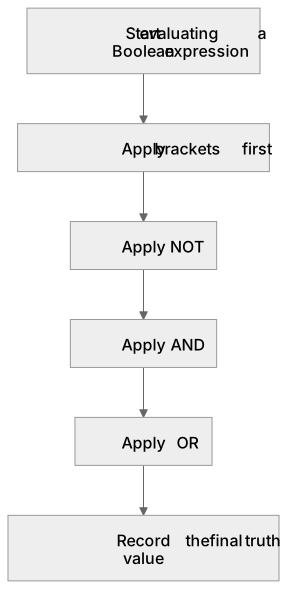
Put it in order
Put these steps in the order they happen.
- 1. Apply NOT
- 2. Apply brackets first
- 3. Start evaluating a Boolean expression
- 4. Record the final truth value
- 5. Apply OR
- 6. Apply AND
Key words
Say what each word means before you turn the card.
Boolean operators
Try answering aloud or in your head before turning the card.
AND
Try answering aloud or in your head before turning the card.
OR
Try answering aloud or in your head before turning the card.
NOT
Try answering aloud or in your head before turning the card.
See every definition
- Boolean operators
- Operators that work on truth values, each of which is either True or False, and let programs combine conditions.
- AND
- A binary operator that produces True only when both of its operands are True; if either operand is False, the result is False.
- OR
- A binary operator that produces True when at least one operand is True; it produces False only when both operands are False.
- NOT
- A unary operator that negates a single Boolean value, turning True into False and False into True.
Label the diagram
Some boxes have lost their names. Pick the right name for each number.
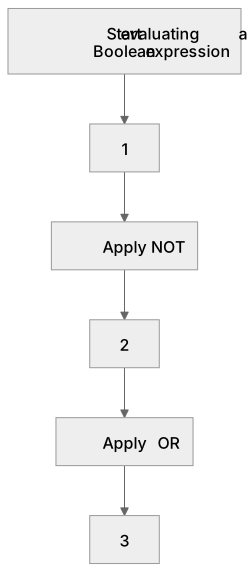
1Box 1
2Box 2
3Box 3
There is more to this lesson
The full lesson goes on to check your understanding and help you earn the marks. Create a free account to carry on, with your progress saved.
A week of Premium from your first lesson · Then the free plan continues · No card, no charge
Test your understanding of Programming fundamentals: The common Boolean operators AND, OR and NOT
Active recall beats re-reading. Take an instant quiz now to test what you’ve learned and lock it into long-term memory.
A week of Premium from your first lesson · Then the free plan continues · No card, no charge