OCR · GCSE · Computer Science
Course version: J277 · Version from Sept 2022
The use of variables, constants, operators, inputs, outputs and assignments
Full specification wording
Programming fundamentals: The use of variables, constants, operators, inputs, outputs and assignments
A program stores changing data in variables and fixed values in constants.
Checked against the OCR J277 specification on .
- Point 1 of 4
- 3 key terms
Study notes
From the checked teaching notes for this specification point.
The idea
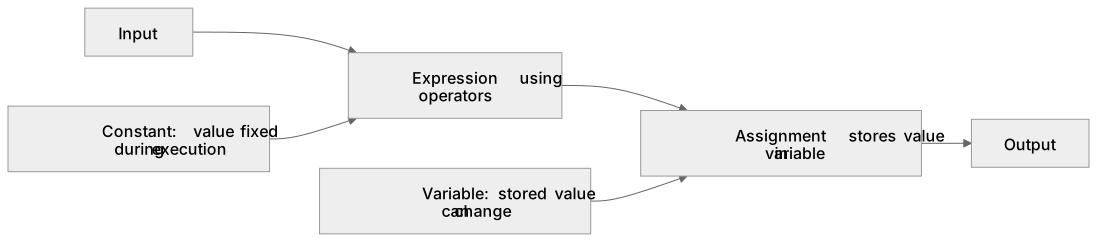
A program stores changing data in variables and fixed values in constants. Each item should have a meaningful identifier and an appropriate data type. An assignment replaces the value held by a variable after evaluating the expression on its right. Input brings data into the program, often from a user or sensor, while output communicates a result through a screen, file or device. Operators combine or compare values to build expressions. Trace code in execution order, recording each assignment, because later statements can overwrite an earlier value.
What earns the marks
- Distinguish a variable, whose stored value can change, from a constant, whose value is fixed during execution. For example, score might be a variable, while VAT_RATE might be a constant.
- Explain that assignment evaluates an expression and stores the resulting value in the named variable. For example, total = price * quantity evaluates price * quantity and stores the result in total.
- Identify input as data entering a program and output as information produced by the program. For example, reading a user's name from the keyboard is input, while displaying a total on screen is output.
- Trace successive assignments in order and state the final value held by each relevant variable. For example, if x = 5 then x = x + 2, the final value of x is 7.
- Explain that operators combine or compare values to build expressions, such as using + to add two numbers or > to compare two values.
Common mistakes and how to put them right
Treating assignment as a statement that two values are permanently equal.
Put it right: It stores a newly evaluated value in a variable. For example, x = x + 1 increases x by 1 rather than stating a mathematical equality.
Calling every named value a variable.
Put it right: Identify fixed named values as constants and changing named values as variables. For example, PI = 3.14 is a constant if it is not reassigned.
Confusing input with output.
Put it right: Describe the direction of data relative to the program. For example, a sensor reading entering the program is input, while a message sent to a screen is output.
Exam tips
- Use a trace table with one column for each variable and update it after every assignment.
- When explaining a line of code, name the input, processing and resulting output separately.
- State both the data type and the purpose when asked to choose a suitable variable.
Try the lesson
The start of the Programming fundamentals: The use of variables, constants, operators, inputs, outputs and assignments lesson, made from checked teaching notes for this specification point.
Have a go first
In a program, which term describes a named store whose value can be changed while the program is running?
Listen
A program stores changing data in variables and fixed values in constants. Each item should have a meaningful identifier and an appropriate data type. An assignment replaces the value held by a variable after evaluating the expression on its right. Input brings data into the program, often from a user or sensor, while output communicates a result through a screen, file or device. Operators combine or compare values to build expressions. Trace code in execution order, recording each assignment, because later statements can overwrite an earlier value. A strong answer earns marks for these points. Distinguish a variable, whose stored value can change, from a constant, whose value is fixed during execution. For example, score might be a variable, while VAT_RATE might be a constant. Explain that assignment evaluates an expression and stores the resulting value in the named variable. For example, total = price * quantity evaluates price * quantity and stores the result in total. Identify input as data entering a program and output as information produced by the program. For example, reading a user's name from the keyboard is input, while displaying a total on screen is output. Trace successive assignments in order and state the final value held by each relevant variable. For example, if x = 5 then x = x + 2, the final value of x is 7. A common slip: Treating assignment as a statement that two values are permanently equal. Instead, it stores a newly evaluated value in a variable. For example, x = x + 1 increases x by 1 rather than stating a mathematical equality. Exam tip: Use a trace table with one column for each variable and update it after every assignment.
See it
Key words
Say what each word means before you turn the card.
variables and constants
Try answering aloud or in your head before turning the card.
assignment
Try answering aloud or in your head before turning the card.
input and output
Try answering aloud or in your head before turning the card.
See every definition
- variables and constants
- A program stores changing data in variables and fixed values in constants, each with a meaningful identifier and an appropriate data type.
- assignment
- An assignment replaces the value held by a variable after evaluating the expression on its right.
- input and output
- Input brings data into the program, often from a user or sensor, while output communicates a result through a screen, file or device.
Label the diagram
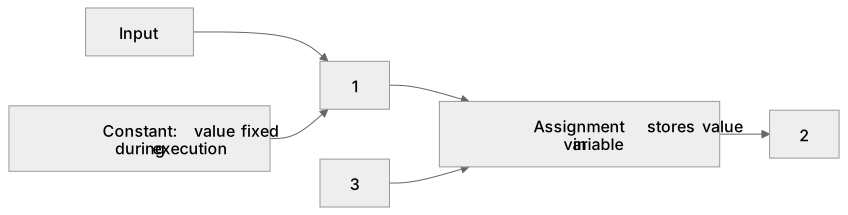
Some boxes have lost their names. Pick the right name for each number.
1Box 1
2Box 2
3Box 3
There is more to this lesson
The full lesson goes on to check your understanding and help you earn the marks. Create a free account to carry on, with your progress saved.
A week of Premium from your first lesson · Then the free plan continues · No card, no charge
Test your understanding of Programming fundamentals: The use of variables, constants, operators, inputs, outputs and assignments
Active recall beats re-reading. Take an instant quiz now to test what you’ve learned and lock it into long-term memory.
A week of Premium from your first lesson · Then the free plan continues · No card, no charge