OCR · GCSE · Computer Science
Course version: J277 · Version from Sept 2022
Testing: Identify syntax and logic errors
A syntax error breaks the rules of the programming language, so the code cannot be translated or run.
Checked against the OCR J277 specification on .
- Point 3 of 5
- 3 key terms
Study notes
From the checked teaching notes for this specification point.
The idea
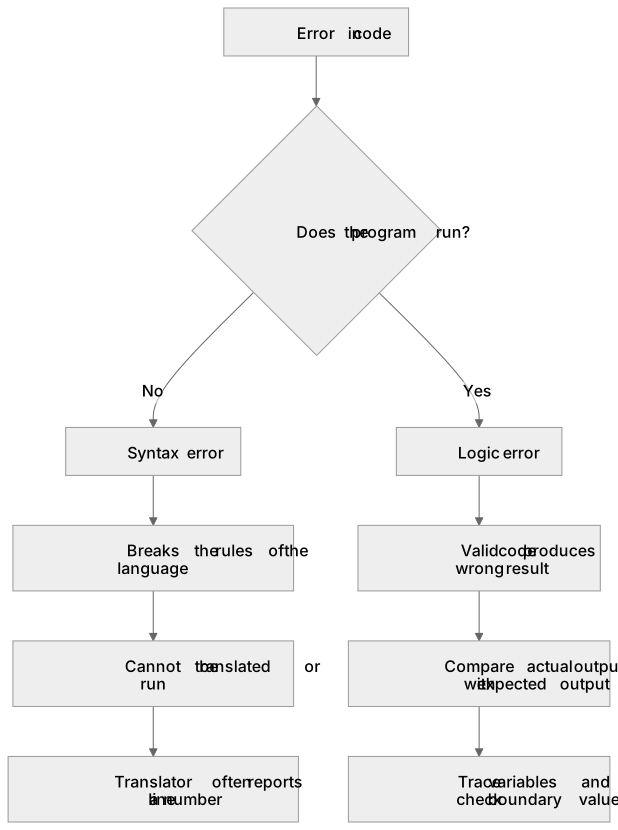
A syntax error breaks the rules of the programming language, so the code cannot be translated or run. Examples include a missing closing bracket in print("Hello", a misspelled keyword such as whille, or using a reserved word as a variable name. Translators usually report syntax errors with a line number, which helps you locate them. A logic error is grammatically valid code that produces the wrong result. For example, average = total / count + 1 adds one incorrectly, or a condition uses > when >= is needed at a boundary. Logic errors are harder to find because the program runs. You identify them by comparing actual output with expected output using test data, tracing variables, and checking boundary values.
What earns the marks
- A syntax error breaks the grammar or rules of the language, so the program cannot be translated or executed.
- Typical syntax errors include missing brackets or quotation marks, misspelled keywords and incorrect punctuation.
- A logic error is valid code that runs but produces an incorrect or unexpected result.
- Logic errors are found by comparing actual output with expected output, often using normal, boundary and erroneous test data.
- Tracing values, using breakpoints or adding temporary output statements can help locate logic errors.
- Translators often flag syntax errors with a line number, whereas logic errors usually require the programmer to reason about the algorithm.
Common mistakes and how to put them right
Calling a wrong calculation a syntax error.
Put it right: If the code runs but gives the wrong answer, it is a logic error.
Assuming the line number reported for a syntax error is always the exact faulty line.
Put it right: The real cause may be on an earlier line, such as an unclosed bracket.
Thinking logic errors are found automatically by the translator.
Put it right: They normally require testing and comparison with expected results.
Exam tips
- Classify the error first: ask whether the program would run at all, then decide syntax or logic.
- Quote the exact faulty line or expression and state the correction rather than describing the error vaguely.
- For logic errors, state the test data used, the expected output and the actual output to justify your identification.
Try the lesson
The start of the Testing: Identify syntax and logic errors lesson, made from checked teaching notes for this specification point.
Have a go first
Which of these describes a syntax error in a computer program?
Listen
A syntax error breaks the rules of the programming language, so the code cannot be translated or run. Examples include a missing closing bracket in print("Hello", a misspelled keyword such as whille, or using a reserved word as a variable name. Translators usually report syntax errors with a line number, which helps you locate them. A logic error is grammatically valid code that produces the wrong result. For example, average = total / count + 1 adds one incorrectly, or a condition uses > when >= is needed at a boundary. Logic errors are harder to find because the program runs. You identify them by comparing actual output with expected output using test data, tracing variables, and checking boundary values. A strong answer earns marks for these points. A syntax error breaks the grammar or rules of the language, so the program cannot be translated or executed. Typical syntax errors include missing brackets or quotation marks, misspelled keywords and incorrect punctuation. A logic error is valid code that runs but produces an incorrect or unexpected result. Logic errors are found by comparing actual output with expected output, often using normal, boundary and erroneous test data. Exam tip: Classify the error first: ask whether the program would run at all, then decide syntax or logic.
See it
Key words
Say what each word means before you turn the card.
Syntax error
Try answering aloud or in your head before turning the card.
Logic error
Try answering aloud or in your head before turning the card.
Test data
Try answering aloud or in your head before turning the card.
See every definition
- Syntax error
- Breaks the rules of the programming language, so the code cannot be translated or run.
- Logic error
- Grammatically valid code that produces the wrong result, and is harder to find because the program runs.
- Test data
- Used with expected output to identify logic errors by comparing it with actual output.
There is more to this lesson
The full lesson goes on to check your understanding and help you earn the marks. Create a free account to carry on, with your progress saved.
A week of Premium from your first lesson · Then the free plan continues · No card, no charge
Test your understanding of Testing: Identify syntax and logic errors
Active recall beats re-reading. Take an instant quiz now to test what you’ve learned and lock it into long-term memory.
A week of Premium from your first lesson · Then the free plan continues · No card, no charge