OCR · GCSE · Computer Science
Course version: J277 · Version from Sept 2022
Utility software: The purpose and functionality of utility software
Utility software is the small, focused toolset that keeps a computer usable once the operating system is installed.
Checked against the OCR J277 specification on .
- Point 1 of 2
- 4 key terms
Study notes
From the checked teaching notes for this specification point.
The idea
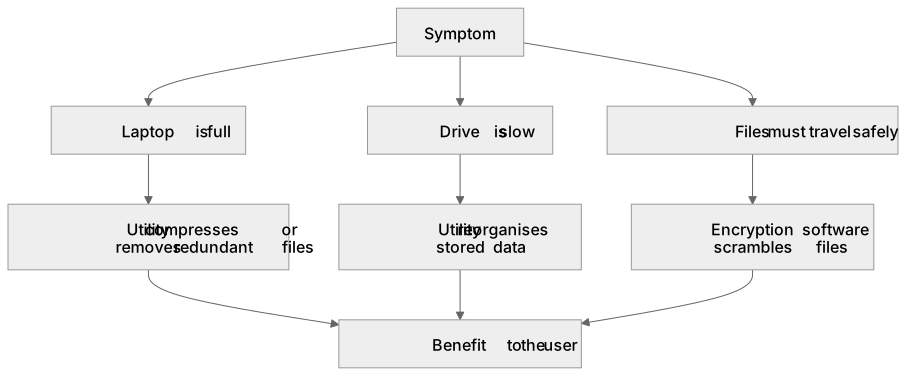
Utility software is the small, focused toolset that keeps a computer usable once the operating system is installed. Where the OS manages hardware, files and users, utilities each solve one housekeeping problem: protecting data, reclaiming storage, shrinking files or restoring order to a drive. A typical machine ships with several, and a technician chooses the right one for the symptom. If a laptop is full, a utility can compress or remove redundant files; if a drive is slow, another reorganises stored data; if files must travel safely, encryption software scrambles them. Utilities usually run in the background or on demand, often need elevated privileges, and report what they changed. Understanding their purpose means matching a named tool to the problem it solves and describing the benefit it delivers to the user.
What earns the marks
- Utilities are programs that perform maintenance or protective tasks on a computer system, separate from the core operating system functions.
- Each utility has a narrow, defined purpose, such as protecting data, freeing storage space or improving drive performance.
- Functionality describes what the tool actually does to data or hardware, for example scrambling file contents or rewriting file locations.
- Utilities may run automatically in the background or be started manually by the user when a problem arises.
- Choosing a utility depends on the symptom: slow drive, low storage, or files that need protection in transit.
- Some utilities require administrator rights because they modify system files or whole drives.
Common mistakes and how to put them right
Treating utility software as the operating system itself.
Put it right: The OS provides core services, while utilities are separate tools that support maintenance and protection.
Assuming every utility improves speed.
Put it right: Encryption and compression trade processing time for security or smaller size, so speed is not the goal.
Describing a utility only by its name without saying what it does.
Put it right: Link the tool to the task it performs and the benefit it gives the user.
Exam tips
- Name the utility, then state its purpose, then give one concrete effect on the user's data or device.
- Use a symptom-to-tool approach: identify the problem in the scenario before naming the utility that solves it.
- Keep answers specific to the named utility rather than listing general benefits of all software.
Try the lesson
The start of the Utility software: The purpose and functionality of utility software lesson, made from checked teaching notes for this specification point.
Have a go first
Which type of software is specifically designed to carry out maintenance tasks such as disk defragmentation and backup?
Listen
Utility software is the small, focused toolset that keeps a computer usable once the operating system is installed. Where the OS manages hardware, files and users, utilities each solve one housekeeping problem: protecting data, reclaiming storage, shrinking files or restoring order to a drive. A typical machine ships with several, and a technician chooses the right one for the symptom. If a laptop is full, a utility can compress or remove redundant files; if a drive is slow, another reorganises stored data; if files must travel safely, encryption software scrambles them. Utilities usually run in the background or on demand, often need elevated privileges, and report what they changed. Understanding their purpose means matching a named tool to the problem it solves and describing the benefit it delivers to the user. A strong answer earns marks for these points. Utilities are programs that perform maintenance or protective tasks on a computer system, separate from the core operating system functions. Each utility has a narrow, defined purpose, such as protecting data, freeing storage space or improving drive performance. Functionality describes what the tool actually does to data or hardware, for example scrambling file contents or rewriting file locations. Utilities may run automatically in the background or be started manually by the user when a problem arises. A common slip: Treating utility software as the operating system itself. Instead, the OS provides core services, while utilities are separate tools that support maintenance and protection. Exam tip: Name the utility, then state its purpose, then give one concrete effect on the user's data or device.
See it
Key words
Say what each word means before you turn the card.
Utility software
Try answering aloud or in your head before turning the card.
System maintenance
Try answering aloud or in your head before turning the card.
Data protection
Try answering aloud or in your head before turning the card.
Storage management
Try answering aloud or in your head before turning the card.
See every definition
- Utility software
- Small, focused tools that keep a computer usable once the operating system is installed, each solving one housekeeping problem.
- System maintenance
- Maintenance or protective tasks performed on a computer system, separate from the core operating system functions.
- Data protection
- Protecting data, for example by scrambling file contents with encryption software so files travel safely.
- Storage management
- Freeing storage space, for example by compressing or removing redundant files when a laptop is full.
Label the diagram
Some boxes have lost their names. Pick the right name for each number.
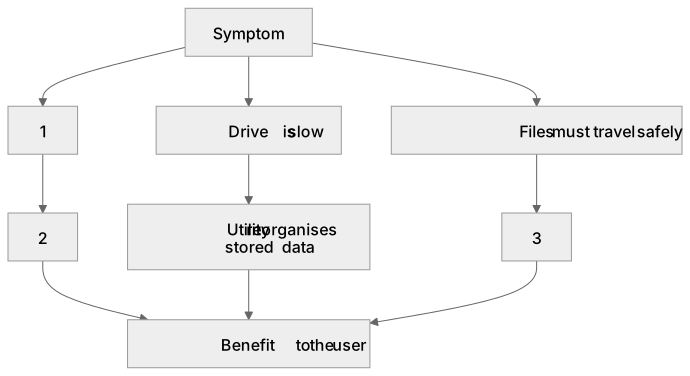
1Box 1
2Box 2
3Box 3
There is more to this lesson
The full lesson goes on to check your understanding and help you earn the marks. Create a free account to carry on, with your progress saved.
A week of Premium from your first lesson · Then the free plan continues · No card, no charge
Test your understanding of Utility software: The purpose and functionality of utility software
Active recall beats re-reading. Take an instant quiz now to test what you’ve learned and lock it into long-term memory.
A week of Premium from your first lesson · Then the free plan continues · No card, no charge