OCR · GCSE · Computer Science
Course version: J277 · Version from Sept 2022
Utility system software Encryption software Defragmentation Data compression
Full specification wording
Utility software: Utility system software Encryption software Defragmentation Data compression
This group covers three widely examined utilities.
Checked against the OCR J277 specification on .
- Point 2 of 2
- 4 key terms
Study notes
From the checked teaching notes for this specification point.
The idea
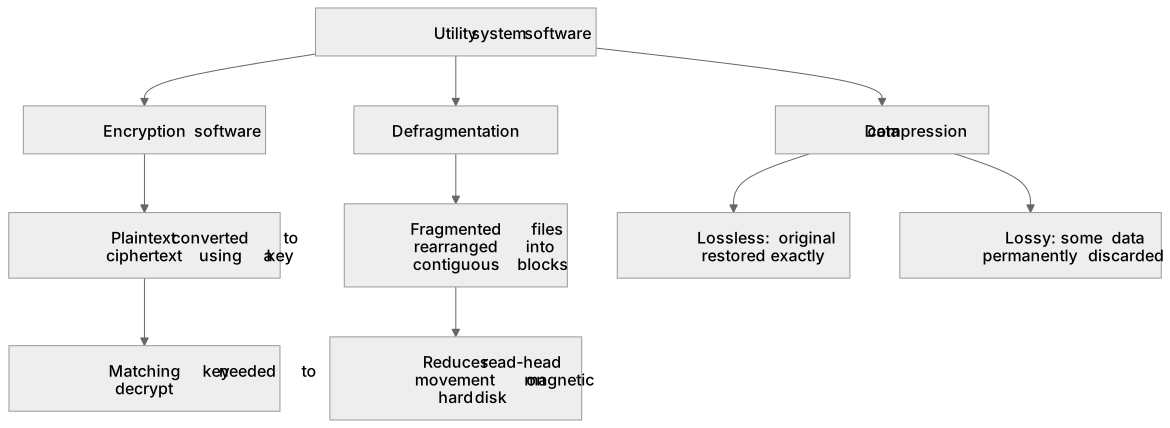
This group covers three widely examined utilities. Encryption software converts readable plaintext into ciphertext using a key, so intercepted data is meaningless without the matching key; it protects files at rest and data in transit, and losing the key can mean losing the data. Defragmentation rearranges fragmented files on a magnetic hard disk so each file occupies contiguous blocks, reducing head movement and improving read speed; it is unnecessary on solid-state drives. Data compression reduces file size either losslessly, so the original is restored exactly, or lossily, where some detail is discarded permanently. Smaller files transfer faster and use less storage, which is why compression suits email attachments, streaming and backups. For each utility, be ready to state what it does, why it is used and one limitation.
What earns the marks
- Encryption software uses an algorithm and a key to convert plaintext into ciphertext so data cannot be understood if intercepted.
- The same key, or a mathematically related key, is needed to decrypt the ciphertext back into readable plaintext.
- Defragmentation moves parts of fragmented files into contiguous blocks on a magnetic hard drive, reducing read-head movement.
- Defragmentation improves access speed on hard disk drives but brings little or no benefit to solid-state drives.
- Lossless compression reduces file size while allowing the original data to be restored exactly.
- Lossy compression permanently discards some data, giving smaller files where perfect fidelity is not required.
- Compressed files use less storage and transfer faster across networks.
Common mistakes and how to put them right
Saying encryption stops data being stolen.
Put it right: Encryption protects confidentiality if data is intercepted, but it does not prevent copying or theft.
Claiming defragmentation speeds up any storage device.
Put it right: It targets magnetic hard drives, and solid-state drives do not benefit because they have no moving read head.
Confusing the two compression types.
Put it right: Lossless restores the exact original, while lossy permanently removes some data.
Exam tips
- For encryption, mention both the key and the fact that ciphertext is meaningless without it.
- For defragmentation, name the storage type it suits and the reason it helps there.
- For compression, state whether the method is lossless or lossy and give a suitable use for each.
Try the lesson
The start of the Utility software: Utility system software Encryption software Defragmentation Data compression lesson, made from checked teaching notes for this specification point.
Have a go first
Which type of utility software scrambles a file so that it cannot be read without a key?
Listen
This group covers three widely examined utilities. Encryption software converts readable plaintext into ciphertext using a key, so intercepted data is meaningless without the matching key; it protects files at rest and data in transit, and losing the key can mean losing the data. Defragmentation rearranges fragmented files on a magnetic hard disk so each file occupies contiguous blocks, reducing head movement and improving read speed; it is unnecessary on solid-state drives. Data compression reduces file size either losslessly, so the original is restored exactly, or lossily, where some detail is discarded permanently. Smaller files transfer faster and use less storage, which is why compression suits email attachments, streaming and backups. For each utility, be ready to state what it does, why it is used and one limitation. A strong answer earns marks for these points. Encryption software uses an algorithm and a key to convert plaintext into ciphertext so data cannot be understood if intercepted. The same key, or a mathematically related key, is needed to decrypt the ciphertext back into readable plaintext. Defragmentation moves parts of fragmented files into contiguous blocks on a magnetic hard drive, reducing read-head movement. Defragmentation improves access speed on hard disk drives but brings little or no benefit to solid-state drives. A common slip: Saying encryption stops data being stolen. Instead, encryption protects confidentiality if data is intercepted, but it does not prevent copying or theft. Exam tip: For encryption, mention both the key and the fact that ciphertext is meaningless without it.
See it
Key words
Say what each word means before you turn the card.
Encryption software
Try answering aloud or in your head before turning the card.
Defragmentation
Try answering aloud or in your head before turning the card.
Lossless compression
Try answering aloud or in your head before turning the card.
Lossy compression
Try answering aloud or in your head before turning the card.
See every definition
- Encryption software
- Uses an algorithm and a key to convert plaintext into ciphertext so data cannot be understood if intercepted.
- Defragmentation
- Moves parts of fragmented files into contiguous blocks on a magnetic hard drive, reducing read-head movement and improving access speed.
- Lossless compression
- Reduces file size while allowing the original data to be restored exactly.
- Lossy compression
- Permanently discards some data, giving smaller files where perfect fidelity is not required.
Label the diagram
Some boxes have lost their names. Pick the right name for each number.
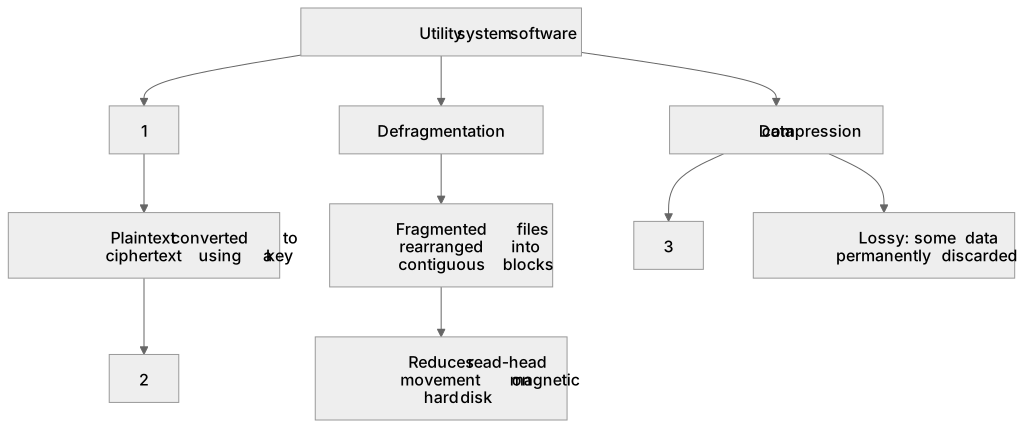
1Box 1
2Box 2
3Box 3
There is more to this lesson
The full lesson goes on to check your understanding and help you earn the marks. Create a free account to carry on, with your progress saved.
A week of Premium from your first lesson · Then the free plan continues · No card, no charge
Test your understanding of Utility software: Utility system software Encryption software Defragmentation Data compression
Active recall beats re-reading. Take an instant quiz now to test what you’ve learned and lock it into long-term memory.
A week of Premium from your first lesson · Then the free plan continues · No card, no charge