OCR · GCSE · Computer Science
Course version: J277 · Version from Sept 2022
Wired and wireless networks, protocols and layers: Ethernet Wireless
Ethernet is the family of protocols and standards used for wired local area networks.
Checked against the OCR J277 specification on .
- Point 2 of 9
- 4 key terms
Study notes
From the checked teaching notes for this specification point.
The idea
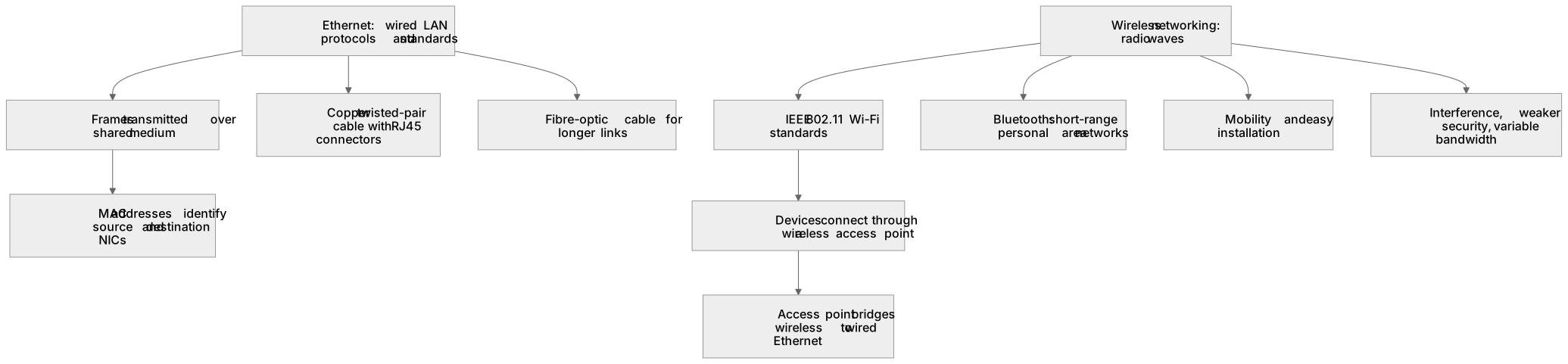
Ethernet is the family of protocols and standards used for wired local area networks. It defines how devices format and transmit frames over a shared medium, using MAC addresses to identify network interface cards. Ethernet commonly runs over copper twisted-pair cable with RJ45 connectors at speeds such as 100 Mbps, 1 Gbps or 10 Gbps, and over fibre for longer links. Wireless networking uses radio waves instead of cables, typically following the IEEE 802.11 standards known as Wi-Fi, with devices connecting through a wireless access point. Bluetooth is another wireless standard used for short-range personal area networks, such as connecting a phone to headphones. Wireless gives mobility and easy installation but can suffer interference, weaker security and variable bandwidth.
What earns the marks
- Ethernet is a set of protocols and standards for wired local area networks, defining how data is packaged into frames and transmitted.
- Ethernet uses MAC addresses to identify the source and destination network interface cards on the network.
- Ethernet commonly operates over copper twisted-pair cable with RJ45 connectors, and can also run over fibre-optic cable.
- Wireless networking transmits data using radio waves, typically following IEEE 802.11 Wi-Fi standards, without a physical cable to each device.
- Wireless devices connect through a wireless access point, which bridges the wireless network to the wired Ethernet network.
- Bluetooth is a wireless standard used for short-range connections between devices, such as peripherals or file transfer.
- Wireless connections offer mobility and easier installation but can be affected by interference, distance, obstacles and weaker security than wired Ethernet.
Common mistakes and how to put them right
Treating Ethernet and Wi-Fi as the same thing.
Put it right by stating that Ethernet is a wired LAN protocol family while Wi-Fi is a wireless LAN standard.
Saying Ethernet uses IP addresses to deliver frames on the local network.
Put it right by explaining that Ethernet frames use MAC addresses, while IP addresses are used at the network layer.
Assuming wireless is always slower than wired.
Put it right by noting that wireless speeds vary with standard, distance and interference, and modern Wi-Fi can be fast, though wired Ethernet is usually more consistent.
Forgetting Bluetooth as a wireless connection method.
Put it right by including Bluetooth for short-range device connections.
Exam tips
- State clearly that Ethernet is a protocol or standard and that the cable is the medium it runs over, so the two ideas are not confused.
- When comparing Ethernet and wireless, refer to MAC addresses, medium, mobility, interference and security.
- Use a labelled example such as a school network where desktop computers use Ethernet and tablets use Wi-Fi through an access point, and mention Bluetooth for peripherals.
Try the lesson
The start of the Wired and wireless networks, protocols and layers: Ethernet Wireless lesson, made from checked teaching notes for this specification point.
Have a go first
Which type of network connection uses a cable to link a computer to a switch?
Listen
Ethernet is the family of protocols and standards used for wired local area networks. It defines how devices format and transmit frames over a shared medium, using MAC addresses to identify network interface cards. Ethernet commonly runs over copper twisted-pair cable with RJ45 connectors at speeds such as 100 Mbps, 1 Gbps or 10 Gbps, and over fibre for longer links. Wireless networking uses radio waves instead of cables, typically following the IEEE 802.11 standards known as Wi-Fi, with devices connecting through a wireless access point. Bluetooth is another wireless standard used for short-range personal area networks, such as connecting a phone to headphones. Wireless gives mobility and easy installation but can suffer interference, weaker security and variable bandwidth. A strong answer earns marks for these points. Ethernet is a set of protocols and standards for wired local area networks, defining how data is packaged into frames and transmitted. Ethernet uses MAC addresses to identify the source and destination network interface cards on the network. Ethernet commonly operates over copper twisted-pair cable with RJ45 connectors, and can also run over fibre-optic cable. Wireless networking transmits data using radio waves, typically following IEEE 802.11 Wi-Fi standards, without a physical cable to each device. A common slip: Treating Ethernet and Wi-Fi as the same thing. Instead, stating that Ethernet is a wired LAN protocol family while Wi-Fi is a wireless LAN standard. Exam tip: State clearly that Ethernet is a protocol or standard and that the cable is the medium it runs over, so the two ideas are not confused.
See it
Key words
Say what each word means before you turn the card.
Ethernet
Try answering aloud or in your head before turning the card.
MAC addressing
Try answering aloud or in your head before turning the card.
Wireless standards
Try answering aloud or in your head before turning the card.
Performance and security trade-offs
Try answering aloud or in your head before turning the card.
See every definition
- Ethernet
- A family of protocols and standards used for wired local area networks, defining how devices format and transmit frames over a shared medium.
- MAC addressing
- Used by Ethernet to identify the source and destination network interface cards on the network.
- Wireless standards
- Networking that uses radio waves instead of cables, typically following the IEEE 802.11 standards known as Wi-Fi, with devices connecting through a wireless access point.
- Performance and security trade-offs
- Wireless gives mobility and easy installation but can suffer interference, weaker security and variable bandwidth.
Label the diagram
Some boxes have lost their names. Pick the right name for each number.
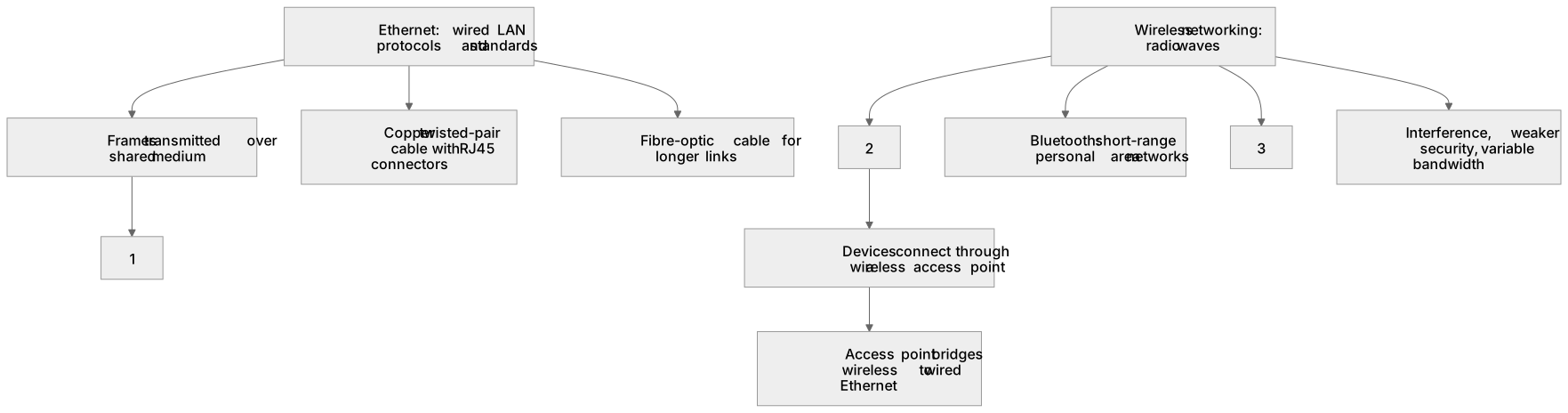
1Box 1
2Box 2
3Box 3
There is more to this lesson
The full lesson goes on to check your understanding and help you earn the marks. Create a free account to carry on, with your progress saved.
A week of Premium from your first lesson · Then the free plan continues · No card, no charge
Test your understanding of Wired and wireless networks, protocols and layers: Ethernet Wireless
Active recall beats re-reading. Take an instant quiz now to test what you’ve learned and lock it into long-term memory.
A week of Premium from your first lesson · Then the free plan continues · No card, no charge