Pearson Edexcel · GCSE · Computer Science
Course version: 1CP2 · Version from Sept 2020
Understand how computers encode characters using 7-bit ASCII
Full specification wording
Data representation: 2.2.1 understand how computers encode characters using 7-bit ASCII
Computers store characters as binary codes so that text can be processed, compared and transmitted consistently.
Checked against the Pearson Edexcel 1CP2 specification (opens in a new tab) on .
- Point 1 of 4
- 2 key terms
Study notes
From the checked teaching notes for this specification point.
The idea
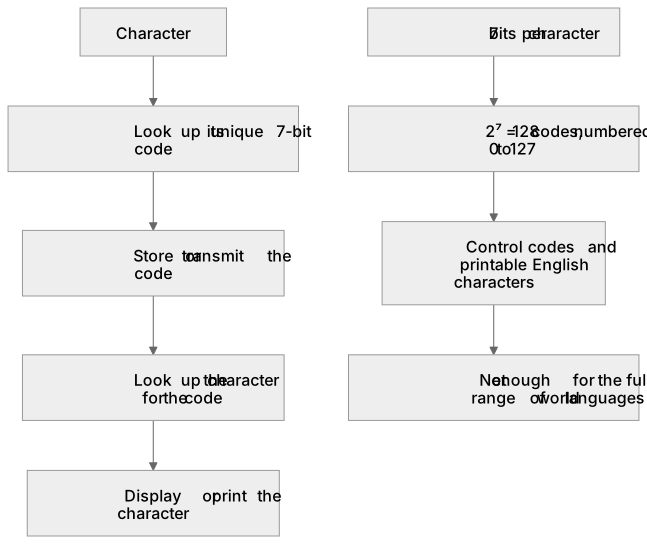
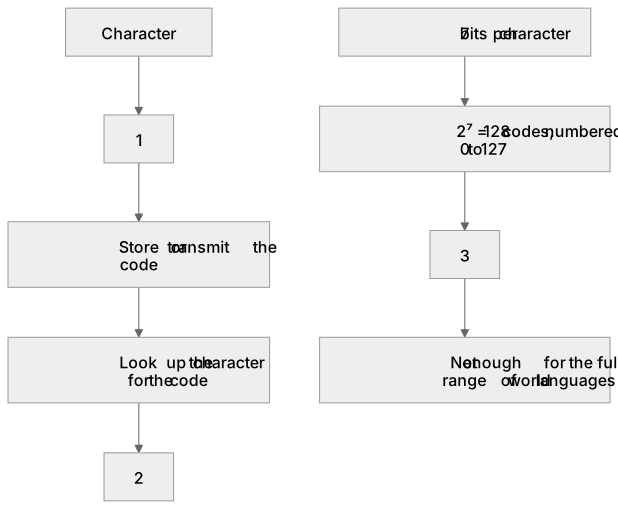
Computers store characters as binary codes so that text can be processed, compared and transmitted consistently. In 7-bit ASCII each character is given a unique 7-bit pattern, so there are 2⁷ = 128 possible codes, numbered 0 to 127. For example, the capital letter A is code 65, which is 1000001 in 7 bits; the digit 0 is code 48, which is 00110000 in 8 bits when a leading zero is added. A computer looks up the code for a character when it stores it, and looks up the character for a code when it displays or prints it. Because the code length is fixed at 7 bits, every character takes the same space, and codes can be sorted into a standard order. The 128 codes cover control codes and printable characters such as letters, digits and punctuation, which is enough for basic English text but not for the full range of world languages.
What earns the marks
- 7-bit ASCII uses exactly 7 bits per character, giving 2⁷ = 128 distinct codes, numbered 0 to 127.
- Each character maps to one unique code, so the same code always represents the same character.
- The capital letter A has code 65, written as 1000001 in 7 bits.
- The digit 0 has code 48, written as 0110000 in 7 bits or 00110000 when padded to 8 bits.
- A computer encodes text by replacing each character with its code and decodes text by replacing each code with its character.
- 7-bit ASCII covers 128 codes including control codes and printable English characters, so it cannot represent all world languages.
Common mistakes and how to put them right
Thinking ASCII uses 8 bits per character.
Put it right: 7-bit ASCII uses 7 bits, giving 128 codes, although an eighth bit may be added as a leading zero when storing in a byte.
Confusing the number of codes with the number of bits.
Put it right: 7 bits give 2⁷ = 128 codes, not 7 codes.
Assuming the code for A is 1 because A is the first letter.
Put it right: The code for A is 65, and codes 0 to 64 are used by other characters and control codes.
Believing 7-bit ASCII can represent any character in any language.
Put it right: Its 128 codes cover basic English characters and control codes only.
Exam tips
- Learn the key values: 2⁷ = 128 codes, A = 65 = 1000001, a = 97, and 0 = 48.
- When converting a character to binary, write exactly 7 bits and pad with leading zeros if needed.
- Check whether a question asks for the number of bits, the number of codes or a specific code value before answering.
Try the lesson
The start of the Data representation: 2.2.1 understand how computers encode characters using 7-bit ASCII lesson, made from checked teaching notes for this specification point.
Have a go first
What is the denary code for uppercase 'A' in 7-bit ASCII?
Listen
Computers store characters as binary codes so that text can be processed, compared and transmitted consistently. In 7-bit ASCII each character is given a unique 7-bit pattern, so there are 2⁷ = 128 possible codes, numbered 0 to 127. For example, the capital letter A is code 65, which is 1000001 in 7 bits; the digit 0 is code 48, which is 00110000 in 8 bits when a leading zero is added. A computer looks up the code for a character when it stores it, and looks up the character for a code when it displays or prints it. Because the code length is fixed at 7 bits, every character takes the same space, and codes can be sorted into a standard order. The 128 codes cover control codes and printable characters such as letters, digits and punctuation, which is enough for basic English text but not for the full range of world languages. A strong answer earns marks for these points. 7-bit ASCII uses exactly 7 bits per character, giving 2⁷ = 128 distinct codes, numbered 0 to 127. Each character maps to one unique code, so the same code always represents the same character. The capital letter A has code 65, written as 1000001 in 7 bits. The digit 0 has code 48, written as 0110000 in 7 bits or 00110000 when padded to 8 bits. Exam tip: Learn the key values: 2⁷ = 128 codes, A = 65 = 1000001, a = 97, and 0 = 48.
See it
Key words
Say what each word means before you turn the card.
Character encoding
Try answering aloud or in your head before turning the card.
Fixed-length codes
Try answering aloud or in your head before turning the card.
See every definition
- Character encoding
- Computers store characters as binary codes so that text can be processed, compared and transmitted consistently.
- Fixed-length codes
- Because the code length is fixed at 7 bits, every character takes the same space, and codes can be sorted into a standard order.
Label the diagram
Some boxes have lost their names. Pick the right name for each number.
1Box 1
2Box 2
3Box 3
There is more to this lesson
The full lesson goes on to check your understanding and help you earn the marks. Create a free account to carry on, with your progress saved.
A week of Premium from your first lesson · Then the free plan continues · No card, no charge
Test your understanding of Data representation: 2.2.1 understand how computers encode characters using 7-bit ASCII
Active recall beats re-reading. Take an instant quiz now to test what you’ve learned and lock it into long-term memory.
A week of Premium from your first lesson · Then the free plan continues · No card, no charge