Pearson Edexcel · GCSE · Computer Science
Course version: 1CP2 · Version from Sept 2020
Be able to use techniques (layout, indentation, comments, meaningful…
Full specification wording
Develop code: 6.1.4 be able to use techniques (layout, indentation, comments, meaningful identifiers, white space) to make programs easier to read, understand and maintain
Readable code lets another programmer follow the logic quickly and change it safely.
Checked against the Pearson Edexcel 1CP2 specification (opens in a new tab) on .
- Point 1 of 2
- 4 key terms
Study notes
From the checked teaching notes for this specification point.
The idea
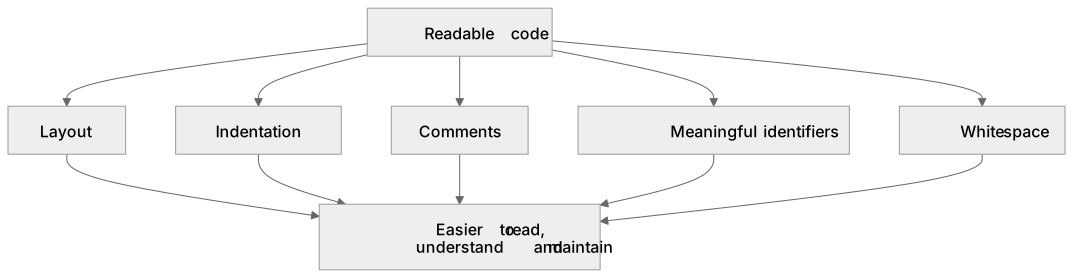
Readable code lets another programmer follow the logic quickly and change it safely. Layout groups related statements so the sequence of actions is obvious. Indentation shows which statements sit inside a loop, selection or subroutine, so nesting depth is visible at a glance. Comments explain why a block exists or what a non-obvious value means, rather than restating each line. Meaningful identifiers name variables and subroutines after their purpose, so totalScore is clearer than t. White space separates logical blocks and operators, making expressions easier to scan. For example, a function that calculates a pupil's average mark should indent its loop body, use names such as markTotal and markCount, and carry a short comment describing the rounding rule. These techniques do not change what the program does; they change how easily a human reads, understands and later maintains it.
What earns the marks
- Layout: related statements are grouped and ordered so the flow of the program is easy to follow.
- Indentation: statements inside loops, selections and subroutines are indented to reveal nesting and control flow.
- Comments: brief comments explain purpose, assumptions or non-obvious decisions rather than repeating the code.
- Meaningful identifiers: variable, constant and subroutine names describe their role, such as markTotal instead of t.
- White space: blank lines and spacing around operators separate logical sections and improve scanning.
- Purpose: all five techniques together make a program easier to read, understand and maintain without altering its behaviour.
Common mistakes and how to put them right
Believing indentation changes what the program does.
Put it right: Indentation is for human readers; it does not alter execution, though poor indentation hides logic errors.
Writing comments that simply restate each line, such as a comment saying increment i above i = i + 1.
Put it right: Comments should explain why, or clarify anything not obvious from the code.
Using single-letter or vague identifiers throughout.
Put it right: Choose names that describe the data or action, such as pupilName or calculateAverage.
Exam tips
- When a question shows two versions of code, compare them against all five techniques and state which version is easier to maintain and why.
- Link each technique to a benefit: layout and white space aid scanning, indentation reveals structure, comments record intent, identifiers convey meaning.
- If asked to improve a snippet, apply the named techniques rather than rewriting the algorithm, and keep the program's behaviour unchanged.
Try the lesson
The start of the Develop code: 6.1.4 be able to use techniques (layout, indentation, comments, meaningful identifiers, white space) to make programs easier to read, understand and maintain lesson, made from checked teaching notes for this specification point.
Have a go first
A student has written a short program that calculates the cost of three items. Another student must read the program and understand it quickly. Which change would make the program easier to read and understand without changing what it does?
Listen
Readable code lets another programmer follow the logic quickly and change it safely. Layout groups related statements so the sequence of actions is obvious. Indentation shows which statements sit inside a loop, selection or subroutine, so nesting depth is visible at a glance. Comments explain why a block exists or what a non-obvious value means, rather than restating each line. Meaningful identifiers name variables and subroutines after their purpose, so totalScore is clearer than t. White space separates logical blocks and operators, making expressions easier to scan. For example, a function that calculates a pupil's average mark should indent its loop body, use names such as markTotal and markCount, and carry a short comment describing the rounding rule. These techniques do not change what the program does; they change how easily a human reads, understands and later maintains it. A strong answer earns marks for these points. Layout: related statements are grouped and ordered so the flow of the program is easy to follow. Indentation: statements inside loops, selections and subroutines are indented to reveal nesting and control flow. Comments: brief comments explain purpose, assumptions or non-obvious decisions rather than repeating the code. Meaningful identifiers: variable, constant and subroutine names describe their role, such as markTotal instead of t. A common slip: Believing indentation changes what the program does. Instead, indentation is for human readers; it does not alter execution, though poor indentation hides logic errors. Exam tip: When a question shows two versions of code, compare them against all five techniques and state which version is easier to maintain and why.
See it
Key words
Say what each word means before you turn the card.
Indentation
Try answering aloud or in your head before turning the card.
Comments
Try answering aloud or in your head before turning the card.
Meaningful identifiers
Try answering aloud or in your head before turning the card.
White space
Try answering aloud or in your head before turning the card.
See every definition
- Indentation
- Statements inside loops, selections and subroutines are indented to reveal nesting and control flow.
- Comments
- Brief comments explain purpose, assumptions or non-obvious decisions rather than repeating the code.
- Meaningful identifiers
- Variable, constant and subroutine names describe their role, such as markTotal instead of t.
- White space
- Blank lines and spacing around operators separate logical sections and improve scanning.
Label the diagram
Some boxes have lost their names. Pick the right name for each number.
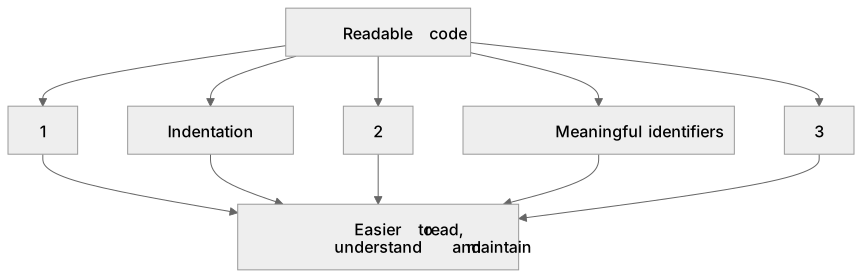
1Box 1
2Box 2
3Box 3
There is more to this lesson
The full lesson goes on to check your understanding and help you earn the marks. Create a free account to carry on, with your progress saved.
A week of Premium from your first lesson · Then the free plan continues · No card, no charge
Test your understanding of Develop code: 6.1.4 be able to use techniques (layout, indentation, comments, meaningful identifiers, white space) to make programs easier to read, understand and maintain
Active recall beats re-reading. Take an instant quiz now to test what you’ve learned and lock it into long-term memory.
A week of Premium from your first lesson · Then the free plan continues · No card, no charge