Pearson Edexcel · GCSE · Computer Science
Course version: 1CP2 · Version from Sept 2020
Understand how the internet is structured (IP addressing, routers)
Full specification wording
Networks: 4.1.3 understand how the internet is structured (IP addressing, routers)
The internet is a network of networks: many independently owned networks are joined so that any device can exchange data with any other.
Checked against the Pearson Edexcel 1CP2 specification (opens in a new tab) on .
- Point 3 of 8
- 4 key terms
Study notes
From the checked teaching notes for this specification point.
The idea
The internet is a network of networks: many independently owned networks are joined so that any device can exchange data with any other. Each device needs an address so data reaches the right destination. An IP address identifies a device or interface on a network; a public address is globally unique, while a private address is reused inside a local network and translated at the boundary. Data is split into packets, each carrying a destination IP address. Routers are the devices that read that destination address and forward each packet along the best available path, hop by hop, until it arrives. Because routers choose routes dynamically, traffic can take different paths at different times, and a packet may pass through several routers. A router also connects separate networks, for example a home network to an internet service provider.
What earns the marks
- An IP address uniquely identifies a device or interface so packets can be delivered to the correct destination.
- A router forwards packets between networks by reading the destination IP address and choosing a route.
- The internet is a network of networks, so data may cross several routers before reaching its destination.
- Packets may travel by different routes, so routers make forwarding decisions rather than using one fixed path.
- Private IP addresses are used inside local networks and are not directly reachable from the public internet.
Common mistakes and how to put them right
Thinking a router stores the whole file.
Put it right: Routers forward individual packets, and the destination device reassembles them.
Confusing a router with a switch.
Put it right: A switch forwards frames within one local network, while a router forwards packets between networks.
Believing an IP address identifies a person.
Put it right: It identifies a device or interface, and addresses can be shared or reassigned.
Assuming all packets take the same path.
Put it right: Routers can forward packets along different routes.
Exam tips
- Read the question stem for the key term, such as router or IP address, before looking at the options.
- Eliminate options that describe a different device, such as a switch or hub, rather than a router.
- Check whether the question asks about addressing, forwarding or structure, and choose the option that matches that focus.
Try the lesson
The start of the Networks: 4.1.3 understand how the internet is structured (IP addressing, routers) lesson, made from checked teaching notes for this specification point.
Have a go first
A home network has a laptop, a phone and a games console. One box connects this network to the internet and reads the destination IP address in each packet so it can pass the packet on to the correct network. What is this box called?
Listen
The internet is a network of networks: many independently owned networks are joined so that any device can exchange data with any other. Each device needs an address so data reaches the right destination. An IP address identifies a device or interface on a network; a public address is globally unique, while a private address is reused inside a local network and translated at the boundary. Data is split into packets, each carrying a destination IP address. Routers are the devices that read that destination address and forward each packet along the best available path, hop by hop, until it arrives. Because routers choose routes dynamically, traffic can take different paths at different times, and a packet may pass through several routers. A router also connects separate networks, for example a home network to an internet service provider. A strong answer earns marks for these points. An IP address uniquely identifies a device or interface so packets can be delivered to the correct destination. A router forwards packets between networks by reading the destination IP address and choosing a route. The internet is a network of networks, so data may cross several routers before reaching its destination. Packets may travel by different routes, so routers make forwarding decisions rather than using one fixed path. Exam tip: Read the question stem for the key term, such as router or IP address, before looking at the options.
See it
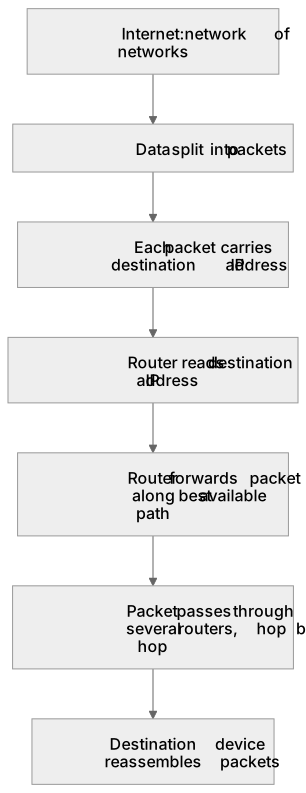
Put it in order
Put these steps in the order they happen.
- 1. Destination device reassembles packets
- 2. Packet passes through several routers, hop by hop
- 3. Each packet carries destination IP address
- 4. Router forwards packet along best available path
- 5. Internet: network of networks
- 6. Data split into packets
- 7. Router reads destination IP address
Key words
Say what each word means before you turn the card.
Network of networks
Try answering aloud or in your head before turning the card.
IP addressing
Try answering aloud or in your head before turning the card.
Packet forwarding by routers
Try answering aloud or in your head before turning the card.
Routing between separate networks
Try answering aloud or in your head before turning the card.
See every definition
- Network of networks
- Many independently owned networks are joined so that any device can exchange data with any other.
- IP addressing
- An IP address identifies a device or interface on a network so data reaches the right destination.
- Packet forwarding by routers
- Routers read the destination address and forward each packet along the best available path, hop by hop, until it arrives.
- Routing between separate networks
- A router connects separate networks, for example a home network to an internet service provider.
Label the diagram
Some boxes have lost their names. Pick the right name for each number.
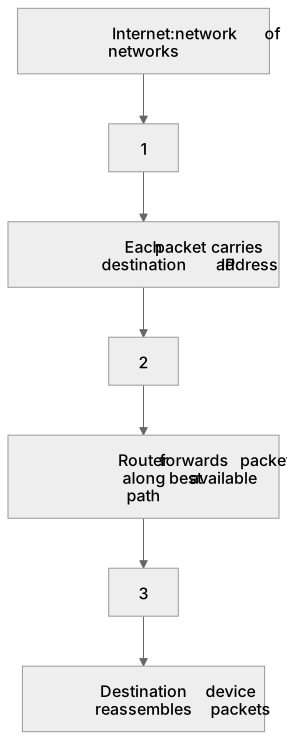
1Box 1
2Box 2
3Box 3
There is more to this lesson
The full lesson goes on to check your understanding and help you earn the marks. Create a free account to carry on, with your progress saved.
A week of Premium from your first lesson · Then the free plan continues · No card, no charge
Test your understanding of Networks: 4.1.3 understand how the internet is structured (IP addressing, routers)
Active recall beats re-reading. Take an instant quiz now to test what you’ve learned and lock it into long-term memory.
A week of Premium from your first lesson · Then the free plan continues · No card, no charge