Pearson Edexcel · GCSE · Computer Science
Course version: 1CP2 · Version from Sept 2020
Understand the purpose and functionality of an operating system (file…
Full specification wording
Software: 3.2.1 understand the purpose and functionality of an operating system (file management, process management, peripheral management, user management)
An operating system is system software that manages the computer's hardware and provides services so application programs and users can work with the machine.
Checked against the Pearson Edexcel 1CP2 specification (opens in a new tab) on .
- Point 1 of 3
- 4 key terms
Study notes
From the checked teaching notes for this specification point.
The idea
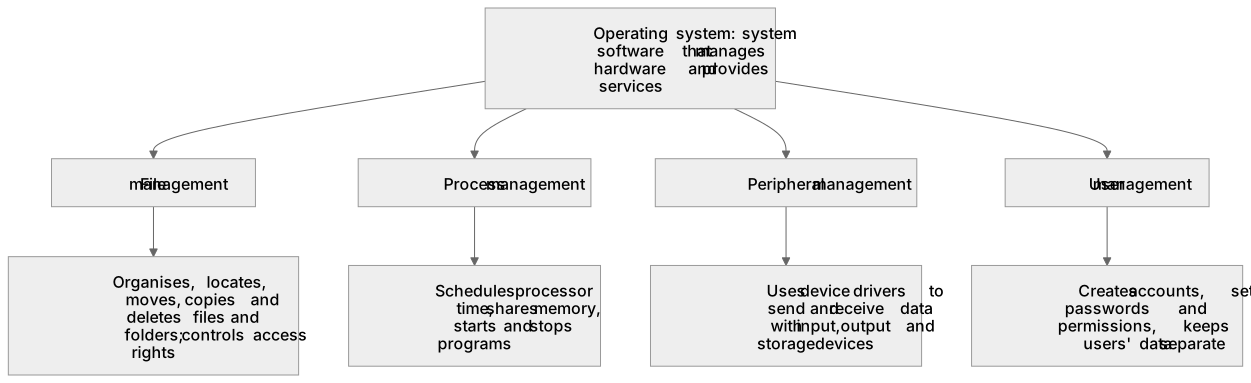
An operating system is system software that manages the computer's hardware and provides services so application programs and users can work with the machine. Its purpose is to control resources, provide a user interface and allow software to run without directly managing hardware. File management organises how files and folders are stored, named, located, moved, copied and deleted, and controls access rights. Process management decides which programs or processes get processor time, schedules them, shares memory between them and closes them when finished. Peripheral management uses device drivers to send data to and receive data from input, output and storage devices such as keyboards, printers and disks. User management creates and controls user accounts, sets passwords and permissions, and keeps different users' settings and files separate.
What earns the marks
- States that an operating system is system software that manages hardware and provides services to applications and users.
- Describes file management as organising, locating, moving, copying and deleting files and folders and controlling access to them.
- Describes process management as scheduling processor time, sharing memory and starting or stopping running programs.
- Describes peripheral management as using device drivers to communicate with input, output and storage devices.
- Describes user management as creating accounts, setting passwords and permissions, and keeping users' data separate.
- Matches a described activity to the correct management function, for example a print job to peripheral management.
Common mistakes and how to put them right
Treating the operating system as an application such as a word processor.
Put it right: It is system software that manages hardware and provides services for applications.
Confusing process management with file management.
Put it right: Process management schedules processor time and memory for running programs, while file management handles stored files and folders.
Saying peripheral management means physically repairing devices.
Put it right: It means using device drivers to control data transfer to and from devices.
Ignoring user management; correction: it covers accounts, passwords, permissions and keeping different users' files and settings separate.
Exam tips
- Learn the four named functions as a checklist and ask which one the scenario describes.
- For each option, name the resource being managed, such as processor time, files, devices or accounts, to decide quickly.
- Reject options that describe application features or hardware repair rather than operating system management.
Try the lesson
The start of the Software: 3.2.1 understand the purpose and functionality of an operating system (file management, process management, peripheral management, user management) lesson, made from checked teaching notes for this specification point.
Have a go first
A student saves a file called coursework.docx into a folder called Year11 on the hard disk. The next day, the student opens the file from that folder. Which operating system function keeps track of where the file is stored on the disk so that it can be found again?
Listen
An operating system is system software that manages the computer's hardware and provides services so application programs and users can work with the machine. Its purpose is to control resources, provide a user interface and allow software to run without directly managing hardware. File management organises how files and folders are stored, named, located, moved, copied and deleted, and controls access rights. Process management decides which programs or processes get processor time, schedules them, shares memory between them and closes them when finished. Peripheral management uses device drivers to send data to and receive data from input, output and storage devices such as keyboards, printers and disks. User management creates and controls user accounts, sets passwords and permissions, and keeps different users' settings and files separate. A strong answer earns marks for these points. States that an operating system is system software that manages hardware and provides services to applications and users. Describes file management as organising, locating, moving, copying and deleting files and folders and controlling access to them. Describes process management as scheduling processor time, sharing memory and starting or stopping running programs. Describes peripheral management as using device drivers to communicate with input, output and storage devices. A common slip: Treating the operating system as an application such as a word processor. Instead, it is system software that manages hardware and provides services for applications. Exam tip: Learn the four named functions as a checklist and ask which one the scenario describes.
See it
Key words
Say what each word means before you turn the card.
File management
Try answering aloud or in your head before turning the card.
Process management
Try answering aloud or in your head before turning the card.
Peripheral management
Try answering aloud or in your head before turning the card.
User management
Try answering aloud or in your head before turning the card.
See every definition
- File management
- Organises how files and folders are stored, named, located, moved, copied and deleted, and controls access rights.
- Process management
- Decides which programs or processes get processor time, schedules them, shares memory between them and closes them when finished.
- Peripheral management
- Uses device drivers to send data to and receive data from input, output and storage devices such as keyboards, printers and disks.
- User management
- Creates and controls user accounts, sets passwords and permissions, and keeps different users' settings and files separate.
Label the diagram
Some boxes have lost their names. Pick the right name for each number.
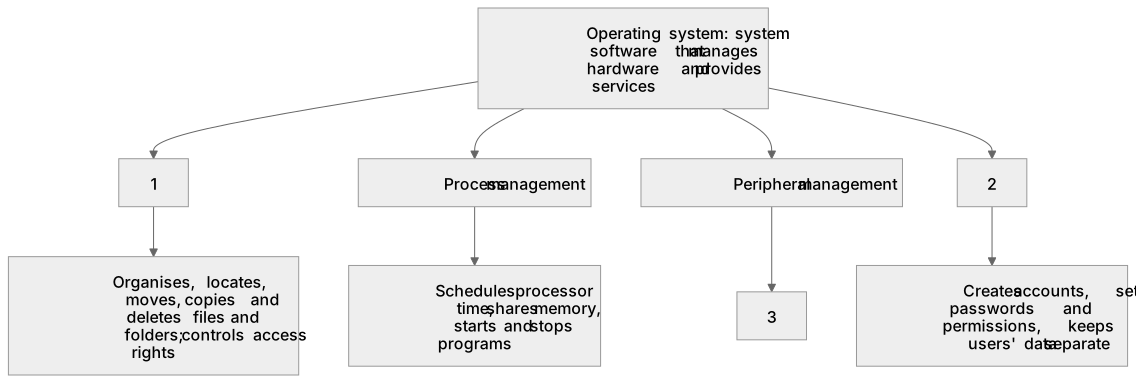
1Box 1
2Box 2
3Box 3
There is more to this lesson
The full lesson goes on to check your understanding and help you earn the marks. Create a free account to carry on, with your progress saved.
A week of Premium from your first lesson · Then the free plan continues · No card, no charge
Test your understanding of Software: 3.2.1 understand the purpose and functionality of an operating system (file management, process management, peripheral management, user management)
Active recall beats re-reading. Take an instant quiz now to test what you’ve learned and lock it into long-term memory.
A week of Premium from your first lesson · Then the free plan continues · No card, no charge