Pearson Edexcel · GCSE · Computer Science
Course version: 1CP2 · Version from Sept 2020
Be able to write programs that use pre-existing (built-in, library) and…
Full specification wording
Subprograms: 6.6.1 be able to write programs that use pre-existing (built-in, library) and user-devised subprograms (procedures, functions)
This criterion requires you to write programs that call and create subprograms.
Checked against the Pearson Edexcel 1CP2 specification (opens in a new tab) on .
- Point 1 of 3
- 2 key terms
Study notes
From the checked teaching notes for this specification point.
The idea
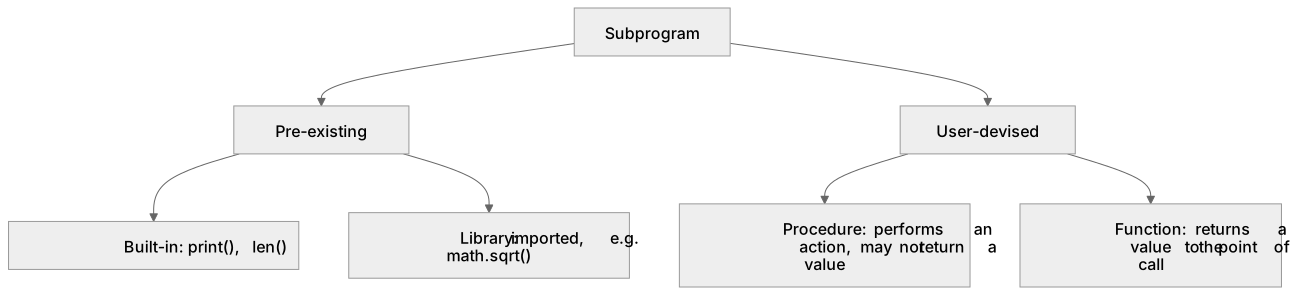
This criterion requires you to write programs that call and create subprograms. A subprogram is a named block of code that performs a task and can be reused. Pre-existing subprograms are already available: built-in ones such as print() or len() come with the language, while library ones are imported, for example math.sqrt(). User-devised subprograms are written by you. A procedure performs an action and may not return a value, while a function returns a value to the point of call. You should define each subprogram with a clear name and parameters, call it with matching arguments, and use any returned value. For example, define a function to convert marks to a grade and call it for each pupil, or write a procedure that prints a formatted receipt. Assessment checks that your code defines and calls subprograms correctly and uses the right kind for the task.
What earns the marks
- A built-in subprogram is supplied by the language and called directly, such as print() or len().
- A library subprogram must be imported before use, for example importing a maths module and then calling its square-root function.
- A user-devised subprogram is defined by the programmer with a name, and may take parameters.
- A procedure performs an action, while a function returns a value that the calling code can use.
- Calls must pass arguments that match the parameters in number and meaning, and any returned value must be used or stored.
Common mistakes and how to put them right
Calling a library subprogram without importing its module.
Put it right by adding the import before the call.
Confusing procedures and functions.
Put it right by checking whether the subprogram must return a value and defining it accordingly.
Passing the wrong number or type of arguments.
Put it right by matching each argument to the declared parameter.
Exam tips
- Decide whether the task needs a returned value before choosing a function or a procedure.
- Name each user-devised subprogram clearly so its purpose is obvious at the call site.
- Check that every call supplies arguments matching the parameters and that any returned value is used.
Try the lesson
The start of the Subprograms: 6.6.1 be able to write programs that use pre-existing (built-in, library) and user-devised subprograms (procedures, functions) lesson, made from checked teaching notes for this specification point.
Have a go first
A Python program sets scores = [12, 7, 19, 3]. What value does the built-in function call max(scores) return?
Listen
This criterion requires you to write programs that call and create subprograms. A subprogram is a named block of code that performs a task and can be reused. Pre-existing subprograms are already available: built-in ones such as print() or len() come with the language, while library ones are imported, for example math.sqrt(). User-devised subprograms are written by you. A procedure performs an action and may not return a value, while a function returns a value to the point of call. You should define each subprogram with a clear name and parameters, call it with matching arguments, and use any returned value. For example, define a function to convert marks to a grade and call it for each pupil, or write a procedure that prints a formatted receipt. Assessment checks that your code defines and calls subprograms correctly and uses the right kind for the task. A strong answer earns marks for these points. A built-in subprogram is supplied by the language and called directly, such as print() or len(). A library subprogram must be imported before use, for example importing a maths module and then calling its square-root function. A user-devised subprogram is defined by the programmer with a name, and may take parameters. A procedure performs an action, while a function returns a value that the calling code can use. A common slip: Calling a library subprogram without importing its module. Instead, adding the import before the call. Exam tip: Decide whether the task needs a returned value before choosing a function or a procedure.
See it
Key words
Say what each word means before you turn the card.
Built-in subprogram
Try answering aloud or in your head before turning the card.
Library subprogram
Try answering aloud or in your head before turning the card.
See every definition
- Built-in subprogram
- A subprogram supplied by the language and called directly, such as print() or len().
- Library subprogram
- A subprogram that must be imported before use, for example importing a maths module and then calling its square-root function.
Label the diagram
Some boxes have lost their names. Pick the right name for each number.
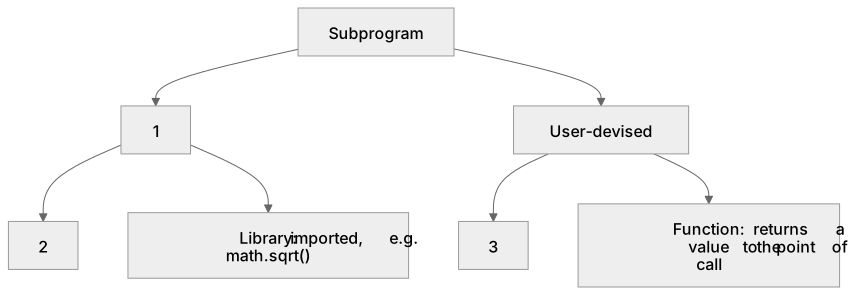
1Box 1
2Box 2
3Box 3
There is more to this lesson
The full lesson goes on to check your understanding and help you earn the marks. Create a free account to carry on, with your progress saved.
A week of Premium from your first lesson · Then the free plan continues · No card, no charge
Test your understanding of Subprograms: 6.6.1 be able to write programs that use pre-existing (built-in, library) and user-devised subprograms (procedures, functions)
Active recall beats re-reading. Take an instant quiz now to test what you’ve learned and lock it into long-term memory.
A week of Premium from your first lesson · Then the free plan continues · No card, no charge