OCR · A-Level · Physics
Course version: H556 · Version from Sept 2015
(b) use of appropriate digital instruments, including electrical…
Full specification wording
Practical skills: (b) use of appropriate digital instruments, including electrical multimeters, to obtain
This practical skill requires you to select and correctly operate digital instruments, especially electrical multimeters, to obtain measurements.
Checked against the OCR H556 specification (opens in a new tab) on .
- Point 2 of 11
- 4 key terms
Study notes
From the checked teaching notes for this specification point.
The idea
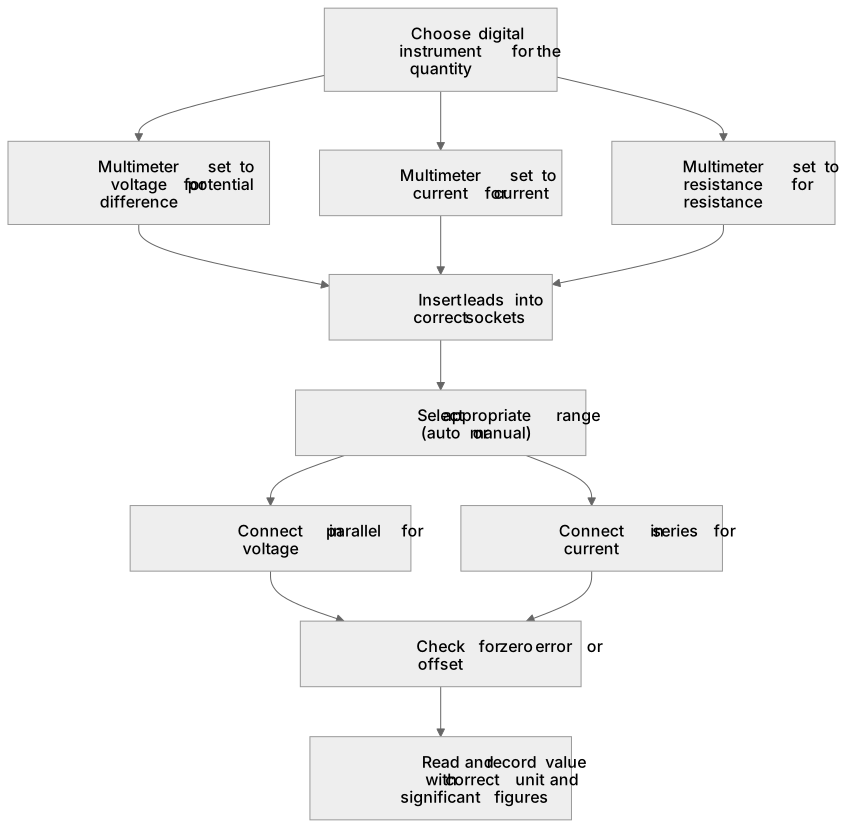
This practical skill requires you to select and correctly operate digital instruments, especially electrical multimeters, to obtain measurements. You must choose the right instrument for the quantity: a multimeter set to voltage for potential difference, current for current, or resistance for resistance. When using a multimeter, insert the leads into the correct sockets, select the appropriate range (auto or manual), and connect in parallel for voltage or in series for current. For example, to measure the current through a resistor, break the circuit and connect the multimeter in series, ensuring the range exceeds the expected current. You should also consider accuracy, resolution, and zero error. The skill is assessed in practical examinations where you must demonstrate correct setup and reading.
What earns the marks
- Select a digital instrument appropriate to the quantity being measured, such as a multimeter for electrical measurements.
- Connect a multimeter in series to measure current and in parallel to measure potential difference.
- Choose a suitable range so that the reading is within the display limits and gives appropriate precision.
- Read and record the value with the correct unit and an appropriate number of significant figures.
- Check for and account for zero error or offset before taking readings.
Common mistakes and how to put them right
Connecting a multimeter in parallel to measure current.
Put it right: Connect it in series.
Using a range that is too low, causing an overload reading.
Put it right: Start with a higher range and decrease for better resolution.
Ignoring the need to zero a multimeter before use.
Put it right: Check that it reads zero when the leads are not connected or when appropriate.
Recording a reading without units or with too many decimal places.
Put it right: Include the correct unit and match significant figures to the instrument resolution.
Exam tips
- Always state the instrument and the setting used, for example 'digital multimeter set to 200 mA d.c.'.
- When describing a circuit, specify whether the meter is in series or parallel and justify the choice.
- Practise reading a multimeter display from diagrams or photographs to avoid misreading the scale or range.
Try the lesson
The start of the Practical skills: (b) use of appropriate digital instruments, including electrical multimeters, to obtain lesson, made from checked teaching notes for this specification point.
Listen
This practical skill requires you to select and correctly operate digital instruments, especially electrical multimeters, to obtain measurements. You must choose the right instrument for the quantity: a multimeter set to voltage for potential difference, current for current, or resistance for resistance. When using a multimeter, insert the leads into the correct sockets, select the appropriate range (auto or manual), and connect in parallel for voltage or in series for current. For example, to measure the current through a resistor, break the circuit and connect the multimeter in series, ensuring the range exceeds the expected current. You should also consider accuracy, resolution, and zero error. The skill is assessed in practical examinations where you must demonstrate correct setup and reading. A strong answer earns marks for these points. Select a digital instrument appropriate to the quantity being measured, such as a multimeter for electrical measurements. Connect a multimeter in series to measure current and in parallel to measure potential difference. Choose a suitable range so that the reading is within the display limits and gives appropriate precision. Read and record the value with the correct unit and an appropriate number of significant figures. A common slip: Connecting a multimeter in parallel to measure current: this can short-circuit the component. Instead, connect it in series. Exam tip: Always state the instrument and the setting used, for example 'digital multimeter set to 200 mA d.c.'.
See it
Key words
Say what each word means before you turn the card.
Instrument selection
Try answering aloud or in your head before turning the card.
Correct connection
Try answering aloud or in your head before turning the card.
Range and resolution
Try answering aloud or in your head before turning the card.
Accuracy and precision
Try answering aloud or in your head before turning the card.
See every definition
- Instrument selection
- Choosing a digital instrument appropriate to the quantity being measured, such as a multimeter for electrical measurements.
- Correct connection
- Connecting a multimeter in series to measure current and in parallel to measure potential difference.
- Range and resolution
- Choosing a suitable range so that the reading is within the display limits and gives appropriate precision.
- Accuracy and precision
- Considering accuracy, resolution and zero error, and recording the value with the correct unit and an appropriate number of significant figures.
Label the diagram
Some boxes have lost their names. Pick the right name for each number.
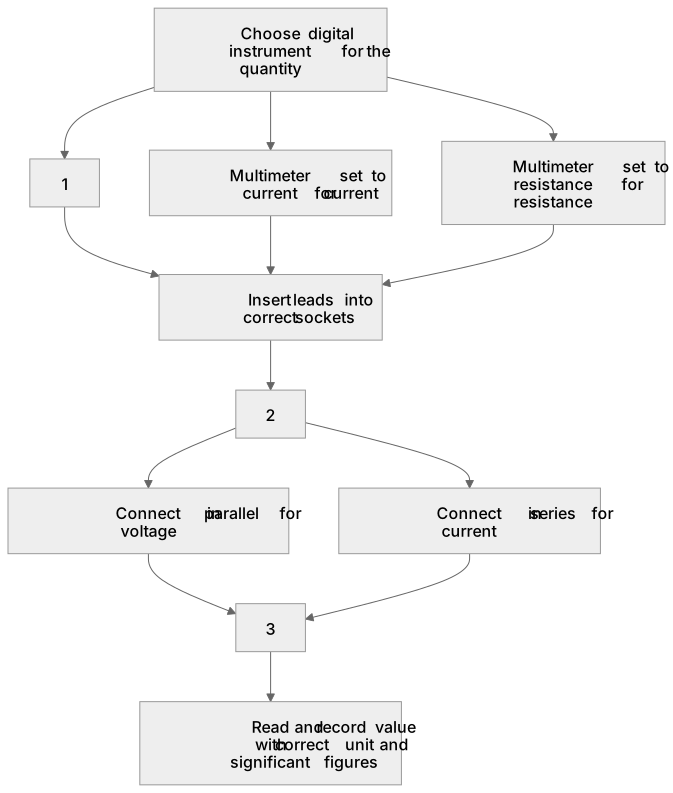
1Box 1
2Box 2
3Box 3
There is more to this lesson
The full lesson goes on to check your understanding and help you earn the marks. Create a free account to carry on, with your progress saved.
A week of Premium from your first lesson · Then the free plan continues · No card, no charge
Test your understanding of Practical skills: (b) use of appropriate digital instruments, including electrical multimeters, to obtain
Active recall beats re-reading. Take an instant quiz now to test what you’ve learned and lock it into long-term memory.
A week of Premium from your first lesson · Then the free plan continues · No card, no charge