Pearson Edexcel · GCSE · Computer Science
Course version: 1CP2 · Version from Sept 2020
Understand how analogue sound is represented in binary (amplitude, sample…
Full specification wording
Data representation: 2.2.3 understand how analogue sound is represented in binary (amplitude, sample rate, bit depth, sample interval)
Analogue sound is a continuously changing pressure wave, so a computer must capture it as discrete measurements.
Checked against the Pearson Edexcel 1CP2 specification (opens in a new tab) on .
- Point 3 of 4
- 4 key terms
Study notes
From the checked teaching notes for this specification point.
The idea
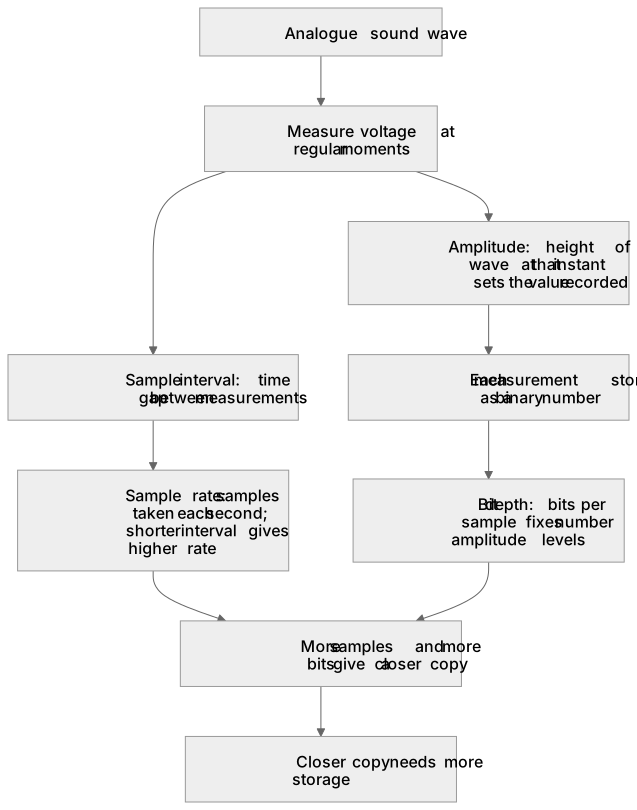
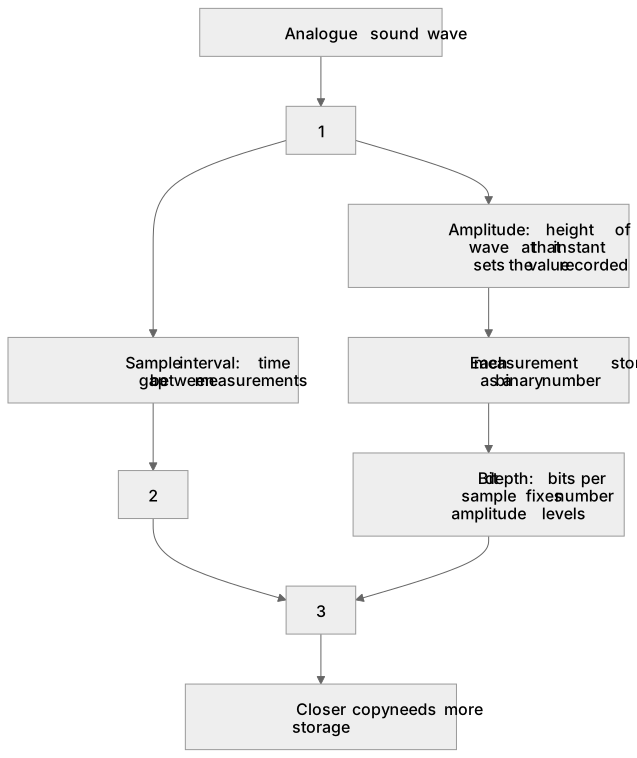
Analogue sound is a continuously changing pressure wave, so a computer must capture it as discrete measurements. At regular moments the microphone voltage is measured and each measurement is stored as a binary number. Amplitude is the height of the wave at that instant, so it sets the value recorded. Sample interval is the time gap between measurements, and sample rate is how many samples are taken each second, so a shorter interval gives a higher rate. Bit depth is the number of bits used for each sample, so it fixes how many different amplitude levels can be coded. For example, a rate of 44 100 samples per second with a bit depth of 16 bits gives 65 536 possible levels per sample. More samples and more bits give a closer copy of the original wave, but the file needs more storage.
What earns the marks
- Amplitude is the size or height of the sound wave at the moment a sample is taken, and it determines the binary value stored for that sample.
- Sample interval is the time between one sample and the next; a shorter interval means more samples are taken in each second.
- Sample rate is the number of samples taken per second, so it is the reciprocal of the sample interval.
- Bit depth is the number of bits used to store each sample, and it determines how many distinct amplitude levels can be represented.
- A higher sample rate captures faster changes in the wave, and a greater bit depth reduces the rounding error between the stored level and the true amplitude.
- Increasing sample rate or bit depth improves the accuracy of the representation but increases the number of bits needed to store the sound.
Common mistakes and how to put them right
Confusing sample rate with bit depth.
Put it right: Sample rate is how often measurements are taken each second, while bit depth is how many bits each measurement uses.
Thinking amplitude is the number of samples per second.
Put it right: Amplitude is the height of the wave at a sample point, not a count of samples.
Believing a higher bit depth makes the sound play faster.
Put it right: Bit depth changes the number of amplitude levels, not the playback speed.
Treating sample interval and sample rate as unrelated.
Put it right: They are reciprocals, so halving the interval doubles the rate.
Exam tips
- Link each term to its effect: amplitude to the stored value, sample rate to how often values are taken, bit depth to how many levels exist.
- Use the reciprocal relationship when a question gives a sample interval and asks for a rate, or the reverse.
- Check whether a question asks about quality or file size, because higher sample rate and bit depth improve quality but increase storage.
Try the lesson
The start of the Data representation: 2.2.3 understand how analogue sound is represented in binary (amplitude, sample rate, bit depth, sample interval) lesson, made from checked teaching notes for this specification point.
Have a go first
A microphone signal is sampled 8 times every second. What is the sample interval, in seconds, between consecutive samples?
Listen
Analogue sound is a continuously changing pressure wave, so a computer must capture it as discrete measurements. At regular moments the microphone voltage is measured and each measurement is stored as a binary number. Amplitude is the height of the wave at that instant, so it sets the value recorded. Sample interval is the time gap between measurements, and sample rate is how many samples are taken each second, so a shorter interval gives a higher rate. Bit depth is the number of bits used for each sample, so it fixes how many different amplitude levels can be coded. For example, a rate of 44 100 samples per second with a bit depth of 16 bits gives 65 536 possible levels per sample. More samples and more bits give a closer copy of the original wave, but the file needs more storage. A strong answer earns marks for these points. Amplitude is the size or height of the sound wave at the moment a sample is taken, and it determines the binary value stored for that sample. Sample interval is the time between one sample and the next; a shorter interval means more samples are taken in each second. Sample rate is the number of samples taken per second, so it is the reciprocal of the sample interval. Bit depth is the number of bits used to store each sample, and it determines how many distinct amplitude levels can be represented. Exam tip: Link each term to its effect: amplitude to the stored value, sample rate to how often values are taken, bit depth to how many levels exist.
See it
Key words
Say what each word means before you turn the card.
Amplitude
Try answering aloud or in your head before turning the card.
Sample interval
Try answering aloud or in your head before turning the card.
Sample rate
Try answering aloud or in your head before turning the card.
Bit depth
Try answering aloud or in your head before turning the card.
See every definition
- Amplitude
- The height of the sound wave at the moment a sample is taken, which determines the binary value stored for that sample.
- Sample interval
- The time between one sample and the next, where a shorter interval means more samples are taken in each second.
- Sample rate
- The number of samples taken per second, so it is the reciprocal of the sample interval.
- Bit depth
- The number of bits used to store each sample, which determines how many distinct amplitude levels can be represented.
Label the diagram
Some boxes have lost their names. Pick the right name for each number.
1Box 1
2Box 2
3Box 3
There is more to this lesson
The full lesson goes on to check your understanding and help you earn the marks. Create a free account to carry on, with your progress saved.
A week of Premium from your first lesson · Then the free plan continues · No card, no charge
Test your understanding of Data representation: 2.2.3 understand how analogue sound is represented in binary (amplitude, sample rate, bit depth, sample interval)
Active recall beats re-reading. Take an instant quiz now to test what you’ve learned and lock it into long-term memory.
A week of Premium from your first lesson · Then the free plan continues · No card, no charge