OCR · A-Level · Physics
Course version: H556 · Version from Sept 2015
(k) use of ICT such as computer modelling, or data logger with a variety…
Full specification wording
Practical skills: (k) use of ICT such as computer modelling, or data logger with a variety of sensors to collect data, or use of software to process data
This skill covers using information and communication technology in practical physics.
Checked against the OCR H556 specification (opens in a new tab) on .
- Point 10 of 11
- 3 key terms
Study notes
From the checked teaching notes for this specification point.
The idea
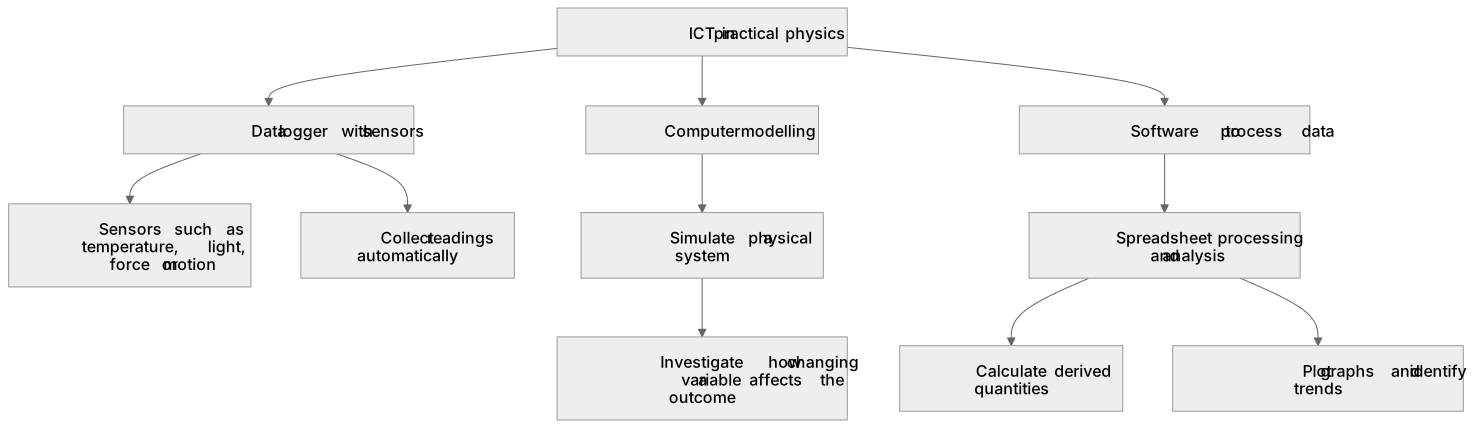
This skill covers using information and communication technology in practical physics. You may use computer modelling to simulate a physical system, a data logger connected to sensors such as temperature, light, force or motion sensors to collect readings automatically, or software such as a spreadsheet to process and analyse data. For example, a data logger with a motion sensor can record displacement against time for a falling object, and spreadsheet software can then calculate velocity and acceleration by differentiation or graph plotting. You should understand the advantages: faster data collection, reduced human reaction-time error, and the ability to process large data sets. You should also recognise limitations, such as sensor calibration errors and sampling-rate constraints.
What earns the marks
- Describes how a data logger with a specified sensor, such as a light gate or motion sensor, is used to collect data automatically over time.
- Explains how computer modelling can simulate a physical system, for example projectile motion, to investigate how changing a variable affects the outcome.
- Describes how software such as a spreadsheet is used to process data, including calculating derived quantities, plotting graphs and identifying trends.
- States an advantage of ICT, such as reduced reaction-time error or rapid processing of large data sets.
- States a limitation of ICT, such as sensor calibration error, sampling rate limitations or reliance on correct model assumptions.
Common mistakes and how to put them right
Assuming data loggers eliminate all error.
Put it right: They reduce human reaction-time error but introduce sensor calibration and resolution uncertainties.
Confusing computer modelling with real experimentation.
Put it right: A model is only as valid as its underlying assumptions and cannot replace empirical measurement.
Neglecting to specify the sensor type when describing data-logger use.
Put it right: Name the sensor, such as a light gate or thermistor, and state what it measures.
Exam tips
- When asked about ICT in practical work, always name the specific sensor or software and state what it measures or processes.
- Give at least one advantage and one limitation to show balanced understanding.
- Link the ICT method to the physical quantity being investigated, rather than describing the technology in isolation.
Try the lesson
The start of the Practical skills: (k) use of ICT such as computer modelling, or data logger with a variety of sensors to collect data, or use of software to process data lesson, made from checked teaching notes for this specification point.
Listen
This skill covers using information and communication technology in practical physics. You may use computer modelling to simulate a physical system, a data logger connected to sensors such as temperature, light, force or motion sensors to collect readings automatically, or software such as a spreadsheet to process and analyse data. For example, a data logger with a motion sensor can record displacement against time for a falling object, and spreadsheet software can then calculate velocity and acceleration by differentiation or graph plotting. You should understand the advantages: faster data collection, reduced human reaction-time error, and the ability to process large data sets. You should also recognise limitations, such as sensor calibration errors and sampling-rate constraints. A strong answer earns marks for these points. Describes how a data logger with a specified sensor, such as a light gate or motion sensor, is used to collect data automatically over time. Explains how computer modelling can simulate a physical system, for example projectile motion, to investigate how changing a variable affects the outcome. Describes how software such as a spreadsheet is used to process data, including calculating derived quantities, plotting graphs and identifying trends. States an advantage of ICT, such as reduced reaction-time error or rapid processing of large data sets. A common slip: Neglecting to specify the sensor type when describing data-logger use. Instead, name the sensor, such as a light gate or thermistor, and state what it measures. Exam tip: When asked about ICT in practical work, always name the specific sensor or software and state what it measures or processes.
See it
Key words
Say what each word means before you turn the card.
Computer modelling
Try answering aloud or in your head before turning the card.
Data logger
Try answering aloud or in your head before turning the card.
Software to process data
Try answering aloud or in your head before turning the card.
See every definition
- Computer modelling
- Using ICT to simulate a physical system, for example projectile motion, to investigate how changing a variable affects the outcome.
- Data logger
- A device connected to sensors such as temperature, light, force or motion sensors to collect readings automatically over time.
- Software to process data
- Software such as a spreadsheet used to process and analyse data, including calculating derived quantities, plotting graphs and identifying trends.
Label the diagram
Some boxes have lost their names. Pick the right name for each number.
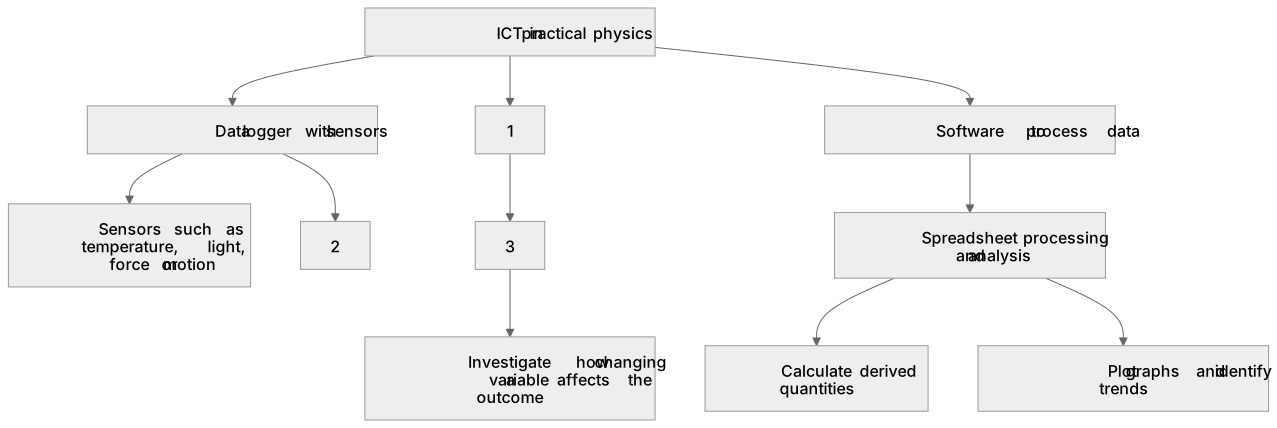
1Box 1
2Box 2
3Box 3
There is more to this lesson
The full lesson goes on to check your understanding and help you earn the marks. Create a free account to carry on, with your progress saved.
A week of Premium from your first lesson · Then the free plan continues · No card, no charge
Test your understanding of Practical skills: (k) use of ICT such as computer modelling, or data logger with a variety of sensors to collect data, or use of software to process data
Active recall beats re-reading. Take an instant quiz now to test what you’ve learned and lock it into long-term memory.
A week of Premium from your first lesson · Then the free plan continues · No card, no charge