OCR · GCSE · Computer Science
Common Programming Languages (Python, Java)
This topic explores the fundamental differences between high-level and low-level programming languages, the mechanics of translators (compilers and interpreters), and the essential facilities provided by Integrated Development Environments (IDEs). Understanding these concepts is crucial for scoring marks in OCR's written papers, where precise terminology and the ability to compare translation methods are frequently assessed.
- 12 min read
- 5 worked examples
- 6 practice questions
- 10 key terms
Study Notes
Overview
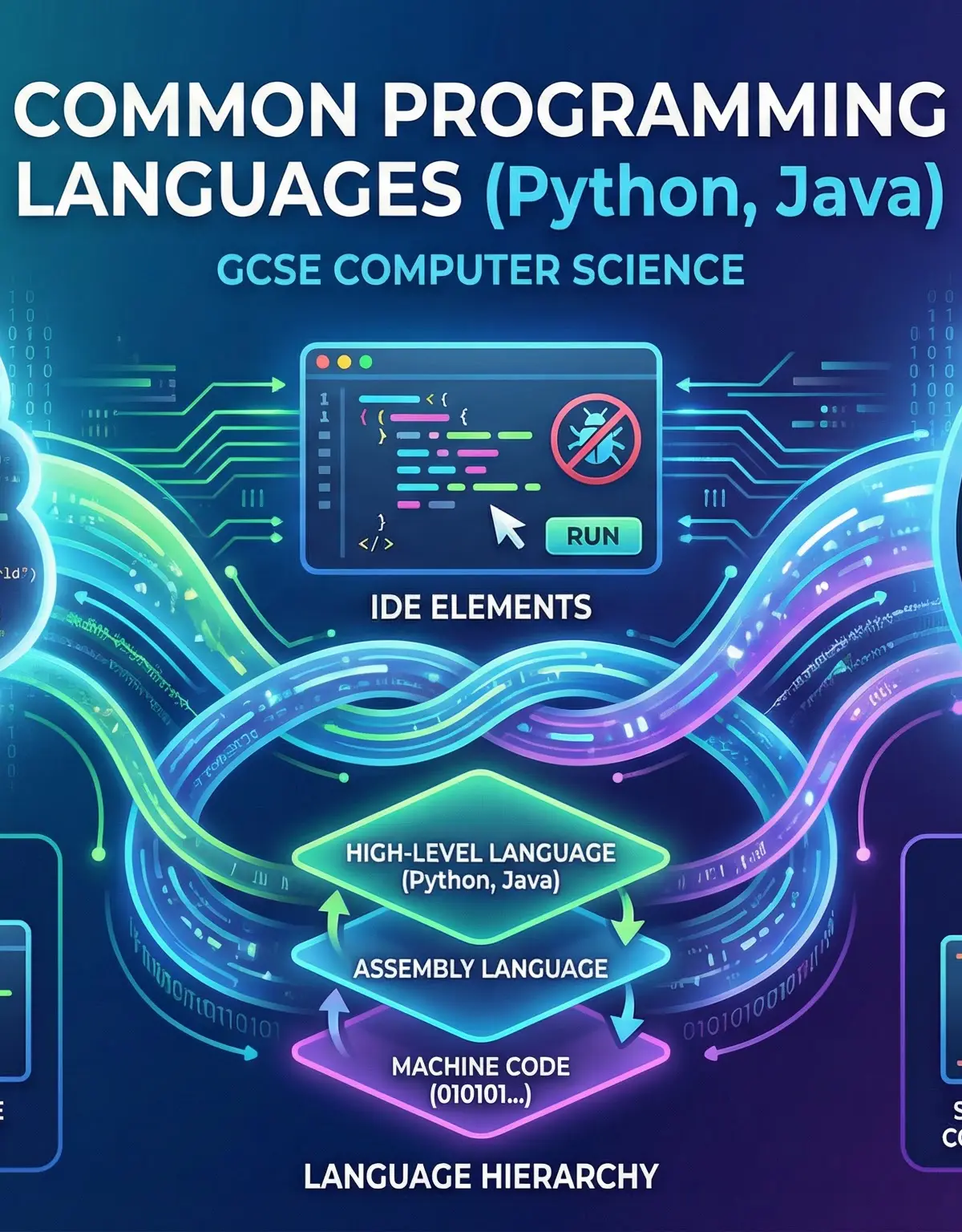
Common Programming Languages (Topic 5.7) sits at the heart of OCR's GCSE Computer Science specification, bridging the gap between writing code and understanding how computers execute it. This topic examines the characteristics of high-level languages like Python and Java, contrasts them with low-level languages such as Assembly Language and Machine Code, and explores the critical role of translators—compilers and interpreters—in converting human-readable code into executable instructions. Additionally, candidates must demonstrate knowledge of Integrated Development Environments (IDEs) and the specific facilities they provide to programmers. In the exam, you will encounter questions that require precise definitions, comparisons between translation methods, and explanations of how IDEs support the development process. Marks are awarded for using correct technical terminology and demonstrating a clear understanding of the translation hierarchy from high-level abstraction down to binary machine code. Typical questions include 'Explain the difference between a compiler and an interpreter' (4-6 marks) and 'State two facilities provided by an IDE' (2 marks). Mastering this topic will not only secure marks in the written papers but also deepen your understanding of how the programs you write are transformed into actions performed by the CPU.
Key Concepts
Concept 1: High-Level Languages
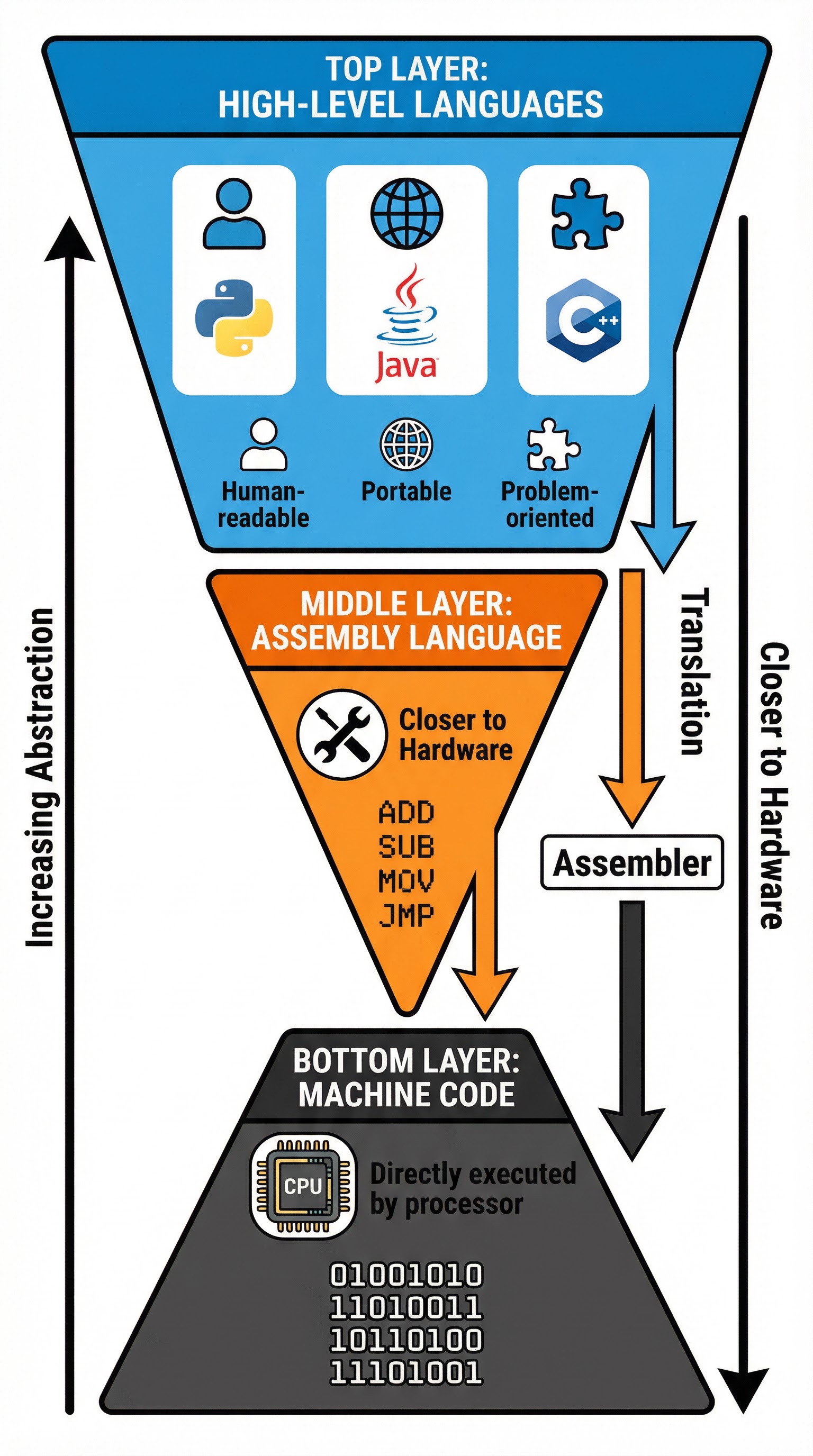
High-level programming languages are designed to be easily understood by humans. They use English-like syntax and abstract away the complex details of computer hardware, allowing programmers to focus on solving problems rather than managing memory addresses or processor registers. Python and Java are quintessential examples of high-level languages. The key characteristics that examiners expect you to identify are portability and problem-orientation. Portability means that code written in a high-level language can run on different types of processors and operating systems with little or no modification, because the language itself is independent of the underlying hardware architecture. Problem-orientation refers to the fact that high-level languages are structured around the tasks and logic of the problem domain, not the specifics of the machine. For instance, when you write print("Hello, World!") in Python, you are expressing the intent to display text, without needing to know how the graphics card or terminal emulator works. High-level languages require translation into machine code before the CPU can execute them, which is where compilers and interpreters come into play.
Example: Python code total = price * quantity is immediately understandable to a human. The same operation in Assembly Language might require multiple lines specifying memory addresses and registers, while in Machine Code it would be a string of binary digits that is completely opaque to human readers.
Concept 2: Low-Level Languages
Low-level languages sit much closer to the hardware and provide little abstraction from the computer's instruction set architecture. The two low-level languages you must know are Assembly Language and Machine Code. Assembly Language uses short, memorable codes called mnemonics to represent individual machine code instructions. Examples include ADD (add two numbers), SUB (subtract), MOV (move data), and JMP (jump to a different instruction). Each mnemonic corresponds directly to a binary instruction that the CPU can execute. Assembly Language still requires translation by a program called an Assembler, which converts the mnemonics into machine code. Machine Code is the lowest level of all—it consists entirely of binary digits (ones and zeros) and is the only language that the CPU can execute directly without any translation. The advantage of low-level languages is that they allow for extremely fine control over hardware and can produce highly optimized, fast-running programs. The disadvantage is that they are difficult to write, read, and debug, and they are not portable—code written for one type of processor will not run on another without significant modification.
Example: The Assembly Language instruction MOV AX, 5 moves the value 5 into a register called AX. The equivalent Machine Code might be 10110000 00000101 in binary. A human programmer would struggle to write or understand the binary version, which is why Assembly Language exists as a slightly more readable intermediary.
Concept 3: The Language Hierarchy
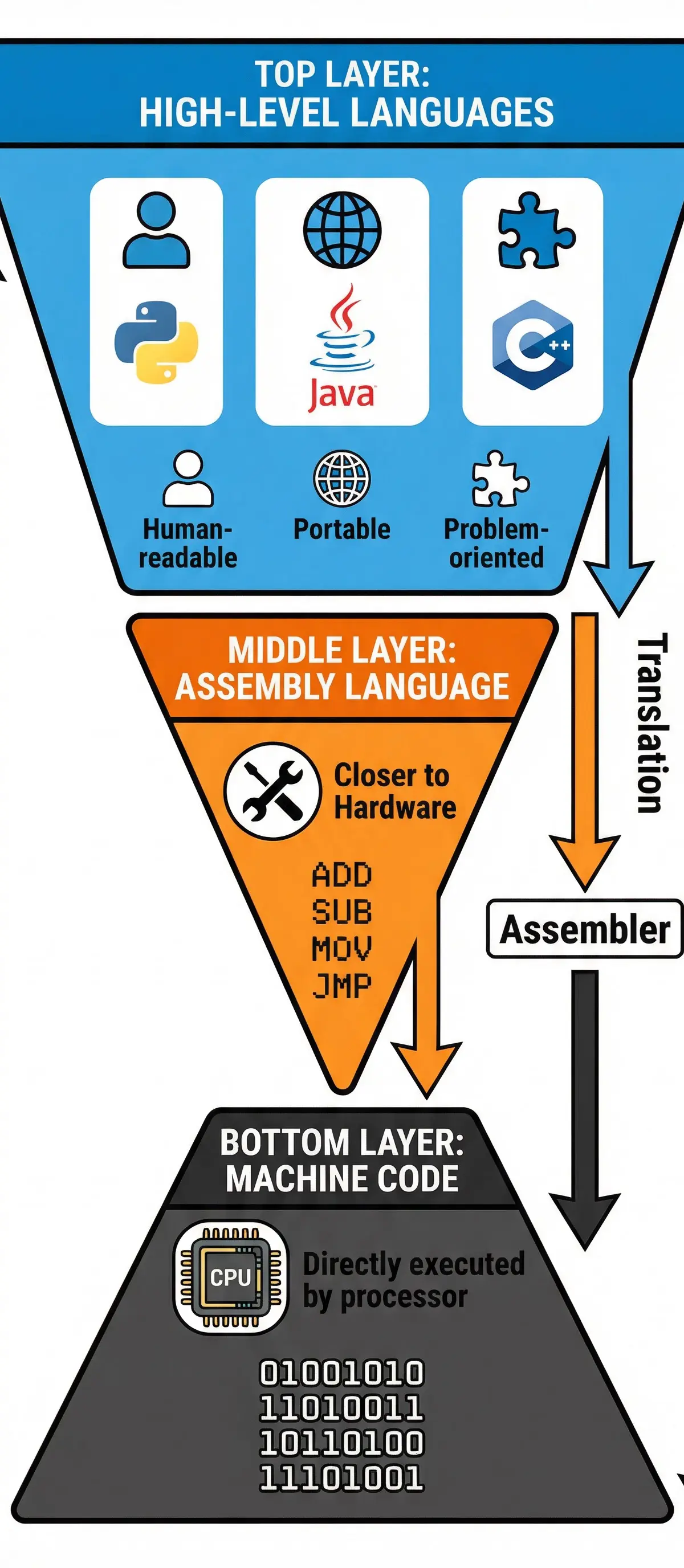
Understanding the hierarchy of programming languages is essential for answering exam questions about translation. At the top of the pyramid are High-Level Languages (Python, Java, C++), which offer maximum abstraction and human readability. These languages are portable and problem-oriented, but they cannot be executed directly by the CPU. In the middle layer is Assembly Language, which uses mnemonics to represent machine instructions. It is closer to the hardware than high-level languages but still requires translation by an Assembler. At the base of the pyramid is Machine Code, consisting of binary instructions that the CPU executes directly. The key point to remember is that only Machine Code runs on the processor—everything else must be translated down to this level. The process of moving from high-level to machine code involves either compilation or interpretation, which we will explore next. Examiners frequently test whether candidates understand that Assembly Language is not directly executable and that it represents an intermediate step between human-readable code and binary instructions.
Concept 4: Compilers
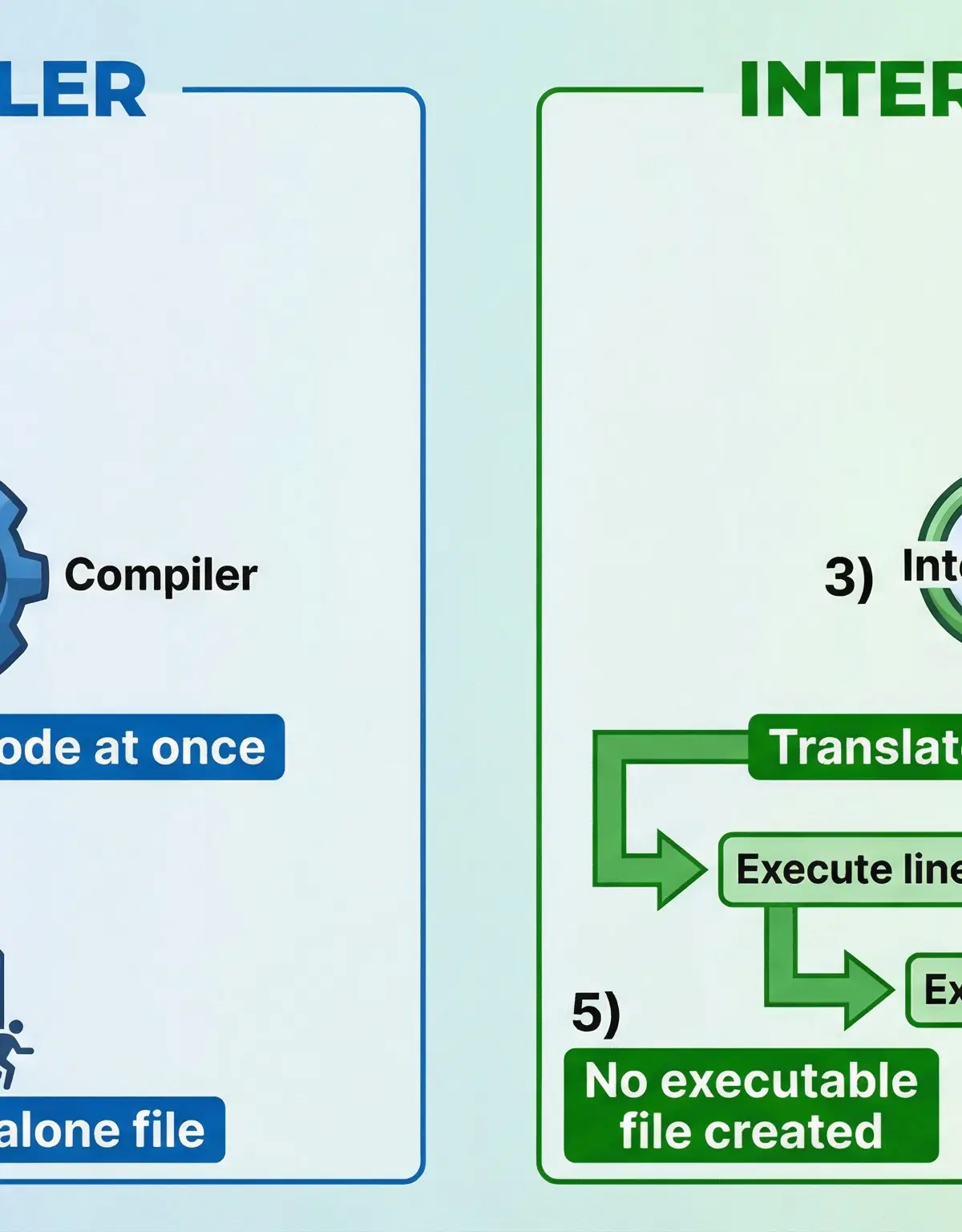
A compiler is a translator program that converts the entire source code of a high-level language program into machine code (or an intermediate object code) in one go, producing a standalone executable file. The compilation process involves several stages: lexical analysis, syntax checking, semantic analysis, optimization, and code generation. If the compiler detects any errors during these stages, it will report them all at the end, and no executable file will be produced until all errors are corrected. Once the executable file is created, it can be run on any compatible computer without the need for the original source code or the compiler itself. This makes compiled programs fast and easy to distribute. Java, C++, and C are typically compiled languages. The key advantage of compilation is execution speed—the resulting machine code runs directly on the CPU without any further translation overhead. The disadvantage is that debugging can be more difficult, because errors are only reported after the entire program has been scanned, and you cannot easily trace which line of source code corresponds to a particular error in the executable.
Example: When you compile a Java program, the Java compiler (javac) reads your .java source file, checks it for syntax and semantic errors, and produces a .class file containing bytecode (a form of intermediate code). This bytecode is then executed by the Java Virtual Machine (JVM), which translates it into machine code for the specific processor. In the context of OCR GCSE, you should focus on the principle that a compiler produces an executable file that can run independently.
Concept 5: Interpreters
An interpreter is a translator program that reads and executes source code line-by-line, translating each instruction into machine code and executing it immediately before moving to the next line. Unlike a compiler, an interpreter does not produce a standalone executable file. Instead, the source code must be present every time the program is run, and the interpreter must be installed on the machine. If the interpreter encounters an error, it stops execution immediately at the line where the error occurred and reports it, which makes debugging much easier—you know exactly where the problem is. Python, JavaScript, and Ruby are typically interpreted languages. The key advantage of interpretation is ease of debugging and testing, because you can run and test small sections of code interactively. The disadvantage is that interpreted programs run more slowly than compiled programs, because the translation overhead occurs every time the program is executed, and the interpreter must be present on every machine where the program runs.
Example: When you run a Python script, the Python interpreter reads the first line, translates it into machine code, executes it, then moves to the second line, and so on. If line 5 contains a syntax error, the interpreter will execute lines 1-4 successfully, then stop and report the error at line 5. You can then fix line 5 and re-run the program immediately.
Concept 6: Integrated Development Environments (IDEs)
An Integrated Development Environment (IDE) is a software application that provides a comprehensive set of tools to support the entire software development process. It is crucial that you do not describe an IDE as simply 'a program to write code'—this is too vague and will not earn marks. Instead, you must identify specific facilities that an IDE provides. The most important facilities to know are:
-
Text Editor with Syntax Highlighting: The text editor allows you to write and edit source code. Syntax highlighting uses different colours to distinguish keywords, variables, strings, and comments, making the code easier to read and helping you spot errors such as misspelled keywords or unclosed strings.
-
Auto-Completion (or Code Completion): As you type, the IDE suggests possible completions for variable names, function names, and keywords. This speeds up coding, reduces typos, and helps you remember the correct syntax for library functions.
-
Debugger: A debugger allows you to run your program step-by-step (a process called 'stepping'), pause execution at specific points (using breakpoints), and inspect the current values of variables. This is invaluable for finding and fixing logical errors where the program runs but produces incorrect results.
-
Run-Time Environment: The IDE provides a built-in environment to compile or interpret and execute your code, often displaying output in a console window within the IDE itself.
-
Error Diagnostics and Reporting: The IDE highlights syntax errors as you type and provides detailed error messages, often with suggestions for how to fix them.
Examples of popular IDEs include PyCharm and IDLE for Python, Eclipse and IntelliJ IDEA for Java, and Visual Studio for C++ and C#. In the exam, if you are asked to 'State two facilities provided by an IDE', you should name specific features like 'syntax highlighting' and 'debugger', and briefly explain what each does.
Example: A candidate writes a Python program with a logical error—a variable is not being updated correctly inside a loop. By using the debugger in an IDE like PyCharm, the candidate can set a breakpoint at the start of the loop, step through each iteration, and inspect the value of the variable after each line executes. This reveals that the variable is being reset to zero on each iteration, identifying the source of the bug.
Practical Applications
Understanding programming languages and their translation is not just an academic exercise—it has real-world implications for software development. High-level languages like Python are used extensively in data science, web development, and automation because they allow rapid prototyping and are easy to learn. Java is the backbone of Android app development and large-scale enterprise systems, valued for its portability and robustness. Low-level languages like Assembly are still used in embedded systems, device drivers, and performance-critical applications where direct hardware control is essential. Compilers are used to build operating systems, games, and applications where speed is paramount. Interpreters are used in scripting, rapid application development, and environments where code needs to be tested and modified frequently. IDEs are indispensable in professional software development, enabling teams to collaborate, manage large codebases, and maintain code quality through integrated testing and version control tools. By mastering the concepts in this topic, you are building a foundation for understanding how modern software is created, from the code you write to the binary instructions executed by the processor.
Mathematical/Scientific Relationships
This topic does not involve mathematical formulas in the traditional sense, but it does involve understanding the translation process as a series of transformations:
High-Level Source Code → [Compiler/Interpreter] → Machine Code → CPU ExecutionFor a compiled language:
- Source Code → Compiler → Object Code/Executable File → CPU executes the executable
For an interpreted language:
- Source Code → Interpreter (line-by-line) → Machine Code (generated on-the-fly) → CPU executes each instruction immediately
For Assembly Language:
- Assembly Code → Assembler → Machine Code → CPU executes the machine code
The key relationship to remember is that only Machine Code is directly executable by the CPU. Everything else requires a translator. Examiners test whether you understand this hierarchy and can explain the role of each translator.
Visual Resources
2 diagrams and illustrations
Interactive Diagrams
2 interactive diagrams to visualise key concepts
Conceptual Flow Outline
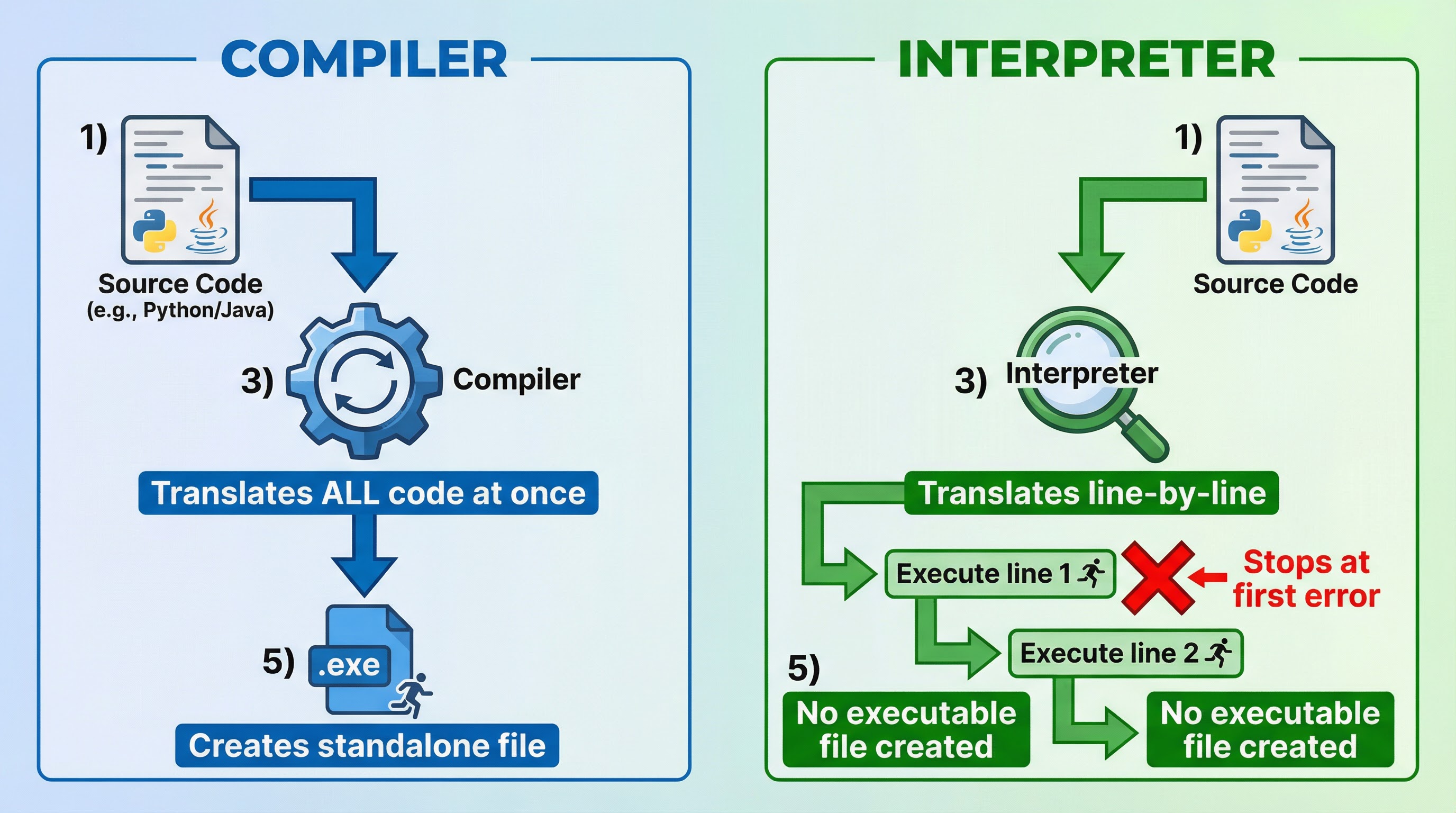
Translation Process: Compiler vs Interpreter. A compiler translates all source code at once and produces an executable file, while an interpreter translates and executes code line-by-line without producing an executable.
Conceptual Flow Outline
IDE Workflow: How an Integrated Development Environment supports the software development process from writing code to debugging and execution.
Worked Examples
5 worked examples — open one to explore the question and available guidance.
Practice Questions
Test your understanding — click to reveal model answers
State one characteristic of a high-level programming language. [1 mark]
Hint: Think about what makes high-level languages easy for humans to use or how they relate to different types of computers.
Describe how a compiler translates a program. [3 marks]
Hint: Think about what the compiler does to the source code, what it produces, and when the translation happens.
Explain one advantage of using an interpreter during program development. [2 marks]
Hint: Think about what happens when an error is found and how this helps the programmer.
A programmer uses an IDE to write a program. State two facilities provided by the IDE that help the programmer write correct code. [2 marks]
Hint: Think about tools that highlight errors or help you write code more quickly and accurately.
Compare Assembly Language and Machine Code. [4 marks]
Hint: Think about how each language is written, whether it is human-readable, and whether it can be executed directly by the CPU.
A software company wants to distribute a game to customers. Explain why the company should use a compiler to translate the game's source code. [4 marks]
Hint: Think about what the company needs to give to customers, how fast the game needs to run, and whether the company wants to protect its source code.