Common Programming Languages (Python, Java) — OCR GCSE Study Guide
Exam Board: OCR | Level: GCSE
Master the core principles of Python and Java for your OCR GCSE Computer Science exam. This guide breaks down the essential syntax, data types, and control structures that examiners look for, helping you write clean, effective code under pressure and secure top marks in Paper 2.
## Overview
Welcome to your essential guide for OCR GCSE Computer Science, Topic 5.7: Common Programming Languages. This section focuses on the practical application of high-level programming languages, specifically Python and Java, which are fundamental to success in Paper 2, Section B. In this paper, candidates are required to demonstrate their ability to write, refine, and debug algorithms. A strong command of either Python or Java is not just about knowing the syntax; it's about understanding how to apply programming constructs to solve problems efficiently. This topic directly connects to algorithms (Topic 2), data representation (Topic 1), and robust program design (Topic 6). Expect to face questions that require you to write new code from scratch, identify and correct errors in existing code, or predict the output of a given algorithm. Mastering these skills is your key to unlocking the higher-level marks.

## Key Concepts
### Concept 1: High-Level Languages vs. Low-Level Languages
A high-level language, like Python or Java, is a programming language with strong abstraction from the details of the computer. This means it uses natural language elements, is easier to read, write, and maintain. In contrast, low-level languages, like assembly language, provide little to no abstraction and are much closer to the machine's instruction set. For your GCSE, you only need to work with high-level languages. The key difference is that high-level languages are designed for humans to understand, while low-level languages are designed for machines to execute quickly.
**Why it works**: Abstraction allows programmers to focus on the problem they are trying to solve, rather than getting bogged down in the complex details of computer architecture, such as memory management or CPU registers. This speeds up development and reduces the chance of errors.
### Concept 2: Interpreted vs. Compiled Languages
This is a key distinction between Python and Java.
* **Python is an interpreted language**. An interpreter runs through the source code line by line and executes each command. This makes it great for scripting and rapid development, as you can run the code immediately without a separate compilation step. However, it can be slower than a compiled language because the translation happens in real-time.
* **Java is a compiled language**. A compiler translates the entire source code into machine code (or an intermediate form called bytecode in Java's case) before the program is run. This compiled code is then executed directly by the CPU. The result is generally faster and more efficient execution, but it adds an extra step to the development process.
### Concept 3: Core Programming Constructs
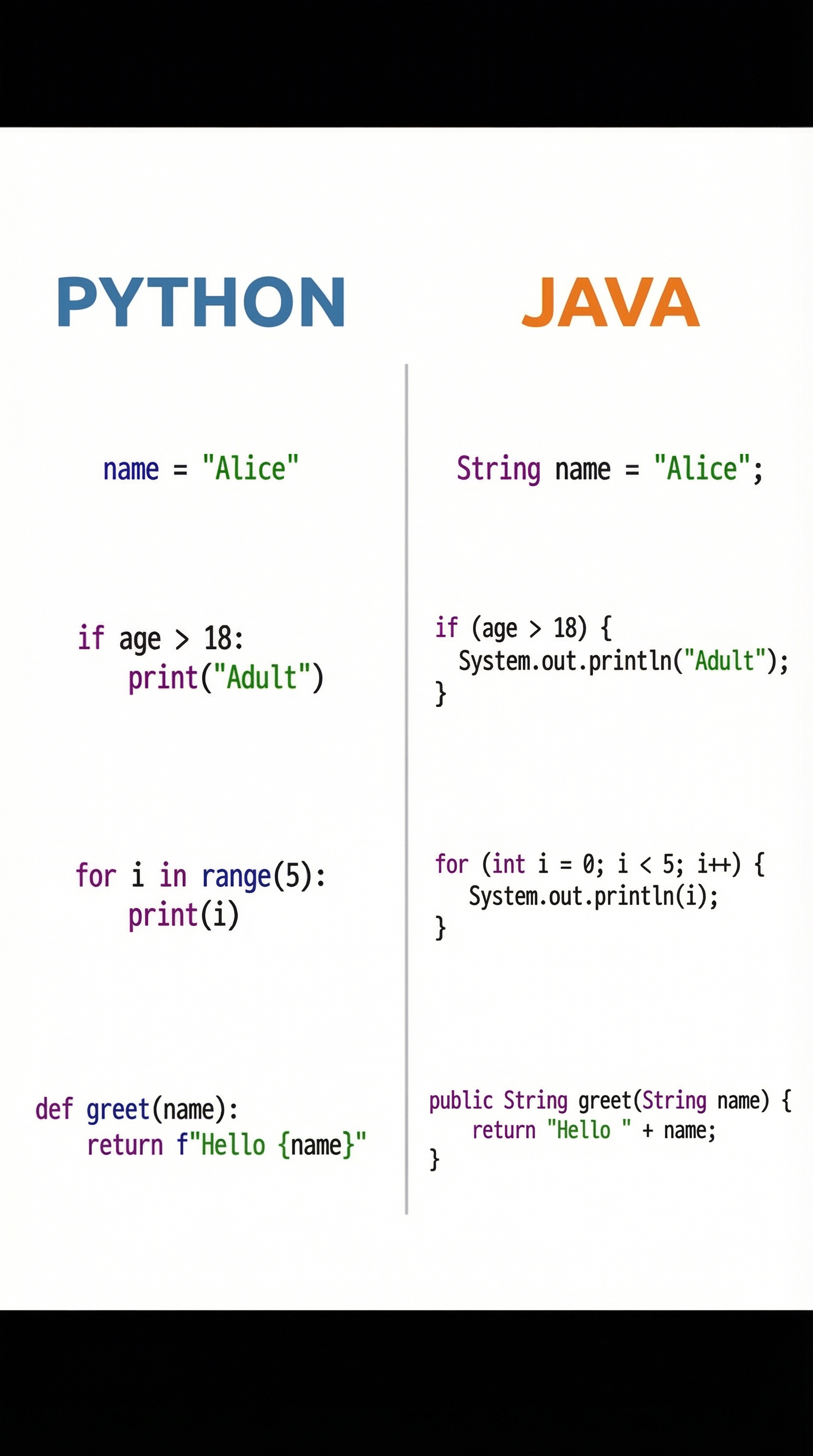
Examiners will test your ability to use three fundamental building blocks of programming:
1. **Sequence**: This is the default control structure where instructions are executed one after another in the order they are written.
2. **Selection**: This is used for making decisions in a program. It's implemented using `if`, `else`, and `elif` (in Python) or `else if` (in Java) statements. These statements check if a condition is true and execute a specific block of code based on that outcome. Credit is given for correctly structuring the logical condition (e.g., using `==` for comparison, not `=`).
3. **Iteration**: This is used for repeating a block of code. There are two main types:
* **Count-controlled iteration**: Repeats a set number of times. Implemented using `for` loops. Examiners will check that you have the correct start, end, and step conditions.
* **Condition-controlled iteration**: Repeats as long as a certain condition is true. Implemented using `while` loops. A common mistake is creating an infinite loop by failing to include a mechanism for the condition to eventually become false.
### Concept 4: Data Types and Structures
Data types define the kind of value a variable can hold. Using the correct data type is crucial for avoiding errors. Both Python and Java share common data types, but with syntactical differences.
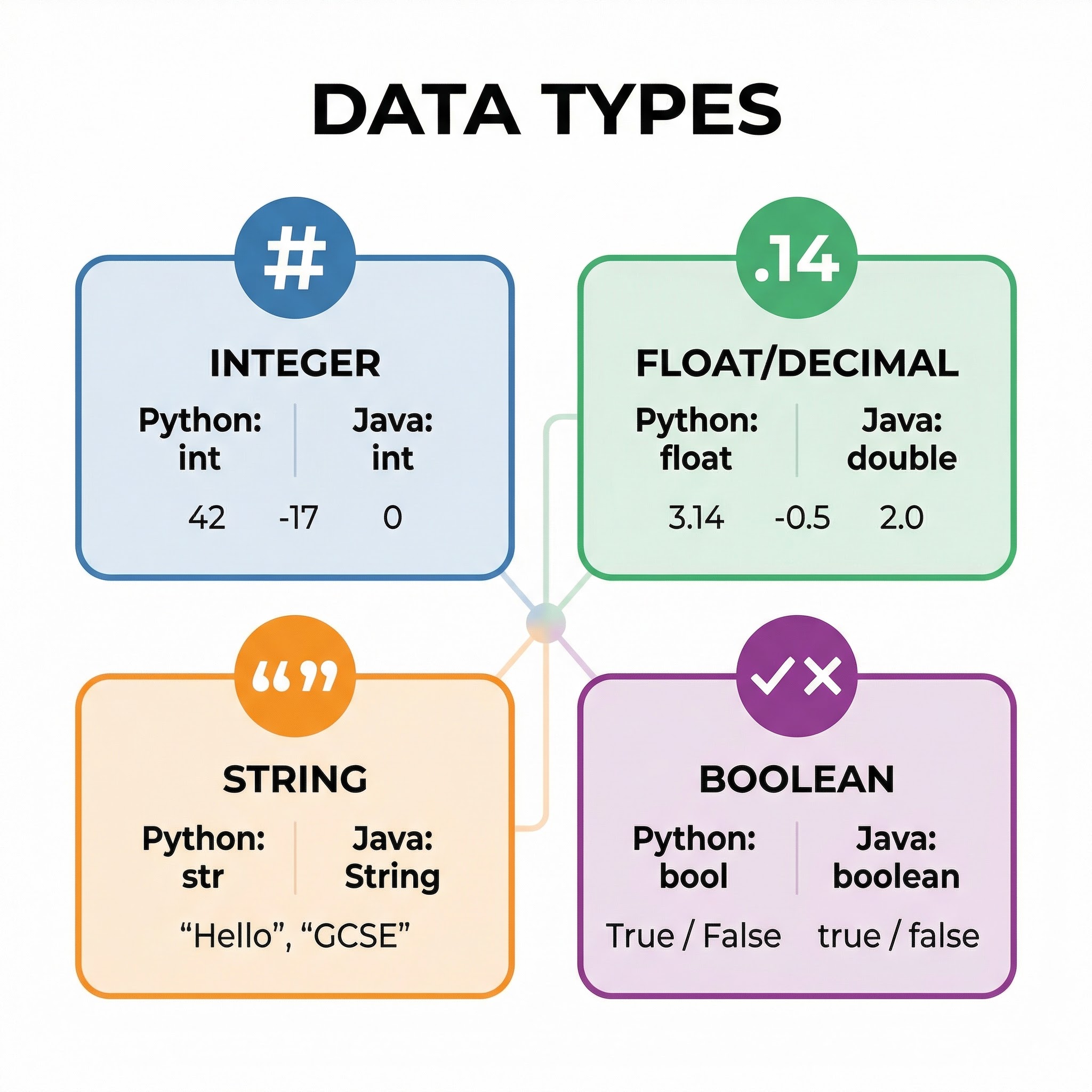
* **Integer (`int` in both)**: Whole numbers (e.g., `10`, `-5`, `0`).
* **Real/Float (`float` in Python, `double` or `float` in Java)**: Numbers with a decimal point (e.g., `3.14`, `-0.5`).
* **String (`str` in Python, `String` in Java)**: A sequence of characters (e.g., `"Hello World"`).
* **Boolean (`bool` in Python, `boolean` in Java)**: Represents one of two values: `True` or `False` (Python) / `true` or `false` (Java).
**Key Difference**: Java is **statically typed**, meaning you must declare the data type of a variable before you use it (e.g., `int age = 18;`). Python is **dynamically typed**, meaning you don't need to declare the data type; the interpreter figures it out at runtime (e.g., `age = 18`). A common error is failing to cast input, which is always read as a string, to a numeric type when performing calculations.
## Practical Applications
Programming languages are the backbone of all software. Python is widely used in web development (e.g., Django, Flask), data science (e.g., Pandas, NumPy), artificial intelligence, and automation. Its simple syntax makes it a popular choice for beginners and experts alike. Java is a powerhouse in the enterprise world, used for building large-scale web applications, Android mobile apps, and complex financial systems. Its platform independence ('write once, run anywhere') makes it incredibly versatile.