Pearson Edexcel · GCSE · Computer Science
Algorithms
Master the logic behind every computer program. This topic covers how to design, trace, and evaluate algorithms using sequence, selection, and iteration, plus the essential searching and sorting techniques you'll need for your exam.
- 6 min read
- 3 worked examples
- 5 practice questions
- 6 key terms
Study Notes
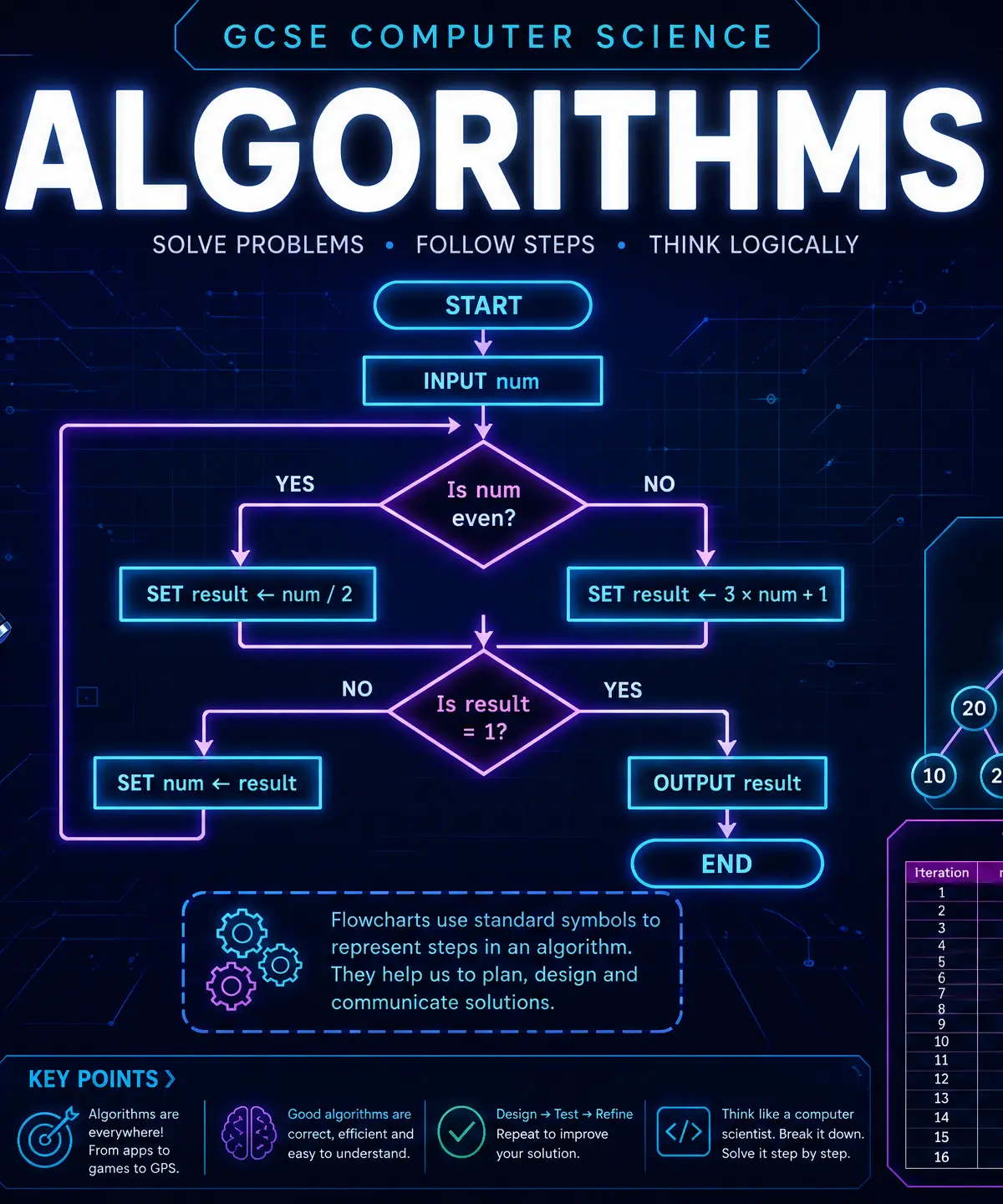
Overview
Algorithms are the foundation of Computer Science. They are simply finite sequences of clear, unambiguous instructions used to solve problems or achieve objectives. Whether you are programming a simple calculator or the AI behind a self-driving car, you are using algorithms.
In your GCSE exam, you won't just be asked to write code; you will be tested on your computational thinking. This means you must be able to design algorithms using flowcharts and pseudocode, trace existing algorithms to see what they do, and evaluate different algorithms to determine which is more efficient. This topic connects heavily to programming constructs and data structures. Examiners love testing this through trace tables, identifying errors in code, and comparing searching/sorting methods.
Key Concepts
Concept 1: The Three Constructs
Every single algorithm, no matter how complex, is built from just three fundamental building blocks:
- Sequence: Instructions are executed one after another, in the exact order they are written.
- Selection: The algorithm makes a decision and chooses a path based on a condition. We use
IF...THEN...ELSEstatements for this. In a flowchart, this is represented by a diamond. - Iteration: The algorithm repeats a block of code. This is also known as looping.
**Understanding Iteration:**There are two types of iteration you must distinguish between:
- Count-controlled iteration: Repeats a specific, known number of times. We use a
FORloop for this. (e.g., "Do this 10 times"). - Condition-controlled iteration: Repeats until a specific condition is met. We use a
WHILEorREPEAT UNTILloop for this. (e.g., "Keep asking for a password UNTIL the correct one is entered").
Examiner Tip: Confusing these two is a very common mistake. Remember: FOR loops count, WHILE loops check conditions.
Concept 2: Trace Tables
A trace table is a manual way of stepping through an algorithm to track the changing values of variables. It is the most reliable way to figure out what a piece of code does or to find a logic error.
How to use them:
- Create a column for every variable in the algorithm.
- Create a separate column for any
OUTPUT. - Work through the algorithm line by line. Every time a variable changes, write the new value in the correct column on a new row.
Why this works: Computers don't skip steps or make assumptions. By forcing yourself to write down the value at every single step, you act like the CPU, preventing you from making human logic leaps that lead to wrong answers.
Concept 3: Types of Errors
When writing algorithms, things go wrong. You must be able to identify three types of errors:
- Syntax Error: A mistake in the grammar or rules of the programming language. (e.g., missing a bracket, misspelling
WHILEasWHLIE). The code will not run. - Logic Error: The code runs perfectly without crashing, but it produces the wrong result. (e.g., using
>instead of>=). The programmer's reasoning was flawed. - Runtime Error: The code is grammatically correct, but something goes wrong while the program is executing, causing it to crash. (e.g., trying to divide a number by zero, or trying to open a file that doesn't exist).
Concept 4: Searching Algorithms
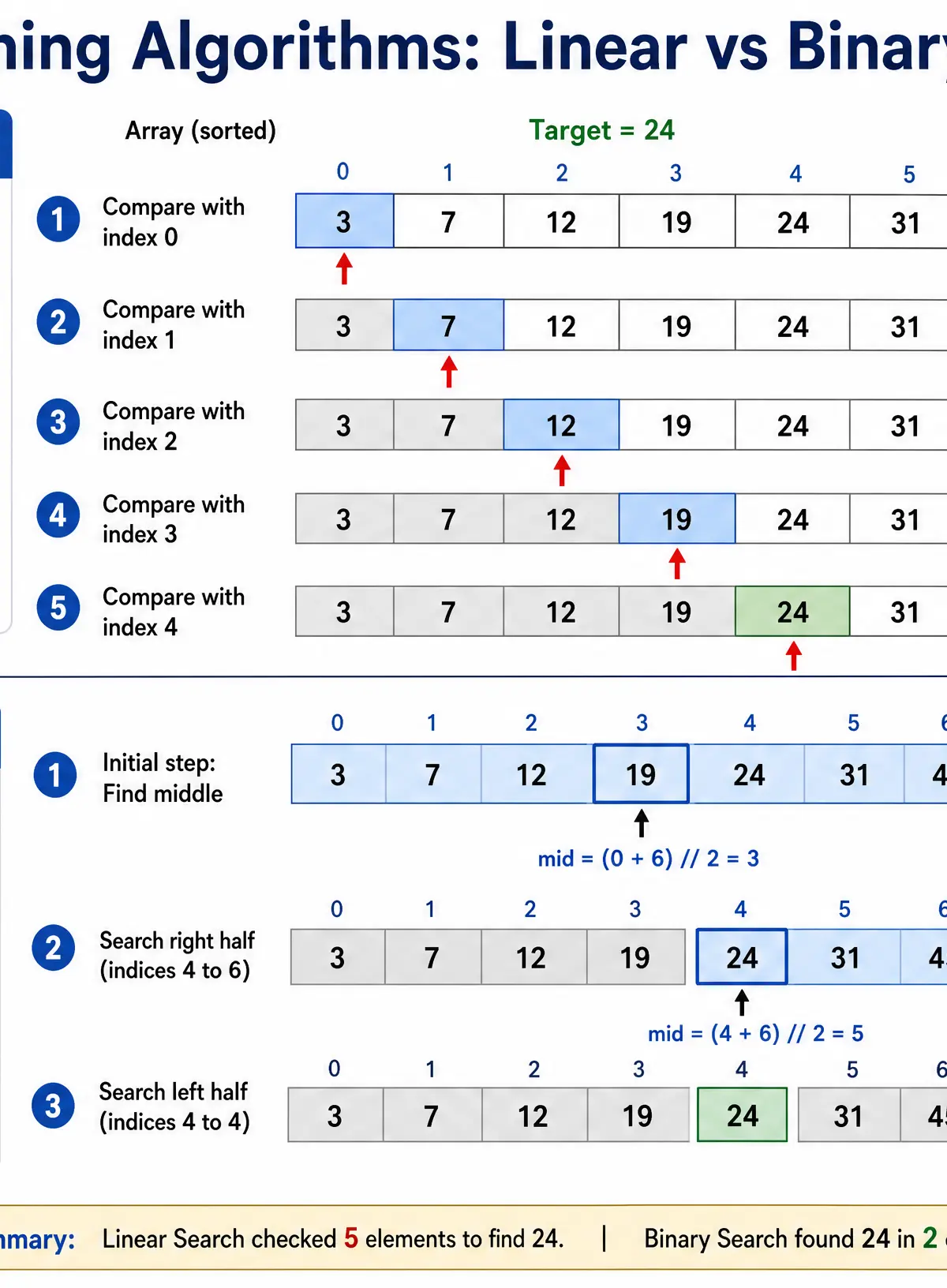
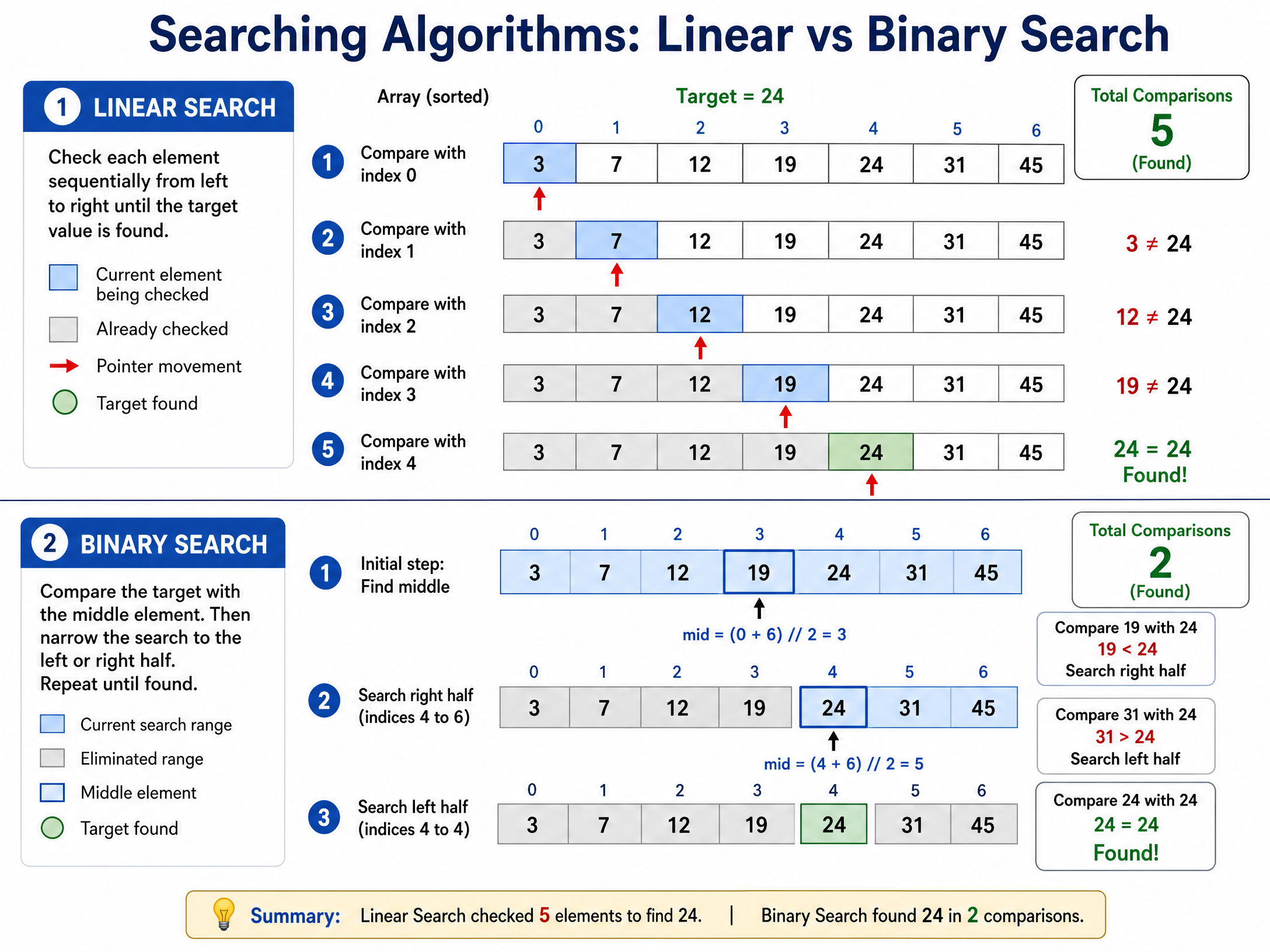
Computers need to find data quickly. You must know two methods:
Linear Search:
- How it works: Starts at the first item and checks every single item one by one until the target is found or the end of the list is reached.
- Advantage: Works on unsorted lists.
- Disadvantage: Very slow for large lists (inefficient).
Binary Search:
- How it works: Looks at the middle item. If the target is smaller, it discards the right half. If the target is larger, it discards the left half. It repeats this halving process until the item is found.
- Advantage: Extremely fast and efficient for large lists.
- Disadvantage: The list MUST be sorted first. (Examiners will almost always test this fact!).
Concept 5: Sorting Algorithms
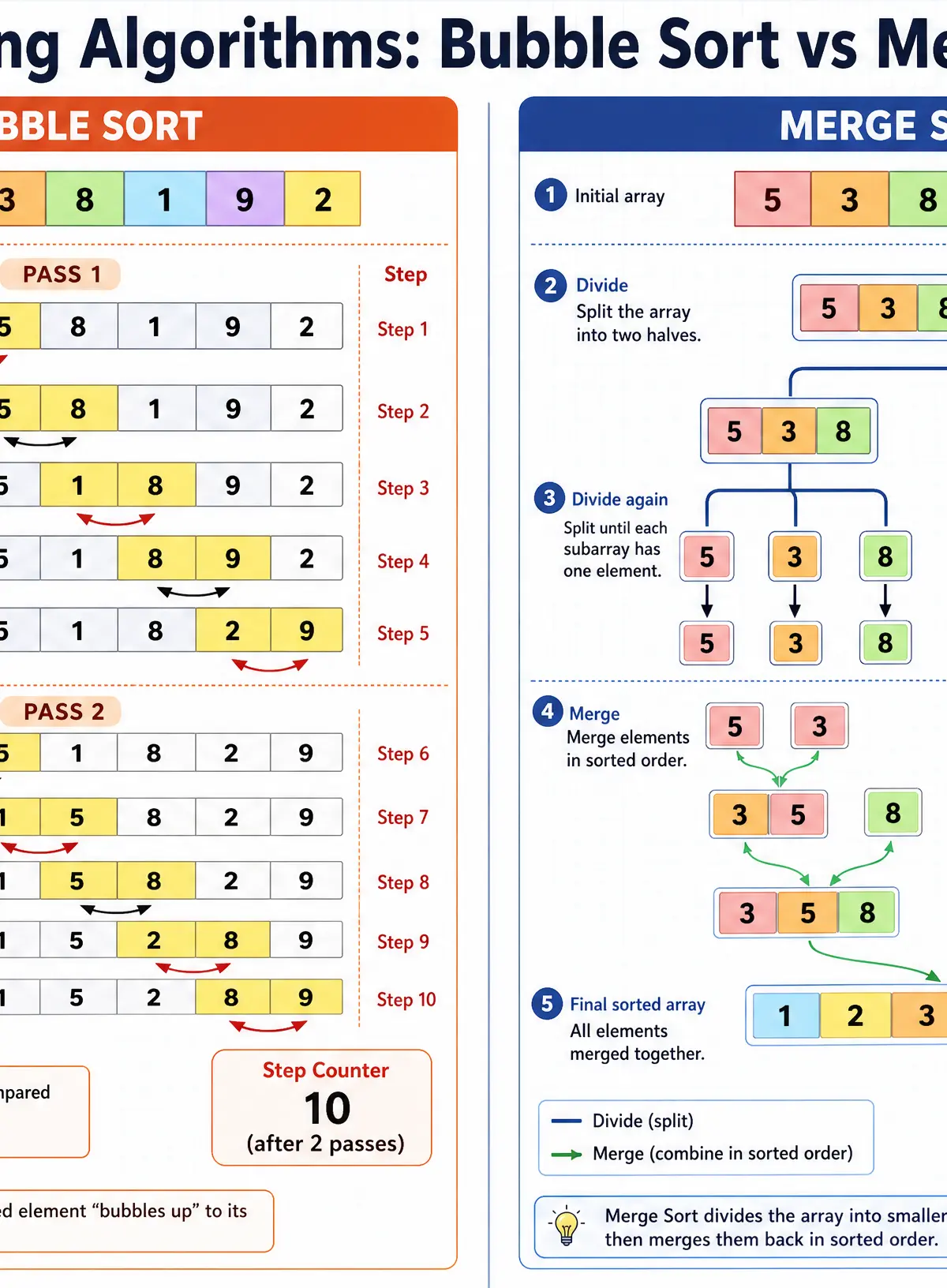
Organising data is crucial. You must know two sorting methods:
Bubble Sort:
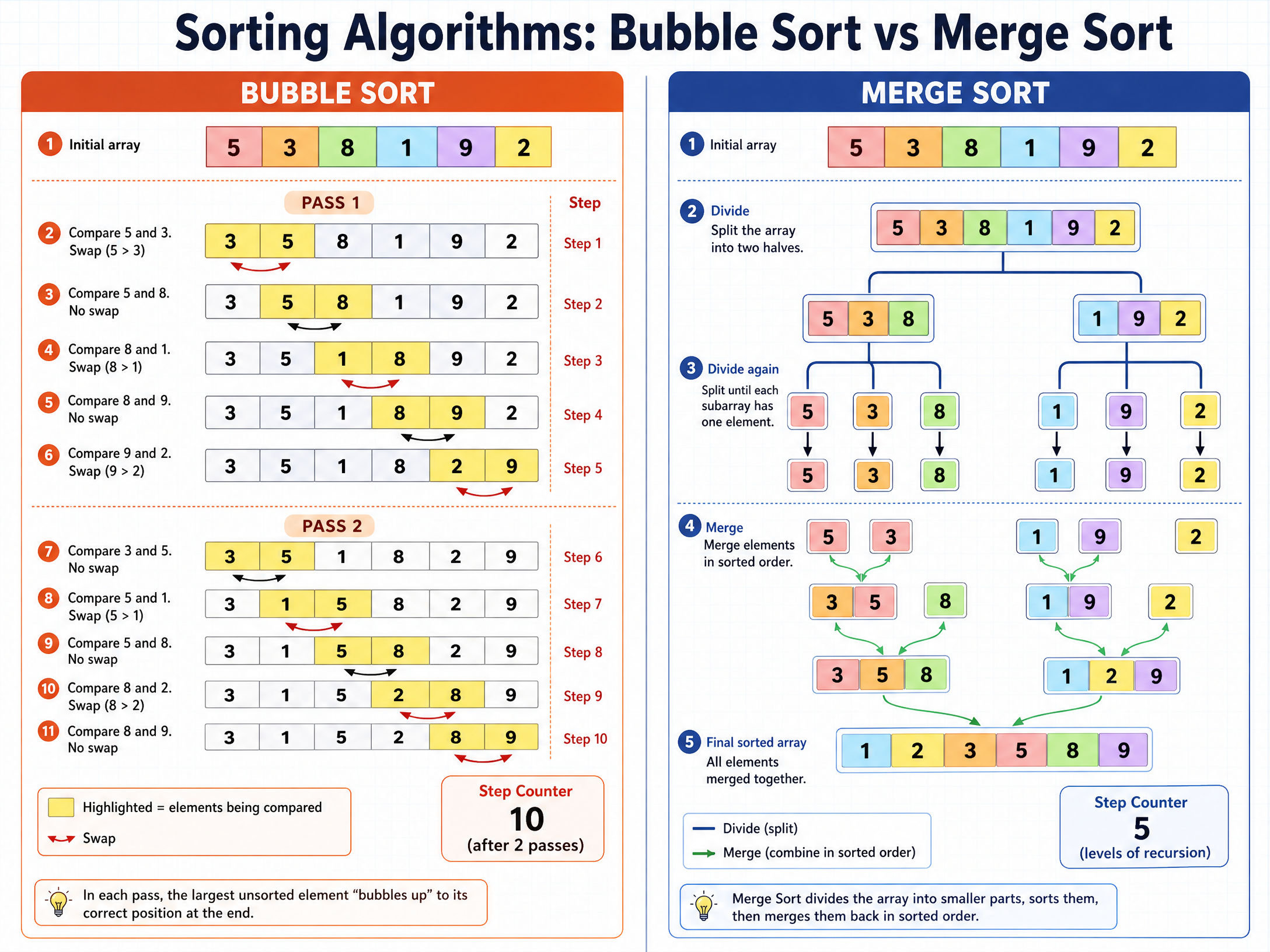
- How it works: Compares adjacent pairs of items. If they are in the wrong order, it swaps them. It makes multiple passes through the list. After each pass, the largest unsorted item "bubbles" up to its correct position at the end.
- Pros/Cons: Simple to write and uses very little memory (sorts in place). However, it is very slow for large lists.
Merge Sort:
- How it works: Uses a "divide and conquer" approach. It repeatedly splits the list in half until every item is in its own list of one. Then, it merges pairs of lists back together in the correct order until one sorted list remains.
- Pros/Cons: Much faster than bubble sort for large lists. However, it requires more memory because it creates new lists during the splitting and merging process.
Listen to the Podcast
Reinforce your learning by listening to our 8-minute deep dive into Algorithms, featuring examiner tips and a quick-fire recall quiz.

Mathematical/Scientific Relationships
While not formulas in the traditional physics sense, you must understand the relational and logical operators used in algorithms:
==or=: Equal to!=or<>: Not equal to<: Less than<=: Less than or equal to>: Greater than>=: Greater than or equal toAND: Both conditions must be trueOR: At least one condition must be trueNOT: Reverses the logical state (True becomes False)
Practical Applications
- Binary Search in the real world: When you search for a contact in your phone, the software uses a binary search (or similar efficient algorithm) to find the name instantly out of thousands, because your contacts are kept alphabetically sorted.
- Trace Tables: Software developers use "debuggers" which essentially automate the trace table process, allowing them to step through code line-by-line to watch variables change and catch logic errors.
Visual Resources
2 diagrams and illustrations
Interactive Diagrams
2 interactive diagrams to visualise key concepts
Conceptual Flow Outline
Flowchart demonstrating Selection (IF statement)
Conceptual Flow Outline
Flowchart demonstrating Iteration (WHILE loop)
Worked Examples
3 worked examples — open one to explore the question and available guidance.
Practice Questions
Test your understanding — click to reveal model answers
State the three basic programming constructs used to design algorithms. (3 marks)
Hint: Think about the order of code, making decisions, and repeating code.
A program asks a user to input a password. It checks if the password is 'letmein123'. If it is, it outputs 'Access Granted'. If not, it outputs 'Access Denied'. Write pseudocode for this algorithm. (4 marks)
Hint: You need an INPUT, an IF statement, an ELSE, and two OUTPUTs.
Explain one advantage of using a binary search rather than a linear search. (2 marks)
Hint: Think about speed and how many items need to be checked.
Explain the difference between a syntax error and a logic error. (2 marks)
Hint: Which one stops the program from running?
An algorithm uses a bubble sort to sort the array [7, 2, 9, 1]. Show the state of the array after the first complete pass. (2 marks)
Hint: Remember to compare adjacent pairs. 7 and 2, then 7 and 9, then 9 and 1.