Pearson Edexcel · GCSE · Computer Science
Data types and structures
Master the fundamental building blocks of programming! This topic covers how computers store, access, and manipulate data using primitive types and complex structures like arrays and records. Essential for writing robust code and scoring high marks in practical exams.
- 5 min read
- 3 worked examples
- 5 practice questions
- 6 key terms
Study Notes
Overview
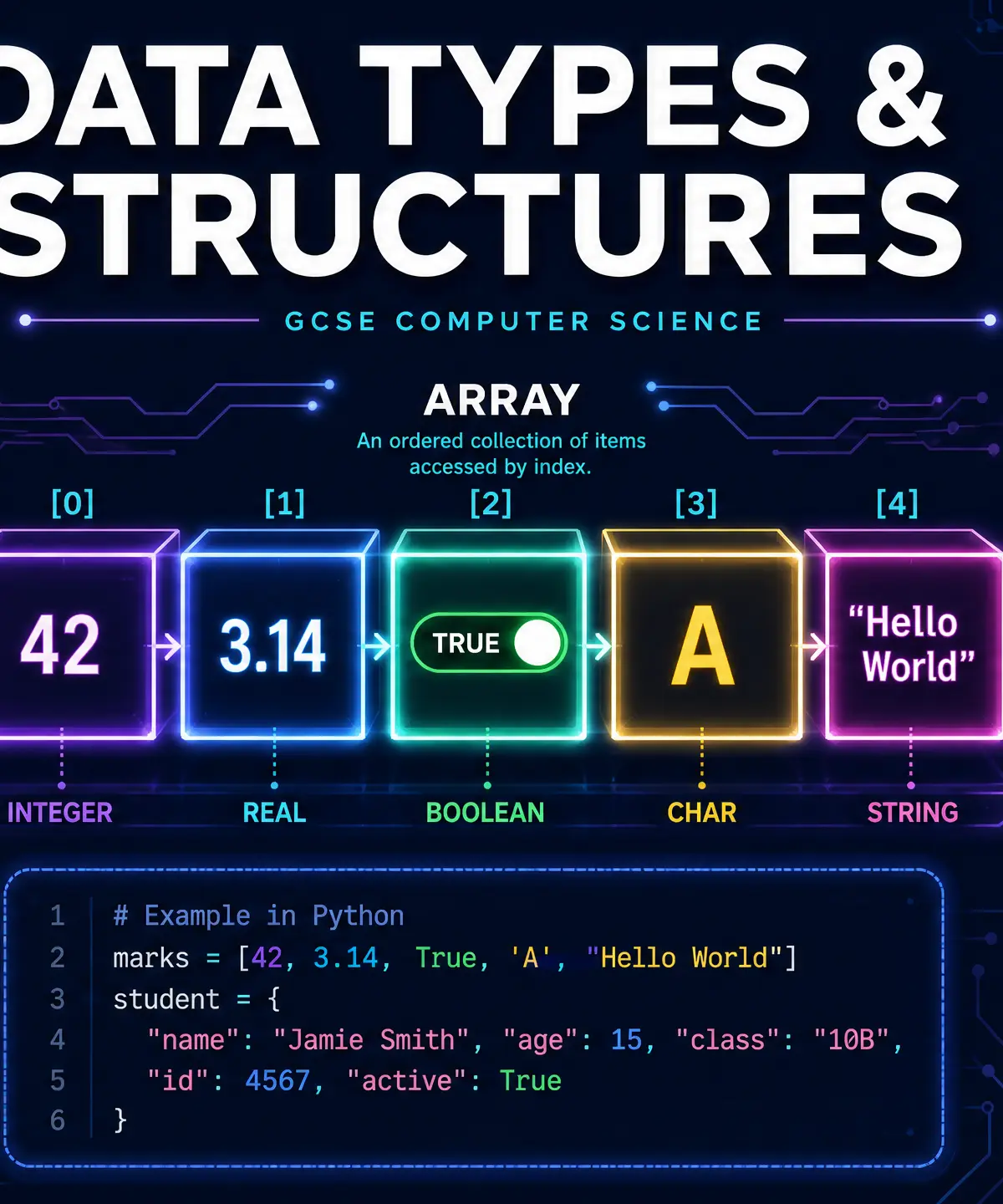
Welcome to one of the most fundamental topics in GCSE Computer Science: Data Types and Structures. At its core, programming is all about taking data, processing it, and outputting a result. But before a computer can process data, it needs to know what kind of data it's dealing with. Is it a number? A word? A simple true or false?
This is why data types matter. They tell the computer how much memory to allocate and what operations are permitted. If you try to multiply two words together, your program will crash. Understanding primitive data types (integers, reals, booleans, chars) and structured types (strings, arrays, records) is crucial not just for passing your theory exam, but for writing working code in your practical assessments.
Examiners frequently test this topic by asking you to identify appropriate data types for given scenarios, spot errors in array indexing, or manipulate strings to extract specific information. Let's dive in.
Key Concepts
Concept 1: Primitive Data Types
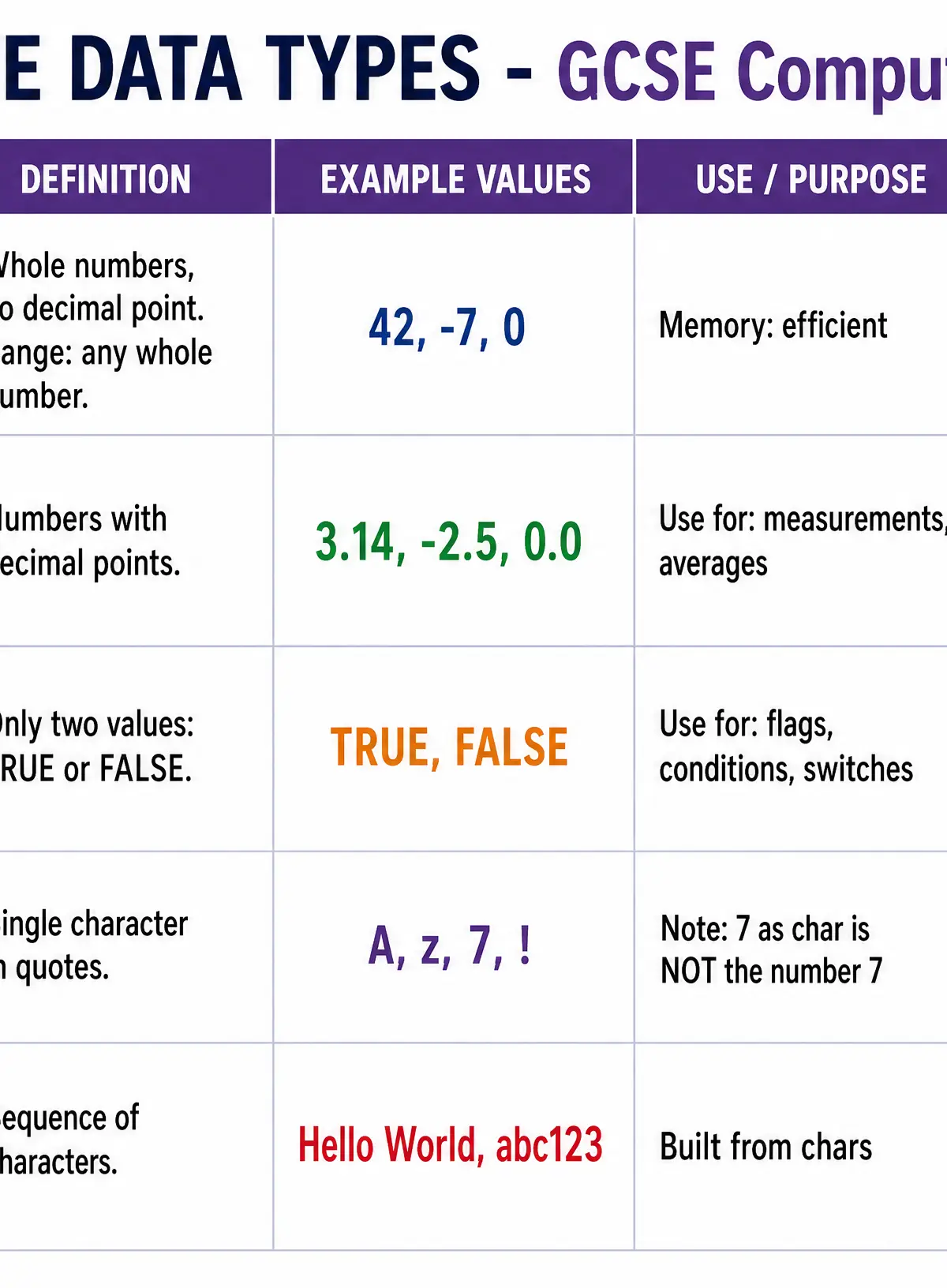
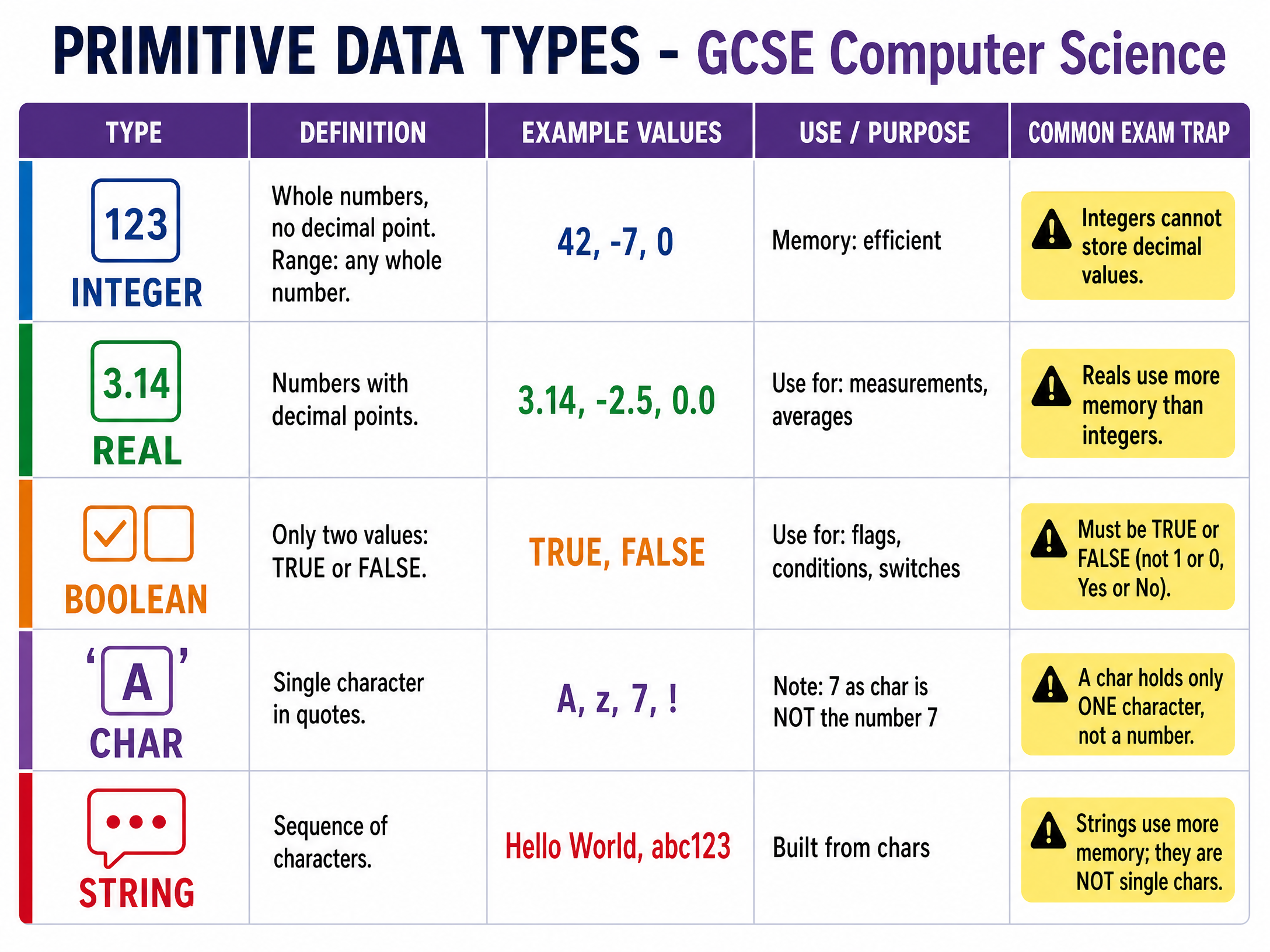
Primitive data types are the basic building blocks. They cannot be broken down into simpler types.
- Integer: A whole number with no fractional part. Use integers for counting things, like a player's score, age in years, or the number of items in a basket.
- Real (or Float): A number that includes a decimal point. Use reals for measurements, prices, or precise calculations like averages.
- Boolean: A type that can hold only one of two values:
TRUEorFALSE. Use booleans for flags or switches, like checking if a user is logged in or if a game is over. - Character (Char): A single alphanumeric symbol, enclosed in quotes. It can be a letter ('A'), a number ('7'), or a symbol ('!').
Examiner Tip: Remember that storing the number 7 as a character '7' means you cannot perform mathematical operations on it. It is treated as text, not a value.
Concept 2: Strings and String Manipulation
A String is a sequence of characters. It is a structured data type because it is built from multiple primitive char types.
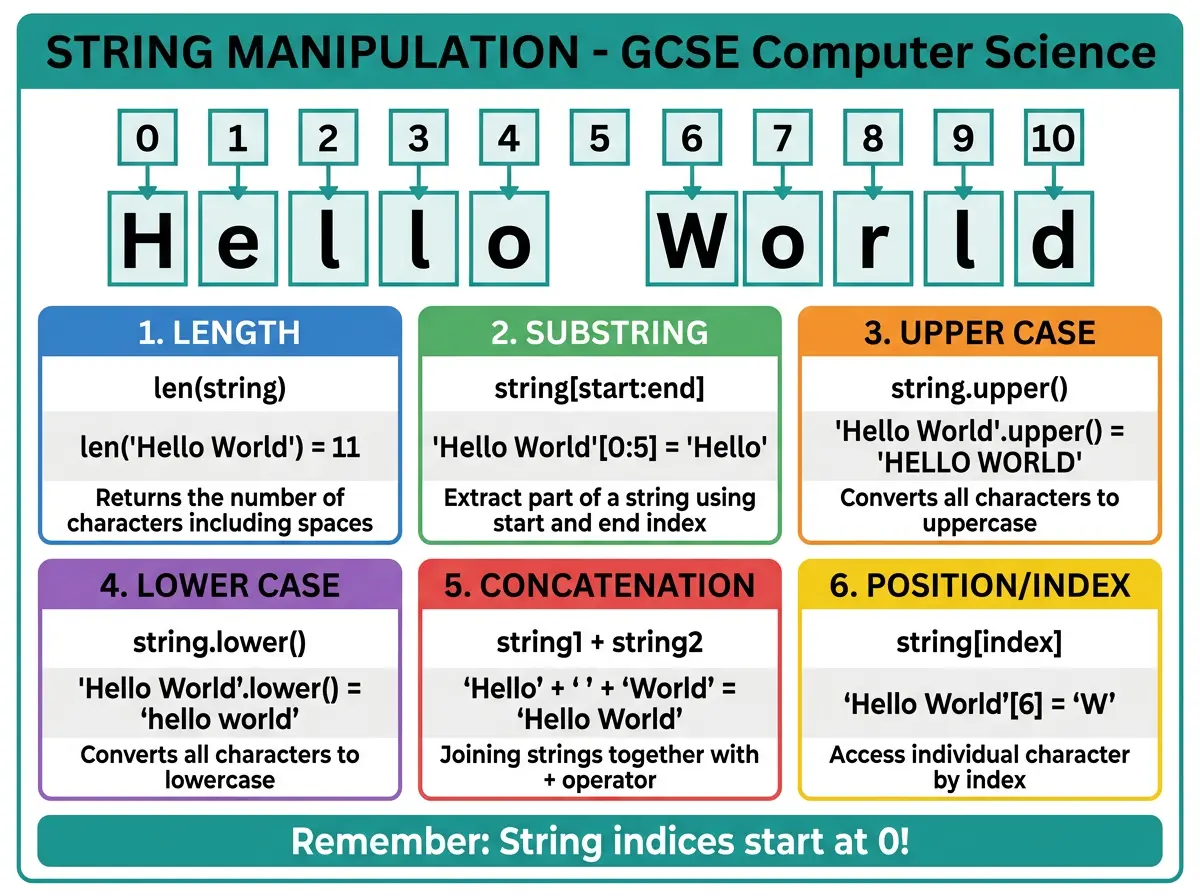
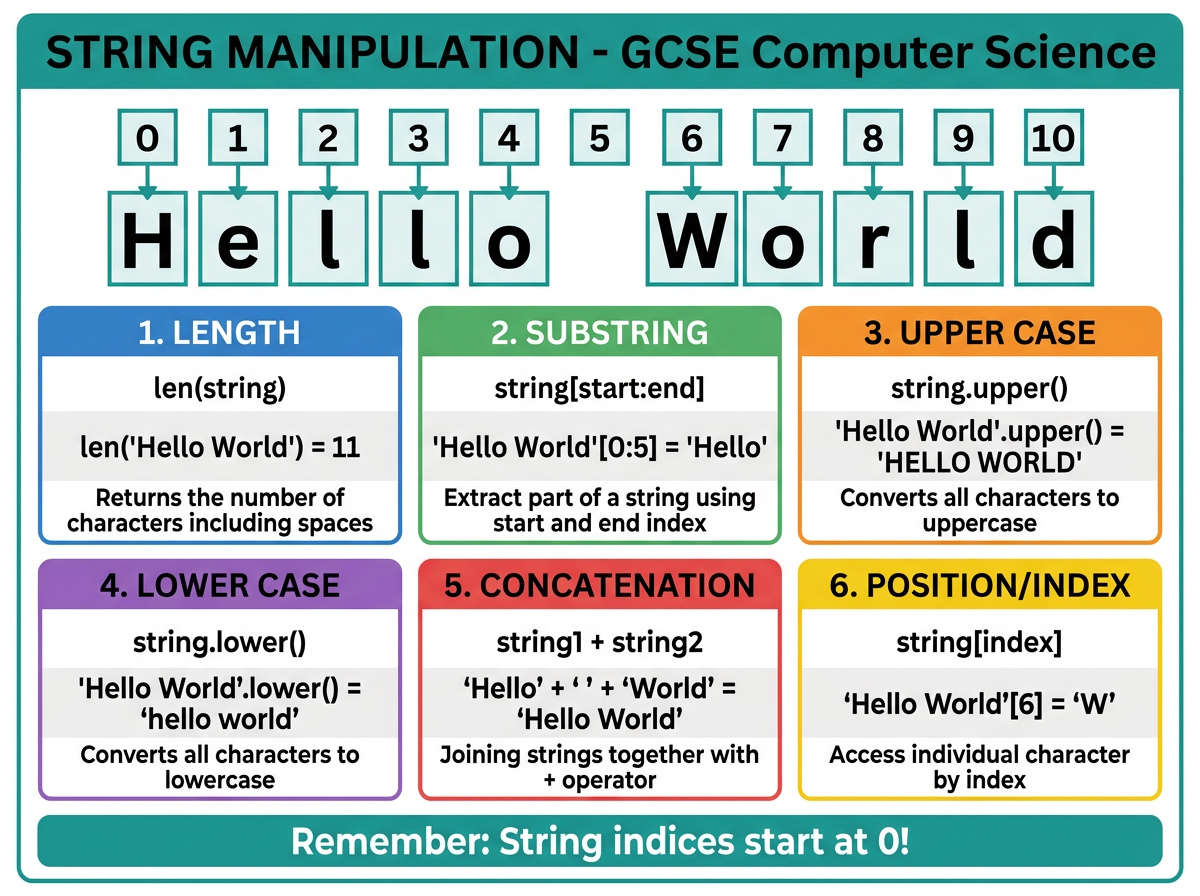
In your exam, you will be expected to know how to manipulate strings using built-in functions. The exact syntax will depend on your exam board's Programming Language Subset (PLS), but the concepts are universal:
- Length: Finding how many characters are in a string. E.g.,
len("Hello")is 5. - Substring: Extracting a portion of a string. E.g., getting the first three letters.
- Concatenation: Joining two strings together. E.g.,
"Hello" + "World"becomes"HelloWorld". - Case Conversion: Changing text to upper or lower case. E.g.,
"abc".upper()becomes"ABC".
Concept 3: Arrays (1D and 2D)
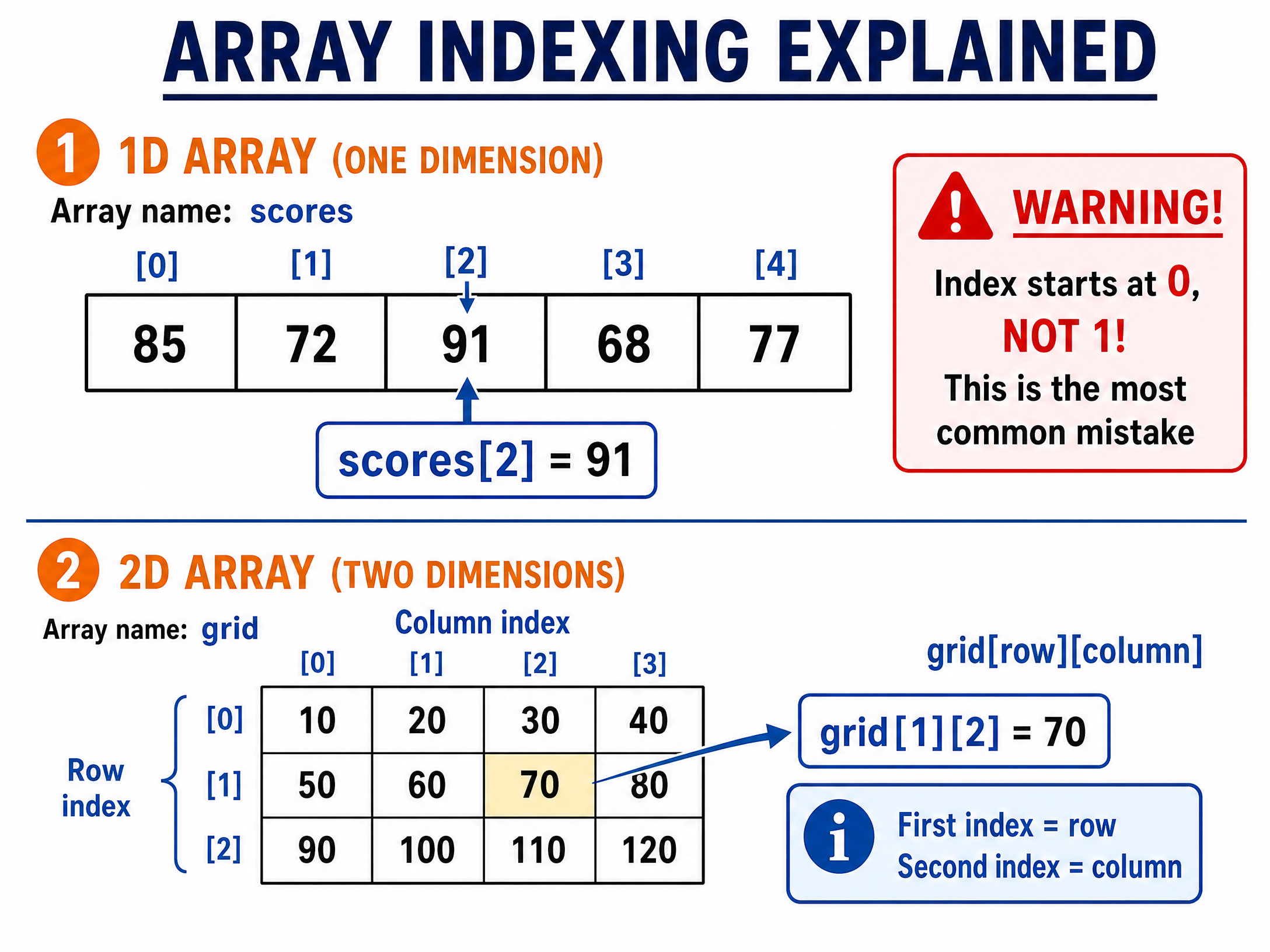
An Array is a structured data type that allows you to store multiple items of the same data type under a single identifier (variable name).
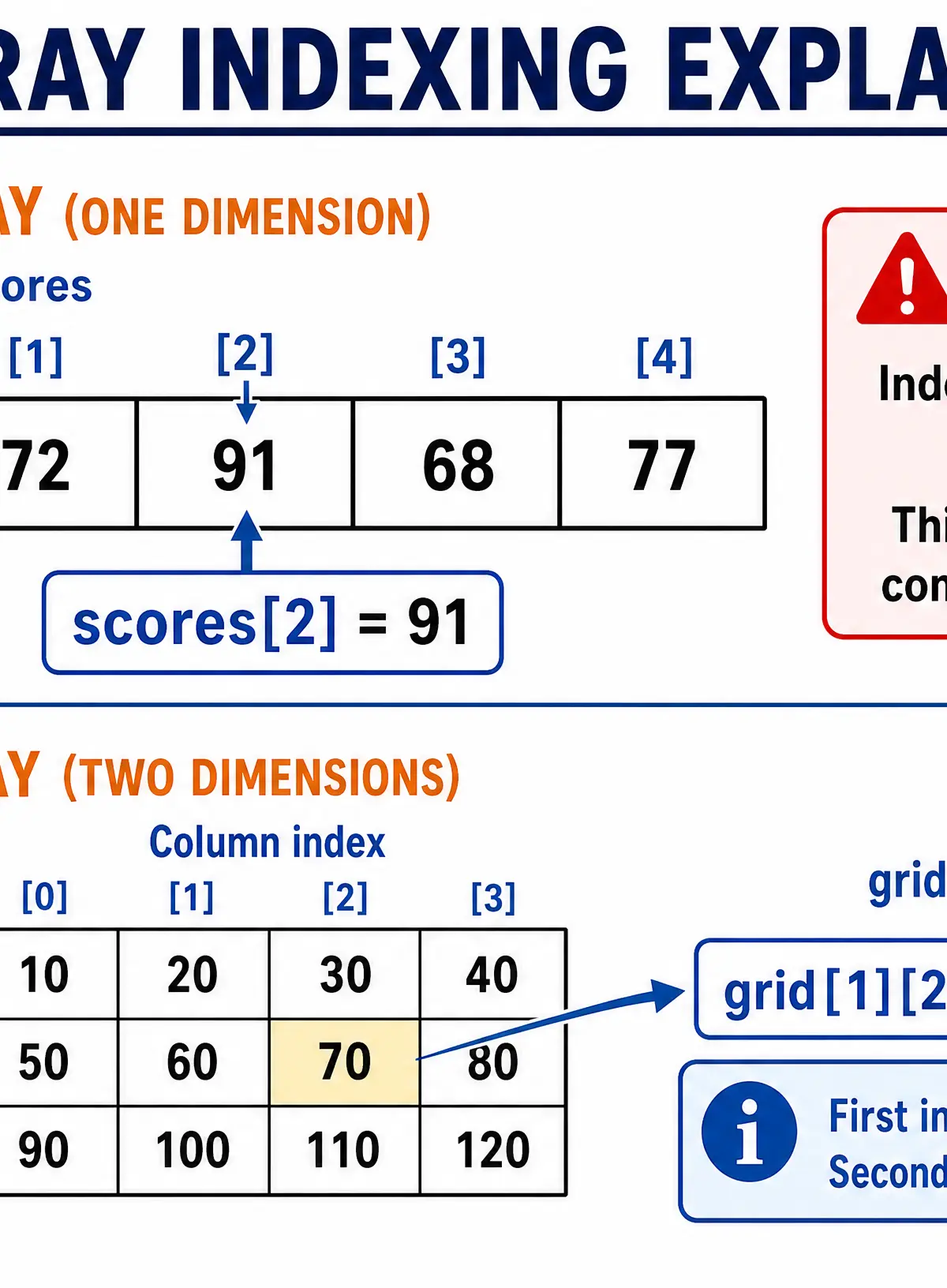
Instead of having five variables (score1, score2, score3, etc.), you have one array (scores) and access individual items using an index.
CRITICAL RULE: In almost all modern programming languages (and GCSE specifications), array indexing is zero-based. This means the first element is at index 0, not index 1.
- 1D Arrays: Like a single list or row. Accessed with one index:
scores[2]. - 2D Arrays: Like a grid or table with rows and columns. Accessed with two indices:
grid[row][column]. A helpful mnemonic is RC Cola (Row, then Column).
Concept 4: Records
While arrays store multiple items of the same data type, a Record stores multiple related items of different data types under one name.
Think of a record as a row in a database table. A Student record might contain:
Name(String)Age(Integer)TargetGrade(Char)IsEnrolled(Boolean)
This is much more efficient for representing real-world entities than using separate variables or arrays.
Concept 5: Variables vs Constants
Both are named memory locations used to store data, but they behave differently:
- Variable: The value stored can change while the program is running (e.g., a player's score).
- Constant: The value is set when the program is written and cannot be changed while it is running (e.g.,
PI = 3.14159orMAX_LIVES = 3). Using constants makes code easier to update and prevents accidental changes to important values.
Listen to the Revision Podcast
Need to recap while on the go? Listen to our comprehensive audio guide covering all these concepts, common mistakes, and a quick-fire quiz.

Visual Resources
3 diagrams and illustrations
Interactive Diagrams
2 interactive diagrams to visualise key concepts
Conceptual Flow Outline
Classification of Data Types
Conceptual Flow Outline
Common String Manipulation Functions
Worked Examples
3 worked examples — open one to explore the question and available guidance.
Practice Questions
Test your understanding — click to reveal model answers
A programmer needs to store the exact weight of a parcel in kilograms. State the most appropriate data type.
Hint: Weight usually involves fractions of a kilogram, like 2.5kg.
Explain why a String is a more appropriate data type than an Integer for storing a bank account number (e.g., '01234567').
Hint: Think about what happens to leading zeros in mathematics.
An array is declared as: colours = ["Red", "Green", "Blue", "Yellow"]. Write a statement to output the word "Blue".
Hint: Remember zero-based indexing.
Compare the use of an Array with the use of a Record for storing data.
Hint: Focus on what types of data each structure can hold and how you access that data.
A variable password stores the string "Pa55w0rd". Evaluate the expression: password.length > 8 AND password.substring(0,2) == "Pa"
Hint: Break it down into two parts. Evaluate the length first, then the substring, then apply the AND operator.