Pearson Edexcel · GCSE · Computer Science
Develop code
Master the art of translating logic into functional Python code. This topic covers the core programming constructs, error identification, and testing strategies essential for securing top marks in your GCSE Computer Science exam.
- 6 min read
- 3 worked examples
- 5 practice questions
- 6 key terms
Study Notes
Overview
Welcome to Develop Code (6.1), arguably the most practical and heavily weighted topic in your GCSE Computer Science specification. This unit is all about turning abstract algorithms into working, efficient, and robust computer programs using Python 3.
Why is this so important? Because examiners don't just want to see that you can write code that works; they want to see code that is well-structured, readable, and fully tested. This topic bridges the gap between theoretical problem-solving (computational thinking) and real-world software engineering.
In the exam, you can expect a mix of reading comprehension (tracing existing code), debugging (finding and fixing errors), and writing original code from scratch. Mastering these skills will not only help you secure top grades but also lay the foundation for A-Level Computer Science and beyond.
Listen to the companion podcast for a complete audio walkthrough of this topic:

Key Concepts
Concept 1: Core Programming Constructs
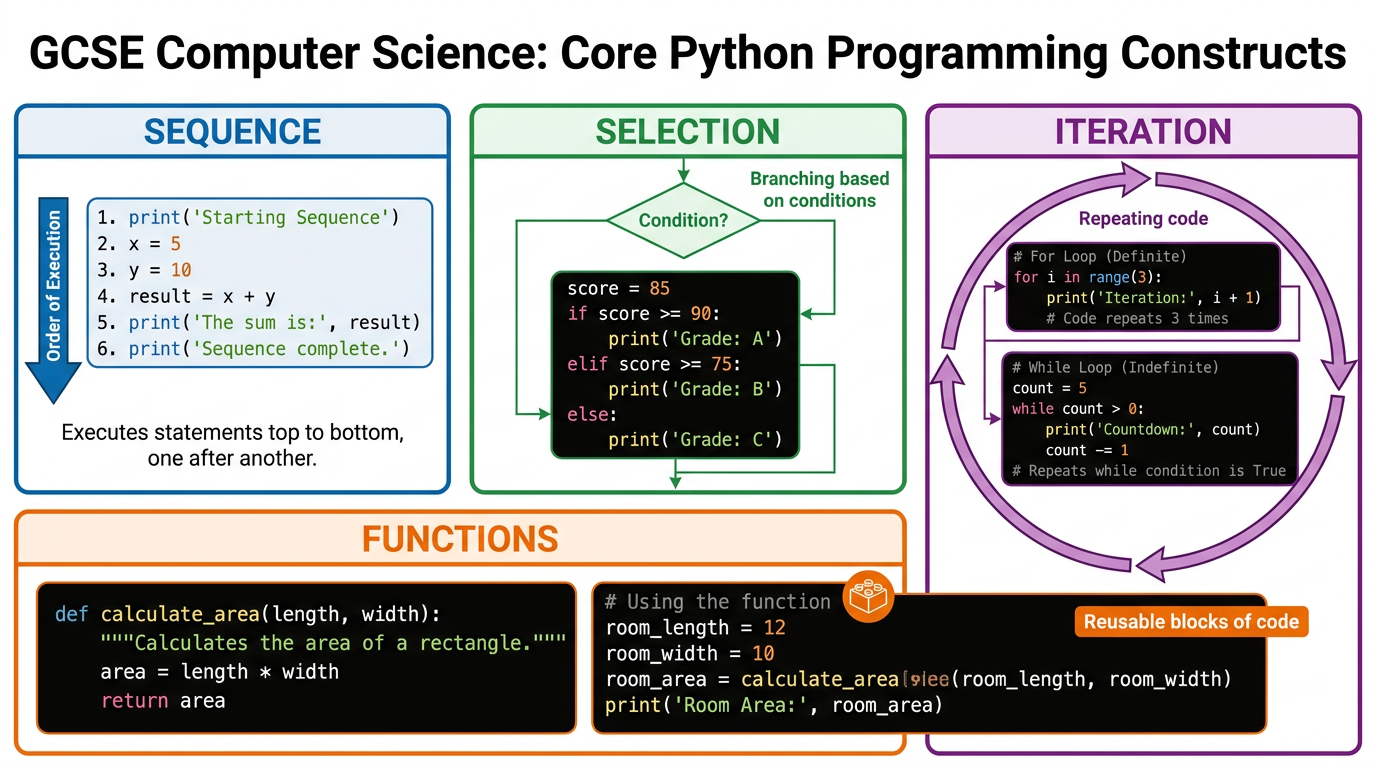
Every computer program, from a simple calculator to a complex 3D game, is built using just four fundamental building blocks. Examiners expect you to identify and implement these fluently.
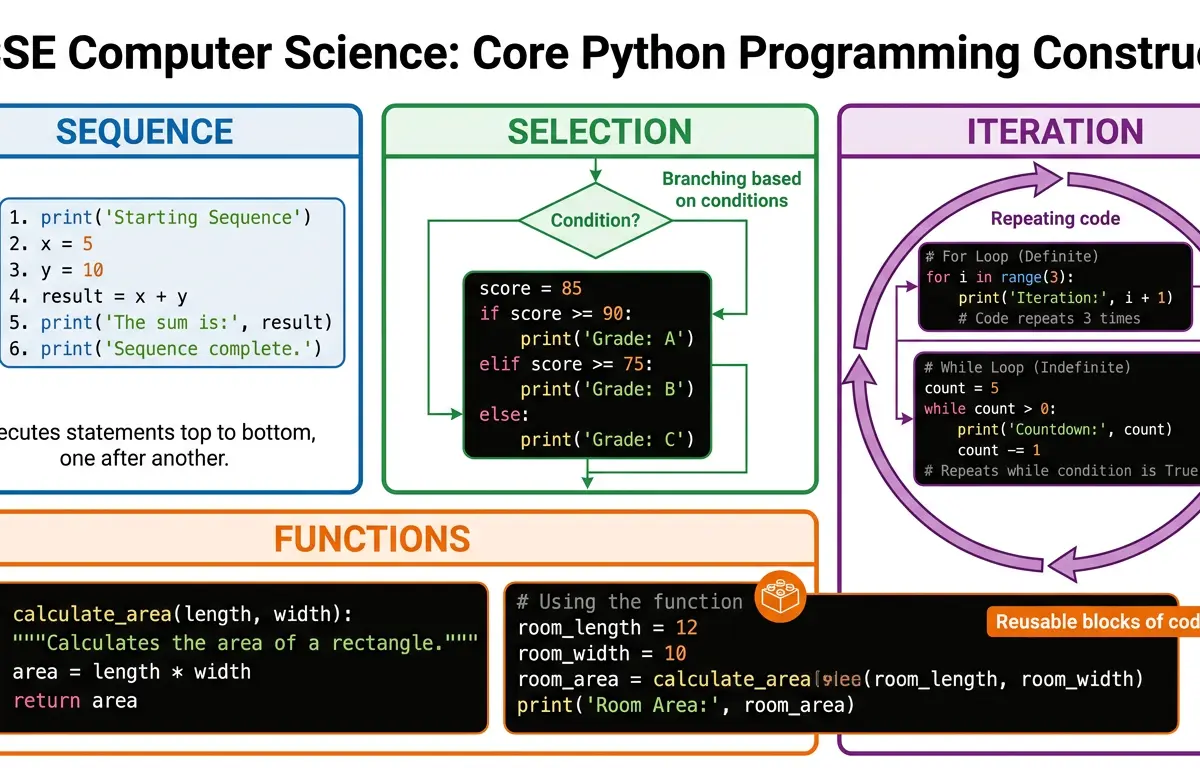
- Sequence: The most basic construct. Instructions are executed line by line, from top to bottom, in the exact order they are written. If you get the sequence wrong, the program's logic breaks.
- Selection: This is how programs make decisions. Using
if,elif, andelsestatements, the program branches down different paths based on specific conditions.- Examiner Tip: Pay close attention to comparison operators.
==checks for equality, while=assigns a value. Mixing these up is a classic logic error.
- Examiner Tip: Pay close attention to comparison operators.
- Iteration (Looping): This construct allows code to repeat. There are two types:
- Definite Iteration (
forloops): Repeats a specific, known number of times (e.g.,for i in range(5):). - Indefinite Iteration (
whileloops): Repeats as long as a condition remains true. - Warning: Always ensure your
whileloop has a mechanism to eventually turn the condition false, otherwise you create an infinite loop!
- Definite Iteration (
- Functions/Subroutines: These are named, reusable blocks of code that perform a specific task. They make code modular, easier to read, and easier to debug.
Concept 2: Data Types and Type Casting
Variables are named memory locations used to store data while a program is running. However, the computer needs to know what kind of data it is dealing with.
- Integer (
int): Whole numbers (e.g.,42,-7). - Real/Float (
float): Numbers with decimal points (e.g.,3.14,-0.5). - String (
str): Text, enclosed in quote marks (e.g.,"Hello","123"). - Boolean (
bool): Can only take one of two values:TrueorFalse.
Type Casting is the process of converting data from one type to another. For example, when you use the input() function in Python, it always returns a String. If you ask for a user's age and want to do maths with it, you must cast it to an Integer first: age = int(input("Enter age: ")).
Concept 3: Error Identification and Debugging
No programmer writes perfect code on the first try. A huge part of this topic is identifying and fixing errors.
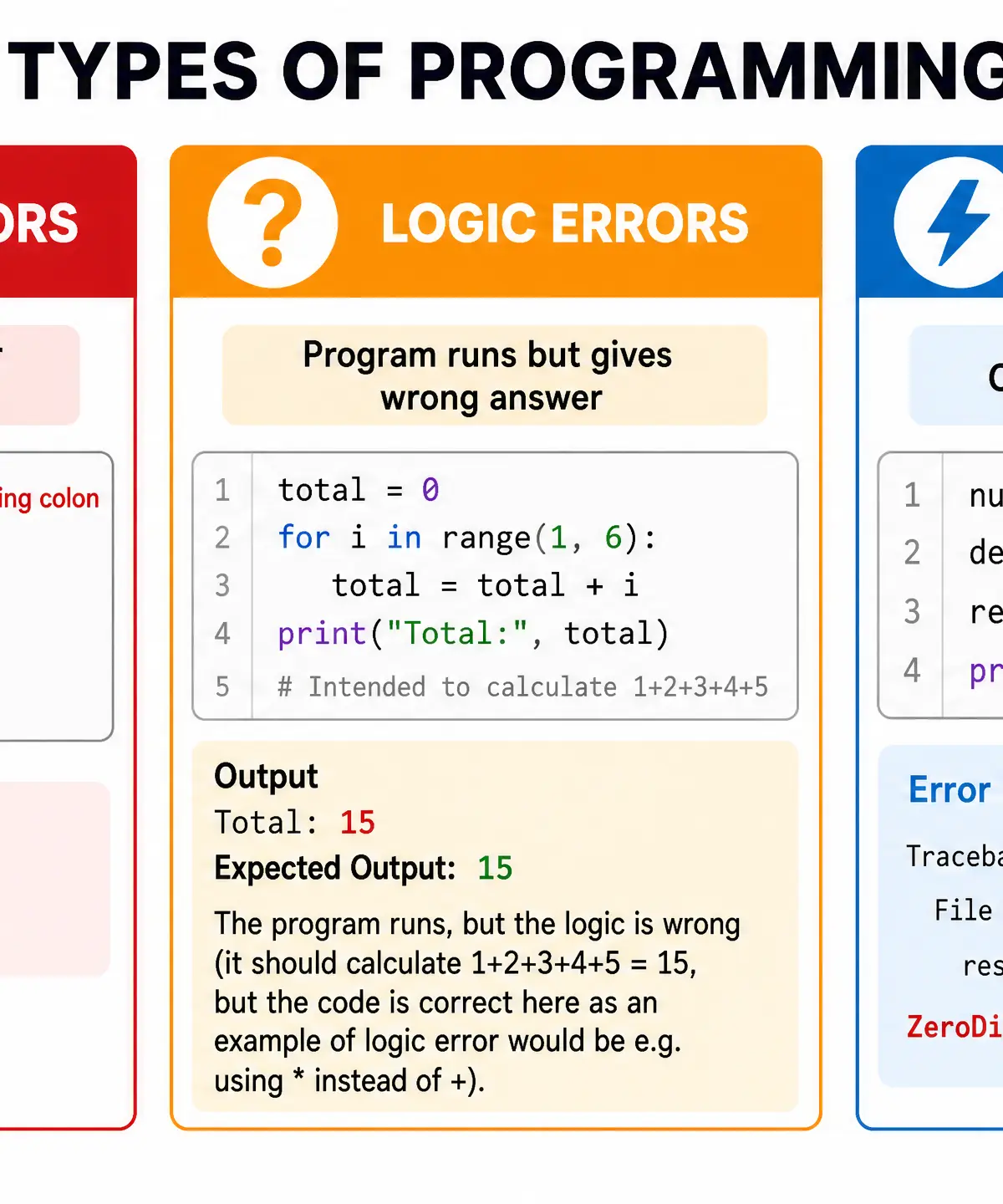
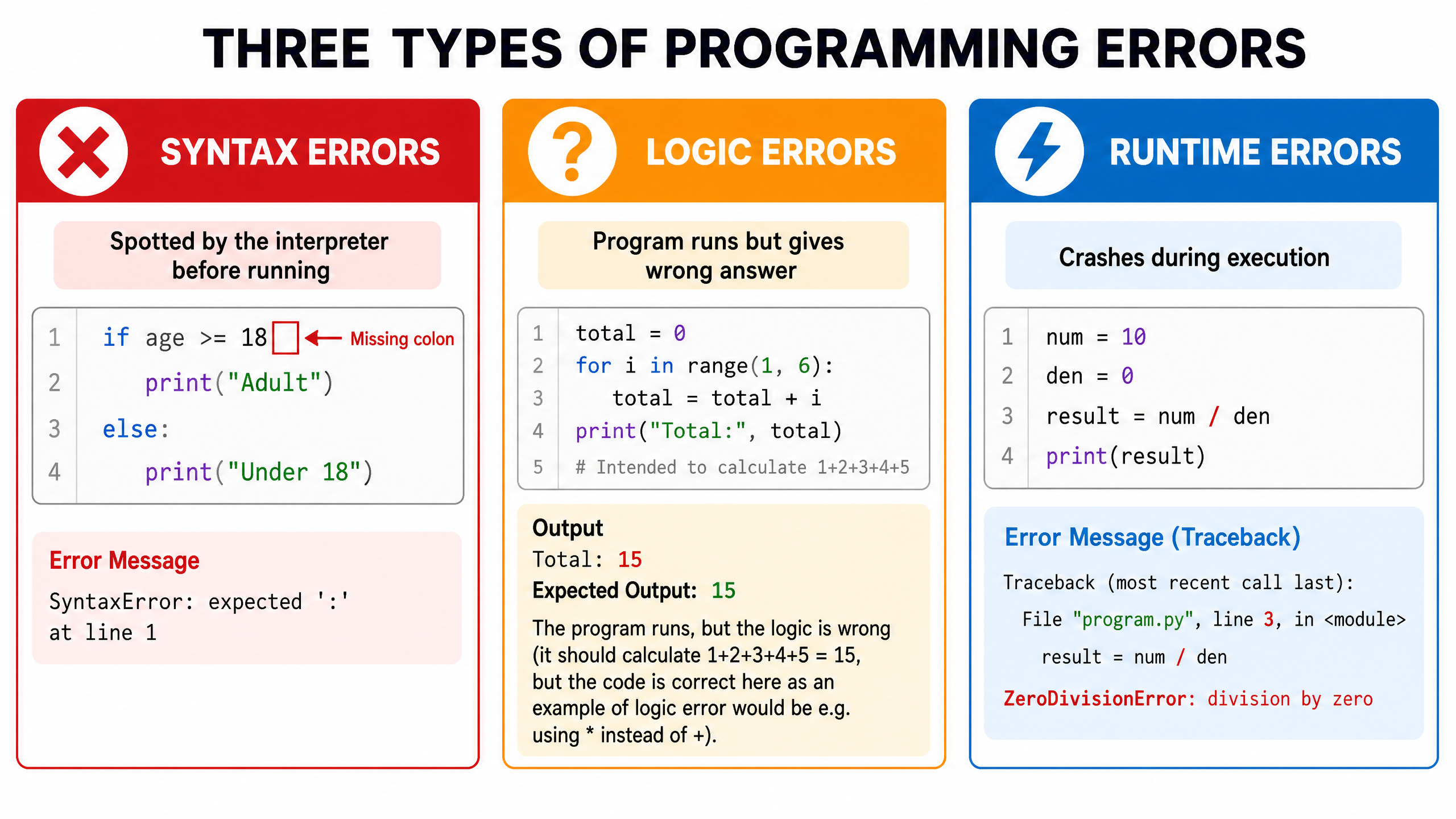
There are three types of errors you must be able to define and spot:
- Syntax Errors: These occur when the rules or grammar of the programming language are broken. The interpreter spots these before the code runs.
- Examples: Missing colons, unclosed brackets, spelling
printasprnt.
- Examples: Missing colons, unclosed brackets, spelling
- Logic Errors: The most difficult to spot. The code runs without crashing, but it produces the wrong output because the underlying algorithm is flawed.
- Examples: Using
+instead of-, or using<instead of<=.
- Examples: Using
- Runtime Errors: These occur during execution. The syntax is fine, but the program attempts an impossible operation, causing it to crash.
- Examples: Dividing by zero, or trying to access an item in a list that doesn't exist (Index Out of Bounds).
Concept 4: Robust Code and Testing
Writing code is only half the job; proving it works is the other half. Robust code is code that can handle unexpected inputs without crashing. This is achieved through validation and comprehensive testing.
When creating a test plan, you must use three categories of test data:
- Normal Data: Typical, expected inputs that the program should process correctly.
- Boundary/Extreme Data: Inputs at the absolute edges of the acceptable range. This is where most logic errors hide!
- Erroneous/Invalid Data: Inputs that are completely wrong (e.g., entering a word when a number is expected). The program should reject these gracefully, perhaps using a
try...exceptblock or awhileloop to ask again.
Practical Applications
- Input Validation: A classic exam requirement. Using a
whileloop to repeatedly ask a user for input until they provide valid data (e.g., a password that is at least 8 characters long). - Trace Tables: A manual way to dry-run code. You create a table tracking the value of every variable line by line to prove the logic works or to find a logic error.
Visual Resources
2 diagrams and illustrations
Interactive Diagrams
2 interactive diagrams to visualise key concepts
Conceptual Flow Outline
Flowchart demonstrating the Selection construct (IF/ELSE).
Conceptual Flow Outline
Flowchart demonstrating Indefinite Iteration (WHILE loop) used for input validation.
Worked Examples
3 worked examples — open one to explore the question and available guidance.
Practice Questions
Test your understanding — click to reveal model answers
A program asks a user to input a percentage score. It should output 'Pass' if the score is 50 or above, and 'Fail' if it is below 50. Write the Python code for this program. (3 marks)
Hint: Remember to convert the input to an integer before comparing it to 50.
Describe the purpose of boundary testing and provide an example using a program that accepts ages between 12 and 16 inclusive. (3 marks)
Hint: Boundary data is right on the edge of the acceptable range.
Write a Python function called calculate_total that takes two parameters: price and quantity. The function should calculate the total cost, apply a 10% discount if the total is over £100, and return the final amount. (5 marks)
Hint: Remember to use the `def` keyword, calculate the initial total, use selection for the discount, and use the `return` keyword at the end.
Look at the following code snippet:
total = 0
for i in range(1, 4):
total = total + i
print(total)
What will be the output of this code? Show your working using a trace table. (4 marks)
Hint: Remember that `range(1, 4)` generates the numbers 1, 2, and 3. It stops *before* 4.
A programmer wants to write a program that asks the user for a password. The password must be exactly 'secret123'. The program should give the user a maximum of 3 attempts. Write this program in Python. (6 marks)
Hint: You will need a loop (either a while loop with a counter, or a for loop) and selection (if/else) inside the loop.