Pearson Edexcel · GCSE · Computer Science
Hardware
Master the physical components that make computers tick. This topic covers the essential Von Neumann architecture, the relentless fetch-decode-execute cycle, and the critical differences between memory and storage types that examiners love to test.
- 6 min read
- 3 worked examples
- 5 practice questions
- 6 key terms
Study Notes
Overview
Welcome to Topic 3.1: Hardware. This topic forms the foundation of Computer Science, explaining the physical components that allow software to execute. You will explore the stored program concept introduced by John von Neumann, dissect the Central Processing Unit (CPU) to understand its internal registers, and trace the steps of the fetch-decode-execute cycle.
Understanding hardware is critical because it explains the physical limitations and capabilities of any computing system. It connects directly to topics on software (how operating systems manage hardware), networks (how hardware communicates), and data representation (how hardware stores binary data). In the exam, you can expect a mix of short recall questions (e.g., "State the purpose of the MAR") and longer, 6-mark extended response questions asking you to compare storage types or explain the fetch-decode-execute cycle in detail.
Listen to the companion podcast to reinforce these concepts on the go:

Key Concepts
Concept 1: Von Neumann Architecture
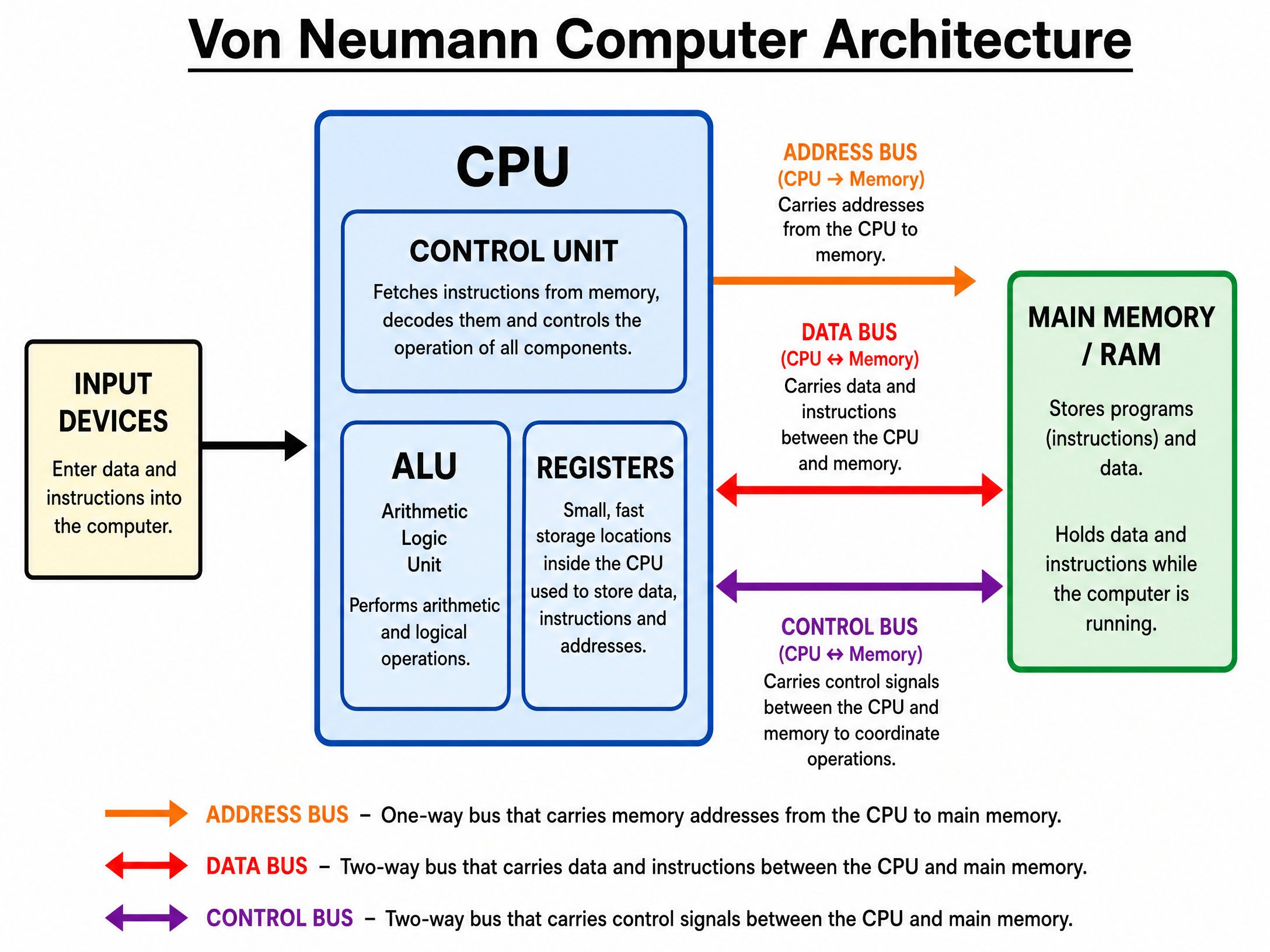
The Von Neumann architecture is the blueprint for almost all modern computers. Its defining feature is the stored program concept: both the program instructions and the data they use are stored together in the same main memory (RAM). Before this, computers had to be physically rewired to perform different tasks.
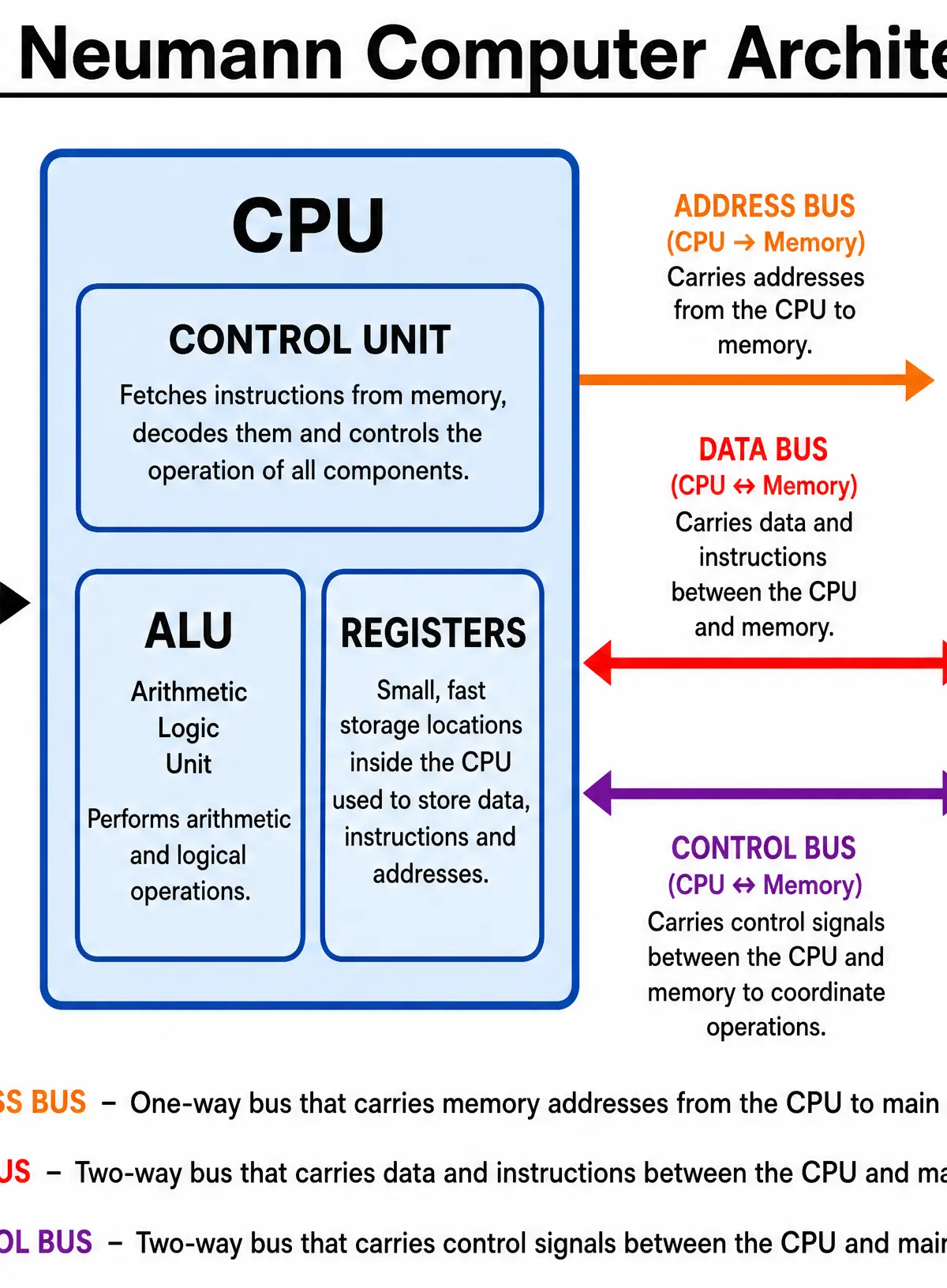
The architecture consists of four main elements:
- Central Processing Unit (CPU): The brain that executes instructions.
- Main Memory (RAM): Stores the programs and data currently in use.
- Input Devices: Allow data to enter the system (e.g., keyboard).
- Output Devices: Display or output results (e.g., monitor).
Concept 2: The CPU and its Registers
The CPU is divided into three key areas:
- Control Unit (CU): The manager. It fetches instructions, decodes them, and sends control signals to coordinate the other components. It does not perform calculations.
- Arithmetic Logic Unit (ALU): The worker. It performs arithmetic operations (addition, subtraction) and logical operations (comparisons like AND, OR, NOT).
- Registers: Tiny, extremely fast memory locations inside the CPU used to hold data temporarily during processing.
Key Registers to Memorise:
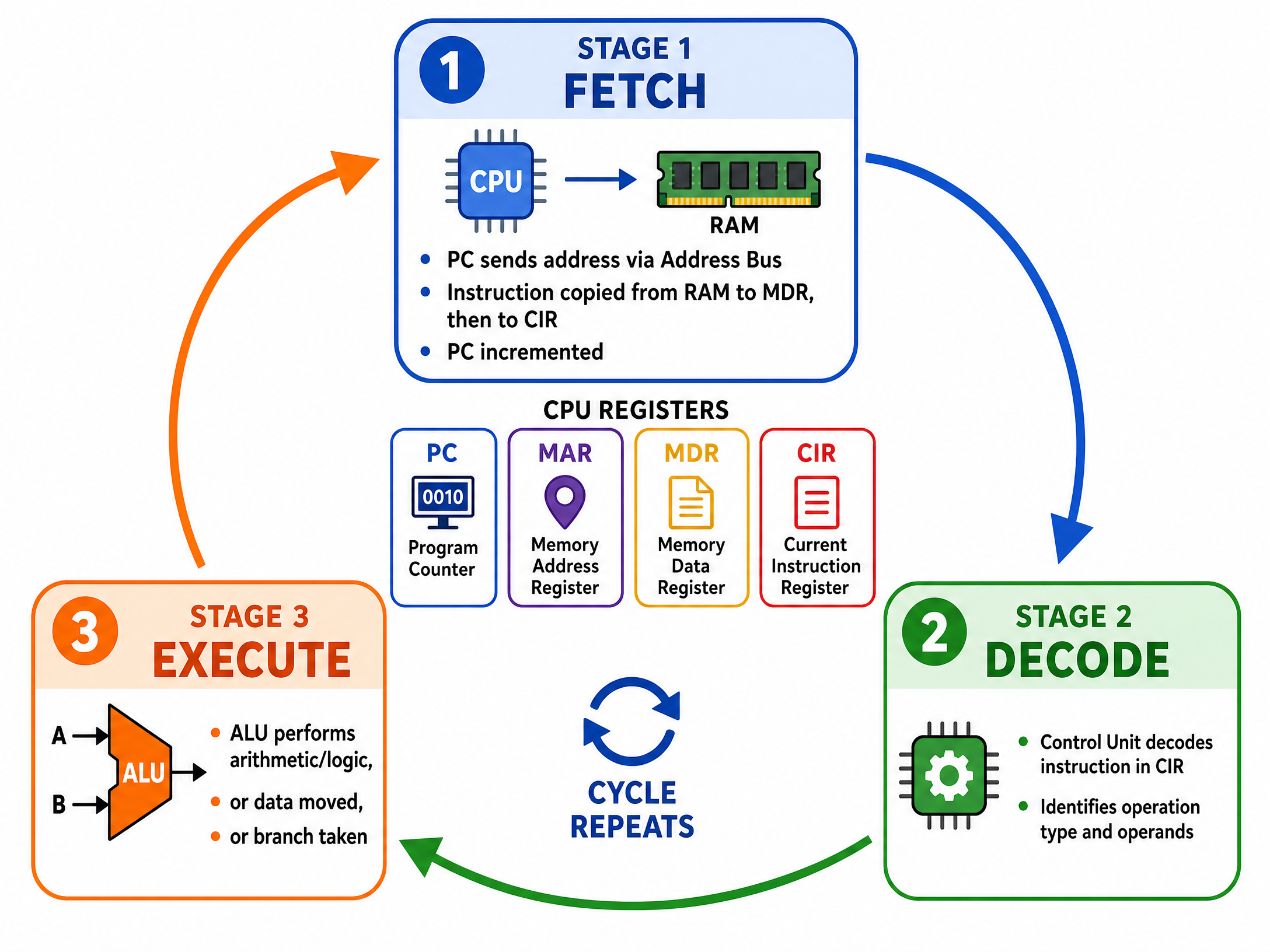
- Program Counter (PC): Holds the memory address of the next instruction to be fetched.
- Memory Address Register (MAR): Holds the address of the memory location currently being read from or written to.
- Memory Data Register (MDR): Holds the actual data or instruction that has just been fetched from memory, or is waiting to be written to memory.
- Current Instruction Register (CIR): Holds the instruction that is currently being decoded and executed.
Concept 3: The Fetch-Decode-Execute Cycle
This is the continuous process the CPU uses to carry out instructions.
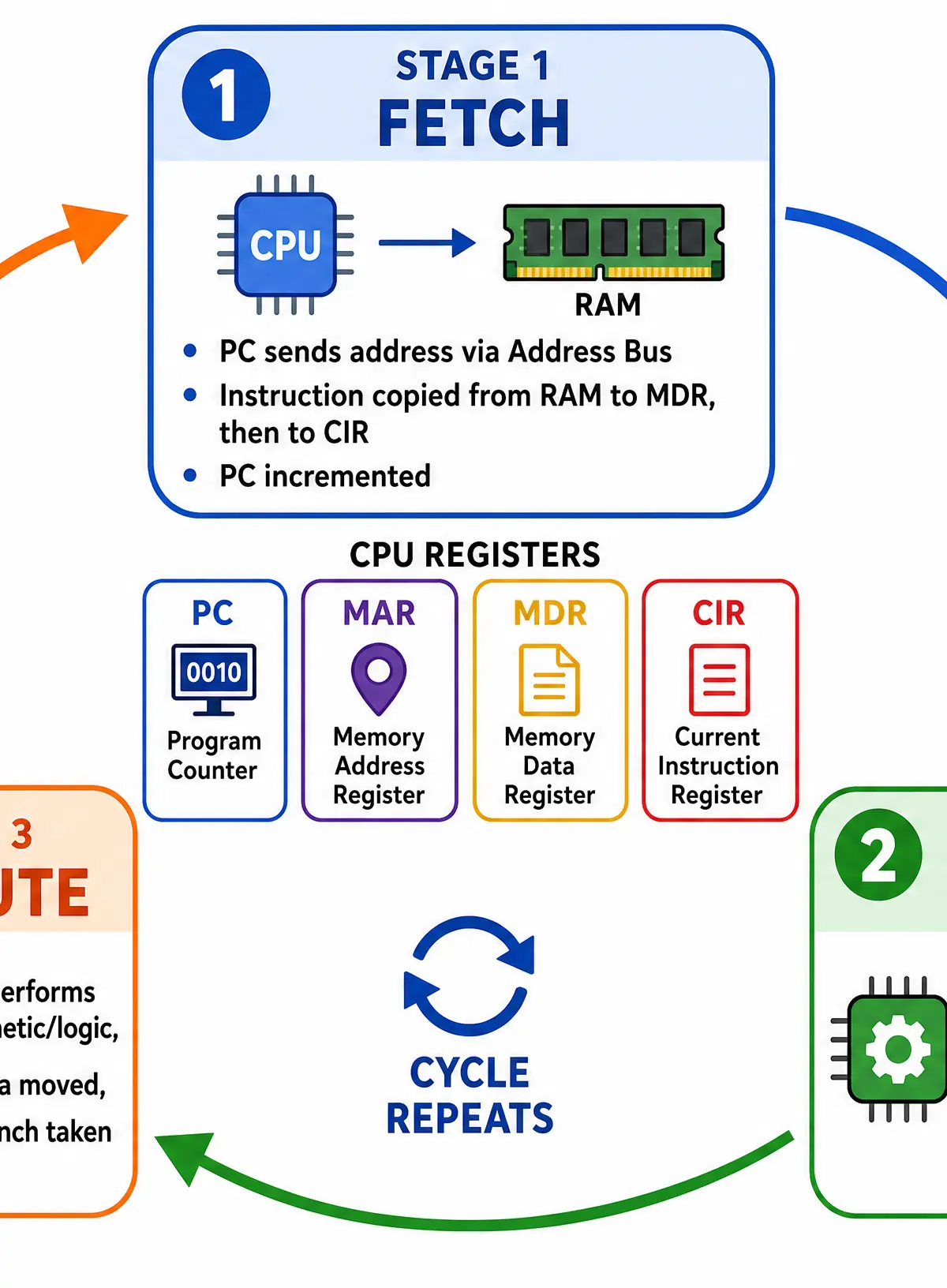
1. Fetch:
- The memory address in the PC is copied to the MAR.
- The address is sent along the address bus to main memory.
- The instruction at that address is sent back along the data bus to the MDR.
- The instruction is copied from the MDR to the CIR.
- Crucial step for marks: The PC is incremented to point to the next instruction.
2. Decode:
- The Control Unit decodes the instruction in the CIR to determine what operation needs to be performed and what data is required.
3. Execute:
- The instruction is carried out. This could involve the ALU performing a calculation, data being moved to/from memory, or the PC being updated for a branch instruction.
Concept 4: System Buses
Buses are parallel wires that connect components.
- Address Bus: Unidirectional (CPU to Memory). Carries the address of the memory location being accessed.
- Data Bus: Bidirectional. Carries the actual data and instructions between the CPU and memory.
- Control Bus: Bidirectional. Carries control signals (e.g., read/write commands, clock signals) from the CU to coordinate the system.
Concept 5: CPU Performance Factors
Three factors affect how quickly the CPU can process instructions:
- Clock Speed: Measured in Gigahertz (GHz). It determines how many fetch-decode-execute cycles occur per second. A 3GHz processor performs 3 billion cycles per second. Higher clock speed = faster execution.
- Cache Size: Cache is a small, fast memory built into the CPU. It stores frequently used instructions. More cache means the CPU spends less time waiting for slower RAM.
- Number of Cores: Each core is an independent processing unit. A quad-core processor has four cores and can potentially process four instructions simultaneously (parallel processing), though this depends on the software being designed to use multiple cores.
Concept 6: Secondary Storage
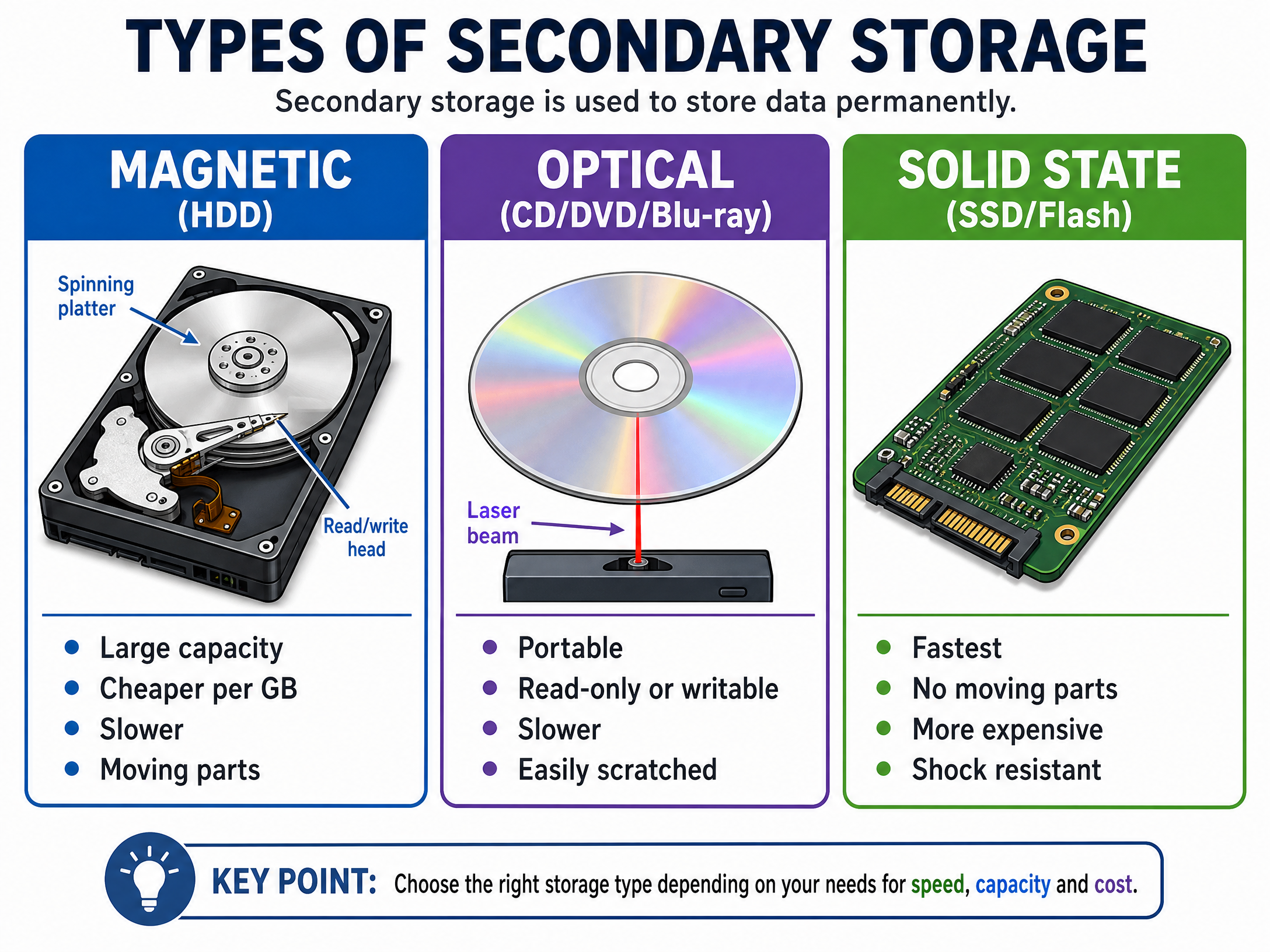
Secondary storage is non-volatile memory used to store data and programs permanently when the power is off.
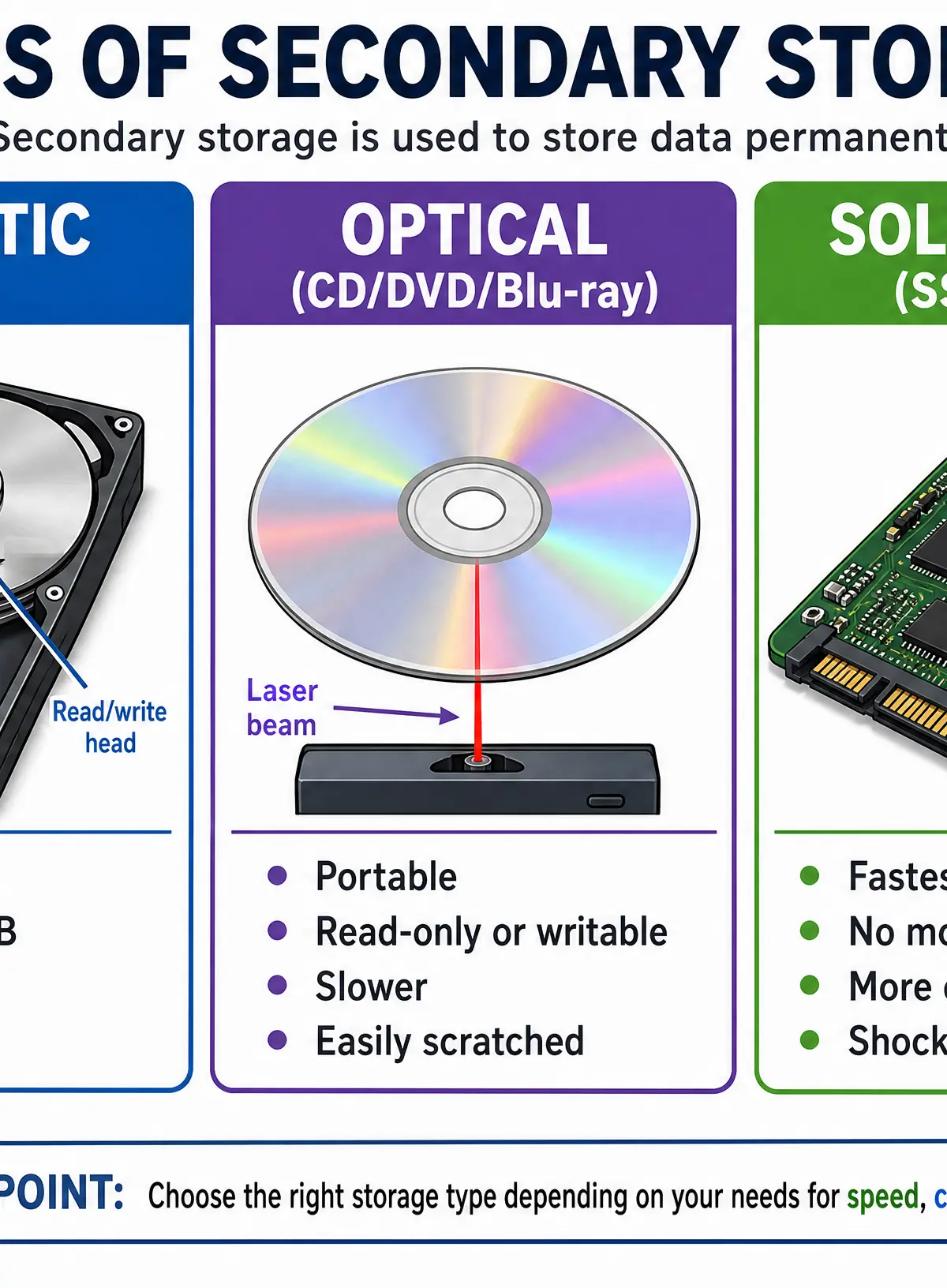
- Magnetic (e.g., Hard Disk Drive - HDD): Uses spinning magnetic platters and a read/write head.
- Pros: Very large capacity, lowest cost per GB.
- Cons: Slower than SSDs, moving parts make it fragile and power-hungry.
- Optical (e.g., CD, DVD, Blu-ray): Uses a laser to read pits and lands on a reflective disc.
- Pros: Cheap to mass-produce, portable, universally readable.
- Cons: Low capacity, slow, easily scratched.
- Solid State (e.g., Solid State Drive - SSD, USB flash drive): Uses flash memory chips with no moving parts.
- Pros: Fastest read/write speeds, highly durable (shock resistant), silent, energy-efficient.
- Cons: Highest cost per GB, limited (but very high) number of read/write cycles.
Concept 7: Embedded Systems
An embedded system is a computer system built into a larger mechanical or electrical system to perform a specific, dedicated function.
- Examples: Washing machines, engine management systems in cars, microwaves, digital watches.
- Characteristics: They are not general-purpose computers. They usually run a single program stored in ROM, require minimal resources, and are highly reliable.
Visual Resources
3 diagrams and illustrations
Interactive Diagrams
2 interactive diagrams to visualise key concepts
Conceptual Flow Outline
The flow of data during the Fetch stage of the cycle.
Conceptual Flow Outline
Directionality of the system buses.
Worked Examples
3 worked examples — open one to explore the question and available guidance.
Practice Questions
Test your understanding — click to reveal model answers
State the purpose of the Program Counter (PC).
Hint: What does it point to next?
Describe two differences between RAM and Secondary Storage.
Hint: Think about volatility and what they are used for.
Explain the steps that occur during the 'Fetch' stage of the fetch-decode-execute cycle.
Hint: Start with the PC and end with the CIR. Don't forget the buses.
A digital washing machine uses an embedded system. Give two characteristics of an embedded system.
Hint: How is it different from your desktop PC?
A company is archiving 10 Terabytes of old financial records that they rarely need to access. Recommend a suitable type of secondary storage and justify your choice.
Hint: Focus on the large capacity and the fact it is rarely accessed.