Pearson Edexcel · GCSE · Computer Science
Networks
This topic covers the fundamental principles of computer networks, from basic LANs and WANs to the global structure of the internet. It's a high-yield exam topic that tests both your factual recall of protocols and your ability to apply concepts to real-world networking scenarios.
- 7 min read
- 3 worked examples
- 5 practice questions
- 6 key terms
Study Notes
Overview
Welcome to Networks! This is a core topic in GCSE Computer Science because networks form the backbone of our modern digital world. In this section, we explore how devices connect, communicate, and share resources. You'll learn the difference between Local Area Networks (LANs) and Wide Area Networks (WANs), how the internet functions using IP addressing and routers, and the protocols that govern data transmission.
Networks is a topic that examiners love because it allows them to test all Assessment Objectives. You'll see AO1 questions asking for protocol definitions, AO2 questions asking you to calculate file transfer times or choose a topology for a specific business, and AO3 questions evaluating the security risks of different network setups. It also links heavily to topics on cybersecurity and systems architecture.
Listen to our comprehensive revision podcast to solidify your understanding:

Key Concepts
Concept 1: The Purpose of Networking
A network is two or more computers connected together to share resources and communicate. When answering exam questions on why an organisation would install a network, you must provide distinct reasons.
Examiners award marks for:
- Sharing hardware (e.g., a central printer instead of one per desk)
- Sharing files and data (collaborative working)
- Centralised management (deploying software updates to all machines simultaneously)
- Centralised security and backup (managing user access and backing up data centrally)
- Communication (internal email or messaging systems)
Example: A school installs a network so students can log in to any computer (roaming profiles), print to the library printer, and submit assignments to a shared server folder.
Concept 2: LANs vs. WANs
This is a classic comparison question. You must distinguish them based on geographical area and ownership.
- Local Area Network (LAN): Covers a small geographical area (e.g., a single building, school, or home). The hardware (cables, switches) is typically owned and managed by the organisation itself.
- Wide Area Network (WAN): Covers a large geographical area (e.g., a city, country, or globally). It connects multiple LANs together. The infrastructure is usually leased from third-party telecommunications companies because it's too expensive to lay cables across a country.
Examiner Tip: Never say "a LAN is faster than a WAN." While often true historically, fibre-optic WAN connections can outpace older LANs. Stick to geography and ownership for guaranteed marks.
Concept 3: The Internet and Routers
The internet is the ultimate WAN—a global network of networks. Devices on the internet communicate using IP (Internet Protocol) addresses, which uniquely identify them, much like a postal address.
Data is sent across the internet in small chunks called packets. A router is a hardware device that directs these packets. It reads the destination IP address on the packet header and determines the most efficient path to send it to the next node.
The Domain Name System (DNS) translates human-readable domain names (like www.bbc.co.uk) into the numerical IP addresses that computers need to locate servers. This saves us from having to memorise strings of numbers.
Concept 4: Network Performance
Network performance determines how quickly and reliably data is transmitted. Key factors include:
- Bandwidth: The maximum amount of data that can be transmitted in a given time (measured in bits per second, bps). Think of it as the width of a pipe; a wider pipe lets more water flow at once.
- Latency: The delay between sending a request and receiving a response. High latency causes lag.
- Interference: Physical obstacles (walls) or other electronic signals that degrade wireless (Wi-Fi) performance.
- Number of Users: Bandwidth is shared. More connected devices mean less bandwidth per device, slowing down the network.
Concept 5: Topologies
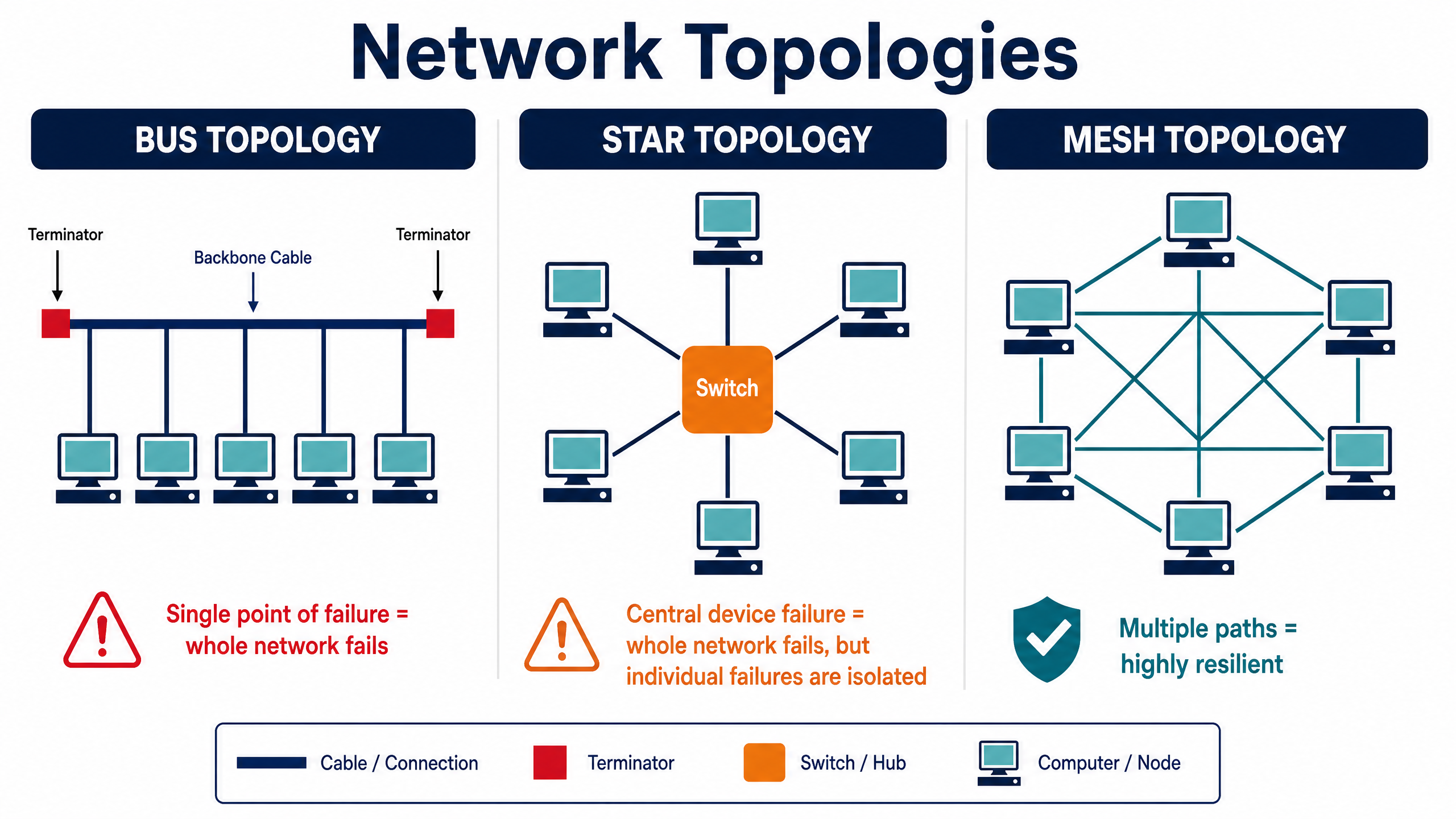
A topology is the arrangement of a network. You must know three:
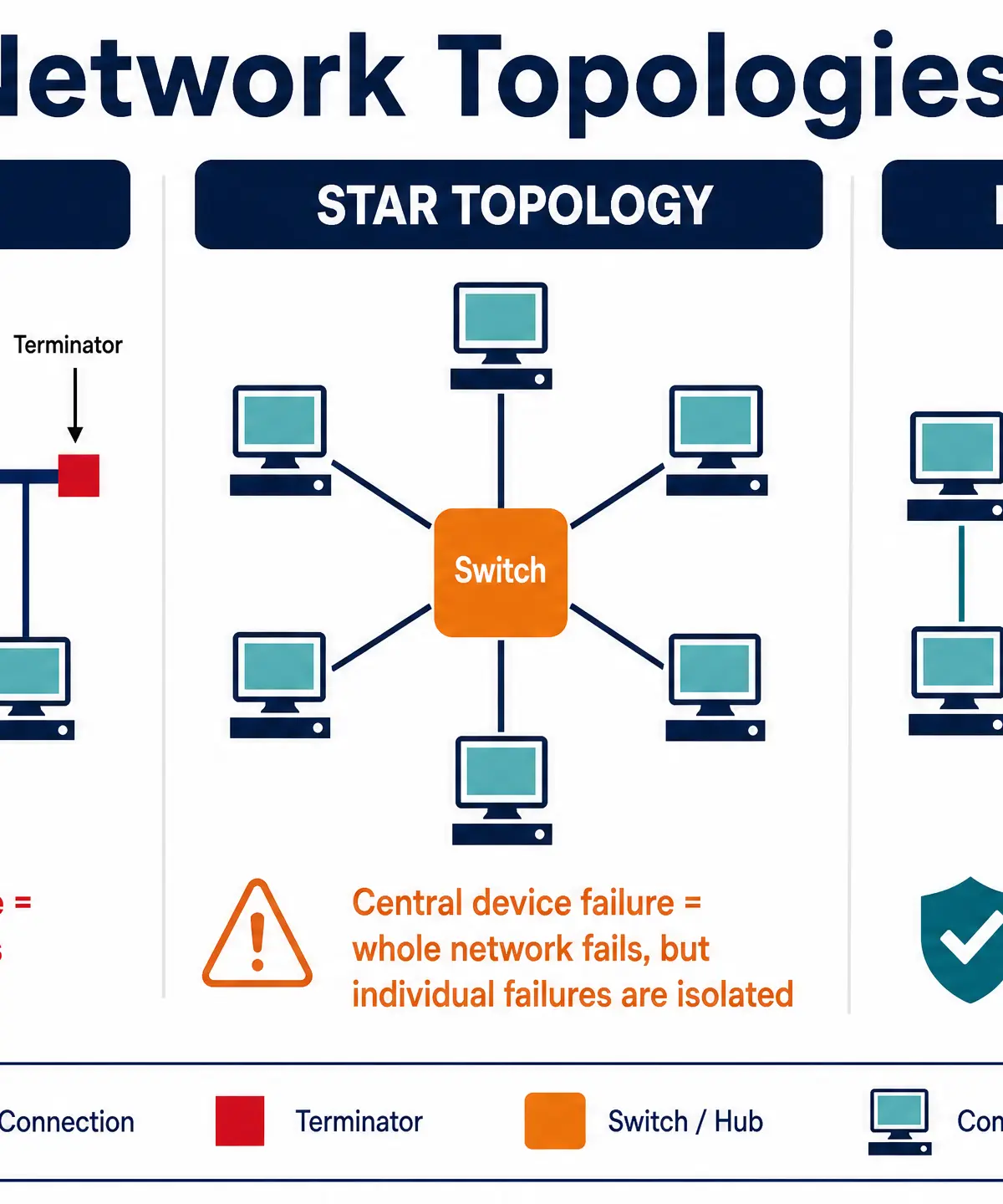
- Star Topology: All devices connect to a central switch.
- Advantage: If one cable fails, only that device goes down. Easy to add new devices.
- Disadvantage: If the central switch fails, the whole network fails. Requires lots of cabling.
- Mesh Topology: Devices are interconnected with multiple paths.
- Advantage: Highly resilient. If a connection breaks, data routes around it. Handles high traffic well.
- Disadvantage: Very expensive and complex to set up due to the amount of cabling required (though wireless meshes reduce this).
- Bus Topology: All devices connect to a single backbone cable.
- Advantage: Cheap and uses minimal cable.
- Disadvantage: A break in the main cable takes down the whole network. High chance of data collisions.
Concept 6: Protocols and the TCP/IP Model
A protocol is a set of rules governing data transmission.
Key protocols to memorise:
- Ethernet: Rules for data transmission over wired connections.
- Wi-Fi: Rules for wireless data transmission via radio waves.
- TCP (Transmission Control Protocol): Breaks data into packets, ensures they arrive, and reassembles them.
- IP (Internet Protocol): Handles addressing and routing packets.
- HTTP (HyperText Transfer Protocol): Used by web browsers to access websites.
- HTTPS (HTTP Secure): Encrypts the data for secure web browsing.
- FTP (File Transfer Protocol): Used to transfer files between client and server.
- SMTP (Simple Mail Transfer Protocol): Used to send emails.
- POP3 (Post Office Protocol 3): Retrieves emails and deletes them from the server.
- IMAP (Internet Message Access Protocol): Retrieves emails but keeps them synced on the server.
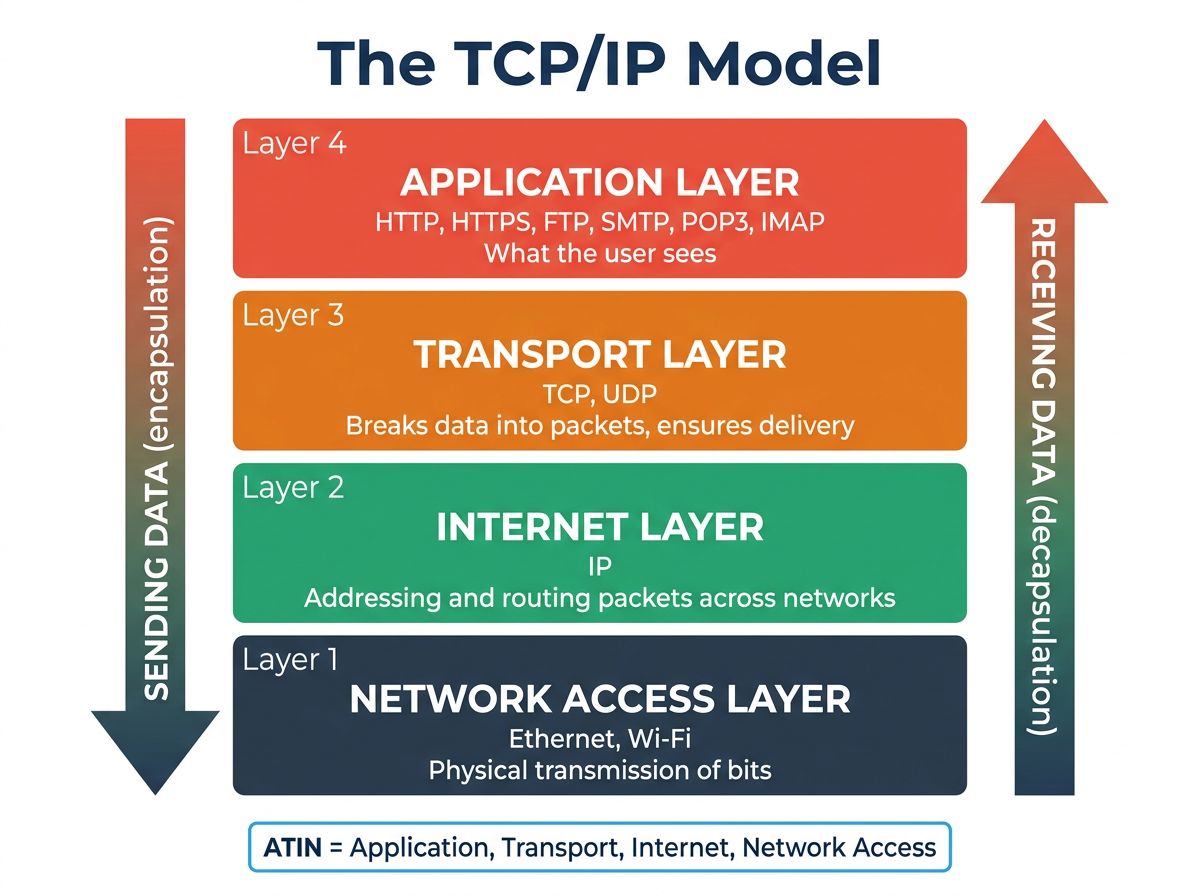
These protocols operate within the TCP/IP 4-Layer Model:
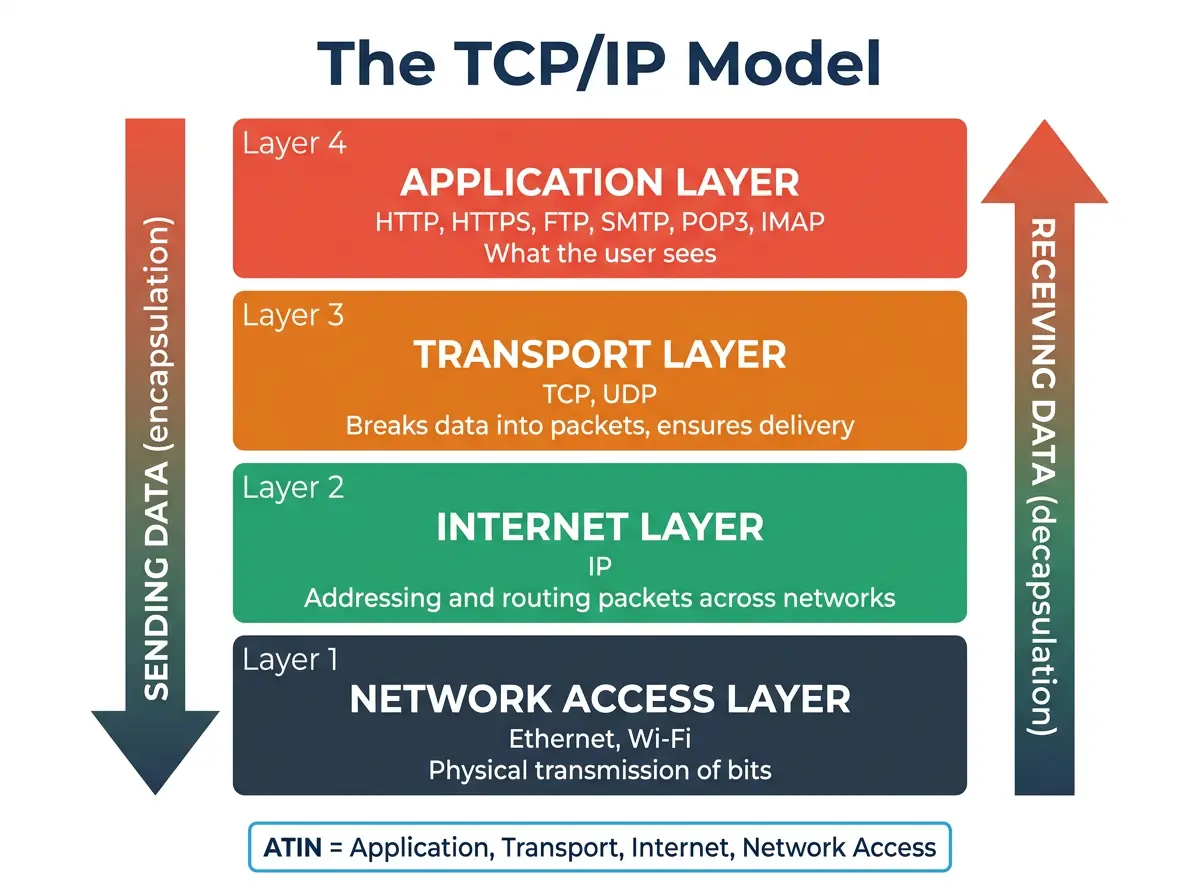
- Application Layer: Where network applications (browsers, email clients) operate (HTTP, SMTP, IMAP).
- Transport Layer: Sets up communication between hosts, breaks data into packets (TCP).
- Internet Layer: Adds IP addresses to packets and routes them (IP).
- Network Access Layer: Handles physical transmission of bits over cables or wireless (Ethernet, Wi-Fi).
Concept 7: Network Security
Networks must be protected from unauthorised access and malware.
- Firewalls: Hardware or software that monitors incoming/outgoing traffic and blocks packets that don't meet security rules.
- Access Control: Using usernames, strong passwords, or biometrics to ensure only authorised users can log in.
- Encryption: Scrambling data so it cannot be read if intercepted, requiring a key to decrypt.
- Penetration Testing: Hiring ethical hackers to deliberately attack the network to find vulnerabilities before malicious hackers do.
- Physical Security: Locking server rooms, using CCTV, and requiring swipe cards.
Mathematical/Scientific Relationships
File Transfer Time Calculation
Time = File Size / Transfer Rate
Crucial Rule: Units must match! File sizes are usually given in Bytes (or Megabytes), while transfer rates are given in bits per second (bps or Mbps).
- 1 Byte = 8 bits.
- Always convert the file size to bits before dividing.
Practical Applications
Understanding networks is essential for setting up home Wi-Fi, understanding why a multiplayer game is lagging (high latency), or ensuring you don't enter credit card details on a site using HTTP instead of HTTPS.
Visual Resources
2 diagrams and illustrations
Interactive Diagrams
2 interactive diagrams to visualise key concepts
Conceptual Flow Outline
The process of Encapsulation and Decapsulation through the TCP/IP 4-Layer Model.
Conceptual Flow Outline
How the Domain Name System (DNS) resolves URLs to IP addresses.
Worked Examples
3 worked examples — open one to explore the question and available guidance.
Practice Questions
Test your understanding — click to reveal model answers
State two differences between a LAN and a WAN. (2 marks)
Hint: Think about the physical size of the area they cover and who owns the cables.
Explain how the Domain Name System (DNS) is used when a user accesses a website. (3 marks)
Hint: What does the user type in, and what does the computer actually need to find the server?
A company wants to securely transfer sensitive customer data to a remote server. Recommend two protocols they should use and justify your choices. (4 marks)
Hint: Think about protocols for file transfer and protocols for security.
Calculate the time taken to transmit a 15 Megabyte (MB) file over a network with a bandwidth of 60 Megabits per second (Mbps). (3 marks)
Hint: Remember to convert Megabytes to Megabits first.
Describe the function of a router in a computer network. (2 marks)
Hint: What does it do with packets, and how does it know where to send them?