Pearson Edexcel · GCSE · Computer Science
Topic 3: Computers
Topic 3: Computers covers the fundamental hardware and software architecture that underpins all modern computing. Understanding the von Neumann architecture, the fetch-decode-execute cycle, and the role of the operating system is crucial for securing top marks in your GCSE Computer Science exam.
- 7 min read
- 3 worked examples
- 5 practice questions
- 6 key terms
Study Notes
Overview
Welcome to Topic 3: Computers. This topic is the bedrock of Computer Science. Before you can understand how to write complex algorithms or network systems together, you must first understand the machine itself. What actually is a computer? How does it follow instructions? How does it store data?
In this section, we will explore the von Neumann architecture, diving deep into the Central Processing Unit (CPU) and its components. We will trace the journey of an instruction through the fetch-decode-execute cycle, and examine how data travels along the bus system. We'll also compare different types of secondary storage, and finally, look at the essential software that makes the hardware usable: operating systems, utilities, and programming translators.
This topic is heavily assessed in the exam. You can expect a mix of short recall questions (e.g., 'State the purpose of the MAR') and longer, 6-mark extended response questions requiring you to explain processes (like the FDE cycle) or evaluate storage choices for a given scenario.
Key Concepts
Concept 1: The Von Neumann Architecture
In the 1940s, mathematician John von Neumann proposed a design that changed computing forever: the stored program concept.
Before this, computers had to be physically rewired to perform different tasks. Von Neumann's insight was that both the program instructions and the data they use should be stored together in the same memory (RAM). This allows a computer to be easily reprogrammed simply by loading different instructions into memory.
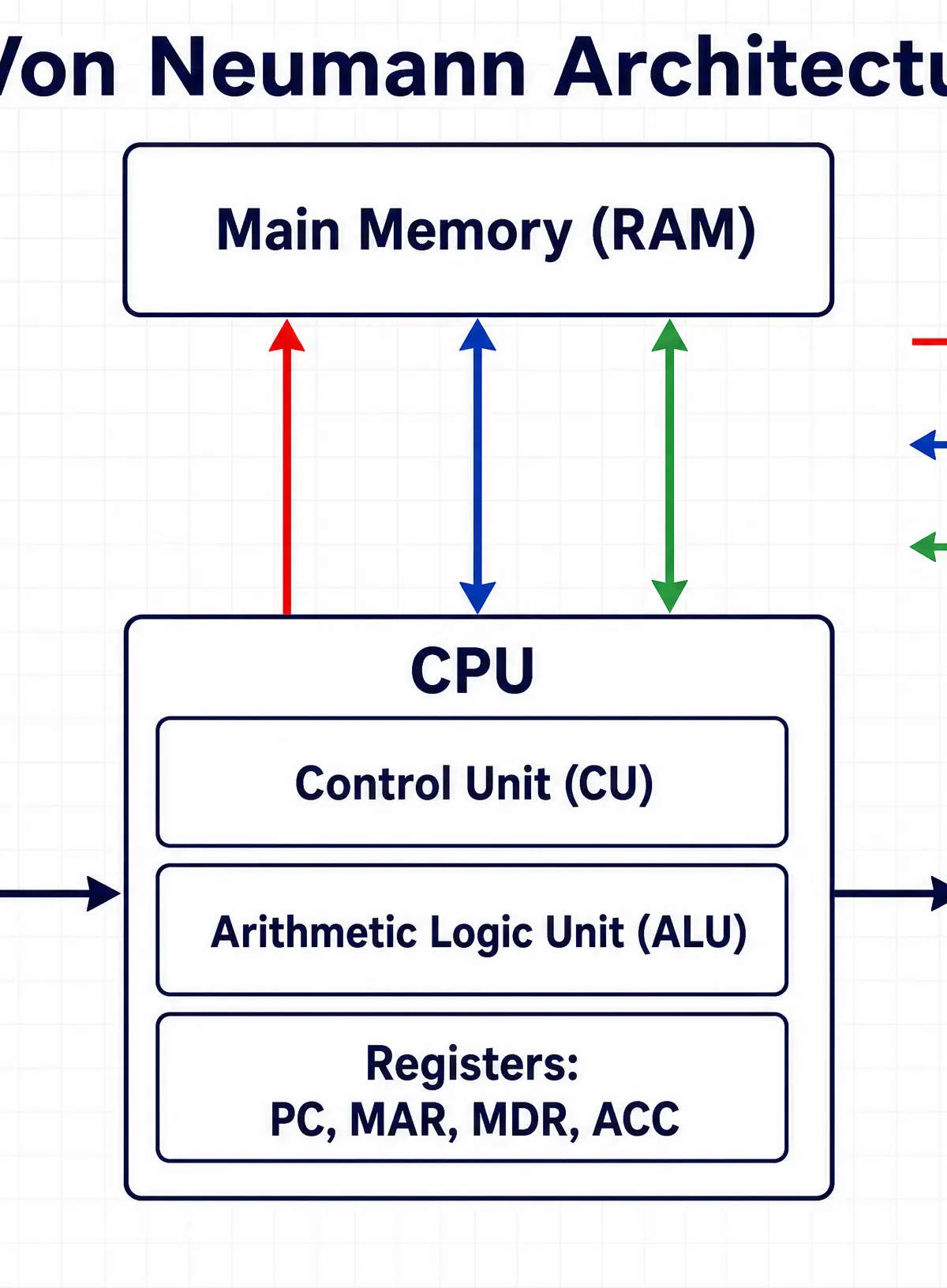
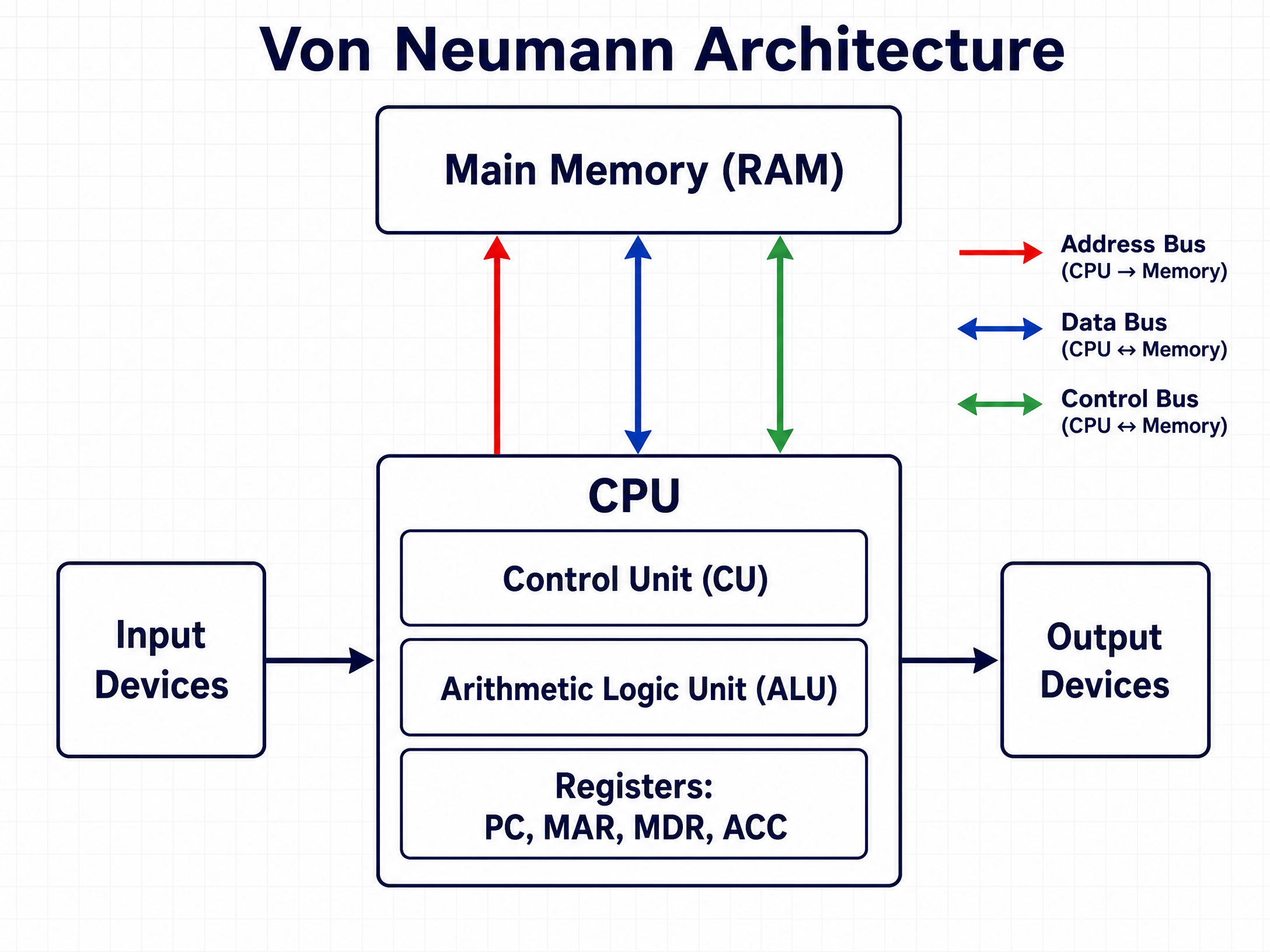
The architecture consists of four main elements:
- Central Processing Unit (CPU): The brain of the computer, responsible for executing instructions.
- Main Memory (RAM): Where instructions and data are stored while in use.
- Input Devices: Allow data to be entered into the system (e.g., keyboard).
- Output Devices: Allow the system to present results (e.g., monitor).
Concept 2: Inside the CPU
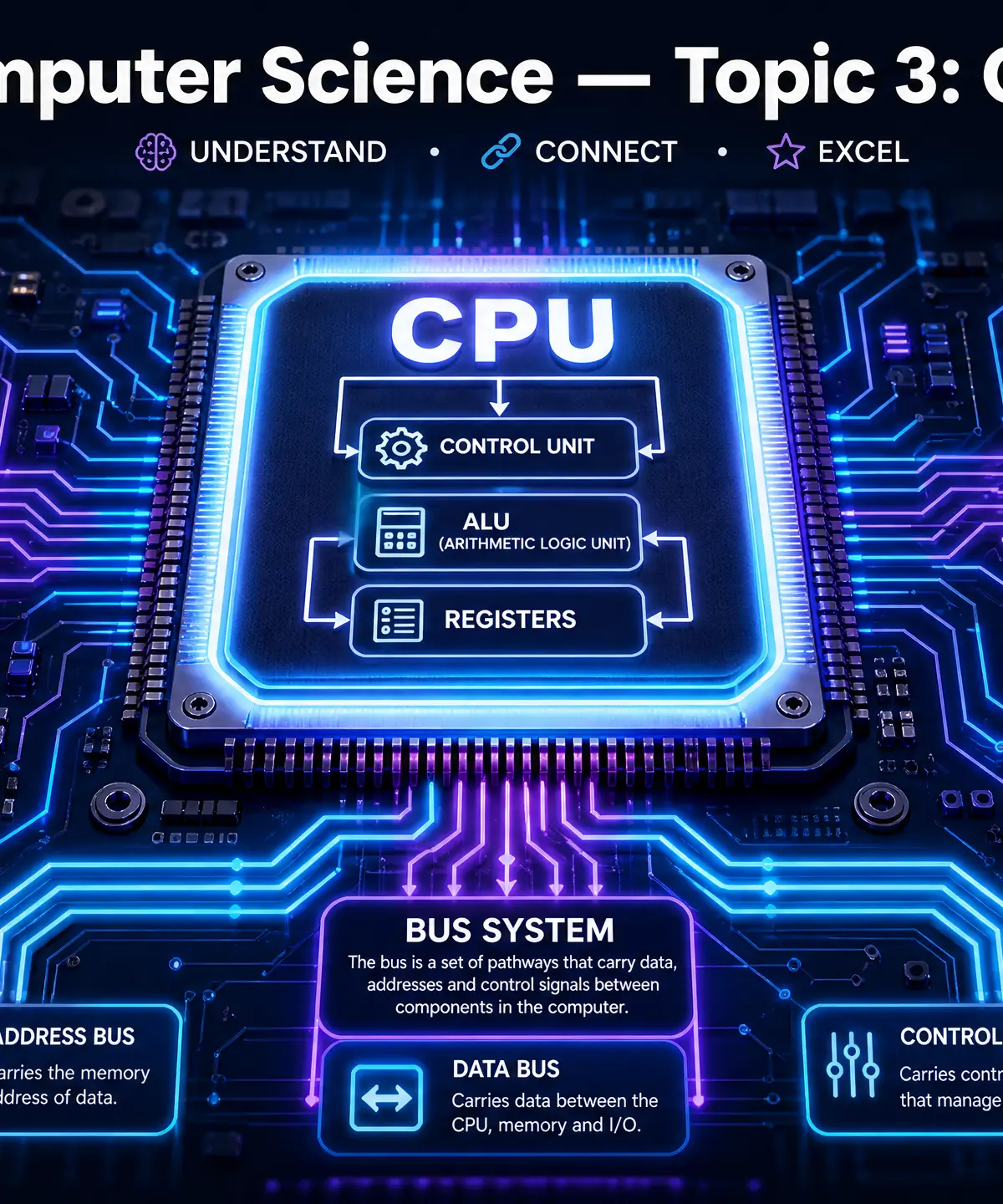
The CPU is a complex integrated circuit containing several vital components:
- Control Unit (CU): The manager. It coordinates the actions of the computer, fetches instructions from memory, decodes them, and manages the execution by sending control signals to other components.
- Arithmetic Logic Unit (ALU): The worker. It performs all mathematical calculations (addition, subtraction) and logical operations (comparing values, AND/OR/NOT gates).
- Registers: Ultra-fast, tiny storage locations inside the CPU itself. The key registers are:
- Program Counter (PC): Holds the memory address of the next instruction to be fetched.
- Memory Address Register (MAR): Holds the address of the memory location currently being read from or written to.
- Memory Data Register (MDR): Holds the actual data or instruction just fetched from memory, or waiting to be written to memory.
- Accumulator (ACC): Holds the result of the most recent calculation performed by the ALU.
Concept 3: The Bus System
Components communicate via buses—sets of parallel wires carrying electrical signals.
- Address Bus: Carries the memory address from the CPU to RAM. It is unidirectional (one-way).
- Data Bus: Carries the actual instructions and data between the CPU and memory. It is bidirectional (two-way).
- Control Bus: Carries control signals (e.g., read/write commands, clock signals) around the system. It is bidirectional.
Concept 4: The Fetch-Decode-Execute (FDE) Cycle
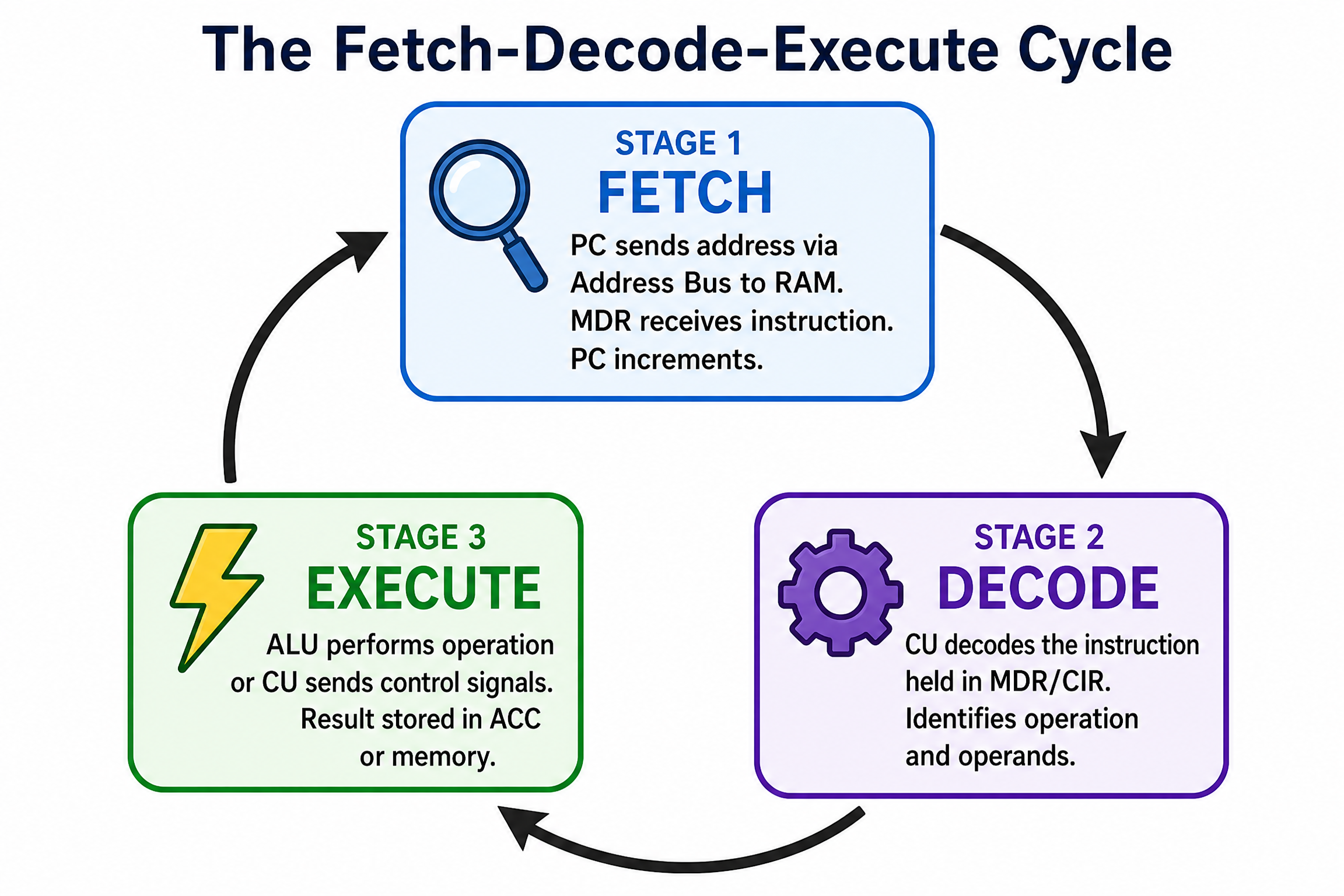
This is the fundamental sequence of steps the CPU performs continuously to run a program.
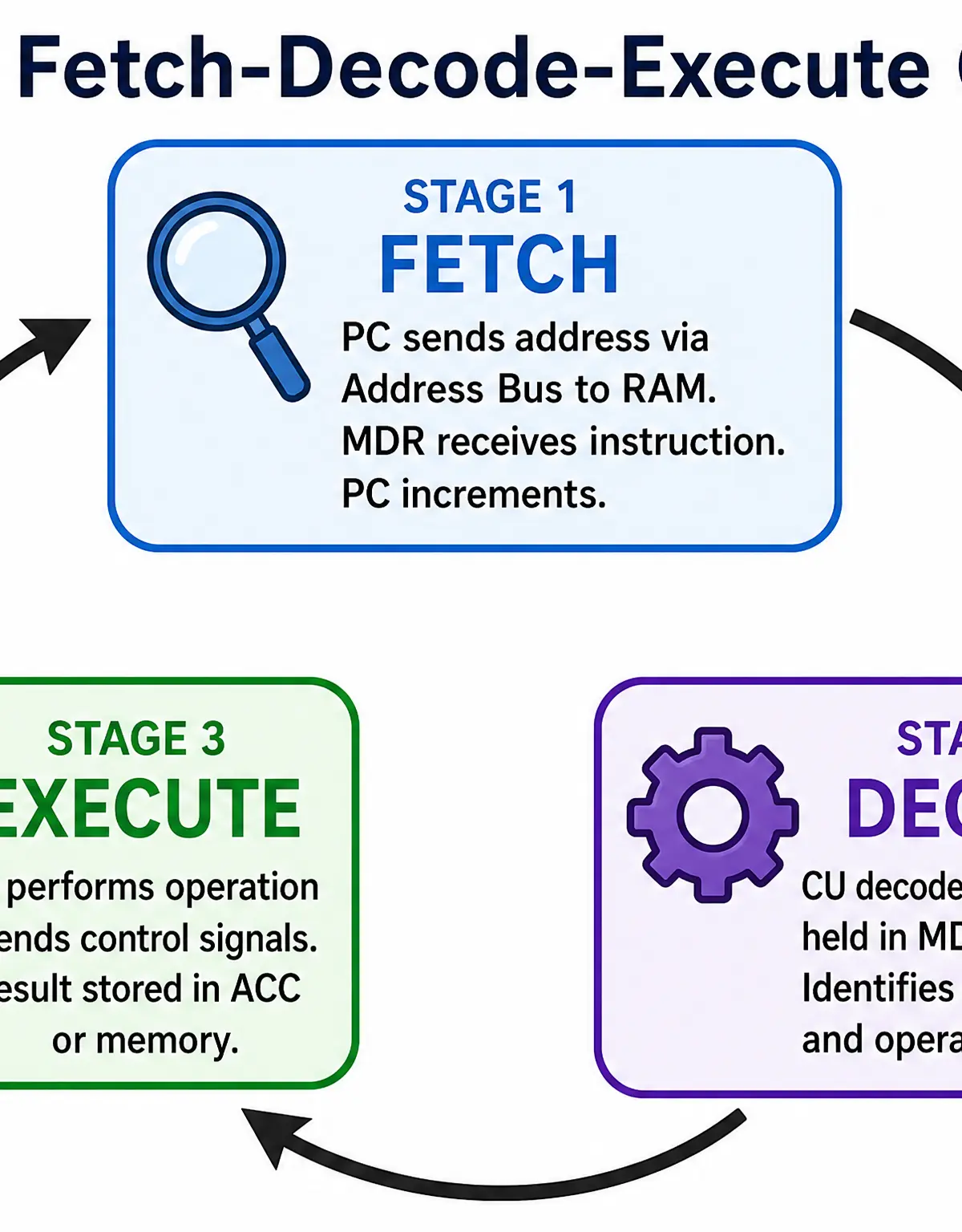
- Fetch:
- The address in the Program Counter (PC) is copied to the MAR.
- The address is sent along the address bus to RAM.
- The instruction at that address is sent back along the data bus and stored in the MDR.
- The PC is incremented to point to the next instruction.
- Decode:
- The Control Unit (CU) examines the instruction in the MDR and works out what operation to perform.
- Execute:
- The instruction is carried out. This might involve the ALU performing a calculation, or data being read from/written to memory.
Concept 5: Secondary Storage
While RAM (primary storage) is fast, it is volatile—it loses its contents when power is lost. We need secondary storage for permanent, non-volatile data retention.
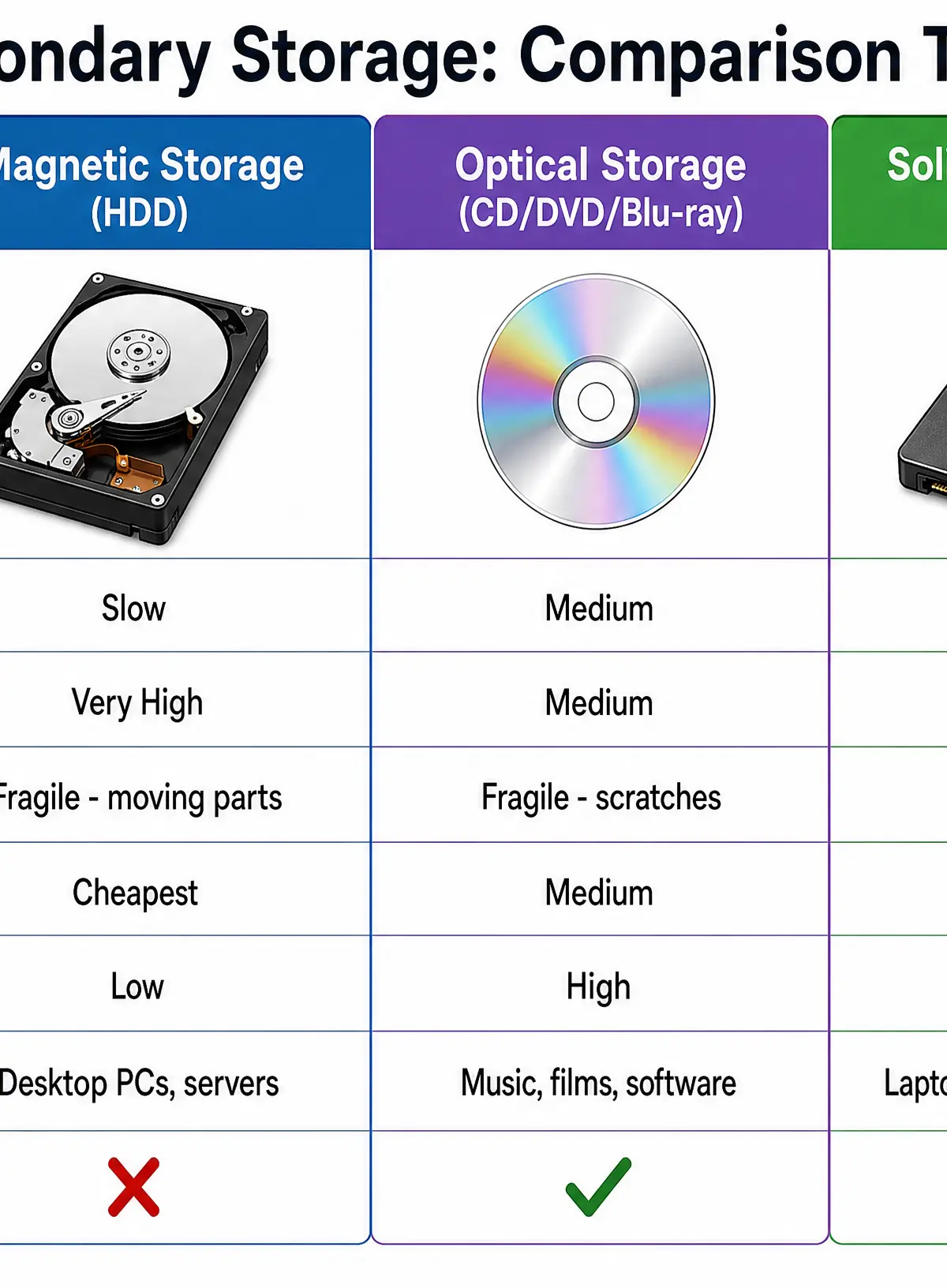
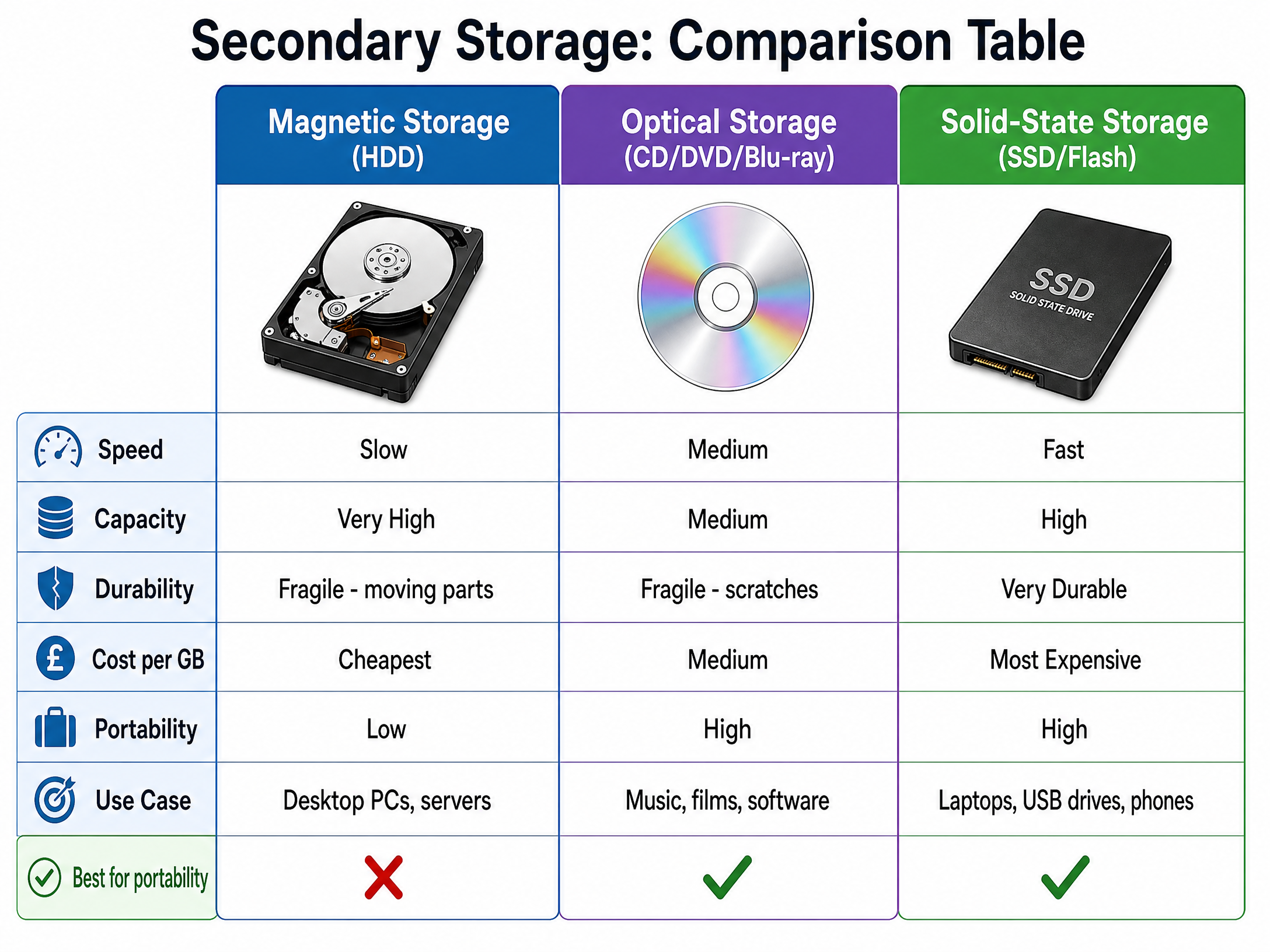
There are three main categories:
- Magnetic (e.g., Hard Disk Drive - HDD): Uses magnetic fields to magnetise tiny sections of a spinning metal platter. High capacity, cheap, but has moving parts so is fragile and slower than solid-state.
- Optical (e.g., CD, DVD, Blu-ray): Uses a laser to read pits and lands burned into a reflective disc. Very portable and cheap, but low capacity and easily scratched.
- Solid-State (e.g., SSD, USB Flash Drive): Uses flash memory chips with no moving parts. Very fast, durable, and increasingly common, but more expensive per GB than magnetic storage.
Concept 6: System Software
System software manages the computer hardware and provides a platform for application software. It is divided into the Operating System and Utility Software.
The Operating System (OS) has four main management roles:
- File Management: Organising files into hierarchical folders, managing permissions, and handling read/write operations to storage.
- Process Management: Allocating CPU time to different running programs (multitasking) and managing system resources.
- Peripheral Management: Communicating with hardware devices (printers, mice) using device drivers.
- User Management: Handling user accounts, passwords, and access rights.
Utility Software performs specific maintenance tasks:
- Anti-malware: Detects and removes malicious software.
- Backup: Creates copies of data for recovery.
- Compression: Reduces file sizes to save space and speed up transmission.
- Defragmentation: Reorganises fragmented files on a magnetic hard drive so they are stored contiguously, speeding up read times. (Note: Never defragment an SSD!)
Concept 7: Translators
Computers only understand machine code (binary). Humans write in high-level languages (like Python or Java). A translator is needed to bridge the gap.
- Compiler: Translates the entire source code into machine code in one go, creating a standalone executable file. The program runs very quickly, but compilation takes time, and errors are only reported at the end.
- Interpreter: Translates and executes the source code line by line. It does not create an executable file. It is slower at runtime but excellent for debugging, as it stops immediately when it finds an error.
Listen to the podcast below for a complete audio walkthrough of these concepts, including examiner tips and a quick-fire quiz!

Practical Applications
Understanding computer architecture isn't just theoretical. When building a gaming PC, understanding the FDE cycle helps you realise why a CPU with a higher clock speed (more cycles per second) improves frame rates. When choosing storage for a smartphone, understanding that solid-state storage is durable and compact explains why we don't put spinning magnetic hard drives in phones.
Visual Resources
3 diagrams and illustrations
Interactive Diagrams
2 interactive diagrams to visualise key concepts
Conceptual Flow Outline
Flowchart comparing Compilers and Interpreters
Conceptual Flow Outline
The Bus System
Worked Examples
3 worked examples — open one to explore the question and available guidance.
Practice Questions
Test your understanding — click to reveal model answers
State the purpose of the Program Counter (PC).
Hint: Think about what the CPU needs to know to find the next instruction.
Describe how the Memory Address Register (MAR) and Memory Data Register (MDR) are used during the Fetch stage of the FDE cycle.
Hint: Think about the sequence of events. How does the address get to memory, and how does the data get back?
A software developer has written a new game in Python. Explain one advantage of using a compiler rather than an interpreter to prepare the game for release to customers.
Hint: Think about what the customer needs to run the game, and how fast it should run.
Explain why a computer needs both RAM and secondary storage.
Hint: Compare their characteristics regarding speed and volatility.
A school network uses a magnetic hard disk drive to store student files. Explain how defragmentation software could improve the performance of this drive.
Hint: What happens to files on a magnetic disk over time, and how does the read head access them?